
Wichtige Sicherheitsinformationen
Please read all safety and operating instructions carefully before using this VCR. Retain this manual for future reference.
- Energiequelle: Connect the VCR only to the power supply indicated on the label.
- Belüftung: Sorgen Sie für ausreichende Belüftung. Blockieren Sie keine Belüftungsöffnungen.
- Wasser und Feuchtigkeit: Do not expose the VCR to rain or moisture. Do not place objects filled with liquids on the VCR.
- Reinigung: Unplug the VCR from the wall outlet before cleaning. Use a dry cloth.
- Wartung: Versuchen Sie nicht, dieses Produkt selbst zu warten. Überlassen Sie alle Wartungsarbeiten qualifiziertem Servicepersonal.
Produkt überview
The Sharp VC-A422 is a 4-head VCR designed for reliable playback and recording of VHS tapes. It features a user-friendly interface for easy operation.
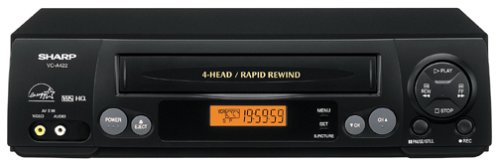
Bild: Vorderseite view of the Sharp VC-A422 4-Head VCR, showing the tape slot, display, and control buttons.
Aufstellen
1. Auspacken und Aufstellen
- Carefully remove the VCR from its packaging.
- Place the VCR on a stable, level surface. Ensure there is adequate space around the unit for ventilation.
- Avoid placing the VCR near heat sources, direct sunlight, or areas with high humidity.
2. Anschluss an einen Fernseher
To connect your VCR to a television, you will typically use RCA audio/video cables (red, white, yellow) or a coaxial cable.
- RCA Connection (Recommended for best quality):
- Connect the yellow video output jack on the VCR to the yellow video input jack on your TV.
- Connect the white audio output jack on the VCR to the white audio input jack on your TV.
- Connect the red audio output jack on the VCR to the red audio input jack on your TV.
- Select the corresponding AV input on your television (e.g., Video 1, AV1, Input 1).
- Koaxialanschluss:
- Connect a coaxial cable from the "RF Out" or "Antenna Out" jack on the VCR to the "Antenna In" or "RF In" jack on your TV.
- Connect your antenna or cable TV signal to the "RF In" or "Antenna In" jack on the VCR.
- Tune your television to channel 3 or 4 (depending on the VCR's output setting) to receive the VCR signal.
3. Stromanschluss
- Stecken Sie das Netzkabel des Videorecorders in eine normale Steckdose.
- The VCR should enter standby mode, indicated by a clock display or power light.
Bedienungsanleitung
1. Einfache Wiedergabe
- Ensure the VCR is powered on and your TV is set to the correct input.
- Insert a VHS tape into the tape slot. The VCR will automatically load the tape.
- Drücken Sie die SPIELEN Taste am Videorecorder oder an der Fernbedienung.
- Um die Wiedergabe zu stoppen, drücken Sie die Taste STOPPEN Taste.
- Um die Wiedergabe anzuhalten, drücken Sie die PAUSE Taste. Zum Fortfahren erneut drücken.
- Zum Vor- oder Zurückspulen die Taste drücken FF (Schnellvorlauf) oder REW (Rewind) button. Press SPIELEN um die normale Wiedergabe fortzusetzen.
- Um das Band auszuwerfen, drücken Sie die Taste AUSWERFEN Taste.
2. Programme aufnehmen
The Sharp VC-A422 allows for recording television programs. Ensure a blank or recordable VHS tape is inserted and its safety tab is intact.
- Tune the VCR to the desired channel using the VCR's tuner.
- Drücken Sie die AUFZEICHNEN button. The VCR will begin recording.
- Um die Aufnahme zu stoppen, drücken Sie die STOPPEN Taste.
- For timed recordings, refer to the VCR's on-screen programming guide (if available) or consult the full manual for detailed timer recording instructions.
Wartung
Durch sachgemäße Wartung wird die Langlebigkeit und optimale Leistung Ihres Videorecorders sichergestellt.
- Außenreinigung: Wipe the exterior of the VCR with a soft, dry cloth. Do not use liquid cleaners or abrasive materials.
- Kopfreinigung: If picture quality degrades (e.g., snowy picture, lines), the video heads may be dirty. Use a dry-type VCR head cleaning cassette sparingly. Excessive use can wear down the heads.
- Pflegehinweise für Klebeband: Store VHS tapes in their cases, away from dust, direct sunlight, and strong magnetic fields. Avoid exposing tapes to extreme temperatures.
- Belüftung: Keep the VCR's ventilation slots clear of obstructions to prevent overheating.
Fehlerbehebung
If you encounter issues with your Sharp VC-A422 VCR, refer to the following common problems and solutions:
| Problem | Mögliche Ursache | Lösung |
|---|---|---|
| Kein Strom | Netzkabel nicht angeschlossen; Steckdose nicht aktiv. | Überprüfen Sie den Anschluss des Netzkabels. Testen Sie die Steckdose mit einem anderen Gerät. |
| Kein Bild oder Ton | Incorrect TV input selected; A/V cables loose or incorrectly connected. | Select correct TV input (e.g., AV1, Video 1). Ensure A/V cables are securely connected to matching color ports. |
| Snowy or distorted picture | Dirty video heads; poor tape quality; incorrect channel for coaxial connection. | Use a VCR head cleaning cassette. Try a different tape. If using coaxial, ensure TV is on channel 3 or 4. |
| Tape will not eject | Power failure; mechanical issue. | Ensure VCR is powered on. If problem persists, seek professional service. |
| Kann nicht aufnehmen | Tape's safety tab removed; VCR not tuned to a channel. | Check if the safety tab on the VHS tape is intact (cover the notch with tape if removed). Ensure VCR tuner is set to the desired channel. |
Technische Daten
- Marke: Scharf
- Modell: VC-A422
- Köpfe: 4-Head (Video)
- Artikelgewicht: 6 Pfund
- Paketabmessungen: 15.55 x 11.02 x 5.24 Zoll
- ASIN: B00005LABU
- Datum der Erstveröffentlichung: 4. September 1999
Hinweis: Technische Daten können ohne vorherige Ankündigung geändert werden.
Garantieinformationen
This Sharp product is covered by a limited warranty. For specific details regarding warranty coverage, duration, and terms, please refer to the warranty card included with your purchase or visit the official Sharp webBewahren Sie Ihren Kaufbeleg für Garantieansprüche auf.
Kundenservice
For further assistance, technical support, or service inquiries, please contact Sharp customer support. You can find contact information on the official Sharp webauf der Website oder in der mit Ihrem Produkt gelieferten Dokumentation.
Visit the official Sharp store for more information: Offizieller Sharp-Shop
Rechtliche Hinweise
Verbraucherhinweis: This television receiver has only an analog broadcast tuner and will require a converter box after February 17, 2009 to receive over-the-air broadcasts with an antenna because of the U.S.'s transition to digital broadcasting. Analog-only TVs should continue to work as before with cable and satellite TV services, gaming consoles, VCRs, DVD players, and similar products. For more information, call the Federal Communications Commission at 1-888-225-5322 (TTY: 1-888-835-5322), or visit the commission s digital-television Web Website unter: www.dtv.gov.