
1. Einleitung
This manual provides instructions for the setup, operation, and maintenance of your Bose MediaMate Computer Speakers. These speakers are designed to enhance the audio experience for your computer, whether for music, movies, or gaming. The compact design and upward-angled sound projection optimize audio delivery for desktop use, occupying minimal desk space.
2. Sicherheitshinweise
Please read and follow all safety instructions before using this product to prevent electric shock, fire, or injury. Keep this manual for future reference.
- Die Lautsprecher dürfen weder Wasser noch Feuchtigkeit ausgesetzt werden.
- Stellen Sie die Lautsprecher nicht in der Nähe von Wärmequellen wie Heizkörpern, Heizlüftern, Öfen oder anderen Geräten (einschließlich) auf. ampKonverter (Lüfter), die Wärme erzeugen.
- Verwenden Sie nur vom Hersteller angegebene Anbaugeräte/Zubehör.
- Trennen Sie das Gerät bei Gewitter oder längerer Nichtbenutzung vom Stromnetz.
- Überlassen Sie alle Wartungsarbeiten qualifiziertem Servicepersonal. Eine Wartung ist erforderlich, wenn das Gerät auf irgendeine Weise beschädigt wurde, z. B. wenn das Netzkabel oder der Stecker beschädigt sind, Flüssigkeit in das Gerät verschüttet wurde oder Gegenstände hineingefallen sind, das Gerät Regen oder Feuchtigkeit ausgesetzt war, nicht normal funktioniert oder fallengelassen wurde.
3. Packungsinhalt
Überprüfen Sie, ob alle Artikel in Ihrem Paket vorhanden sind:
- Bose MediaMate Computer Speakers (2 units)
- Netzteil
- Audio Cable (3.5mm stereo jack)
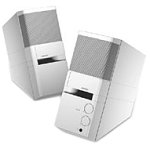
Image: The Bose MediaMate Computer Speakers in Gray. The image shows two compact speakers, one with visible volume and mix controls, and a headphone jack.
4. Einrichtung
Follow these steps to set up your Bose MediaMate Computer Speakers:
- Platzierung: Place the speakers on a flat, stable surface on either side of your computer monitor. Ensure they are angled slightly upward towards your listening position for optimal sound.
- Audiokabel anschließen: Connect the 3.5mm audio cable from the back of the primary speaker (the one with controls) to the audio output jack on your computer.
- Strom anschließen: Plug the power adapter into the power input on the primary speaker, then plug the adapter into a wall outlet.
- Einschalten: Turn on the speakers using the volume knob. The power indicator light should illuminate.
5. Bedienungsanleitung
Once set up, operating your MediaMate speakers is straightforward:
- Lautstärkeregelung: Use the large knob labeled "VOLUME" on the front of the primary speaker to adjust the overall sound level.
- Mischungsregler: The "MIX" knob allows you to blend audio from two different sources if you have a second device connected to the auxiliary input.
- Kopfhöreranschluss: For private listening, plug your headphones into the headphone jack located on the front of the primary speaker. This will mute the speakers.
- Zwei Eingänge: The speakers feature dual inputs, allowing you to connect and mix two audio sources simultaneously. For example, you can connect your computer and a portable music player.
6. Wartung
Um die Langlebigkeit und optimale Leistung Ihrer Lautsprecher zu gewährleisten:
- Reinigung: Use a soft, dry cloth to clean the exterior surfaces of the speakers. Do not use liquid cleaners or aerosols.
- Staub: Die Lautsprechergitter sollten regelmäßig abgestaubt werden, um Ablagerungen zu vermeiden, die die Klangqualität beeinträchtigen könnten.
- Lagerung: Wenn Sie die Lautsprecher über einen längeren Zeitraum lagern, trennen Sie sie vom Stromnetz und bewahren Sie sie an einem kühlen, trockenen Ort auf.
7. Fehlerbehebung
If you encounter issues with your Bose MediaMate speakers, refer to the following common problems and solutions:
| Problem | Mögliche Ursache | Lösung |
|---|---|---|
| Kein Ton |
|
|
| Verzerrter Ton |
|
|
| Nur ein Lautsprecher funktioniert |
|
|
8. Spezifikationen
- Marke: Bose
- Modell: MediaMate
- Konnektivität: 3.5mm Audio Input, AC Power
- Audioausgang: Stereo
- Lautsprechertyp: Multimedia
- Material: Metall
- Lautsprechergröße: 6 Centimeters (Audio Driver)
- Artikelgewicht: 3 Pfund
- Farbe: Grau
9. Garantie und Support
Bose MediaMate Computer Speakers come with a limited warranty. For specific warranty details and duration, please refer to the warranty card included with your product or visit the official Bose webWebsite.
For technical support, product registration, or service inquiries, please contact Bose customer service:
- Telefon: 800-444-2673
- WebWebsite: www.bose.com
Please have your product model number (MediaMate) and purchase date available when contacting support.