
Einführung
The Metra 70-1858 Radio Wiring Harness is designed to simplify the installation of an aftermarket receiver into select General Motors vehicles manufactured between 1988 and 2002. This harness provides a direct connection to the factory plug, eliminating the need for cutting and splicing original vehicle wiring. This manual provides essential information for proper installation and use.

Image: Metra 70-1858 Radio Wiring Harness, showing the multi-pin connector and colored wires.
Fahrzeugkompatibilität
This wiring harness is compatible with select General Motors vehicles from model years 1988 to 2002. Please verify your vehicle's specific model and year against the product's compatibility list to ensure proper fitment before installation.
Installations-Setup
Before beginning installation, ensure the vehicle's battery is disconnected to prevent electrical shorts or damage. Identify the factory radio wiring harness in your vehicle. The Metra 70-1858 harness is designed to plug directly into this factory connector.
Kabelverbindungen
Match the colored wires of the Metra 70-1858 harness to the corresponding wires of your aftermarket radio's wiring harness. Typically, wire colors are standardized across aftermarket radio manufacturers, but always refer to your aftermarket radio's instruction manual for specific wiring diagrams.
- Stromkabel: Connect the constant 12V (yellow), accessory 12V (red), and ground (black) wires.
- Lautsprecherkabel: Match the positive and negative wires for each speaker (e.g., white/white-black for front left, gray/gray-black for front right, green/green-black for rear left, purple/purple-black for rear right).
- Antenne/AmpVerstärker einschalten: Connect the blue wire for power antenna or amplifier remote turn-on, if applicable.
- Illumination/Dimmer: Connect the orange wire for illumination or dimmer control, if applicable.
After all connections are securely made (preferably soldered and heat-shrunk, or crimped with high-quality connectors), plug the Metra harness into the vehicle's factory radio connector. Reconnect the vehicle battery and test the aftermarket radio's functionality.

Bild: Nahaufnahme view of the Metra 70-1858 wiring harness, showing the various colored wires and connectors.
Betrieb
Once installed, the Metra 70-1858 harness allows your aftermarket radio to operate as intended, receiving power and sending audio signals to the vehicle's speakers through the factory wiring. Ensure all radio functions, including power, volume, balance, fade, and station tuning, are working correctly after installation.
Wartung
The Metra 70-1858 wiring harness requires no routine maintenance. Ensure all connections remain secure and free from corrosion. If any issues arise, inspect the wiring connections for looseness or damage.
Fehlerbehebung
- Kein Strom für das Radio: Check the vehicle's fuse box for blown fuses. Verify the constant 12V (yellow) and accessory 12V (red) wires are correctly connected and receiving power. Ensure the ground (black) wire has a solid connection.
- Kein Ton aus den Lautsprechern: Confirm all speaker wires are correctly matched and connected. Check the aftermarket radio's settings for balance and fade. Ensure the amplifier remote turn-on (blue wire) is connected if an external amplifier verwendet wird.
- Intermittierende Funktionalität: Inspect all wire connections for looseness or poor contact. Ensure wires are not pinched or damaged.
Technische Daten
| Besonderheit | Detail |
|---|---|
| Marke | Metra |
| Modellnummer | 70-1858 |
| Artikelabmessungen (L x B x H) | 8 x 5 x 1 Zoll |
| Artikelgewicht | 13.61 g |
| Steckertyp | Fahrzeugspezifisch |
| Material | Computer-grade wiring |
| Gurtlänge | 5 Zoll |
| Im Lieferumfang enthaltene Komponenten | Kabelbaum |
Garantie und Support
The Metra 70-1858 Radio Wiring Harness comes with a 1 Jahr eingeschränkte Garantie. This warranty does not cover misuse of the product. For technical assistance or support, please contact Metra's technical support team.
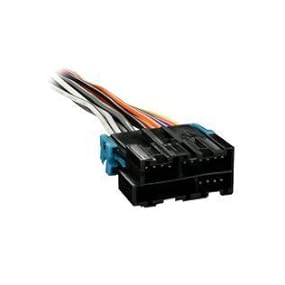
Image: Metra Tech Support contact information, including phone number.
Metra Technical Support: 386-257-1187


