
1. Einleitung
The Rane RS-1 is a dedicated external power supply designed to provide reliable 120VAC power to a range of compatible Rane audio products. This manual provides essential information for the safe and correct setup, operation, and maintenance of your RS-1 power supply.
Please read this manual thoroughly before using the product to ensure proper function and to prevent damage to the unit or connected equipment.
2. Sicherheitshinweise
- Energiequelle: Connect the RS-1 only to a 120VAC, 60Hz power outlet. Ensure the outlet is properly grounded.
- Belüftung: Do not block any ventilation openings. Ensure adequate airflow around the power supply.
- Feuchtigkeit: Do not expose the unit to rain, moisture, or excessive humidity. Keep liquids away from the power supply.
- Hitze: Vermeiden Sie es, das Gerät in der Nähe von Wärmequellen wie Heizkörpern, Heizlüftern, Öfen oder anderen wärmeerzeugenden Geräten aufzustellen.
- Kabel: Schützen Sie das Netzkabel vor Beschädigungen oder Beschädigungen durch Fußgänger, insbesondere an den Steckern, Steckdosen und an der Stelle, an der es aus dem Gerät austritt.
- Wartung: Versuchen Sie nicht, dieses Produkt selbst zu warten. Überlassen Sie alle Wartungsarbeiten qualifiziertem Servicepersonal.
- Trennung: Unplug the power supply from the wall outlet during lightning storms or when unused for long periods.
3. Einrichtung
Follow these steps to correctly set up your Rane RS-1 Power Supply:
- Kompatibles Gerät identifizieren: Ensure your Rane audio product requires the RS-1 power supply and has the appropriate RJ-45 style power input port.
- Mit Gerät verbinden: Carefully insert the RJ-45 style connector from the RS-1 power supply into the designated power input port on your Rane audio device. Ensure a secure connection.
- An die Steckdose anschließen: Plug the two-prong AC power cord of the RS-1 into a standard 120VAC, 60Hz wall outlet.
- Einschalten: Once connected, your Rane audio device should receive power. Refer to your Rane audio device's manual for specific power-on procedures.
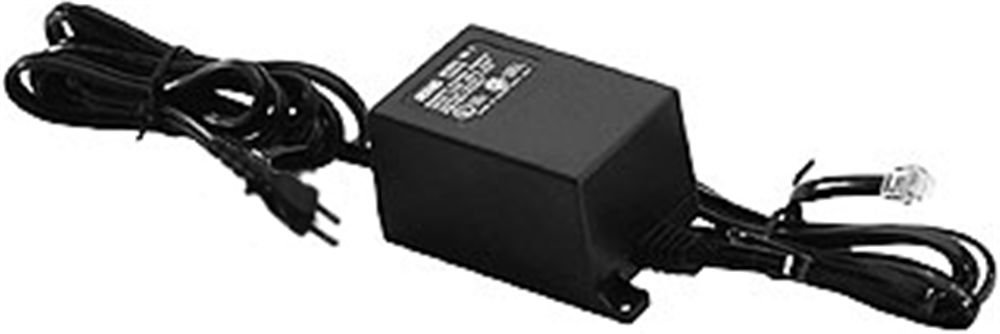
Image: Rane RS-1 Power Supply. This image displays the Rane RS-1 Power Supply, a black rectangular unit with an attached power cord featuring a two-prong North American plug on one end and an RJ-45 style connector on the other, designed to provide power to compatible Rane audio equipment.
4. Bedienungsanleitung
The Rane RS-1 is an external power supply that operates automatically once connected to a power source and a compatible Rane device. It does not have user-adjustable controls.
- Vor dem Einschalten des Stroms sicherstellen, dass alle Verbindungen fest sitzen.
- The power supply is designed for continuous operation within its specified voltage und wattage-Grenzen.
- Always disconnect the power supply from the wall outlet before disconnecting it from the Rane audio device, especially if the device does not have its own power switch.
5. Wartung
The Rane RS-1 Power Supply requires minimal maintenance. Follow these guidelines to ensure longevity:
- Reinigung: Disconnect the power supply from the wall outlet before cleaning. Use a soft, dry cloth to wipe the exterior. Do not use liquid cleaners or aerosol sprays.
- Inspektion: Periodically inspect the power cord and connectors for any signs of damage, fraying, or loose connections. If damage is observed, discontinue use and seek professional servicing.
- Lagerung: Bei längerer Nichtbenutzung sollte das Netzteil an einem kühlen, trockenen Ort, fern von direkter Sonneneinstrahlung und extremen Temperaturen, aufbewahrt werden.
6. Fehlerbehebung
If you encounter issues with your Rane RS-1 Power Supply, refer to the following common troubleshooting steps:
| Problem | Mögliche Ursache | Lösung |
|---|---|---|
| No power to connected Rane device. |
|
|
| Zeitweise Stromversorgung. |
|
|
If these steps do not resolve the issue, contact Rane customer support or a qualified service technician.
7. Spezifikationen
| Modell | RS1 |
| Marke | Rane |
| Eingangslautstärketage | 120 Volt AC |
| Stromquelle | AC |
| Wastage | 1000 Watt |
| Netzsteckertyp | Typ A - 2-polig (Nordamerika) |
| Artikelgewicht | 1.3 Pfund (0.59 kg) |
| Maße | (Not specified in data) |
| UPC | 687499101045 |
| ASIN | B0002IU02S |
8. Compatible Rane Devices
The Rane RS-1 Power Supply is compatible with the following Rane audio products:
- AC 22B
- AC 23B
- AD 22d
- AP 13
- AVA 22d
- CP 52
- CP 64
- DA 216a
- DA 26
- DC 24
- DMS 22
- GE 130
- GE 215
- GE 30
- HC 4
- HC 6
- MLM 42
- MLM 82a
- MM 8z
- MP 2
- MP 22z
- MP 24z
- MP 2016
- MS 1b
- KGV 17
- PS 1
- RA 30
- SM 26B
- SM 82
- SRM 66
- SSE 35
- THX 22
- THX 44
- TTM 54i
- TTM 56
- VP 12
9. Garantie und Support
For information regarding warranty coverage, product registration, or technical support, please refer to the official Rane website or contact Rane customer service directly. Keep your purchase receipt as proof of purchase for warranty claims.
Rane Official WebWebsite: www.rane.com