
1. Zu Endeview
The Canon PowerShot SD450 Digital ELPH camera is a compact digital camera designed for ease of use and high-quality imaging. It features a 5.0-megapixel sensor, a 3x optical zoom lens, and a 2.5-inch LCD display. The camera incorporates Canon's DIGIC II processor for efficient image processing and offers various shooting modes to suit different photographic situations.

Abbildung 1.1: Vorderseite view of the Canon PowerShot SD450 Digital ELPH camera with its lens retracted.
2. Lieferumfang
Bitte überprüfen Sie, ob alle folgenden Artikel in Ihrem Paket enthalten sind:
- PowerShot SD450 body
- Lithium battery pack NB-4L
- Battery charger CB-2LV
- 16 MB SD memory card SDC-16M
- Handgelenkschlaufe WS-600
- Lösungs-CD-ROM für Digitalkameras
- USB-Schnittstellenkabel IFC-400PCU
- Audio-video cable AVC-DC300
3. Einrichtung
3.1. Laden des Akkus
- Insert the Lithium battery pack NB-4L into the battery charger CB-2LV.
- Stecken Sie das Ladegerät in eine Steckdose. Die Ladeanzeigeleuchte leuchtet auf.
- Once charging is complete, the indicator light will change or turn off. Remove the battery.
3.2. Einlegen des Akkus und der SD-Karte
- Öffnen Sie die Abdeckung des Batterie-/Speicherkartenfachs an der Unterseite der Kamera.
- Insert the charged battery pack into the compartment, ensuring correct orientation.
- Insert the SD memory card into the card slot until it clicks into place.
- Schließen Sie die Fachabdeckung sicher.
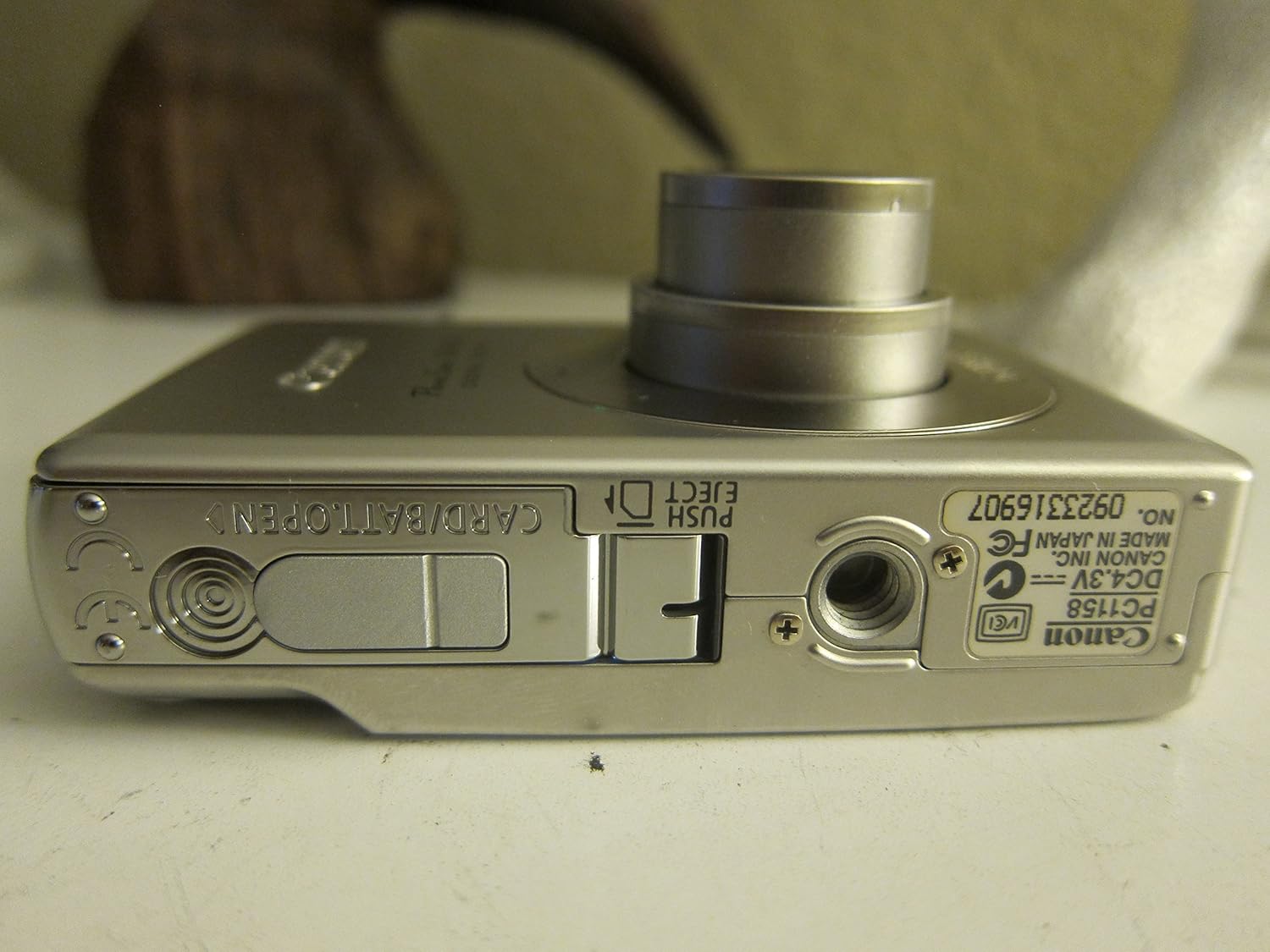
Abbildung 3.1: Unten view of the camera, illustrating the battery and SD card compartment.
3.3. Erstes Einschalten und Grundeinstellungen
- Drücken Sie die EIN/AUS Taste, um die Kamera einzuschalten.
- Folgen Sie den Anweisungen auf dem Bildschirm, um Datum, Uhrzeit und Sprache einzustellen.

Abbildung 3.2: Oben view der Kamera, wobei der Ein-/Ausschalter und der Auslöser hervorgehoben werden.
4. Bedienung der Kamera
4.1. Grundlagen der Fotografie
- Ein-/Ausschalten: Drücken Sie die EIN/AUS Taste.
- Ein Bild aufnehmen: Drücken Sie den Auslöser halb durch, um zu fokussieren, und drücken Sie ihn dann ganz durch, um das Bild aufzunehmen.
- Zoom: Mit dem Zoomhebel um den Auslöser lässt sich der 3-fache optische Zoom einstellen.

Abbildung 4.1: Vorderseite view of the camera with the optical zoom lens extended.
4.2. Aufnahmemodi
The PowerShot SD450 offers various shooting modes to optimize settings for different scenes. Rotate the mode dial to select:
- Auto: Camera automatically sets optimal exposure and focus.
- Manual: Allows for more control over settings like white balance and color tones (black and white, sepia, vivid, neutral).
- Porträt: Der Hintergrund wird verwischt, um das Motiv hervorzuheben.
- Landschaft: Ensures sharp focus on distant subjects.
- Night Snapshot: For shooting in low light conditions.
- Szenenmodi: Includes specific settings for Kids & Pets, Foliage, Fireworks, Snow, Underwater, Beach, and Indoor.
- Meine Farben: Apply special effects like Color Swap or Custom Color directly in-camera.
4.3. Focusing and Exposure
- AiAF: The 9-point Artificial Intelligence Auto Focus system automatically focuses on subjects, even if off-center.
- Belichtungssteuerung: Select from Evaluative, Center-weighted, or Spot metering.
- ISO-Empfindlichkeit: Adjustable to Auto, 50, 100, 200, or 400 to control light sensitivity.
4.4. Videoaufnahme
The camera can record high-quality movies:
- Beschlüsse: VGA (640x480) or QVGA (320x240) at 30 or 15 frames per second.
- Fast Frame Rate Movie Mode: Records at 60 frames per second for slow-motion playback.
- Compact Movie Mode (QQVGA): 160x120 at 15 frames per second, suitable for email sharing.
- Continuous filming is available until the file size reaches 1 GB or 60 minutes.
4.5. Wiedergabe und Review
Um zu review Ihre Fotos und Videos:
- Drücken Sie die Wiedergabe Taste.
- Use the directional pad to navigate through images and videos.
- Intelligent Orientation Sensor: Automatically rotates stored images for correct playback when the camera is rotated.
- Slideshow Functions: Create impressive slideshows with transition effects directly on the camera.

Abbildung 4.2: Rückseite view of the camera, showing the LCD display during image playback.
4.6. Drucken von Bildern
The PowerShot SD450 supports direct printing:
- PictBridge: Connect directly to PictBridge-compatible printers (e.g., Canon PIXMA printers) for printing without a PC.
- Schaltfläche „Drucken/Teilen“: Simplifies direct printing and image uploading to Windows XP or Mac OS X.
5. Wartung
5.1. Reinigung der Kamera
- Verwenden Sie ein weiches, trockenes Tuch, um das Kameragehäuse zu reinigen.
- For the lens and LCD screen, use a lens cleaning cloth and specialized cleaning solution if necessary. Avoid harsh chemicals.
5.2. Batteriepflege
- Bewahren Sie Batterien an einem kühlen, trockenen Ort auf, wenn Sie sie nicht verwenden.
- Um die Lebensdauer der Batterie zu verlängern, sollte eine häufige vollständige Entladung vermieden werden.
- Recharge the battery using only the provided Canon charger.
5.3. Speicherung
- When storing the camera for extended periods, remove the battery.
- Store the camera in a protective case to prevent dust and scratches.
6. Fehlerbehebung
| Problem | Lösung |
|---|---|
| "Memory Error" message appears. |
|
| Bilder sind verschwommen. |
|
| Flash is too strong or washes out subjects. |
|
| Der Akku entlädt sich schnell. |
|
| Die Kamera lässt sich nicht einschalten. |
|
7. Spezifikationen
| Marke | Kanon |
| Modellname | Canon PowerShot SD450 |
| Effektive Standbildauflösung | 5 Megapixel |
| Optischer Zoom | 3x |
| Bildschirmgröße | 2.5 Zoll |
| Bildstabilisierung | Digital, optisch |
| ISO-Bereich | Automatisch, 50, 100, 200, 400 |
| Minimale Verschlusszeit | 15 Sekunden |
| Maximale Verschlusszeit | 1/1500 Sekunde |
| Auflösung der Videoaufnahme | SD VGA 480p |
| Videoaufnahmeformat | AVI |
| File Format | JPEG, RAW |
| Abmessungen (L x B x H) | 3.39 x 0.87 x 2.13 Zoll |
| Artikelgewicht | 5.44 Unzen |
| Farbe | Silber |
| Hat Selbstauslöser | Ja |
| Wasserbeständigkeit | Nicht wasserfest |
8. Garantie und Support
Detaillierte Garantieinformationen finden Sie auf der Ihrem Produkt beiliegenden Garantiekarte oder auf der offiziellen Canon-Website. website. The camera comes bundled with Canon software (ZoomBrowser EX 5.5, PhotoRecord 2.2, ImageBrowser 5.5, PhotoStitch 3.1, Movie Edit Task) for image management and editing. Purchasers are also eligible for membership to Canon iMAGE Gateway for additional support and services.
For technical support, driver downloads, or service inquiries, please visit the official Canon support webBesuchen Sie die Website oder kontaktieren Sie den Canon-Kundendienst.