1. Einleitung
This manual provides essential instructions for the safe and efficient operation, setup, and maintenance of your Ohaus ES50R ES Industrial Bench Scale. The Ohaus ES50R is designed for industrial weighing applications, offering a capacity of 50 kg (110 lb) with a readability of 20 g (0.05 lb). Please read this manual thoroughly before using the scale to ensure proper functionality and to prevent damage.
2. Sicherheitshinweise
Beachten Sie immer die folgenden Sicherheitsvorkehrungen:
- Die Waage darf nicht über ihre maximale Kapazität von 50 kg (110 lb) hinaus überlastet werden.
- Ensure the scale is placed on a stable, level surface to achieve accurate readings.
- Operate the scale only with the specified 120 V power supply.
- Die Waage sollte keinen extremen Temperaturen, hoher Luftfeuchtigkeit oder direkter Sonneneinstrahlung ausgesetzt werden.
- Tauchen Sie die Waage nicht in Wasser oder andere Flüssigkeiten.
- Keep the scale clean and free from dust and debris.
- Reparaturen oder Wartungsarbeiten, die über die routinemäßige Reinigung hinausgehen, sollten nur von qualifiziertem Personal durchgeführt werden.
3. Packungsinhalt
Prüfen Sie beim Auspacken, ob alle Komponenten vorhanden sind:
- Ohaus ES50R ES Industrial Bench Scale unit
- Power Adapter (for 120 V operation)
- Benutzerhandbuch (dieses Dokument)
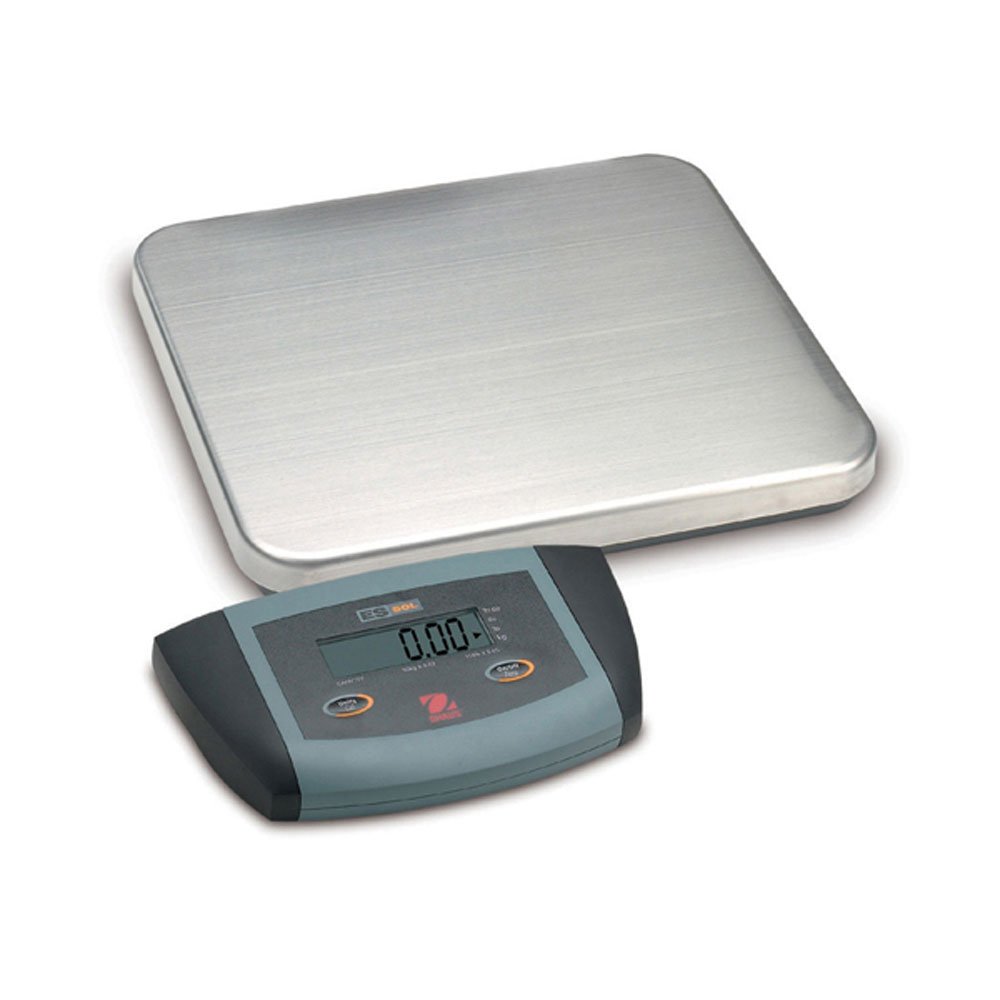
Abbildung 1: Ohaus ES50R ES Industrial Bench Scale. This image shows the complete bench scale unit, including the weighing platform and the display unit.
4. Einrichtung
- Auspacken: Entnehmen Sie alle Komponenten vorsichtig aus der Verpackung. Bewahren Sie die Verpackung für spätere Transporte oder Lagerung auf.
- Platzierung: Place the scale on a firm, level, and stable surface, free from vibrations, drafts, and rapid temperature changes. Ensure adequate space around the scale for safe operation.
- Stromanschluss: Connect the power adapter to the scale's power input port. Plug the adapter into a standard 120 V AC power outlet.
- Erstes Einschalten: Drücken Sie die EIN/AUS button to power on the scale. The display will perform a self-test and then show "0.00" or "0.0".
- Nivellierung: If your scale includes adjustable feet, rotate them until the bubble in the spirit level (if present) is centered.
5. Bedienungsanleitung
5.1 Grundlegendes Wiegen
- Ensure the scale is powered on and the display shows "0.00" or "0.0".
- Place the item to be weighed gently in the center of the weighing platform.
- Wait for the display to stabilize. The stable weight reading will be shown on the large LCD display.
- Remove the item from the platform. The display should return to zero.
5.2 Tara-Funktion
The tare function allows you to subtract the weight of a container, so only the net weight of the contents is displayed.
- Stellen Sie einen leeren Behälter auf die Wiegeplattform.
- Drücken Sie die TARA button. The display will reset to "0.00" or "0.0", indicating the container's weight has been tared.
- Geben Sie das zu wiegende Material in den Behälter. Das Display zeigt das Nettogewicht des Materials an.
- Um das Tara zu entfernen, nehmen Sie den Behälter von der Plattform und drücken Sie die Taste TARA erneut die Taste.
5.3 Sonderfunktionen
- Automatische Abschaltung: The scale is equipped with an auto shut-off feature to conserve power. If no activity is detected for a set period, the scale will automatically turn off.
- Großes Display: The LCD display provides clear and easy-to-read weight indications.
- Manuelles Herunterfahren: To manually turn off the scale, press and hold the EIN/AUS gedrückt, bis sich das Display ausschaltet.
6. Wartung
6.1 Reinigung
To maintain accuracy and prolong the life of your scale:
- Trennen Sie die Waage vor der Reinigung vom Stromnetz.
- Wischen Sie die Schuppenoberflächen mit einem Tuch ab.amp Tuch und einem milden Reinigungsmittel.
- Verwenden Sie keine Scheuermittel, Lösungsmittel oder aggressive Chemikalien.
- Ensure no liquid enters the scale's internal components.
- Dry the scale thoroughly after cleaning.
6.2 Kalibrierung
Regular calibration ensures the accuracy of your scale. Refer to the full technical manual or contact Ohaus customer support for detailed calibration procedures. Calibration typically requires certified weights.
7. Fehlerbehebung
| Problem | Mögliche Ursache | Lösung |
|---|---|---|
| Die Waage lässt sich nicht einschalten. | Keine Stromversorgung; defektes Netzteil. | Check power connection and outlet. Ensure power adapter is functioning correctly. |
| Ungenaue Messwerte. | Scale not level; unstable surface; overload; calibration required. | Ensure scale is level and on a stable surface. Do not exceed capacity. Perform calibration if necessary. |
| Auf dem Display wird „Err“ oder ein Fehlercode angezeigt. | Überlastung; interne Fehlfunktion. | Remove weight from platform. If error persists, power cycle the scale. If still present, contact customer support. |
| Auto shut-off too soon/not at all. | Auto shut-off settings. | Refer to the full technical manual for adjusting auto shut-off settings, if available. |
8. Spezifikationen
| Besonderheit | Detail |
|---|---|
| Modell | ES50R |
| Marke | Ohaus |
| Kapazität | 50 kg |
| Lesbarkeit | 20 g |
| Anzeigetyp | LCD (Large Display) |
| Besondere Merkmale | Auto Shut Off, Manual Shutdown |
| Formfaktor | Bench Scale |
| Stromversorgung | 120 V AC (via adapter) |
| Technische Daten | 15 x 13 x 5.5 Zoll |
| Artikelgewicht | 9.64 Pfund |
| Hersteller | COLE-PARMER |
9. Gewährleistung
The Ohaus ES50R ES Industrial Bench Scale comes with a 1 Jahr Garantie from the date of purchase. This warranty covers defects in materials and workmanship under normal use. It does not cover damage resulting from misuse, accident, unauthorized modification, or operation outside the specified environmental and electrical limits. For warranty claims, please retain your proof of purchase and contact Ohaus customer support.
10. Kundendienst
For technical assistance, service, or to inquire about replacement parts, please contact Ohaus customer support. Visit the official Ohaus webAuf dieser Website finden Sie die aktuellsten Kontaktinformationen und weitere Ressourcen.
Notiz: Always provide your product model number (ES50R) and serial number (if applicable) when contacting support.