
1. Einleitung
Welcome to the user manual for your new Singing Machine SMVG-620 CD+G Karaoke System. This system is designed to provide hours of entertainment with its CD+G playback capabilities, built-in camera, 5.5-inch monitor, and AM/FM radio. Please read this manual thoroughly before operating your unit to ensure proper use and to maximize your enjoyment.
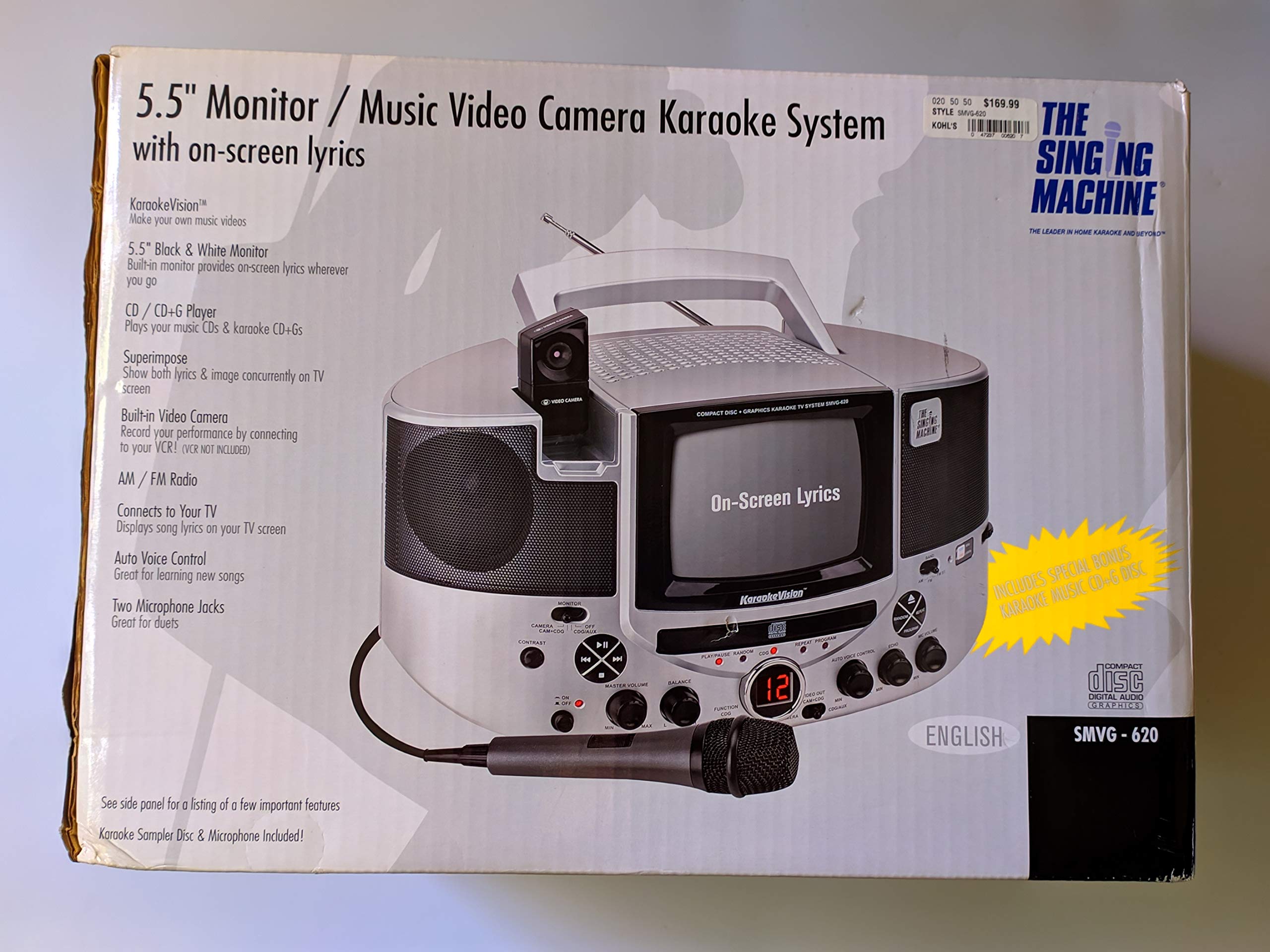
Abbildung 1.1: The Singing Machine SMVG-620 CD+G Karaoke System.
For optimal performance and safety, always follow the instructions and warnings provided.
2. Wichtige Sicherheitshinweise
- Anweisungen lesen: Vor der Inbetriebnahme des Geräts sollten alle Sicherheits- und Bedienungshinweise gelesen werden.
- Anweisungen aufbewahren: Bewahren Sie die Sicherheits- und Bedienungshinweise zum späteren Nachschlagen auf.
- Warnungen beachten: Sämtliche Warnhinweise am Gerät und in der Bedienungsanleitung sind zu beachten.
- Folgen Sie den Anweisungen: Alle Betriebs- und Gebrauchsanweisungen sind zu befolgen.
- Wasser und Feuchtigkeit: Verwenden Sie dieses Gerät nicht in der Nähe von Wasser.
- Reinigung: Nur mit trockenem Tuch reinigen.
- Belüftung: Die Lüftungsöffnungen dürfen nicht blockiert werden. Die Installation muss gemäß den Anweisungen des Herstellers erfolgen.
- Hitze: Installieren Sie das Gerät nicht in der Nähe von Wärmequellen wie Heizkörpern, Heizregistern, Öfen oder anderen Geräten (einschließlich ampKonverter (Lüfter), die Wärme erzeugen.
- Netzkabelschutz: Schützen Sie das Netzkabel vor Beschädigungen oder Beschädigungen durch Fußgänger, insbesondere an den Steckern, Steckdosen und an der Stelle, an der es aus dem Gerät austritt.
- Anbauteile/Zubehör: Verwenden Sie nur vom Hersteller angegebene Zusatzgeräte/Zubehör.
- Blitz: Trennen Sie das Gerät bei Gewitter oder längerer Nichtbenutzung vom Stromnetz.
- Wartung: Überlassen Sie alle Wartungsarbeiten qualifiziertem Servicepersonal. Eine Wartung ist erforderlich, wenn das Gerät in irgendeiner Weise beschädigt wurde.
3. Packungsinhalt
Carefully unpack your Singing Machine SMVG-620 system and ensure all items listed below are present and in good condition.
- SMVG-620 CD+G Karaoke System
- One (1) Microphone
- Sampler CD+G Disc
- Audio/Video RCA Cables
- Netzteil
- Bedienungsanleitung

Abbildung 3.1: Contents of the box, including the microphone, RCA cables, and the instruction manual.
4. Produktüberschreitungview
Familiarize yourself with the various parts and controls of your SMVG-620 Karaoke System.

Abbildung 4.1: Hinteren view of the product packaging highlighting key features and components of the SMVG-620 system.
Hauptmerkmale:
- 5.5" Black & White Monitor: For on-screen lyrics from CD+G discs.
- Built-in Color Camera: Allows you to see yourself on the monitor or connected TV.
- Dual Microphone Jacks: Connect two microphones for duets (one microphone included).
- AM/FM-Radio: Schalten Sie Ihre Lieblingsradiosender ein.
- CD+G-Player: Plays standard audio CDs and CD+Graphics discs.
- Automatische Sprachsteuerung (AVC): Helps maintain vocal balance by automatically reducing the main vocal track when you sing.
- Echokontrolle: Adds depth and resonance to your voice.
- Professional Style Microphone: For clear vocal pickup.
- Audio-/Videoausgang: Connects to your TV for larger screen display and enhanced audio.
5. Einrichtung
5.1 Stromanschluss
- Stellen Sie sicher, dass das Gerät auf einer stabilen, ebenen Fläche steht.
- Connect the AC power adapter to the DC IN jack on the back of the SMVG-620 unit.
- Plug the other end of the AC power adapter into a standard wall outlet (AC 120V ~ 60Hz).
5.2 Anschluss an einen Fernseher
Zu view lyrics on a larger screen and enhance audio, connect the SMVG-620 to your television using the supplied Audio/Video RCA cables.
- Locate the AUDIO OUT (white and red) and VIDEO OUT (yellow) jacks on the back of the SMVG-620.
- Connect the white plug of the RCA cable to the white AUDIO OUT jack on the karaoke system and to the white AUDIO IN jack on your TV.
- Connect the red plug of the RCA cable to the red AUDIO OUT jack on the karaoke system and to the red AUDIO IN jack on your TV.
- Connect the yellow plug of the RCA cable to the yellow VIDEO OUT jack on the karaoke system and to the yellow VIDEO IN jack on your TV.
- Turn on your TV and select the correct A/V input source (e.g., AV1, Video 1) that corresponds to the jacks you used.
5.3 Mikrofonanschluss
Plug the microphone into either the MIC 1 or MIC 2 jack on the front of the SMVG-620 unit.
6. Bedienung
6.1 Ein-/Ausschalten
Drücken Sie die LEISTUNG button located on the front panel to turn the unit ON or OFF.
6.2 CD+G Playback
- Open the CD compartment door and carefully place a CD+G disc (or standard audio CD) onto the spindle with the label side facing up. Close the door.
- Wählen CD + G. mode using the FUNCTION selector.
- Drücken Sie die WIEDERGABE/PAUSE Taste, um die Wiedergabe zu starten.
- Passen Sie die MASTERLAUTSTÄRKE Stellen Sie mit dem Drehknopf die gewünschte Lautstärke ein.
- Verwenden Sie die ÜBERSPRINGEN Tasten (<< or >>) um zwischen den Gleisen zu navigieren.
- Zum Anhalten drücken Sie WIEDERGABE/PAUSE Drücken Sie erneut, um fortzufahren.
- Um die Wiedergabe zu stoppen, drücken Sie die Taste STOPPEN Taste.
6.3 Mikrofonnutzung
- Ensure the microphone is connected to a MIC jack.
- Passen Sie die LAUTSTÄRKE VON DEM MIKROFON Drehknopf zur Steuerung des Ausgangspegels des Mikrofons.
- Drehen Sie den ECHO Mit diesem Regler können Sie Ihrer Stimme einen Echoeffekt hinzufügen.
- Der AUTO VOICE CONTROL (AVC) switch can be toggled ON/OFF. When ON, the original vocal track on a CD+G disc will be reduced when you sing into the microphone.
6.4 AM/FM-Radio
- Wählen AM or FM mode using the FUNCTION selector.
- Für besseren Empfang die FM-Antenne ausziehen.
- Drehen Sie den TUNING Drehknopf zur Auswahl des gewünschten Radiosenders.
- Passen Sie die MASTERLAUTSTÄRKE Knopf.
6.5 Kamerafunktion
The built-in camera allows you to display your image on the 5.5-inch monitor or a connected TV.
- Ensure the unit is powered on and connected to a TV if you wish to use an external display.
- The camera feed will automatically display when the unit is in CD+G or Video mode, or when no other video source is active.
7. Wartung
7.1 Reinigung des Geräts
- Trennen Sie das Gerät vor der Reinigung immer vom Stromnetz.
- Verwenden Sie zum Reinigen der Außenflächen ein weiches, trockenes Tuch.
- Verwenden Sie keine Scheuermittel, Wachse oder Lösungsmittel, da diese die Oberfläche beschädigen können.
- Für die CD-Linse verwenden Sie eine spezielle CD-Linsenreinigungsscheibe.
7.2 CD-Pflege
- Fassen Sie CDs an ihren Kanten an, um Fingerabdrücke auf der Abspieloberfläche zu vermeiden.
- Keep discs in their cases when not in use to prevent scratches.
- Reinigen Sie die Scheiben mit einem weichen, fusselfreien Tuch, indem Sie von der Mitte nach außen wischen.
8. Fehlerbehebung
If you encounter any issues with your SMVG-620, please refer to the following common problems and solutions.
| Problem | Mögliche Ursache | Lösung |
|---|---|---|
| Kein Strom | Netzkabel nicht richtig angeschlossen. | Stellen Sie sicher, dass der Netzadapter fest mit dem Gerät und einer funktionierenden Steckdose verbunden ist. |
| Kein Ton von den Lautsprechern | Master Volume is too low. Falscher Funktionsmodus ausgewählt. | Erhöhen Sie die MASTER-LAUTSTÄRKE. Select the correct FUNCTION (CD+G, AM, FM). |
| Kein Ton vom Mikrofon | Mikrofon nicht angeschlossen. MIC VOLUME is too low. Der Mikrofonschalter ist AUS. | Plug microphone into MIC 1 or MIC 2 jack. Increase the MIC VOLUME. Ensure microphone switch is ON. |
| No video on TV / No lyrics | Die RCA-Kabel sind nicht richtig angeschlossen. Falscher TV-Eingang ausgewählt. Not a CD+G disc. | Check all RCA cable connections (yellow for video). Select the correct A/V input on your TV. Ensure you are playing a CD+G disc for lyrics. |
| CD springt | Die Disc ist verschmutzt oder zerkratzt. Das Gerät steht auf einer instabilen Oberfläche. | Reinigen Sie die Disc oder versuchen Sie es mit einer anderen Disc. Place the unit on a stable, vibration-free surface. |
9. Spezifikationen
| Modellnummer | SMVG-620 (SIN SMVG620) |
| Stromquelle | AC 120V ~ 60Hz (via AC Adapter) |
| Monitor | 5.5-inch Black & White |
| Anzahl der Sprecher | 2 |
| Kompatible Geräte | Fernsehen |
| Medientyp | CD, CD+G |
| Produktabmessungen (L x B x H) | 35.8 x 20.8 x 19.3 cm (14.1 x 8.2 x 7.6 Zoll) |
| Artikelgewicht | 3.9 kg |
10. Garantie und Support
For warranty information and customer support, please refer to the warranty card included with your product or contact The Singing Machine directly. You may also consult your retailer for details regarding their return and warranty policies.
Hersteller: Die Gesangsmaschine