
1. Einleitung
Vielen Dank für Ihren Einkauf.asing the GPX CDP6806DT Personal CD Player. This manual provides important safety instructions, operational guidelines, and maintenance procedures to ensure optimal performance and longevity of your device. Please read this manual thoroughly before using the product and retain it for future reference.
2. Sicherheitshinweise
Wichtige Sicherheitshinweise
- Setzen Sie das Gerät weder Wasser noch Feuchtigkeit aus.
- Vermeiden Sie es, das Gerät in der Nähe von Wärmequellen wie Heizkörpern, Heizlüftern, Öfen oder anderen Geräten (einschließlich) aufzustellen. ampKonverter (Lüfter), die Wärme erzeugen.
- Versuchen Sie nicht, das Gerät zu zerlegen oder zu verändern. Überlassen Sie alle Wartungsarbeiten qualifiziertem Servicepersonal.
- Use only the specified batteries (2 x AA batteries). Ensure correct polarity when inserting batteries.
- Entfernen Sie die Batterien, wenn das Gerät längere Zeit nicht verwendet wird.
- Um Gehörschäden vorzubeugen, vermeiden Sie es, über längere Zeiträume bei hoher Lautstärke zu hören.
- Reinigen Sie das Gerät nur mit einem trockenen Tuch.
3. Packungsinhalt
Carefully unpack your GPX CDP6806DT Personal CD Player and ensure all items are present:
- GPX CDP6806DT Personal CD Player
- Benutzerhandbuch (dieses Dokument)
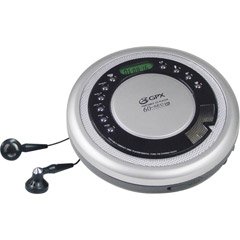
Figure 1: GPX CDP6806DT Personal CD Player. This image illustrates the compact design and general appearance of the device.
4. Bedienelemente und Funktionen
Familiarize yourself with the controls and features of your GPX CDP6806DT for optimal use.
- LCD Anzeige: 6-digit display for track number, time, and FM frequency.
- WIEDERGABE/PAUSE (►/−): Press to start or pause CD playback.
- STOP (■): Drücken Sie diese Taste, um die CD-Wiedergabe zu stoppen.
- ÜBERSPRINGEN/SUCHEN (◀◀/▶▶): Press to skip tracks. Hold to search within a track.
- LAUTSTÄRKE (+/-): Passt den Audioausgabepegel an.
- MODUS/PROGRAMM: Selects playback mode (Repeat, Random) or programs CD tracks.
- FM TUNER (ON/OFF/BAND): Switches to FM radio mode, turns FM on/off, or changes FM band.
- VOREINSTELLUNG (+/-): Navigates saved FM radio presets.
- CD-Fach: Area for inserting audio CDs.
- Batteriefach: Located on the bottom, holds 2 AA batteries.
- Kopfhöreranschluss (3.5 mm): Anschlussmöglichkeit für Kopfhörer zum privaten Musikhören.
Figure 2: GPX CDP6806DT Controls Layout. This image provides a visual reference for the location of various buttons and ports on the device.
5. Einrichtung
5.1 Einlegen der Batterie
The GPX CDP6806DT requires two (2) AA batteries (not included) for portable operation.
- Suchen Sie das Batteriefach an der Unterseite des Geräts.
- Schieben Sie den Batteriefachdeckel auf.
- Legen Sie zwei AA-Batterien ein und achten Sie dabei auf die richtige Polarität (+ und -), wie im Batteriefach angegeben.
- Schließen Sie den Batteriefachdeckel fest.
5.2 Kopfhörer anschließen
For private listening, connect your 3.5mm stereo headphones (not included) to the headphone jack located on the side of the unit.
6. Bedienungsanleitung
6.1 CD-Wiedergabe
The unit supports CD and CD-R/RW disc formats.
- Open the CD compartment lid by gently pressing the OPEN button (if present, or lifting the lid).
- Legen Sie eine CD mit der beschrifteten Seite nach oben auf die Mittelspindel.
- Close the CD compartment lid firmly until it clicks.
- Drücken Sie die Wiedergabe/Pause (►/−) button to begin playback. The track number and elapsed time will appear on the LCD display.
- Um die Wiedergabe zu unterbrechen, drücken Sie Wiedergabe/Pause (►/−). Drücken Sie erneut, um fortzufahren.
- Um die Wiedergabe zu stoppen, drücken Sie die Taste STOP (■) Taste.
- Um zum nächsten Titel zu springen, drücken Sie SKIP/SEARCH (▶▶).
- To go back to the beginning of the current track, press ÜBERSPRINGEN/SUCHEN (◀◀) once. Press twice to go to the previous track.
- To search rapidly forward or backward within a track, hold down SKIP/SEARCH (▶▶) or (◀◀) jeweils.
- Stellen Sie die Lautstärke mit den LAUTSTÄRKE (+/-) Kontrollen.
6.2 FM-Radiobetrieb
The unit features a digital FM tuner with station presets.
- Schieben Sie den UKW-TUNER switch to the ON position or press the BAND Taste, um in den FM-Modus zu wechseln.
- Drücken Sie die SKIP/SEARCH (▶▶) or (◀◀) Tasten zur manuellen Einstellung der gewünschten Frequenz.
- To auto-scan and save stations, hold down the Wiedergabe/Pause (►/−) button (or refer to specific instructions for auto-scan if available on the device).
- To recall saved presets, use the VOREINSTELLUNG (+/-) Schaltflächen.
6.3 CD Programming (24-Track)
You can program up to 24 tracks to play in a specific order.
- Drücken Sie bei gestoppter CD die Taste MODUS/PROGRAMM Drücken Sie die Taste. „PROG“ blinkt im Display.
- Verwenden Sie die SKIP/SEARCH (▶▶) or (◀◀) buttons to select the first track you wish to program.
- Drücken MODUS/PROGRAMM again to confirm the selection. The display will show the program number and the next available program slot.
- Wiederholen Sie die Schritte 2 und 3, um Ihrem Programm bis zu 24 Spuren hinzuzufügen.
- Nachdem Sie alle gewünschten Spuren programmiert haben, drücken Sie Wiedergabe/Pause (►/−) um die programmierte Wiedergabe zu starten.
- Um das Programm zu löschen, drücken Sie die Taste STOP (■) Taste zweimal.
6.4 Anti-Skip-Schutz (ASP)
The GPX CDP6806DT features a 60-second Anti-Skip Protection system. This system buffers audio data to minimize interruptions caused by minor shocks or vibrations during CD playback. The ASP activates automatically when a CD is playing.
7. Wartung
7.1 Reinigung des Geräts
- Wischen Sie die Außenseite des Geräts mit einem weichen, trockenen Tuch ab.
- Verwenden Sie keine Scheuermittel, Wachse oder Lösungsmittel.
- If the CD lens needs cleaning, use a specialized CD lens cleaner disc or a soft, lint-free cloth designed for optical lenses.
7.2 Batteriepflege
- Remove batteries if the unit is not used for an extended period to prevent leakage.
- Mischen Sie keine alten und neuen Batterien oder verschiedene Batterietypen.
- Entsorgen Sie gebrauchte Batterien verantwortungsvoll gemäß den örtlichen Vorschriften.
8. Fehlerbehebung
If you experience issues with your GPX CDP6806DT, please consult the following table for common problems and solutions.
| Problem | Mögliche Ursache/Lösung |
|---|---|
| Gerät lässt sich nicht einschalten. | Check if batteries are inserted correctly with proper polarity. Ensure batteries are fresh and not depleted. |
| Kein Ton aus den Kopfhörern. | Ensure headphones are fully plugged into the headphone jack. Increase the volume level. Test with another pair of headphones. |
| Die CD springt oder die Wiedergabe wird unterbrochen. | Ensure the CD is clean and free of scratches or smudges. Clean the CD with a soft, lint-free cloth. Ensure the unit is on a stable surface or held steadily during use. |
| Die CD wird nicht abgespielt. | Ensure the CD is inserted correctly with the label side up. Close the CD compartment lid completely. Check if the CD is a supported format (CD, CD-R/RW). |
| Der FM-Radioempfang ist schlecht. | Extend the headphone cable as it acts as the antenna. Try moving to a different location. |
9. Spezifikationen
- Marke: GPX
- Modell: CDP6806DT
- Unterstützte Disc-Formate: CD, CD-R/RW
- Anti-Skip-Schutz: 60 Sekunden
- Anzeige: 6-stelliges LCD
- Radio: Digital FM Tuner with Presets
- CD Programming: 24-spurig
- Energiequelle: 2 x AA-Batterien (nicht im Lieferumfang enthalten)
- Konnektivität: 3.5-mm-Kopfhörerbuchse (Auxiliary)
10. Garantie und Support
For detailed warranty information, please refer to the warranty card included with your original product packaging. For technical support, service inquiries, or to purchase replacement parts, please visit the official GPX website or contact their customer service department using the contact information provided in your product documentation.
Bitte bewahren Sie Ihren Kaufbeleg für Garantieansprüche auf.