
1. Einleitung
This manual provides essential instructions for the safe and efficient use of your Welch Allyn 24001-1000 Recharging Base Station. This device is designed to recharge compatible Welch Allyn medical instruments, ensuring they are ready for use when needed. Please read this manual thoroughly before operating the device and retain it for future reference.
2. Sicherheitshinweise
- Lies alle Anweisungen: Before using the recharging base station, read all safety and operating instructions.
- Energiequelle: Use only the specified power adapter for this device. Connecting to an incompatible power source may damage the unit or pose a safety risk.
- Vermeiden Sie Flüssigkeiten: Do not expose the base station to water or other liquids. If liquid enters the unit, disconnect it immediately and contact customer support.
- Belüftung: Ensure proper ventilation around the base station. Do not block ventilation openings.
- Schaden: Do not operate the base station if it has been damaged in any way (e.g., dropped, power cord damaged). Contact qualified service personnel for repair.
- Reinigung: Disconnect the power before cleaning. Use a soft, dry cloth. Do not use abrasive cleaners.
- Verwendungszweck: This device is intended solely for recharging compatible Welch Allyn instruments. Do not attempt to charge other devices.
3. Packungsinhalt
Carefully unpack the box and ensure all items are present and undamaged. If any items are missing or damaged, contact your supplier immediately.
- Welch Allyn 24001-1000 Recharging Base Station
- Power Adapter (may be integrated or separate)
- Bedienungsanleitung (dieses Dokument)
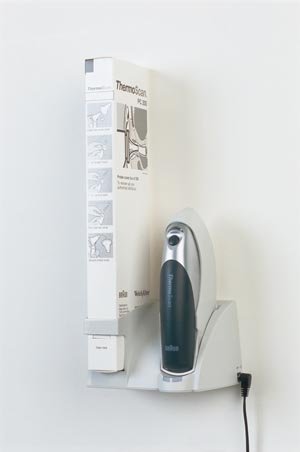
Image: The Welch Allyn 24001-1000 Recharging Base Station. This image displays the compact design of the base station, typically featuring a slot for the medical instrument and a power input port.
4. Einrichtung
- Wählen Sie einen Standort: Place the recharging base station on a stable, flat surface away from direct sunlight, heat sources, and moisture. Ensure adequate space for ventilation.
- Strom anschließen:
- Insert the small end of the power adapter cable into the power input port on the back or side of the recharging base station.
- Plug the larger end of the power adapter into a standard electrical outlet.
- Betriebsanzeige: Once connected to power, a power indicator light (if present) on the base station should illuminate, indicating it is ready for use. Refer to the device's specific indicator light behavior for confirmation.
5. Bedienungsanleitung
The Welch Allyn 24001-1000 Recharging Base Station is designed for simple and efficient charging of compatible Welch Allyn instruments.
- Insert Instrument: Gently place the compatible Welch Allyn instrument into the charging slot of the base station. Ensure it is seated correctly and makes proper contact with the charging terminals.
- Ladeanzeige: A charging indicator light on the base station or the instrument itself should activate, typically indicating that charging has begun. This light may change color or pattern to show charging status (e.g., red for charging, green for fully charged). Consult your instrument's manual for specific indicator light meanings.
- Ladezeit: Charging times vary depending on the instrument's battery level and type. Refer to your instrument's manual for estimated charging durations.
- Remove Instrument: Once the instrument is fully charged (indicated by the charging light), carefully lift it out of the base station.
Notiz: It is safe to leave instruments in the base station even after they are fully charged, as the base station typically employs trickle charging or charge maintenance features to prevent overcharging.
6. Wartung
- Reinigung:
- Before cleaning, always disconnect the base station from the power outlet.
- Wipe the exterior surfaces of the base station with a soft, dry, or slightly damp Tuch.
- Do not use harsh chemicals, abrasive cleaners, or solvents, as these can damage the finish or internal components.
- Ensure no liquid enters the charging slot or power input port.
- Lagerung: When not in use for extended periods, store the base station in a cool, dry place, away from direct sunlight and extreme temperatures.
- Inspektion: Periodically inspect the power cord and the base station for any signs of damage, such as frayed wires or cracks in the casing. If damage is found, discontinue use and contact customer support.
7. Fehlerbehebung
| Problem | Mögliche Ursache | Lösung |
|---|---|---|
| Instrument not charging |
|
|
| Kontrollleuchte leuchtet nicht |
|
|
| Base station feels warm |
|
|
8. Spezifikationen
- Modellnummer: 24001-1000
- Hersteller: Welch Allyn
- Artikelgewicht: 5 Pfund
- Paketabmessungen: 10 x 10 x 10 Zoll
- Verwendungszweck: Recharging compatible Welch Allyn medical instruments
- Leistungsaufnahme: Refer to power adapter for specific input requirements.
9. Garantie und Support
For warranty information, technical support, or service inquiries, please contact Welch Allyn customer service or your authorized distributor. Keep your purchase receipt and product model number (24001-1000) handy when contacting support.
Kontaktinformationen von Welch Allyn: Please refer to the official Welch Allyn webDie aktuellsten Kontaktdaten finden Sie auf der Website oder der Produktverpackung.