
1. Einleitung
This manual provides detailed instructions for the installation, operation, and maintenance of the Lutron MA-ALFQ35 Maestro Companion Fan and Light Control. This device is designed to work in conjunction with a compatible Lutron Maestro Multi-Location Fan and Light Control (MA-LFQ3 or MA-LFQM) to provide multi-location control of your ceiling fan speed and light levels.
2. Wichtige Sicherheitshinweise
WARNUNG: Stromschlaggefahr.
- Always turn off power at the circuit breaker or fuse box before installing or servicing this device.
- Do not use this device with any fan or light control other than specified Lutron Maestro models.
- Die Installation muss von einem qualifizierten Elektriker oder gemäß allen lokalen und nationalen Elektrovorschriften durchgeführt werden.
- Überschreiten Sie nicht die maximale Wassermengetage ratings for connected loads.
- Dieses Produkt ist nur für den Innenbereich bestimmt.
3. Produktüberschreitungview
The Lutron MA-ALFQ35 is a companion control unit that extends the functionality of a primary Maestro Multi-Location Fan and Light Control. It allows you to adjust both the fan speed and light intensity from additional locations within a room or area. This unit does not function independently and must be paired with a compatible Maestro master control.
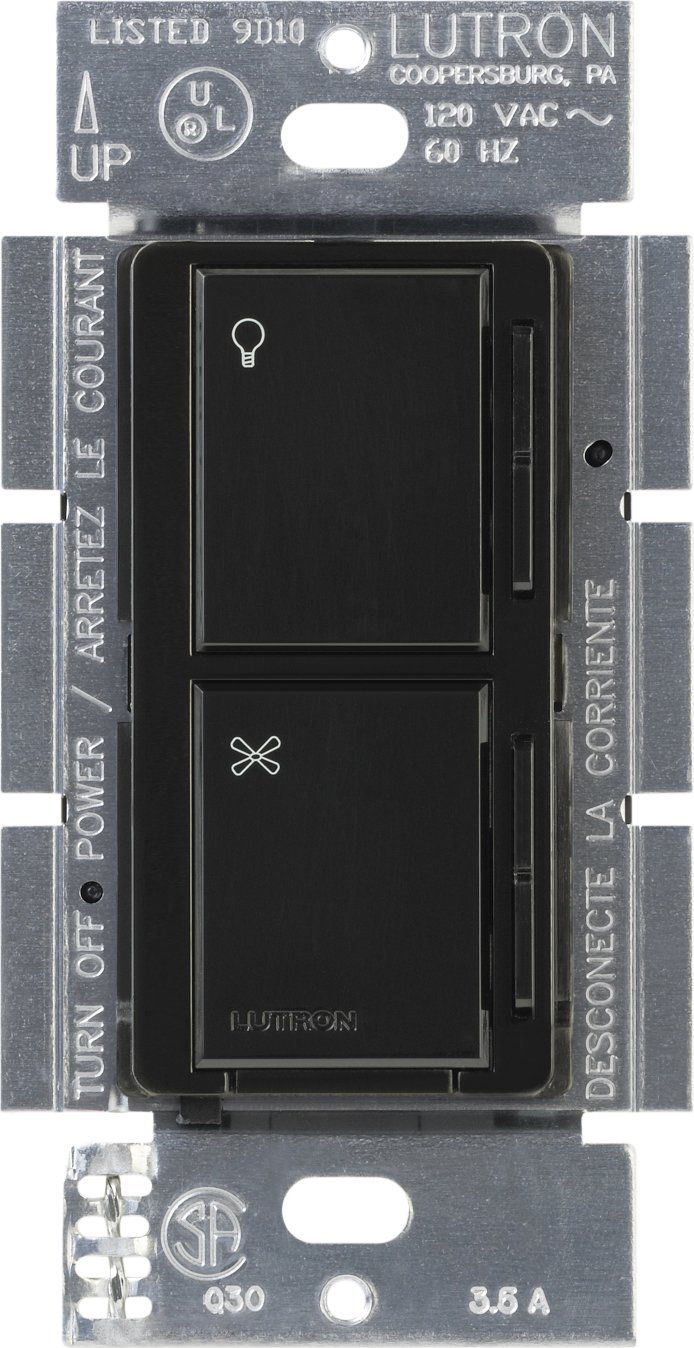
Bild 1: Vorderseite view of the Lutron MA-ALFQ35 Maestro Companion Fan and Light Control. This black wall-mounted unit features separate touch controls for light (top) and fan (bottom), with a small Lutron logo at the base.
Zu den Hauptmerkmalen gehören:
- Multi-location control for fan speed and light level.
- Adjusts fan speed and light level from up to three locations (when used with additional companion controls).
- Sets and recalls 7 distinct light levels and fan speeds.
- Touch control method for intuitive adjustments.
4. Kompatibilität
This companion control unit is designed to operate exclusively with specific Lutron Maestro Multi-Location Fan and Light Controls. It is not a standalone device and will not function without a compatible master unit.
Compatible Master Control Models:
- Lutron MA-LFQ3
- Lutron MA-LFQM
Ensure you have one of these master units installed before attempting to install the MA-ALFQ35 companion control.
5. Installation (Einrichtung)
Installation of the MA-ALFQ35 companion control requires basic electrical wiring knowledge. If you are unsure about any steps, consult a qualified electrician.
5.1 Bevor Sie beginnen
- Strom ausschalten: Locate the circuit breaker or fuse box that controls the power to the fan and light fixture. Turn off the power completely to prevent electric shock. Verify power is off using a voltage Tester.
- Verkabelung identifizieren: Carefully remove the existing wall plate and switch. Identify the wiring in the wall box. This companion control typically requires a neutral wire, a hot wire, and a traveler wire connected to the master control. Refer to the wiring diagram provided with your Master Maestro Multi-Location Fan and Light Control for specific connections.
- Drähte vorbereiten: Strip insulation from wires if necessary, ensuring approximately 1/2 inch (12 mm) of bare wire is exposed.
5.2 Wiring the Companion Control
The MA-ALFQ35 companion control connects to the master control unit via traveler wires. The exact wiring configuration will depend on your specific setup (e.g., 3-way or 4-way control). Always follow the wiring instructions provided with the Master Lutron Maestro Multi-Location Fan and Light Control (MA-LFQ3 or MA-LFQM).
- Connect the appropriate wires from the wall box to the terminals on the MA-ALFQ35.
- Stellen Sie sicher, dass alle Kabelverbindungen sicher sind.
5.3 Montage und Endbearbeitung
- Montieren Sie die Steuerung: Carefully push the wired MA-ALFQ35 into the wall box. Secure it with the provided mounting screws.
- Wandplatte installieren: Attach a coordinating Claro wallplate (sold separately) over the companion control.
- Strom wiederherstellen: Schalten Sie den Strom am Sicherungsautomaten oder Sicherungskasten wieder ein.
- Testfunktionalität: Test both the fan and light controls from all locations to ensure proper operation.
6. Bedienung
The Lutron MA-ALFQ35 companion control provides intuitive touch-based operation for your ceiling fan and lights.
6.1 Lichtsteuerung
- Ein-/Ausschalten: Tap the top section of the control (light icon) to turn the lights on or off.
- Helligkeit anpassen: Press and hold the top section to dim or brighten the lights. Release when the desired brightness is reached. The control supports 7 distinct light levels.
- Preset abrufen: A quick tap will often recall the last set brightness level.
6.2 Lüftergeschwindigkeitssteuerung
- Ein-/Ausschalten: Tap the bottom section of the control (fan icon) to turn the fan on or off.
- Geschwindigkeit anpassen: Press and hold the bottom section to increase or decrease the fan speed. Release when the desired speed is reached. The control supports 7 distinct fan speeds.
- Preset abrufen: A quick tap will often recall the last set fan speed.
7. Wartung
The Lutron MA-ALFQ35 requires minimal maintenance.
- Reinigung: To clean the surface of the control, wipe with a soft, damp Mit einem Tuch abwischen. Verwenden Sie keine Scheuermittel, Lösungsmittel oder chemische Sprays, da diese die Oberfläche oder die internen Bauteile beschädigen können.
- Keine vom Benutzer zu wartenden Teile: There are no user-serviceable parts inside this unit. Do not attempt to open or repair the control.
8. Fehlerbehebung
If your Lutron MA-ALFQ35 companion control is not functioning as expected, consider the following:
- Kein Strom: Ensure the circuit breaker or fuse supplying power to the fan and light circuit is in the ON position.
- Reagiert nicht: Verify that the master Maestro Multi-Location Fan and Light Control (MA-LFQ3 or MA-LFQM) is properly installed and functioning. The companion unit relies on the master unit for operation.
- Falsche Verdrahtung: Double-check all wiring connections, especially the traveler wires between the companion and master units. Refer to the master unit's installation guide for correct wiring diagrams. Ensure all connections are secure.
- Incompatible Master Unit: Confirm that the master control unit is one of the specified compatible Lutron Maestro models (MA-LFQ3 or MA-LFQM). This companion control will not work with other types of fan or light controls.
- Lose Verbindungen: Turn off power at the breaker and re-check all wire connections in the wall box for tightness.
If problems persist after checking these points, contact Lutron customer support or a qualified electrician.
9. Spezifikationen
| Modell | MA-ALFQ35-BL |
| Marke | Lutron |
| Betriebsmodus | EIN-AUS |
| Kontrollmethode | Berühren |
| Anzahl Positionen | 7 (for both fan speed and light level) |
| Wastage | 300 Watts (when used with compatible master) |
| Kompatible Geräte | MA-LFQ3, MA-LFQM |
| Montagetyp | Steckhalterung |
| Artikelgewicht | 0.3 Pfund |
| Farbe | Schwarz |
10. Garantie und Support
10.1 Garantieinformationen
The Lutron MA-ALFQ35 Maestro Companion Fan and Light Control comes with a 1 Jahr eingeschränkte Garantie on materials and manufacture. Please retain your proof of purchase for warranty claims. This warranty covers defects in materials and workmanship under normal use.
10.2 Kundendienst
For technical assistance, troubleshooting beyond this manual, or warranty inquiries, please contact Lutron customer support. Visit the official Lutron webWebsite für Kontaktinformationen und weitere Ressourcen.