
1. Einleitung
Welcome to the instruction manual for your Camelion CM9398 Universal Charger. This charger is designed to safely and efficiently recharge various types of rechargeable batteries, including AA, AAA, C, D, and 9V. Please read this manual thoroughly before first use to ensure proper operation and to maximize the lifespan of your batteries and charger.
2. Wichtige Sicherheitshinweise
- This charger is intended for nur für den Innenbereich. Do not expose it to rain or moisture.
- Das Ladegerät darf nicht zerlegt oder verändert werden. Alle Wartungsarbeiten dürfen nur von qualifiziertem Fachpersonal durchgeführt werden.
- Das Ladegerät sollte vor Wasser, hohen Temperaturen und direkter Sonneneinstrahlung geschützt werden.
- Use this charger only with wiederaufladbare Batterien of the specified types (Ni-MH/Ni-Cd). Attempting to charge non-rechargeable batteries may cause them to leak, rupture, or explode.
- Always observe the correct polarity (+/-) when inserting batteries into the charger.
- Laden Sie keine beschädigten oder auslaufenden Batterien.
- Unplug the charger from the power outlet when not in use and before cleaning.
- Außerhalb der Reichweite von Kindern aufbewahren.
3. Produktüberschreitungview
The Camelion CM9398 is a versatile charger capable of handling multiple battery formats. Its design allows for simultaneous charging of different battery types.
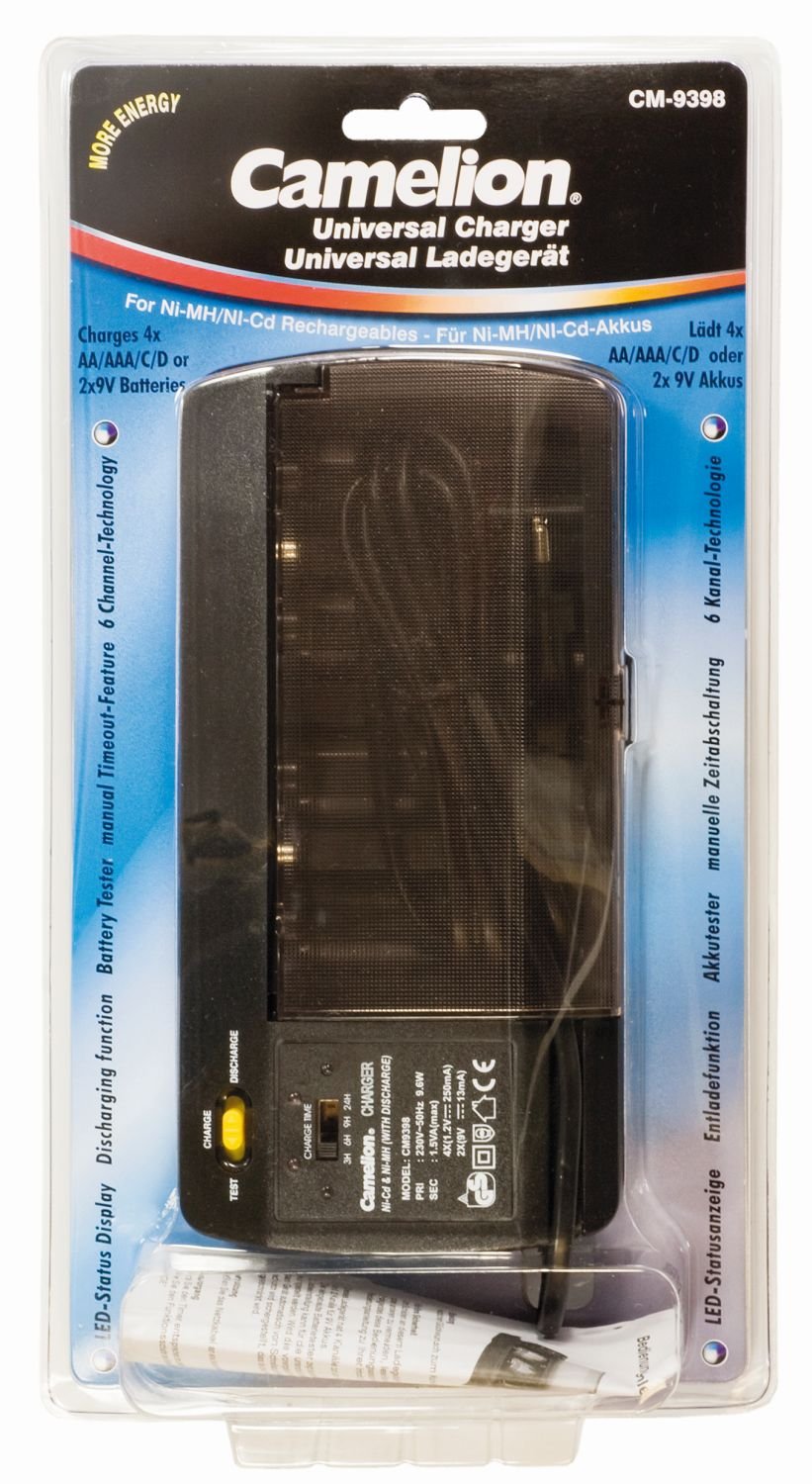
Image: The Camelion CM9398 Universal Charger, showing slots for various battery sizes.
Hauptmerkmale:
- Compatible with AA, AAA, C, D, and 9V rechargeable batteries.
- Mehrere Ladeschächte für gleichzeitiges Laden.
- LED indicator lights for charging status.
4. Einrichtung
- Auspacken des Ladegeräts: Nehmen Sie das Ladegerät vorsichtig aus der Verpackung und überprüfen Sie es auf etwaige Beschädigungen.
- An die Stromversorgung anschließen: Plug the charger's power cord into a standard wall outlet.
5. Bedienungsanleitung
5.1 Batterien einlegen
- Insert rechargeable batteries into the appropriate charging slots.
- Ensure that the positive (+) and negative (-) terminals of the batteries align correctly with the polarity markings in the charger slots. Incorrect insertion can prevent charging or damage the batteries/charger.
5.2 Ladevorgang
- Once batteries are correctly inserted and the charger is plugged in, the indicator lights for the respective slots will illuminate, indicating that charging has begun.
- Important Note on Charging: This charger operates on a timer-based charging system. It does not feature automatic charge termination based on battery capacity or full charge detection. Users must monitor charging times according to battery specifications to prevent overcharging, which can reduce battery lifespan or cause damage.
5.3 Calculating Charging Times
To determine the appropriate charging duration, refer to your battery's capacity (measured in mAh) and the charger's output current for each battery type. Overcharging can damage batteries and is not covered by warranty.
Exampauf: If your AA battery has a capacity of 2000mAh and the charger provides a charging current of 200mA for AA batteries, the theoretical charging time would be approximately 10 hours (2000mAh / 200mA = 10 hours). Always add a small buffer (e.g., 10-20%) to account for charging inefficiencies, but avoid excessive overcharging.
5.4 Batterien entnehmen
Once the calculated charging time has elapsed, disconnect the charger from the power outlet and carefully remove the charged batteries from their slots.
6. Wartung
- Reinigung: Trennen Sie das Ladegerät vor der Reinigung vom Stromnetz. Wischen Sie die Außenseite des Ladegeräts mit einem weichen, trockenen Tuch ab. Verwenden Sie keine flüssigen Reiniger oder Lösungsmittel.
- Lagerung: Bewahren Sie das Ladegerät bei Nichtgebrauch an einem kühlen, trockenen Ort fern von direkter Sonneneinstrahlung und extremen Temperaturen auf.
- Inspektion: Periodically check the charger and its power cord for any signs of damage.
7. Fehlerbehebung
Ladegerät für 7.1 funktioniert nicht
- Überprüfen Sie den Stromanschluss: Stellen Sie sicher, dass das Ladegerät fest in eine funktionierende Steckdose eingesteckt ist.
- Batterien prüfen: Verify that batteries are inserted correctly with the correct polarity.
7.2 Akkus werden nicht geladen
- Are Batteries Rechargeable? Confirm that you are attempting to charge Ni-MH or Ni-Cd rechargeable batteries, not alkaline or other non-rechargeable types.
- Polarität prüfen: Double-check that batteries are inserted with the correct positive (+) and negative (-) orientation.
- Faulty Batteries: Some batteries may be too old or damaged to accept a charge. Try charging different batteries to isolate the issue.
- Kontrollleuchten: The charger uses indicator lights. Refer to the product packaging or manufacturer's website for specific interpretations of light patterns, as detailed information is not provided in this manual.
8. Spezifikationen
| Marke | Kamelion |
| Modellnummer | 20009398 (CM9398) |
| Kompatible Batterietypen | AA, AAA, C, D, 9V (Ni-MH/Ni-Cd) |
| Farbe | Schwarz |
| Hersteller | CAMELION |
| ASIN | B0014IXZ5E |
| Garantie | 1 Jahre Herstellergarantie |
9. Garantie und Support
This Camelion CM9398 Universal Charger comes with a 1 Jahr Herstellergarantie ab Kaufdatum. Diese Garantie deckt Material- und Verarbeitungsfehler bei normalem Gebrauch ab.
For warranty claims, technical support, or any questions regarding your charger, please visit the official Camelion website or contact their customer service department. Please have your proof of purchase and the product model number (CM9398 or 20009398) ready when contacting support.