
1. Einleitung
Welcome to the user manual for your Timex Ironman T5K200SU Digital Watch. This guide provides essential information on setting up, operating, maintaining, and troubleshooting your watch to ensure optimal performance and longevity. Please read these instructions carefully before using your watch.
2. Produktüberschreitungview
The Timex Ironman T5K200SU is a robust digital watch designed for active lifestyles. It features a clear digital display, durable resin case and band, and is built to withstand various conditions. Key features include water resistance and a scratch-resistant crystal.
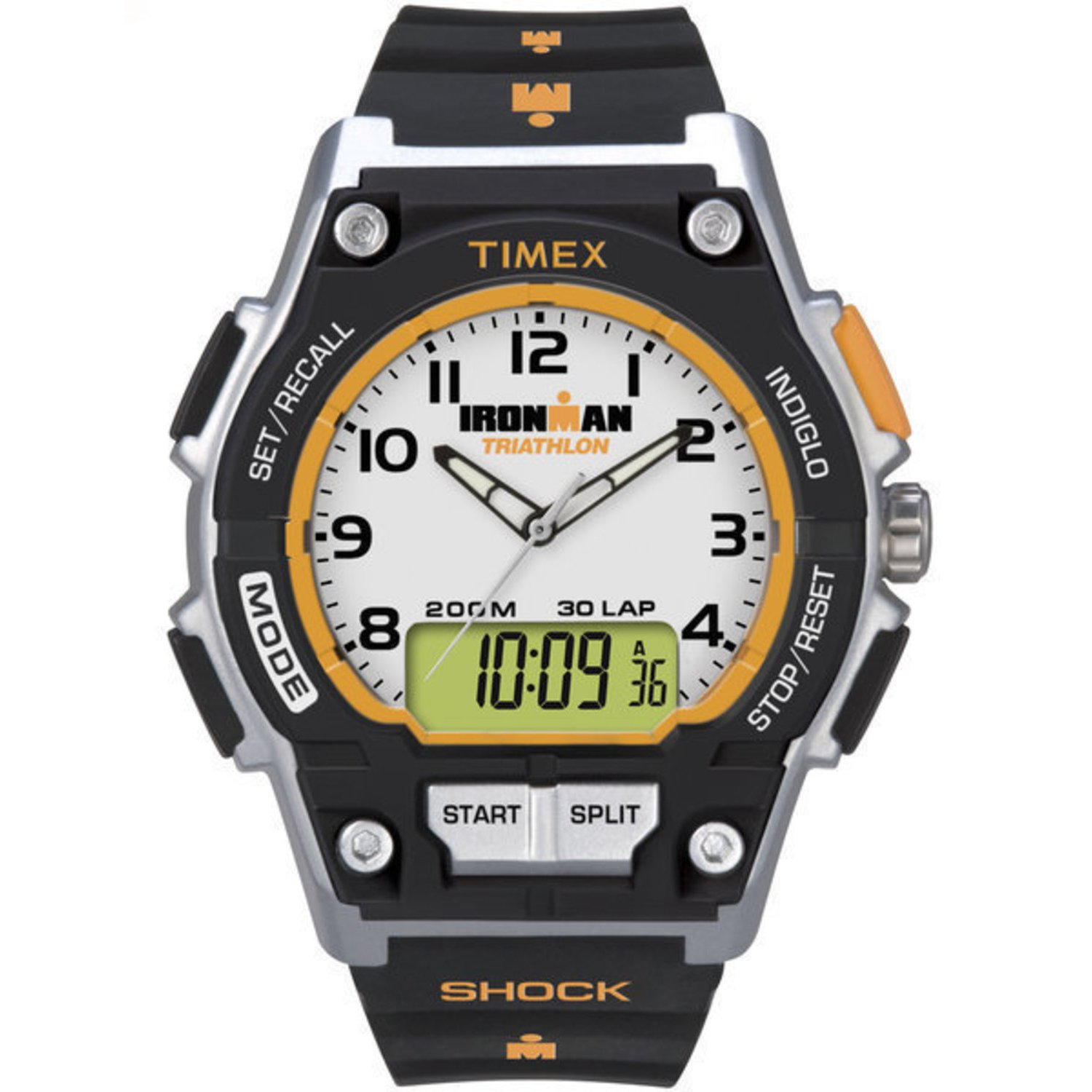
Abbildung 2.1: Front view of the Timex Ironman T5K200SU Digital Watch, showing its digital display and button layout.
3. Einrichtung
3.1 Erste Batterieaktivierung
Your watch comes with a pre-installed Lithium Ion battery. If the display is not active, press any button to wake the watch. No special activation is typically required for initial use.
3.2 Uhrzeit und Datum einstellen
- Halten Sie die SATZ or MODUS button (refer to watch specific button labels) until the time display begins to flash.
- Verwenden Sie die START/STOP or ANPASSEN button to increment the flashing digit (hours, minutes, seconds).
- Drücken Sie die MODUS button again to move to the next setting (e.g., minutes, then year, month, day).
- Sobald alle Einstellungen korrekt sind, drücken Sie die Taste SATZ or MODUS -Taste, um den Einstellmodus zu verlassen.
4. Bedienungsanleitung
4.1 Grundlegende Zeitanzeige
In normal timekeeping mode, the watch displays the current time (hours, minutes, seconds) and often the day of the week and date. Pressing the MODUS button cycles through different functions.
4.2 Modusfunktionen
Your Ironman watch typically includes several modes:
- Zeitmodus: Displays current time, date, and day.
- Stoppuhr-Modus: For timing events. Press START/STOP to begin/pause, RUNDE/ZURÜCKSETZEN to record laps or reset.
- Timer-Modus: For countdowns. Set the desired time, then press START/STOP.
- Alarmmodus: Stellen Sie tägliche Alarme ein.
4.3 INDIGLO Night-Light
Drücken Sie die INDIGLO button (usually located on the top left of the watch face) to illuminate the display for easy viewbei schlechten Lichtverhältnissen.
4.4 Wasserbeständigkeit

Abbildung 4.1: Illustration of the watch's water resistance feature.
Your Timex Ironman T5K200SU is rated as waterproof. This means it is suitable for swimming, showering, and general water activities. However, avoid pressing buttons underwater, as this can compromise the water seal. Always ensure the crown (if present) is pushed in completely before exposure to water.
5. Wartung
5.1 Reinigung Ihrer Uhr
Um Ihre Uhr zu reinigen, wischen Sie sie mit einem weichen, feuchten Tuch ab.amp cloth. For resin bands, mild soap and water can be used. Avoid harsh chemicals or abrasive materials that could damage the watch's finish or crystal.

Abbildung 5.1: Close-up of the watch's scratch-resistant crystal.
5.2 Batteriewechsel
When the display dims or functions become erratic, it may be time to replace the battery. It is recommended to have the battery replaced by an authorized Timex service center to ensure the watch's water resistance is maintained. Note: Replacing the battery yourself or by an unauthorized service may compromise the watch's water-resistant properties.
5.3 Speicherung
Bewahren Sie Ihre Uhr bei Nichtgebrauch an einem kühlen, trockenen Ort fern von direkter Sonneneinstrahlung und extremen Temperaturen auf.
6. Fehlerbehebung
- Watch Not Working / Blank Display:
Prüfen Sie, ob die Batterie ausgetauscht werden muss. Falls sie erst kürzlich gewechselt wurde, vergewissern Sie sich, dass sie korrekt eingesetzt wurde. - Falsche Zeitanzeige:
Refer to Section 3.2 for instructions on setting the time and date. Ensure you are in the correct 12-hour or 24-hour format if applicable. - Schaltflächen reagieren nicht:
Ensure the watch is not in a locked mode (if applicable). If the issue persists, a battery replacement might be necessary, or contact customer support. - Wasser in der Uhr:
If moisture appears inside the watch, stop using it immediately and take it to an authorized service center. This indicates a compromised seal.
7. Spezifikationen
| Besonderheit | Spezifikation |
|---|---|
| Modellnummer | T5K200SU |
| Anzeigetyp | Digitales |
| Gehäusedurchmesser | 42 Millimeter |
| Bandbreite | 20 Millimeter |
| Gehäusedicke | 14 Millimeter |
| Wasserbeständigkeit | Wasserdicht |
| Armbandmaterialtyp | Harz |
| Gehäusematerialart | Harz |
| Stromquellentyp | Batteriebetrieben (1 Lithium-Ionen-Akku im Lieferumfang enthalten) |
| Artikelgewicht | 113 g |
| Verschlusstyp | Schnalle (Dornschnalle) |
8. Garantie und Support
Your Timex watch is covered by a manufacturer's warranty against defects in materials and workmanship. For specific warranty terms and conditions, please refer to the warranty card included with your purchase or visit the official Timex webWebsite.
For service, repairs, or technical assistance, please contact an authorized Timex Service Centre. Using unauthorized service may void your warranty.

Abbildung 8.1: Information regarding Timex Service Centres.