
Technics SL-PD807
Technics SL-PD807 MASH 5-Disc-CD-Player – Benutzerhandbuch
Model: SL-PD807
Einführung
Vielen Dank für Ihren Einkauf.asing the Technics SL-PD807 MASH 5 Disc CD Player. This manual provides detailed instructions for the proper setup, operation, and maintenance of your new audio component. Please read this manual thoroughly before using the unit to ensure optimal performance and longevity.
The SL-PD807 features a 5-disc carousel changer, allowing for extended playback without interruption, and incorporates MASH (Multi-stage Noise Shaping) D/A conversion for high-quality audio reproduction.
Wichtige Sicherheitsinformationen
- Energiequelle: Ensure the unit is connected to an AC 120V, 60Hz power supply.
- Belüftung: Die Lüftungsöffnungen dürfen nicht blockiert werden. Um eine Überhitzung zu vermeiden, muss ausreichend Platz um das Gerät herum für eine ordnungsgemäße Luftzirkulation gewährleistet sein.
- Feuchtigkeit: Setzen Sie das Gerät weder Regen noch Feuchtigkeit aus. Stellen Sie keine mit Flüssigkeiten gefüllten Gegenstände, wie z. B. Vasen, auf das Gerät.
- Reinigung: Ziehen Sie vor der Reinigung den Netzstecker. Verwenden Sie zum Reinigen ein trockenes Tuch.
- Wartung: Versuchen Sie nicht, dieses Gerät selbst zu reparieren. Überlassen Sie alle Wartungsarbeiten qualifiziertem Fachpersonal.
Packungsinhalt
Bitte überprüfen Sie, ob alle Artikel im Paket vorhanden sind:
- Technics SL-PD807 MASH 5 Disc CD Player
- Netzkabel
- Cinch-Audiokabel
Note: A remote control is not included with this unit.
Aufstellen
1. Auspacken
Carefully remove the CD player and all accessories from the packaging. Retain the packaging materials for future transport or storage.
2. Platzierung
Place the CD player on a stable, level surface away from direct sunlight, heat sources, and excessive dust or vibrations. Ensure there is sufficient space around the unit for proper ventilation.

Abbildung 1: Front view of the Technics SL-PD807 CD Player with included RCA cables.
3. Verbindungen
Schließen Sie den CD-Player an Ihr Gerät an. amplifier or receiver using the supplied RCA audio cables.
- Connect one end of the RCA audio cables (red and white plugs) to the 'LINE OUT' jacks on the rear of the SL-PD807.
- Connect the other end of the RCA audio cables to an available 'CD IN' or 'AUX IN' input on your amplifier/receiver. Match the red plug to the 'R' (right) input and the white plug to the 'L' (left) input.
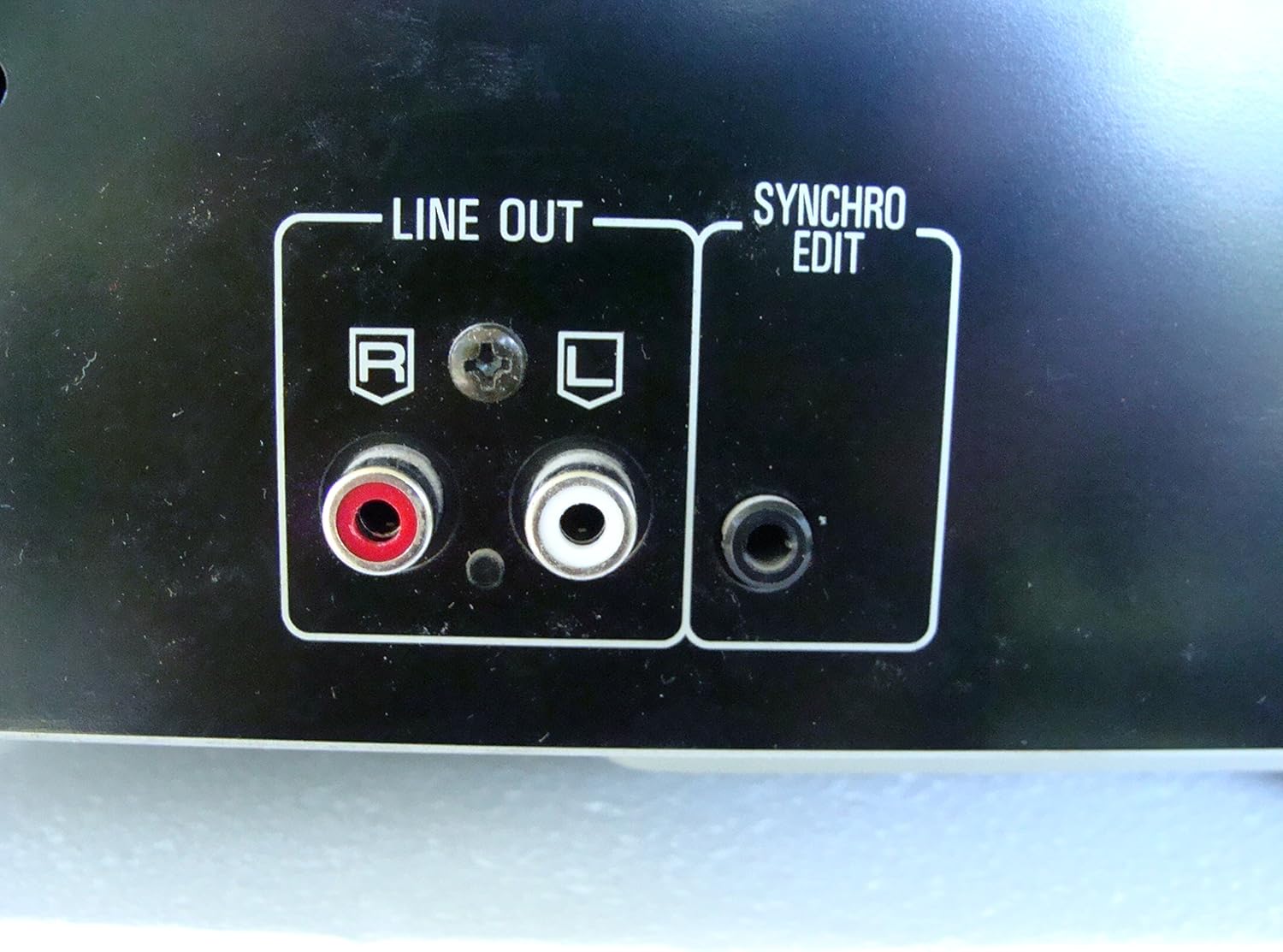
Abbildung 2: Rear panel connections, highlighting the 'LINE OUT' (RCA) and 'SYNCHRO EDIT' ports.
- Plug the power cord into the AC inlet on the rear of the CD player, then plug the other end into a standard AC wall outlet.
Bedienungsanleitung
1. Ein-/Ausschalten
Drücken Sie die LEISTUNG button located on the front left of the unit to turn the CD player on or off.
2. Loading Discs
The SL-PD807 features a 5-disc carousel. Press the ÖFFNEN/SCHLIESSEN button to open the disc tray. Place up to five CDs onto the numbered disc slots with the label side facing up. Press ÖFFNEN/SCHLIESSEN erneut, um das Fach zu schließen.

Abbildung 3: Front panel controls including disc tray, display, and playback buttons.
3. Einfache Wiedergabe
- Spielen: Drücken Sie die SPIELEN Drücken Sie die Taste (►), um die Wiedergabe zu starten.
- Pause: Drücken Sie die PAUSE button (⏸) to temporarily stop playback. Press again to resume.
- Stop: Drücken Sie die STOPPEN Drücken Sie die Taste (■), um die Wiedergabe zu stoppen.
- Tracks überspringen: Drücken Sie die ÜBERSPRINGEN buttons (⏭︎ / ⏮︎) to skip to the next or previous track.
- Suchen: Halten Sie die SUCHEN buttons (⏪︎ / ⏩︎) to fast forward or rewind within a track.
4. Disc Exchange
You can exchange discs while another disc is playing. Press the DISC ÜBERSPRINGEN button to rotate the carousel to an empty slot or a disc you wish to remove/replace. The currently playing disc will continue to play until you select a new disc to play.
5. Wiedergabemodi
- Zufälliges Spiel: Drücken Sie die ZUFÄLLIG button to play tracks on the current disc or all loaded discs in a random order.
- Programmablauf: Verwenden Sie die PROGRAMM button to create a custom playback sequence of tracks from the loaded discs. Refer to the on-screen display for programming steps.
- Wiederholungsspiel: Drücken Sie die WIEDERHOLEN button to repeat the current track, current disc, or all discs.
Wartung
1. Reinigung des Geräts
Wischen Sie die Außenseite des Geräts mit einem weichen, trockenen Tuch ab. Bei hartnäckigen Flecken leicht andrücken.ampen the cloth with water and a mild detergent, then wipe dry. Do not use abrasive cleaners, benzene, thinner, or alcohol, as these can damage the finish.

Abbildung 4: Top surface of the unit, illustrating areas that may require cleaning or show wear.
2. Disc Care
- Fassen Sie die Discs an ihren Kanten an, um Fingerabdrücke auf der Spielfläche zu vermeiden.
- Keep discs clean. Wipe from the center outwards with a soft, lint-free cloth if necessary.
- Bewahren Sie die Discs in ihren Hüllen auf, um sie vor Staub und Kratzern zu schützen.
Fehlerbehebung
If you experience problems with your CD player, please consult the following table before seeking service.
| Problem | Mögliche Ursache | Lösung |
|---|---|---|
| Kein Strom | Das Netzkabel ist nicht richtig angeschlossen. | Prüfen Sie, ob das Netzkabel an das Gerät und die Wandsteckdose angeschlossen ist. |
| Kein Ton | RCA audio cables not connected correctly. AmpVerstärker-/Empfängereingang nicht ausgewählt. | Ensure RCA cables are securely connected to both the CD player and ampVerstärker. Wählen Sie den richtigen Eingang an Ihrem amplifier/Empfänger. |
| Disc spielt nicht ab / springt | Disc is dirty or scratched. Disc is inserted incorrectly. | Clean the disc with a soft, lint-free cloth. Ensure the disc is placed label-side up in the tray. Try another disc. |
| Carousel does not rotate | Obstruction in the disc tray. | Ensure no foreign objects are obstructing the carousel mechanism. |
Technische Daten
The following are the technical specifications for the Technics SL-PD807 MASH 5 Disc CD Player:
| Besonderheit | Spezifikation |
|---|---|
| Modellname | SL-PD807 |
| Hersteller | Technik |
| Disc-Kapazität | 5 Scheiben |
| Strombedarf | Wechselstrom 120 V, 60 Hz, 13 W |
| Verpackungsabmessungen | 17 x 17 x 5 Zoll |
| Artikelgewicht | 15.02 Pfund |
| Konnektivitätstechnologie | Hilfsinfrarot |
| Besonderheit | Anti-Skip-Schutz |

Abbildung 5: Product label displaying model number and power specifications.
Garantie und Support
For information regarding warranty coverage and customer support for your Technics SL-PD807 CD Player, please refer to the warranty card included with your purchase or visit the official Technics website. If you require further assistance, please contact Technics customer service.
Ask a question about this manual
Ask about setup, troubleshooting, compatibility, parts, safety, or missing instructions. Manuals+ will review the question and use this page’s manual context to help answer it.