
Einführung
This manual provides instructions for the proper use and maintenance of your Presto 04213 Digital Timer. This electronic timer is designed for various timing needs, featuring both countdown and stopwatch functions. It includes an easy-to-read LCD display, an audible alarm, and a memory function for convenience.
Packungsinhalt
- Presto 04213 Digital Timer
- 1 AAA-Batterie (im Lieferumfang enthalten)
Aufstellen
Einlegen der Batterie
- Locate the battery compartment on the back of the timer. This is typically covered by the clip/easel stand.
- Gently open the clip/easel stand to access the battery compartment.
- Legen Sie eine AAA-Batterie ein und achten Sie darauf, dass die Plus- (+) und Minus- (-) Anschlüsse mit den Markierungen im Inneren des Batteriefachs übereinstimmen.
- Close the battery compartment securely. The timer display should now be active.

Abbildung: Rückseite view of the timer with the easel stand deployed, revealing the battery compartment and a separate AAA battery.
Platzierungsoptionen
The Presto 04213 Digital Timer offers versatile placement options:
- Magnetische Befestigung: A magnet on the back allows the timer to be attached to metallic surfaces like refrigerators or ovens.
- Easel Stand: The integrated clip can be extended to form an easel stand for tabletop use.
- Aus dem Video: The clip can also be used to attach the timer to clothing or other objects.
Bedienungsanleitung
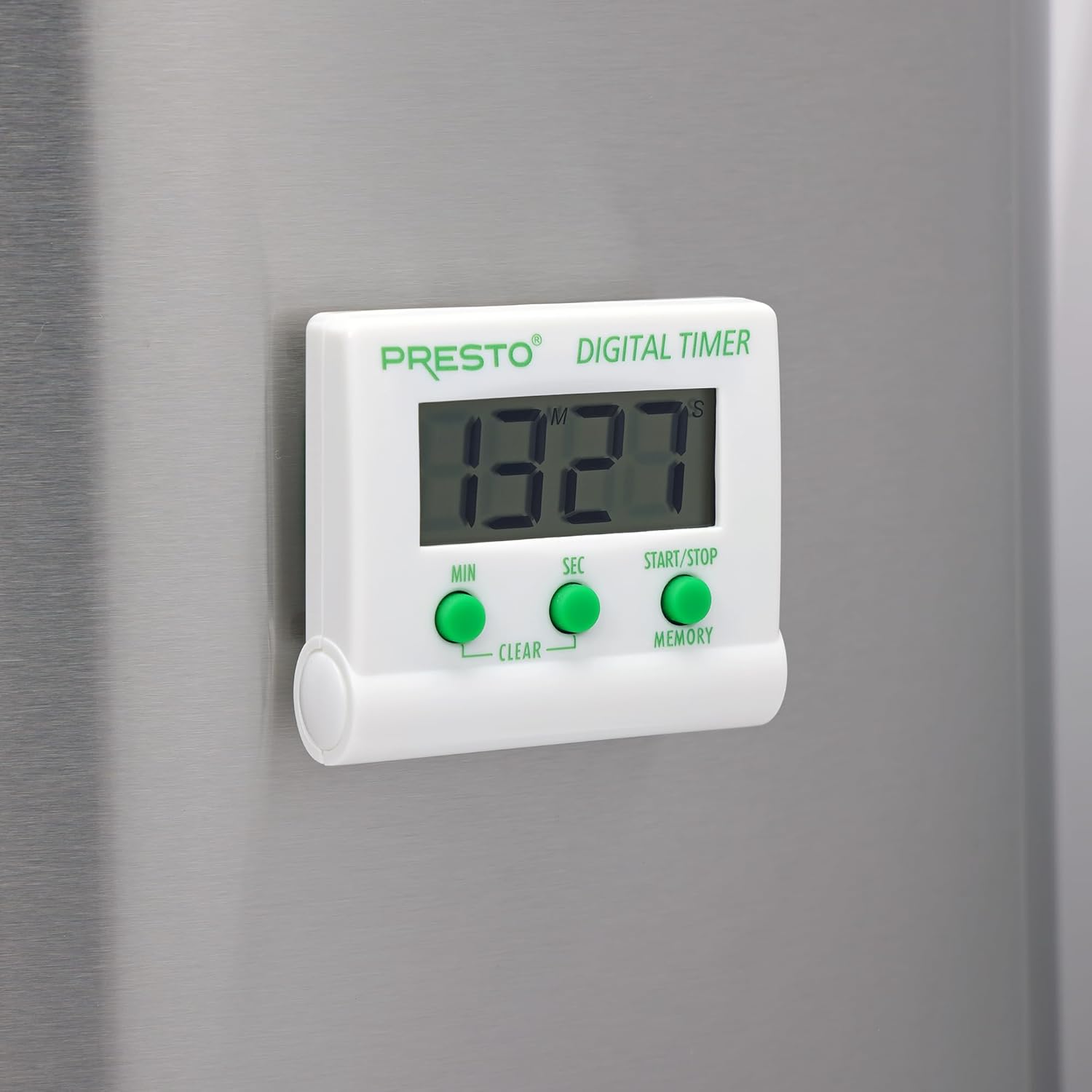
Bild: Vorderseite view of the Presto Digital Timer, displaying the time and showing the MIN, SEC, and START/STOP/MEMORY buttons.
Einstellen des Countdown-Timers
- Drücken Sie die MIN button to set the desired minutes (up to 99).
- Drücken Sie die SEC button to set the desired seconds (up to 59).
- To clear the current time setting, press both MIN Und SEC Tasten gleichzeitig.
- Drücken Sie die START/STOP Knopf zum Starten des Countdowns.
- When the time reaches zero, an alarm will sound. Press START/STOP um den Alarm stumm zu schalten.
Using the Stopwatch Function (Count-Up)
- Ensure the timer display is set to "00:00". If not, press both MIN Und SEC buttons to clear it.
- Drücken Sie die START/STOP Knopf zum Starten des Hochzählens.
- Drücken START/STOP Um die Stoppuhr erneut anzuhalten.
- Um fortzufahren, drücken Sie START/STOP. To reset to "00:00", press both MIN Und SEC buttons while the stopwatch is paused.
Memory Funktion
The timer automatically stores the last countdown setting. After the alarm sounds and is silenced, or if the timer is stopped before reaching zero, pressing the ERINNERUNG button will recall the last set countdown time for quick reuse.
Merkmale
- Zählt von jeder beliebigen Zeit bis zu 99 Minuten und 59 Sekunden herunter.
- Functions as a stopwatch (counts up).
- Easy-to-read digital display shows minutes and seconds.
- Audible alarm signals when countdown is complete.
- Memory feature stores the last countdown setting.
- Versatile design with a convenient clip, easel stand, and magnet for various mounting options.
- Operates on one AAA battery.
Wartung
Reinigung
To clean the timer, carefully wipe it with a slightly damp cloth. Do not immerse the timer in water or use abrasive cleaners, as this can damage the electronic components.
Batteriewechsel
When the display becomes dim or the timer stops functioning, replace the AAA battery following the installation steps in the "Setup" section.
Fehlerbehebung
- Timer schaltet sich nicht ein: Ensure the AAA battery is correctly installed with proper polarity and is not depleted. Replace the battery if necessary.
- Das Display ist dunkel oder leer: This indicates a low battery. Replace the AAA battery.
- Kein Alarm: Check if the timer reached zero. Ensure there are no obstructions to the speaker.
- Schaltflächen reagieren nicht: Ensure the timer is clean and free from debris around the buttons. If the issue persists after battery replacement, contact customer support.
Technische Daten
| Modellnummer | 04213 |
| Marke | Presto |
| Material | Plastik |
| Abmessungen (T x B x H) | 0.5" x 2.25" x 2.5" |
| Artikelgewicht | 2.88 Unzen |
| Stromquelle | 1 AAA Batterie |
| Max Countdown | 99 Minuten, 59 Sekunden |
| Farbe | Weiß |

Image: The Presto Digital Timer with its dimensions (2.5" H, 2.25" W, 0.5" D) clearly indicated.
Garantie und Support
Garantieinformationen
This Presto 04213 Digital Timer comes with a 1 Jahr eingeschränkte Garantie Diese Garantie gilt ab Kaufdatum und deckt Material- und Verarbeitungsfehler bei normalem Gebrauch ab. Sie deckt keine Schäden ab, die durch Missbrauch, Unfälle, Veränderungen oder nicht autorisierte Reparaturen entstehen.
Kundenservice
For warranty claims, technical assistance, or any questions regarding your Presto Digital Timer, please contact Presto customer service. Refer to the official Presto webDie aktuellsten Kontaktinformationen finden Sie auf der Website oder der Produktverpackung.
Besuchen Sie auch die Presto Store on Amazon Für weitere Produktinformationen und Supportressourcen.