
Einführung
Vielen Dank für Ihren Einkauf.asing the Snakebyte Wireless Bluetooth Premium PS3 Controller. This manual provides detailed instructions for setting up, operating, maintaining, and troubleshooting your new controller. Please read this manual thoroughly before use to ensure optimal performance and longevity of your device.
Packungsinhalt
Bitte überprüfen Sie, ob alle Artikel im Paket vorhanden sind:
- Snakebyte Wireless Bluetooth Premium PS3 Controller
- USB Charging Cable (approximately 3 meters)
- Bedienungsanleitung (dieses Dokument)

Image: The Snakebyte Wireless Bluetooth Premium PS3 Controller shown in its retail blister packaging, indicating the product and included cable.
Aufstellen
1. Aufladen des Controllers
Before initial use, fully charge the controller. Connect the supplied USB charging cable to the controller's charging port and the other end to a USB port on your PlayStation 3 console or a compatible USB power adapter. The indicator lights on the controller will show charging status and turn off or change color when fully charged.
2. Verbindung zu PlayStation 3 herstellen
To connect the controller wirelessly to your PlayStation 3 console:
- Stellen Sie sicher, dass Ihre PlayStation 3-Konsole eingeschaltet ist.
- Connect the controller to the PS3 console using the supplied USB charging cable. This will register the controller with the console.
- Drücken Sie die PS-Taste (located in the center of the controller) once. The controller will power on and attempt to establish a connection.
- Once the controller is registered and connected, the indicator lights will illuminate, typically assigning a player number.
- You can now disconnect the USB cable for wireless gameplay. If the connection is lost, reconnect the USB cable and press the PS button again.

Bild: Vorderseite view of the Snakebyte Wireless Bluetooth Premium PS3 Controller, showing the button layout including the central PS button.
Bedienungsanleitung
Controller-Layout und Funktionen
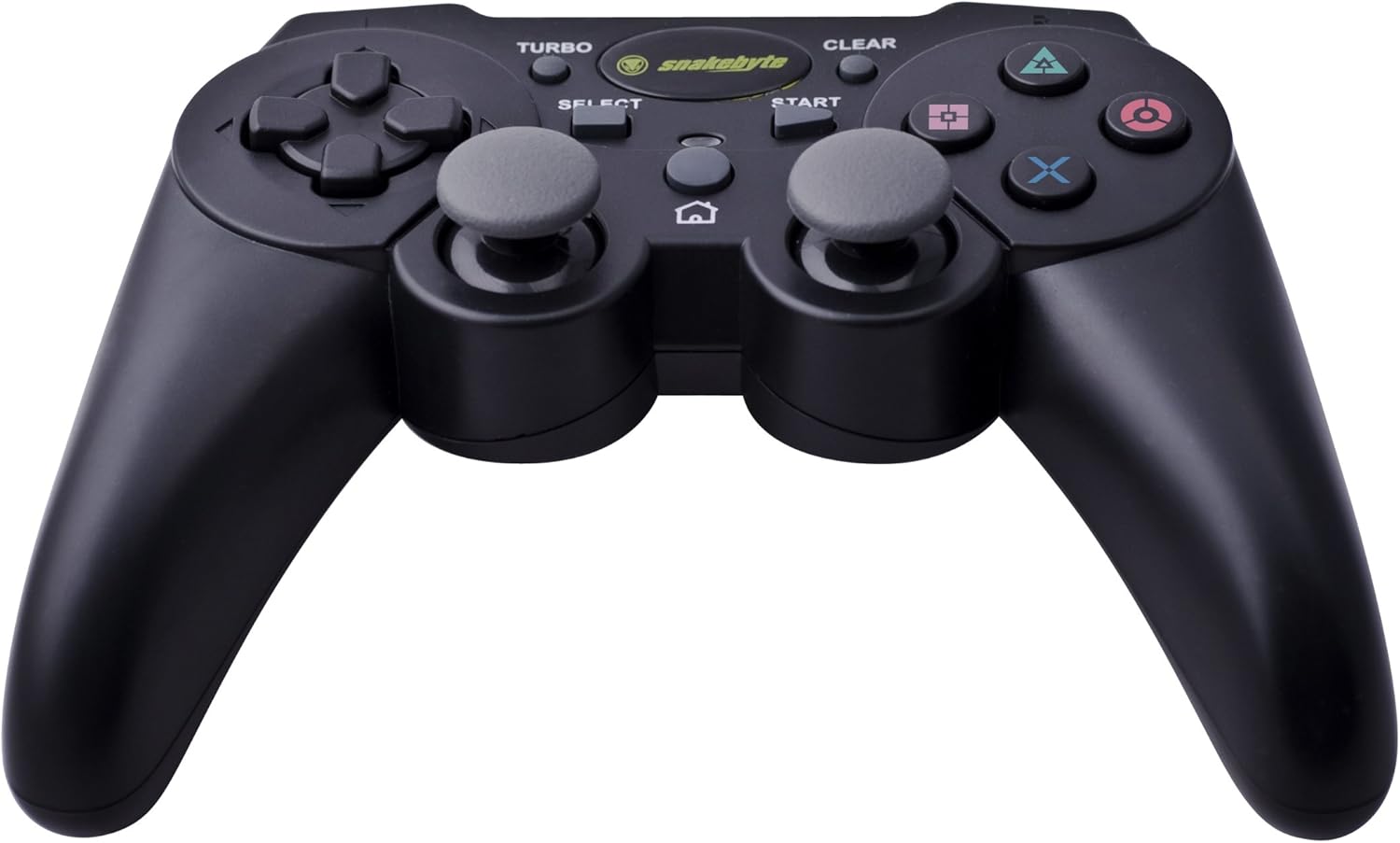
Image: The Snakebyte Wireless Bluetooth Premium PS3 Controller, highlighting the dual analog sticks and various buttons.
- Richtungspad (D-Pad): For precise directional input in games.
- Linker Analogstick: Primäre Bewegungssteuerung.
- Rechter Analogstick: Kamerasteuerung oder sekundäre Bewegung.
- Aktionsschaltflächen (Dreieck, Kreis, Kreuz, Quadrat): Spielspezifische Aktionen.
- L1/R1-Tasten: Schultertasten für verschiedene Spielfunktionen.
- L2/R2-Trigger: Analog triggers for pressure-sensitive input, often used for acceleration/braking or aiming/firing.
- Start Knopf: Pauses games or opens menus.
- Auswahlknopf: Opens in-game maps, inventories, or other menus.
- PS-Taste: Powers on the controller, accesses the PS3 XMB (Cross Media Bar) menu, or turns off the controller/console.
- TURBO-Taste: Aktiviert die Turbofunktion für andere Tasten.
- CLEAR-Taste: Deaktiviert die Turbofunktion.
Turbo-Funktion
The controller features a TURBO function, allowing a selected button to register multiple presses rapidly with a single hold. This can be useful for certain game mechanics.
- To activate TURBO: Press and hold the TURBO-Taste, then press the desired action button (e.g., Cross, Square, Circle, Triangle, L1, R1, L2, R2). Release both buttons. The selected button will now have the TURBO function enabled.
- To deactivate TURBO for a specific button: Press and hold the CLEAR-Taste, then press the button for which TURBO is currently active. Release both buttons.
- To deactivate all TURBO functions: Press the CLEAR-Taste once without holding it down.
Motion Sensing and Vibration Feedback
This controller supports motion sensing capabilities, allowing for intuitive control in compatible games. It also provides vibration feedback to enhance immersion during gameplay, reacting to in-game events such as impacts or explosions.
Ein- und Ausschalten
- Zum Einschalten: Drücken Sie die Taste PS-Taste.
- To power off: The controller will automatically enter sleep mode after a period of inactivity to conserve battery. Alternatively, you can hold the PS-Taste for several seconds to bring up the PS3 menu, where you can choose to turn off the controller.
Wartung
- Reinigung: Reinigen Sie den Controller mit einem weichen, trockenen Tuch. Verwenden Sie keine Scheuermittel oder Lösungsmittel.
- Lagerung: Bewahren Sie den Controller an einem kühlen, trockenen Ort fern von direkter Sonneneinstrahlung und extremen Temperaturen auf.
- Batteriepflege: Um die Batterielebensdauer zu verlängern, vermeiden Sie häufiges vollständiges Entladen des Controllers. Laden Sie ihn regelmäßig auf, auch wenn er nicht ständig in Gebrauch ist.
- Schäden vermeiden: Do not drop the controller or expose it to excessive force or moisture.
Fehlerbehebung
| Problem | Mögliche Lösung |
|---|---|
| Der Controller verbindet sich nicht drahtlos. |
|
| Die Tasten oder Analogsticks reagieren nicht. |
|
| Der Controller lädt nicht. |
|
Zurücksetzen des Controllers
If the controller behaves erratically or becomes unresponsive, you can perform a reset. Locate the small reset button on the back of the controller (often in a small hole). Use a thin, pointed object (like a straightened paperclip) to press and hold the reset button for a few seconds. This will restart the controller's internal electronics.
Technische Daten
- Marke: Snakebyte
- Modellnummer: SB904714
- Kompatible Plattform: Sony PlayStation 3
- Konnektivität: Kabellos (Bluetooth)
- Anzahl Tasten: 16
- Abmessungen (L x B x H): Ungefähr 23.01 x 16.31 x 8.51 cm (9.06 x 6.42 x 3.35 Zoll)
- Gewicht: Ca. 419.99 g (0.93 lbs)
- Farbe: Schwarz
Garantie und Support
For warranty information and technical support, please refer to the documentation provided with your purchase or contact your retailer. You may also visit the official Snakebyte webWeitere Hilfe und Produktinformationen finden Sie auf dieser Website.