
Einführung
The Nokia Bluetooth Stereo Headset BH-905 is designed to provide a superior audio experience with active noise cancellation and wide compatibility. This manual provides instructions for setting up, operating, and maintaining your headset to ensure optimal performance.
The headset features 10 microphones: 8 dedicated to capturing ambient noise for cancellation and 2 for capturing speech in noisy environments. It offers versatile connectivity, supporting both wireless Bluetooth and wired connections with various devices.
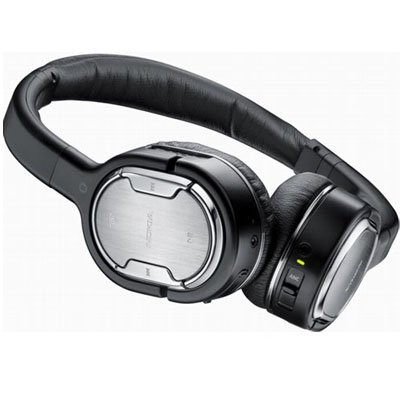
Image: The Nokia Bluetooth Stereo Headset BH-905, showcasing its sleek design and over-ear cups.
Hauptmerkmale
- Aktive Geräuschunterdrückung (ANC): Significantly reduces ambient noise for an immersive listening experience.
- 10 Mikrofone: Utilizes 8 microphones for noise capture and 2 for clear speech transmission in loud surroundings.
- Breite Kompatibilität: Connects wirelessly via Bluetooth or wired to a variety of mobile phones, music players, and other audio devices.
- Nahtlose Steuerung: Intuitive controls allow for easy switching between music and calls without needing to look at the device.
Aufstellen
Bluetooth-Kopplung
- Stellen Sie sicher, dass Ihr Headset geladen und ausgeschaltet ist.
- Aktivieren Sie Bluetooth auf Ihrem Mobilgerät.
- Press and hold the power button on the headset until the indicator light flashes blue rapidly, indicating pairing mode.
- On your device, search for Bluetooth devices and select "Nokia BH-905" from the list.
- If prompted, enter the passcode (usually "0000").
- Once paired, the indicator light will turn solid blue or flash slowly.
Kabelverbindung
For devices without Bluetooth or when battery is low, use the provided audio cables. The headset includes plugs for standard audio jacks and airplane adapters for versatile use.
- Connect one end of the audio cable to the headset's audio input port.
- Connect the other end to your audio source (e.g., mobile phone, MP3 player, airplane entertainment system).
Bedienungsanleitung
Ein-/Ausschalten
- Zum Einschalten den Netzschalter gedrückt halten, bis die Kontrollleuchte aufleuchtet.
- Zum Ausschalten den Netzschalter gedrückt halten, bis die Kontrollleuchte erlischt.
Aktive Geräuschunterdrückung (ANC)
The BH-905 features advanced Active Noise Cancellation technology. With 8 dedicated microphones, it captures ambient low-frequency noise and generates an inverse sound wave, effectively canceling out unwanted sounds. This allows for a clearer audio experience, especially in noisy environments like airplanes or busy streets.
- To activate ANC, locate the ANC switch on the headset and slide it to the 'On' position. A green indicator light will confirm activation.
- To deactivate ANC, slide the switch to the 'Off' position.
Anruf-Management
The headset is equipped with 2 microphones specifically designed for speech. These microphones not only capture your voice clearly but also work to cancel out ambient noise, ensuring that the person you are speaking with hears you, not your surroundings.
- Anrufe entgegennehmen / beenden: Use the dedicated call button on the headset.
- Switching between Music and Calls: The headset allows for seamless transitions between listening to music and taking calls. When a call comes in, your music will pause, and you can answer the call directly from the headset.
Musikwiedergabe
Control your music directly from the headset using the intuitive buttons. The design supports "blind usage," meaning you can operate the controls by feel without needing to look at them.
- Abspielen/Pause: Verwenden Sie die Wiedergabe-/Pause-Taste.
- Tracks überspringen: Use the forward/backward track buttons.
- Lautstärkeregelung: Die Lautstärke kann über die dafür vorgesehenen Lautstärketasten eingestellt werden.
Video: An official Nokia video demonstrating the features and technology behind the BH-905 headset, including its active noise cancellation and multi-microphone system for clear audio and calls.
Wartung
- Reinigen Sie das Headset regelmäßig mit einem weichen, trockenen Tuch.
- Avoid exposing the headset to extreme temperatures, moisture, or direct sunlight.
- Store the headset in its protective case when not in use to prevent damage.
- Versuchen Sie nicht, das Headset zu zerlegen oder zu verändern, da dies zum Erlöschen der Garantie führt.
Fehlerbehebung
- Kein Strom: Stellen Sie sicher, dass das Headset vollständig aufgeladen ist.
- Kopplung fehlgeschlagen: Make sure the headset is in pairing mode and within range of your device. Try restarting both devices.
- Kein Ton/Schlechte Tonqualität: Check volume levels on both the headset and your connected device. For wired connections, ensure cables are securely plugged in. For Bluetooth, ensure a stable connection.
- ANC funktioniert nicht effektiv: Ensure the ANC switch is in the 'On' position.
- Callers Cannot Hear Me Clearly: Ensure the headset's microphones are not obstructed.
If issues persist, refer to the Nokia support webBesuchen Sie unsere Website oder kontaktieren Sie unseren Kundenservice für weitere Unterstützung.
Technische Daten
| Besonderheit | Spezifikation |
|---|---|
| Marke | Nokia |
| Modellnummer | 02716J5 |
| Formfaktor | Over-ear (two_ear) |
| Lärmschutz | Aktive Geräuschunterdrückung |
| Konnektivitätstechnologie | Bluetooth, Kabelgebunden |
| Drahtlose Kommunikationstechnologie | Bluetooth |
| Zusätzliche Merkmale | Microphone; Stereo |
| Steuerungstyp | Mediensteuerung |
| Artikelgewicht | 0.32 Pfund |
| UPC | 758478021477 |
| GTIN | 758478021477 |
Garantie und Support
The Nokia Bluetooth Stereo Headset BH-905 comes with a 12 Monate Garantie Diese Garantie gilt ab Kaufdatum und deckt Herstellungsfehler bei normalem Gebrauch ab. Bitte bewahren Sie Ihren Kaufbeleg für Garantieansprüche auf.
For technical support, warranty service, or additional information, please visit the official Nokia support website or contact your local Nokia customer service center.