
Einführung
Thank you for choosing the Hisonic MA-3800K Professional Digital Echo Mixing Amplifier. Dies amplifier is engineered for quality and durability, designed to provide a reliable audio mixing solution for karaoke, DJ, VJ, and KJ applications. This manual provides essential information for the proper setup, operation, and maintenance of your MA-3800K amplifier, um optimale Leistung und Langlebigkeit zu gewährleisten.
Sicherheitshinweise
Bitte lesen und verstehen Sie alle Sicherheitshinweise, bevor Sie dieses Gerät in Betrieb nehmen. Bewahren Sie diese Bedienungsanleitung zum späteren Nachschlagen auf.
- Energiequelle: Verbinden Sie amplifier only to the specified power supply (AC 110V/220V, switchable). Ensure the voltage selector on the rear panel matches your local power supply before connecting.
- Belüftung: Do not block ventilation openings. Ensure adequate airflow around the unit to prevent overheating. Avoid placing the amplifier on carpets or in enclosed spaces.
- Feuchtigkeit: Do not expose this appliance to rain or moisture. Keep liquids away from the unit.
- Wartung: Do not attempt to service this unit yourself. Refer all servicing to qualified service personnel. Opening the casing kann Sie gefährlichen Temperaturen aussetzentage oder andere Gefahren.
- Platzierung: Platzieren Sie die ampStellen Sie den Verstärker auf eine stabile, ebene Fläche. Vermeiden Sie es, ihn in der Nähe von Wärmequellen oder in direktem Sonnenlicht aufzustellen.
- Reinigung: Vor der Reinigung den Netzstecker ziehen. Ein weiches, trockenes Tuch verwenden. Keine flüssigen oder Aerosolreiniger verwenden.
Packungsinhalt
Überprüfen Sie, ob alle Artikel im Paket vorhanden sind:
- Hisonic MA-3800K Karaoke-Mixer Ampschwerer
- Fernbedienung
- Netzkabel
- Benutzerhandbuch (dieses Dokument)
Produkt überview
Bedienelemente auf der Vorderseite
The front panel provides access to all primary controls for microphone and music mixing, as well as key control functions.
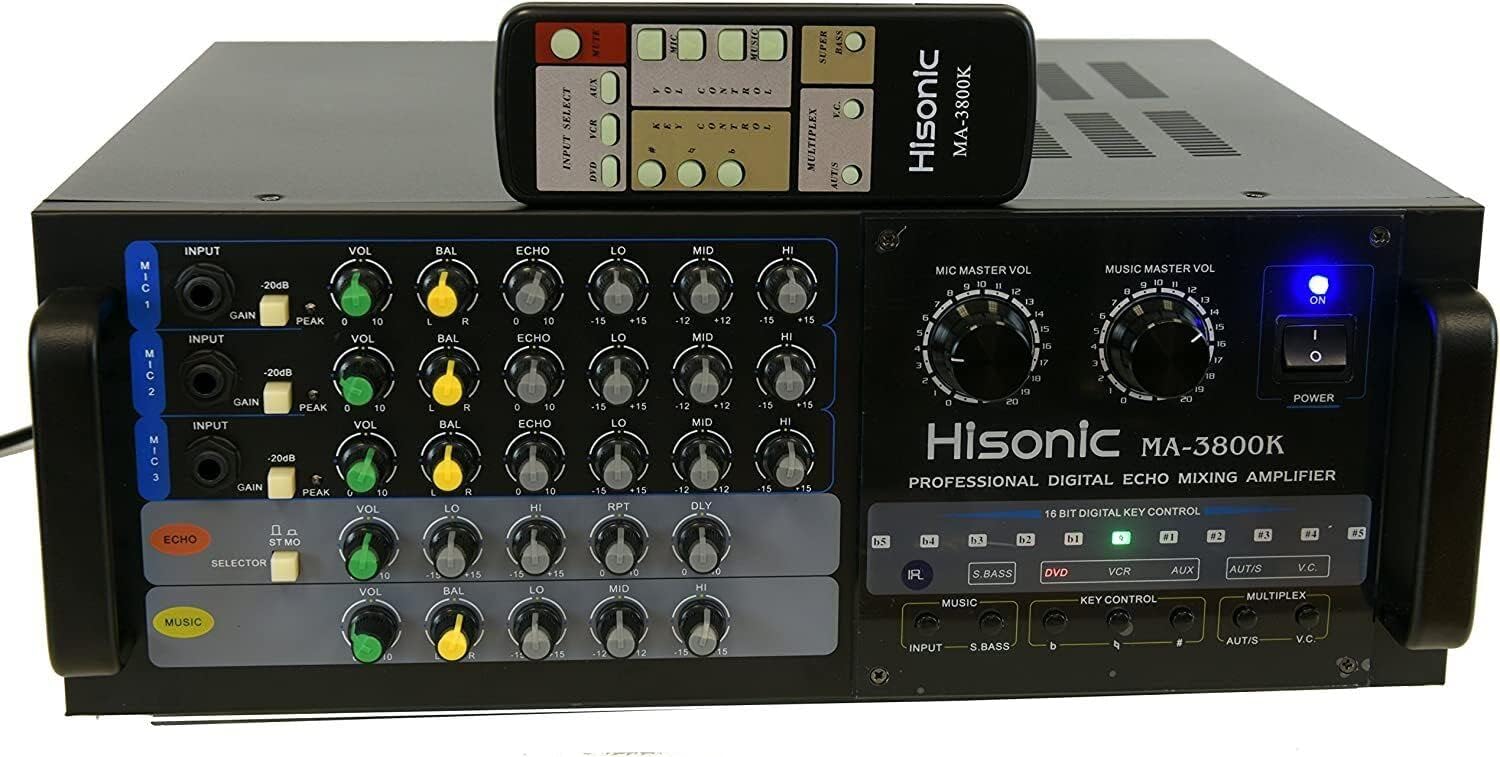
Bild: Vorderseite view of the Hisonic MA-3800K amplifier with its remote control. The image highlights the various knobs and buttons for microphone and music volume, echo, tone controls, and input selection.
- MIC MASTER VOL: Adjusts the overall volume of all connected microphones.
- MUSIC MASTER VOL: Regelt die Gesamtlautstärke des Musikeingangs.
- POWER-Taste: Schaltet den amplifier ein oder aus.
- Microphone Inputs (MIC 1, MIC 2, MIC 3): 1/4" jacks for connecting microphones. Each input has individual controls:
- EINGANG: Empfindlichkeitseinstellung.
- LAUTSTÄRKE: Individual microphone volume.
- BAL: Microphone balance (left/right).
- ECHO: Individual microphone echo depth.
- LO/MID/HI: Individual microphone bass, midrange, and treble tone controls.
- ECHO Section: Controls for the overall echo effect.
- MUSIC Section: Controls for music tone (VOL, BAL, LO, MID, HI).
- 16 BIT DIGITAL KEY CONTROL: Buttons for adjusting the musical key (e.g., #, b, KEY CONTROL).
- Eingangswähler: Buttons to select the audio source (DVD, VCR, AUX).
- MULTIPLEX Controls (AUT/S, V.C.): Functions for specific karaoke media, including auto singing-mate switch and vocal cancellation.
Anschlüsse auf der Rückseite
The rear panel houses all input and output connections for external devices.

Bild: Rückseite view of the Hisonic MA-3800K amplifier, showing the various audio and video input/output ports, speaker terminals, and power input.
- VIDEO AUS: RCA output for video signal.
- AUX/VCR/DVD/MUSIC INPUT: RCA stereo audio inputs for connecting various audio sources.
- SPEAKER SYSTEM (A & B): Terminals for connecting speakers. Supports 8 Ohm impedance.
- SICHERUNG: Fuse holder (15A).
- AC-EINGANG: Netzkabelanschluss.
- VOLTAGE WÄHLEN: Switch for selecting 110V or 220V power input.
- EFFECT LOOP (OUTPUT/INPUT): RCA connections for external audio effects processors.
- MIC/MIX/PREOUT: Additional audio outputs.
Fernbedienung
The included remote control allows for convenient operation of key functions from a distance.

Image: Close-up of the Hisonic MA-3800K remote control, displaying buttons for input selection, mute, key control, volume control for microphone and music, multiplex functions, and super bass.
- INPUT SELECT (DVD, VCR, AUX): Wählt die Audioeingangsquelle aus.
- STUMM: Schaltet alle Audioausgaben stumm.
- KEY CONTROL (#, b): Adjusts the musical key up or down.
- VOL CONTROL (MIC, MUSIC): Adjusts microphone and music master volumes.
- MULTIPLEX (AUT/S, V.C.): Activates auto singing-mate and vocal cancellation functions for compatible media.
- SUPER BASS: Verstärkt die Bassfrequenzen.
Aufstellen
- Auspacken und Aufstellen: Entfernen Sie vorsichtig die amplifier from its packaging. Place it on a flat, stable surface with adequate ventilation around all sides.
- Bandtage Auswahl: Before connecting the power cord, ensure the VOLTAGE SELECT switch on the rear panel is set to match your local power supply (110V or 220V). Incorrect voltagDie falsche Auswahl kann das Gerät beschädigen.
- Lautsprecheranschluss: Connect your speakers to the SPEAKER SYSTEM terminals on the rear panel. Ensure correct polarity (+ to + and - to -). The amplifier supports 8 Ohm speakers.
- Audioquellenanschluss: Connect your audio sources (e.g., DVD player, karaoke machine, computer) to the desired RCA INPUTs (DVD, VCR, AUX, MUSIC INPUT) on the rear panel using appropriate RCA cables.
- Mikrofonanschluss: Plug your microphones into the 1/4" MIC 1, MIC 2, or MIC 3 inputs on the front panel.
- Stromanschluss: Once all connections are secure, plug the power cord into the AC INPUT on the rear panel and then into a wall outlet.
Bedienungsanleitung
- Einschalten: Press the POWER button on the front panel. The power indicator light will illuminate.
- Eingabequelle auswählen: Use the INPUT selector buttons (DVD, VCR, AUX) on the front panel or remote control to choose your desired music source.
- Musiklautstärke anpassen: Slowly turn the MUSIC MASTER VOL knob clockwise to increase the music volume to a comfortable listening level. Use the individual MUSIC tone controls (LO, MID, HI) to adjust bass, midrange, and treble.
- Mikrofonlautstärke anpassen: Ensure the individual VOL knobs for each connected microphone are at a low setting. Speak into the microphone and slowly increase the MIC MASTER VOL and the individual microphone VOL knobs until your voice is audible and balanced with the music.
- Apply Echo and Tone: Use the individual ECHO knob for each microphone to add reverberation. Adjust the individual LO, MID, HI knobs for each microphone to fine-tune your vocal tone. The main ECHO section controls the overall echo characteristics.
- Tastensteuerung: For karaoke, use the 16 BIT DIGITAL KEY CONTROL buttons (# for sharp, b for flat) on the front panel or remote to adjust the musical key of the song to suit your vocal range.
- Multiplex-Funktionen: If using multiplex karaoke media, the AUT/S (Auto Singing-mate) and V.C. (Vocal Cancellation) buttons on the front panel or remote can be used to activate these features.
- Ausschalten: When finished, turn down all volume controls and press the POWER button to turn off the ampschwerer.
Wartung
- Reinigung: Wischen Sie regelmäßig die amplifier's exterior with a soft, dry cloth. Avoid using abrasive cleaners or solvents. Ensure the unit is powered off and unplugged before cleaning.
- Belüftung: Periodically check that the ventilation grilles are free from dust and obstructions. Proper airflow is crucial for preventing overheating and ensuring component longevity.
- Lagerung: Bei der Speicherung der amplifier for an extended period, disconnect it from power, clean it, and store it in a cool, dry place, preferably in its original packaging.
- Sicherungswechsel: Wenn das amplifier does not power on, check the fuse on the rear panel. Replace it only with a fuse of the same type and rating (15A). If the fuse blows repeatedly, consult qualified service personnel.
Fehlerbehebung
If you encounter issues with your Hisonic MA-3800K amplifier, beachten Sie die folgenden häufigen Probleme und Lösungen:
| Problem | Mögliche Ursache | Lösung |
|---|---|---|
| Kein Strom | Power cord disconnected, power outlet faulty, fuse blown, voltage-Selektor fehlerhaft. | Check power cord connection. Test outlet with another device. Replace fuse (15A). Verify voltage selector matches local supply. |
| Keine Tonausgabe | Speakers not connected, speaker wires incorrect polarity, input source not selected, volume controls too low, MUTE activated. | Ensure speakers are correctly connected. Check speaker wire polarity. Select correct input source. Increase MASTER VOL and individual VOL knobs. Deactivate MUTE. |
| Kein Mikrofonton | Microphone not connected, individual MIC VOL too low, MIC MASTER VOL too low, faulty microphone. | Ensure microphone is securely plugged in. Increase individual MIC VOL and MIC MASTER VOL. Test with a different microphone. |
| Verzerrter Ton | Volume too high, input signal too strong, speaker impedance mismatch. | Reduce MASTER VOL or individual VOL. Check input signal level. Ensure speakers are 8 Ohm. |
| Fernbedienung funktioniert nicht | Batteries depleted, line of sight blocked, remote faulty. | Replace batteries. Ensure clear path between remote and ampschwerer. |
| Intermittent sound loss | Loose connections, overheating, internal fault. | Check all cable connections. Ensure adequate ventilation. If problem persists, contact support. |
Technische Daten
| Besonderheit | Spezifikation |
|---|---|
| Modell | MA-3800K |
| Audioausgang | 380W + 380W @ 8 Ohm (760W Total) |
| Empfindlichkeit des Mikrofoneingangs | 0 < 15mV |
| Frequenzgang | 25 Hz bis 20 kHz |
| Abmessungen (B x H x T) | 430mm x 156mm x 335mm (16.9 x 6.1 x 13.2 inches approx.) |
| Stromverbrauch | 650 W |
| Gewicht | 38 kg |
| Mikrofoneingänge | 3 x 1/4" (front panel) |
| Schlüsselkontrolle | 16 Bit Digital Key Control |
| Kanäle | 2 |
| Stromquelle | Kabelgebundenes Elektrogerät (110 V/220 V wählbar) |
| Konnektivitätstechnologie | Aux, Power Cord |
| Hersteller | Hisonisch |
| UPC | 000000123044 |
| ASIN | B0032CXF28 |
| Datum der ersten Verfügbarkeit | 30. Dezember 2009 |
Garantie und Support
The Hisonic MA-3800K Karaoke Mixing AmpDer lifier verfügt über eine 30 Tage Geld-zurück-Garantie und ein 1 Jahr eingeschränkte Garantie Ab Kaufdatum. Diese Garantie deckt Herstellungsfehler und Verarbeitungsfehler bei normalem Gebrauch ab.
For warranty claims, technical support, or service inquiries, please contact your retailer or the Hisonic customer service department. Please have your purchase receipt and product model number (MA-3800K) available when contacting support.
Hinweis: Die Garantie deckt keine Schäden ab, die durch Missbrauch, Unfälle, unbefugte Änderungen oder unsachgemäße Installation verursacht wurden.