
Einführung
This manual provides detailed instructions for the operation and maintenance of your Garmin GPSMAP 78sc 2.6-Inch Waterproof Marine GPS and Chartplotter. The GPSMAP 78sc series is designed for recreational navigation, featuring a bright 2.6-inch LCD color display, built-in basemap, and a high-sensitivity GPS receiver. All models are waterproof to IPX7 standards and float in water, making them suitable for boating and watersports. Key features include a built-in microSD card slot for additional maps and a dedicated Man Over Board (MOB) button.
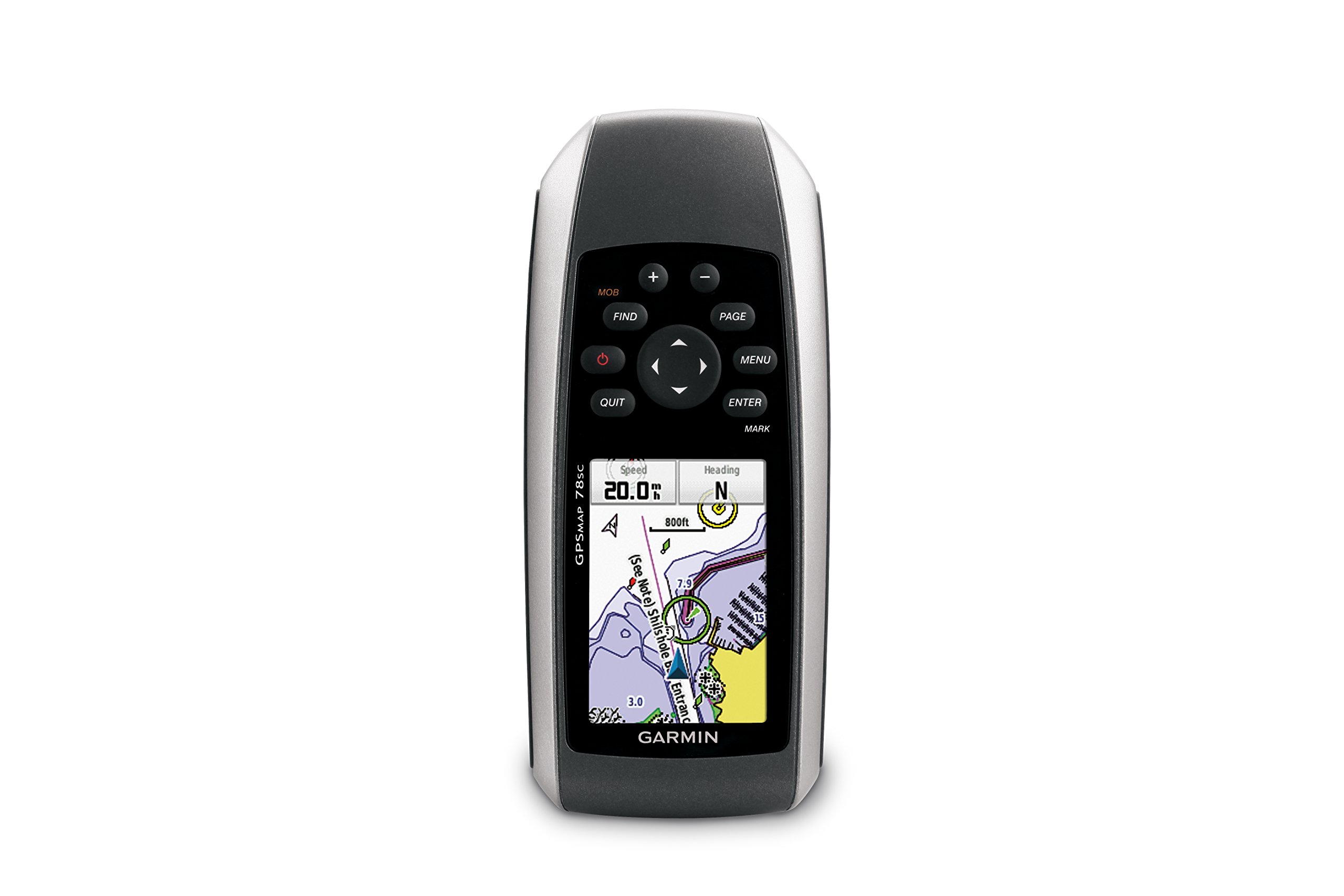
Abbildung 1: Vorderseite view of the Garmin GPSMAP 78sc handheld marine GPS and chartplotter.
Produkt überview
Hauptmerkmale:
- Marine-friendly handheld with high-sensitivity GPS receiver and 2.6-inch color TFT display.
- Waterproof to IPX7 standards; floats in water.
- Built-in BlueChart g2 U.S./Bahamas coastal charts with shorelines, depth contours, navaids, harbors, marinas, and more.
- Built-in 3-axis tilt-compensated electronic compass and barometric altimeter for heading, altitude, and weather information.
- Wireless sharing of waypoints, tracks, routes, and geocaches with other compatible devices.
Was ist in der Box:
- GPSMAP 78sc device
- Handschlaufe
- USB-Kabel
- Handbuch

Abbildung 2: Schräg view of the Garmin GPSMAP 78sc, highlighting its button interface.
Produktvideos:
Garmin GPSmap 78 handheld GPS Overview
Dieses Video bietet einen allgemeinen Überblickview of the Garmin GPSMAP 78 handheld GPS, demonstrating its features and design.
Produkt überview Video
A concise product overview video from the seller, highlighting key aspects of the device.
Aufstellen
1. Einlegen der Batterien:
The GPSMAP 78sc operates on two AA batteries (not included). To install:
- Suchen Sie die Abdeckung des Batteriefachs auf der Rückseite des Geräts.
- Twist the D-ring counter-clockwise to unlock and remove the cover.
- Legen Sie zwei AA-Batterien ein und achten Sie dabei auf die richtige Polarität (+ und -).
- Replace the cover and twist the D-ring clockwise to secure it.

Abbildung 3: Zurück view of the Garmin GPSMAP 78sc, illustrating the battery compartment.
2. Ein-/Ausschalten:
Halten Sie die Leistung button (located on the left side) to turn the device on or off. A short press will adjust the backlight.
3. Grundeinstellungen:
Upon first use, the device may prompt you to set language, time zone, and other preferences. Follow the on-screen instructions using the directional pad and EINGEBEN Taste.
Betrieb
Navigation Basics:
- Hauptmenü: Drücken Sie die SPEISEKARTE button twice to access the main menu.
- Seitentaste: Drücken SEITE to cycle through the main pages (Map, Compass, Trip Computer, etc.).
- Steuerkreuz: Use the directional pad to scroll through menus, pan the map, or adjust settings.
- ENTER-Taste: Drücken EINGEBEN einen Artikel auswählen oder eine Aktion bestätigen.
- QUIT Button: Drücken AUFHÖREN to return to the previous page or cancel an action.
Wegpunkte erstellen:
To mark your current location as a waypoint:
- Drücken Sie die MARKIEREN Taste.
- Edit the waypoint name, symbol, and coordinates if desired.
- Wählen Erledigt or Speichern to store the waypoint.
Man Over Board (MOB) Function:
Im Notfall die Taste drücken MOB button to immediately mark the current location and initiate navigation back to that point. This feature is critical for safety in marine environments.
Wartung
Reinigung des Geräts:
Wischen Sie das Gerät mit einem Tuch ab dampened with a mild detergent solution. Dry thoroughly. Avoid using abrasive cleaners or solvents that could damage the device's finish or screen.
Batteriepflege:
Always use fresh, high-quality AA batteries. If the device will not be used for an extended period, remove the batteries to prevent leakage and corrosion.
Software-Updates:
Überprüfen Sie regelmäßig das Garmin-Gerät. website for software updates to ensure optimal performance and access to the latest features. Updates can typically be installed by connecting the device to a computer via the USB cable.
Fehlerbehebung
Gerät lässt sich nicht einschalten:
- Stellen Sie sicher, dass die Batterien richtig eingelegt und vollständig aufgeladen sind.
- Try new batteries.
- Überprüfen Sie die Batteriekontakte auf Korrosion.
Schlechtes GPS-Signal:
- Stellen Sie sicher, dass das Gerät frei ist view des Himmels.
- Avoid areas with tall buildings, dense foliage, or other obstructions.
- Allow sufficient time for the device to acquire satellites, especially after being off for a long period.
Bildschirm reagiert nicht:
- Führen Sie einen Soft-Reset durch, indem Sie die Batterien entfernen und wieder einsetzen.
- Stellen Sie sicher, dass der Bildschirm sauber und frei von Verunreinigungen ist.
Technische Daten
| Besonderheit | Detail |
|---|---|
| Marke | Garmin |
| Modellname | GPS-Karte |
| Modellnummer | 010-00864-02 |
| Bildschirmgröße | 2.6 Zoll |
| Anzeigetyp | LCD |
| Auflösung | 160 x 240 Pixel |
| Wasserdichtigkeit | IPX7 (floats) |
| Akkulaufzeit | 20 Stunden (typisch) |
| Akku-Typ | 2 AA-Batterien (nicht im Lieferumfang enthalten) |
| Speicherkapazität | 1 GB |
| Compatible Flash Memory Type | microSD |
| Unterstütztes Satellitennavigationssystem | GPS |
| Besondere Merkmale | Rugged case, Barometric altimeter, Garmin Connect compatible, Electromagnetic compass, Garmin HotFix, Custom POIs, Automatic routing, Hunt/fish calendar, Geocaching, Photo navigation |
| Artikelabmessungen L x B x H | 2.6 Zoll L x 1.2 Zoll B x 6 Zoll H |
| Artikelgewicht | 7.7 Unzen |
Garantie und Support
The Garmin GPSMAP 78sc comes with a 1 Year Limited Warranty. For detailed warranty information, product support, or service inquiries, please refer to the official Garmin website or contact Garmin customer service directly. The included manual also contains contact information and further support resources.