
Einführung
Welcome to the Greenlee DM-810A True RMS Digital Multimeter user manual. This document provides essential information for the safe and effective operation, maintenance, and troubleshooting of your device. The DM-810A is designed for accurate measurement of AC/DC voltage, AC/DC current, resistance, capacitance, frequency, and continuity, making it a versatile tool for electrical professionals.
Sicherheitshinweise
Um einen sicheren Betrieb und Service des Messgeräts zu gewährleisten, befolgen Sie diese Anweisungen. Die Nichtbeachtung dieser Warnungen kann zu schweren Verletzungen oder zum Tod führen.
- Always read and understand the entire instruction manual before using the meter.
- Die maximalen Eingangsgrenzen für keine Funktion dürfen überschritten werden.
- Seien Sie vorsichtig beim Arbeiten mit VolumentagEs liegt über 30 V AC RMS, 42 V Spitze oder 60 V DC. Diese SpannungentagEs besteht die Gefahr eines Stromschlags.
- Always use the proper terminals, function, and range for your measurements. The DM-810A features a Beep-Jack audible and visible warning to guard against improper A and mA terminal plug-in.
- Inspect test leads for damaged insulation or exposed metal before each use. Replace if damaged.
- Verwenden Sie das Messgerät nicht, wenn es beschädigt erscheint oder das Gehäuse geöffnet ist.
- Vor dem Betrieb sicherstellen, dass der Batteriedeckel fest verschlossen ist.
- Adhere to local and national safety codes. Use personal protective equipment (PPE) such as approved safety glasses and electrically insulated gloves when necessary.
Produkt überview
This section identifies the key parts and controls of your Greenlee DM-810A multimeter.

Abbildung 1: Front view of the Greenlee DM-810A Digital Multimeter, showing the display, function selector dial, and input jacks.
- Anzeige: Large LCD for clear readings, often with dual display capability.
- Funktionswahlschalter: Used to select the desired measurement function (e.g., V~, V-, A~, A-, Ω, CAP, Hz, Continuity).
- Eingangsbuchsen:
- COM: Gemeinsamer (negativer) Eingang für alle Messungen.
- VΩHz: Positiver Input für Voltage, Widerstands-, Frequenz- und Kapazitätsmessungen.
- mAμA: Positive input for milliampere und microampere aktuelle Messungen.
- A: Positive input for ampere aktuelle Messungen.
- Tasten:
- WÄHLEN: Toggles between functions on a single dial position (e.g., AC/DC voltage, Diode/Durchgangsprüfung).
- ANGEBOT: Manually selects measurement range or returns to auto-ranging.
- △: Delta function for relative measurements.
- HALT: Friert den aktuellen Anzeigewert ein.
Aufstellen
Einlegen der Batterie
The Greenlee DM-810A requires batteries for operation. Refer to the back of the meter for the battery compartment. Use a screwdriver to open the compartment, insert the specified batteries (typically AA or 9V, check the compartment label), observing correct polarity, and then securely close the cover.
Anschließen der Messleitungen
Vor der Messung ist stets sicherzustellen, dass die Messleitungen ordnungsgemäß angeschlossen sind.
- Stecken Sie die schwarze Messleitung in den COM (gemeinsame) Eingangsbuchse.
- Insert the red test lead into the appropriate positive input jack based on the measurement you intend to make:
- Für voltage, resistance, capacitance, or frequency, use the VΩHz Jack.
- Für Milliampere oder microampere current, use the mAμA Jack.
- Für ampere current, use the A Jack.
- The meter's Beep-Jack feature will provide an audible and visible alert if the function selector is set to a current measurement (A or mA) but the test lead is incorrectly plugged into a voltage/resistance jack, or vice-versa. This helps prevent damage to the meter and ensures correct setup.
Bedienungsanleitung
This section details how to perform various measurements with your DM-810A multimeter.
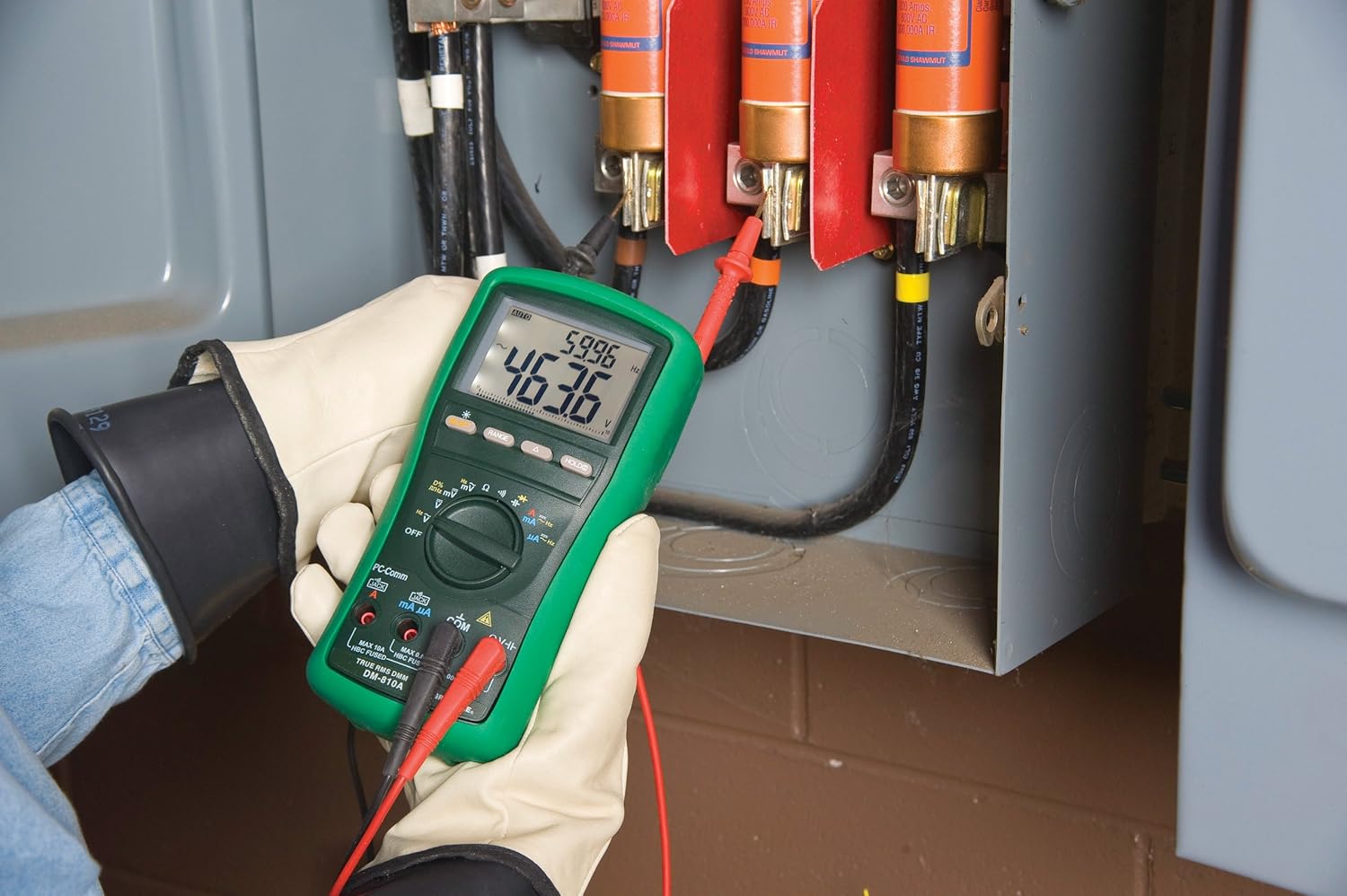
Abbildung 2: The Greenlee DM-810A Digital Multimeter being used to take measurements within an electrical panel, demonstrating practical application.
Messen von AC/DC-Voltage
- Set the function selector to V~ (AC Voltage) oder V- (DC Voltage). Use the SELECT button to toggle if both are on one position.
- Schließen Sie das schwarze Messkabel an an COM und die rote Testführung VΩHz.
- Schließen Sie die Messspitzen parallel an den zu messenden Stromkreis oder das zu messende Bauteil an.
- Lesen Sie den Bandtage-Wert auf dem Display.
Messung von AC/DC-Strom
Wichtig: Current measurements require the meter to be connected in series with the circuit. Ensure the circuit is de-energized before connecting the meter.
- Schalten Sie den Stromkreis spannungsfrei.
- Set the function selector to A~ (AC Current) or A- (DC Current), or mA~ / mA-.
- Schließen Sie das schwarze Messkabel an an COM. Connect the red test lead to mAμA for small currents or A for larger currents (up to 10A). The Beep-Jack warning will activate if leads are in the wrong jacks for the selected function.
- Open the circuit where the current is to be measured and connect the meter in series.
- Schalten Sie den Stromkreis wieder ein und lesen Sie den aktuellen Wert ab.
- De-energize the circuit before disconnecting the meter.
Measuring Resistance (Ω)
- De-energize the circuit or component.
- Set the function selector to Ω.
- Schließen Sie das schwarze Messkabel an an COM und die rote Testführung VΩHz.
- Verbinden Sie die Testsonden mit dem Bauteil.
- Lesen Sie den Widerstandswert ab.
Measuring Capacitance (CAP)
- Vor der Messung muss sichergestellt werden, dass der Kondensator vollständig entladen ist.
- Set the function selector to CAP.
- Schließen Sie das schwarze Messkabel an an COM und die rote Testführung VΩHz.
- Schließen Sie die Messspitzen an die Kondensatoranschlüsse an.
- Lesen Sie den Kapazitätswert ab.
Messfrequenz (Hz)
- Set the function selector to Hz.
- Schließen Sie das schwarze Messkabel an an COM und die rote Testführung VΩHz.
- Schließen Sie die Testspitzen an die Signalquelle an.
- Lesen Sie den Frequenzwert ab.
Durchgangsprüfung
- De-energize the circuit or component.
- Set the function selector to the continuity symbol (often shared with diode test, use SELECT to toggle).
- Schließen Sie das schwarze Messkabel an an COM und die rote Testführung VΩHz.
- Verbinden Sie die Prüfspitzen mit dem Stromkreis oder dem Bauteil.
- Ein akustisches Signal zeigt Durchgang (niedrigen Widerstand) an. Der Widerstandswert wird im Display angezeigt.
Wartung
Reinigung
Den Zähler mit Werbung abwischenamp Mit einem Tuch und mildem Reinigungsmittel reinigen. Keine Scheuermittel oder Lösungsmittel verwenden. Vor Gebrauch sicherstellen, dass das Messgerät vollständig trocken ist.
Batteriewechsel
When the battery indicator appears on the display, replace the batteries immediately to ensure accurate readings. Follow the battery installation steps outlined in the Setup section.
Sicherungswechsel
If the current measurement functions cease to work, the internal fuses may need replacement. Refer to the meter's internal diagram (usually accessible by opening the battery compartment or back casing) for fuse specifications and replacement instructions. Always replace fuses with those of the specified type and rating to maintain safety and performance.
Fehlerbehebung
This section provides solutions for common issues encountered during the operation of your DM-810A multimeter.
| Problem | Mögliche Ursache | Lösung |
|---|---|---|
| Keine oder nur schwache Anzeige | Leere oder schwache Batterien | Batterien ersetzen. |
| Falsche Messwerte | Incorrect function/range selected; Damaged test leads; External interference | Verify function and range; Inspect and replace test leads; Move away from strong electromagnetic fields. |
| Strommessung funktioniert nicht | Blown fuse; Incorrect lead connection | Check and replace fuses; Ensure leads are in the correct A or mA jacks. |
| Beep-Jack warning active | Test leads connected to incorrect input jacks for the selected function | Adjust test lead connections to match the selected function on the dial. |
| Durchgangsprüfung piept nicht. | Unterbrechung; hoher Widerstand | Ensure the circuit is closed; Check for breaks in the circuit or component. |
Technische Spezifikationen
The following table outlines the key technical specifications for the Greenlee DM-810A Digital Multimeter.
| Besonderheit | Wert |
|---|---|
| Marke | Greenlee |
| Modell | DM-810A |
| Messtyp | True-RMS-Digitalmultimeter |
| Stromquelle | Batteriebetrieben |
| Stil | Digitales |
| Artikelgewicht | 16 Unzen (1 Pfund) |
| Produktabmessungen (L x B x H) | 10 x 10 x 12 Zoll |
| Zertifizierungen | CE, CSA, UL |
| UPC | 783310087434 |
Garantie und Support
Garantieinformationen
The Greenlee DM-810A Digital Multimeter comes with a 1 Jahr HerstellergarantieDiese Garantie deckt Material- und Verarbeitungsfehler bei normalem Gebrauch ab. Bitte bewahren Sie Ihren Kaufbeleg für Garantieansprüche auf.
Kundenservice
For technical assistance, warranty service, or to inquire about replacement parts, please contact Greenlee customer support. Refer to the official Greenlee webDie aktuellsten Kontaktinformationen finden Sie auf der Website oder der Produktverpackung.