
1. Produktüberschreitungview
The Logilink WZ0012 5-in-1 Network Tool Set is designed for various network cabling tasks, including crimping, punching down, stripping, and testing network cables. This comprehensive kit provides essential tools for both professional and home network installations and maintenance.

Bild 1.1: The Logilink WZ0012 5-in-1 Network Tool Set, displaying all five components: the crimping tool, LSA punch down tool, cable tester (master and remote units), and wire stripper.
Enthaltene Komponenten:
- 1 x Modular Crimping Tool 8P8C (WZ0004): For RJ45, RJ12, and RJ11 connectors.
- 1 x LSA Punch Down Tool (WZ0001A): For connecting wires to IDC terminals on patch panels or wall jacks.
- 1 x Wire Stripper (WZ0005): For safely stripping the outer jacket of network cables.
- 1 x Network Cable Tester RJ11 & RJ12 & RJ45 (WZ0010): For verifying cable continuity and wiring configuration.
- 1 x Carrying Case: For organized storage and transport of the tools.

Bild 1.2: The Logilink WZ0012 Network Tool Set neatly organized within its protective carrying case, secured by elastic straps.
2. Einrichtung und Vorbereitung
Before beginning any network cabling task, ensure you have a clean, well-lit workspace and all necessary materials, such as bulk cable, connectors (RJ45, RJ11, RJ12), and wall plates or patch panels.
2.1. Cable Preparation with the Wire Stripper (WZ0005)
- Identify the desired length of cable to be stripped.
- Open the wire stripper and insert the cable into the appropriate slot for its diameter. The tool typically has multiple slots for different cable gauges.
- Gently close the stripper handles, ensuring the blades cut only the outer jacket without damaging the inner conductors.
- Rotate the stripper around the cable 1-2 times to score the jacket.
- Remove the stripper and pull off the stripped jacket section.

Bild 2.1: The Logilink WZ0005 Wire Stripper, used for removing the outer insulation from network cables.
3. Bedienungsanleitung
3.1. Using the Modular Crimping Tool 8P8C (WZ0004)
This tool is used to attach RJ45 (8P8C), RJ12 (6P6C), and RJ11 (6P4C) connectors to network cables.
- After stripping the cable jacket (as per Section 2.1), untwist the wire pairs and arrange them according to the desired wiring standard (e.g., T568A or T568B for RJ45).
- Trim the ends of the wires evenly, ensuring they are straight and the correct length to reach the pins inside the connector.
- Carefully insert the prepared wires into the RJ connector, making sure each wire slides into its designated channel and the cable jacket is seated inside the connector for strain relief.
- Place the loaded connector into the appropriate crimping slot on the tool (8P for RJ45, 6P for RJ11/RJ12).
- Squeeze the handles of the crimping tool firmly and completely until the ratchet mechanism releases (if applicable) or until you feel the connector pins fully seat into the wires.
- Remove the crimped connector from the tool.

Bild 3.1: The Logilink WZ0004 Modular Crimping Tool, featuring red handles and a black body, used for attaching RJ-type connectors to network cables.
3.2. Using the LSA Punch Down Tool (WZ0001A)
This tool is used to terminate network wires onto IDC (Insulation Displacement Connector) terminals found on patch panels, keystone jacks, and wall outlets.
- Prepare the cable by stripping the outer jacket to expose the twisted pairs.
- Untwist one pair of wires and place a single wire into the appropriate slot on the IDC terminal, following the color code indicated on the jack or panel.
- Hold the wire firmly in place and position the punch down tool over the terminal. Ensure the cutting side of the tool (if applicable) is facing the excess wire.
- Apply firm, even pressure to the top of the punch down tool until it clicks. This action seats the wire into the terminal and simultaneously trims any excess wire.
- Repeat for all remaining wires.
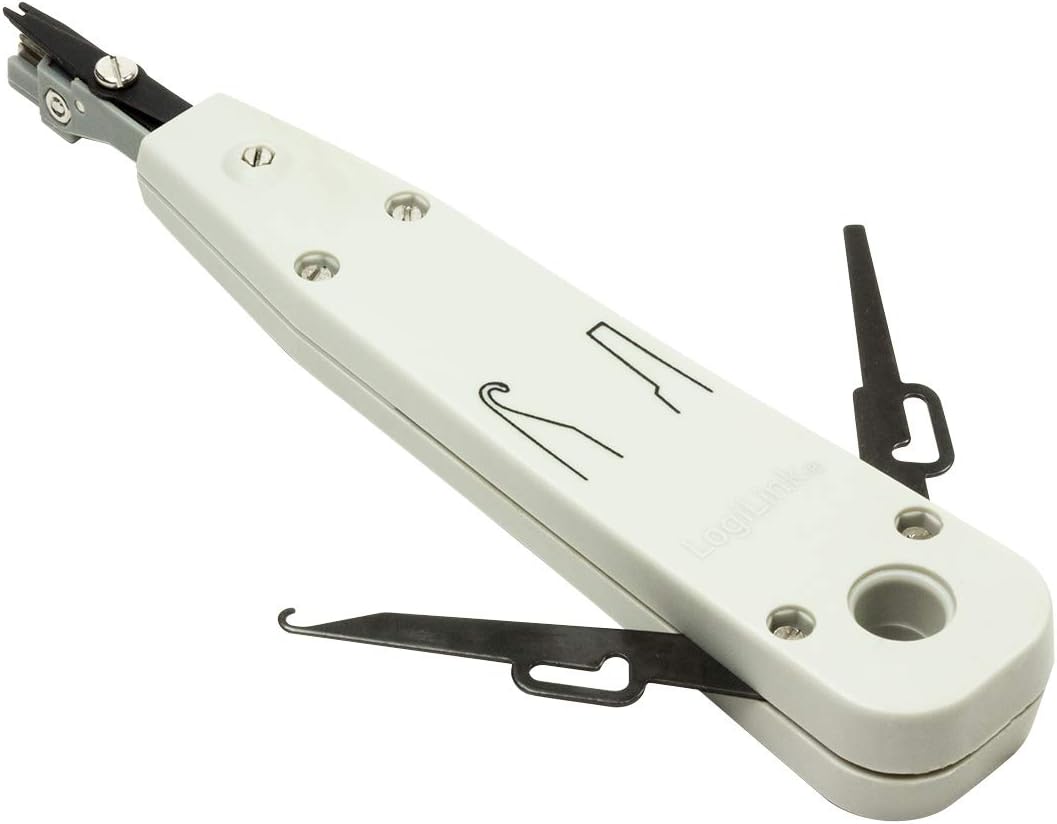
Bild 3.2: The Logilink WZ0001A LSA Punch Down Tool, a grey tool with a spring-loaded mechanism for terminating wires into IDC blocks.
3.3. Using the Network Cable Tester (WZ0010)
The cable tester verifies the continuity and correct wiring configuration of RJ45, RJ12, and RJ11 cables.
- Separate the master unit and the remote unit of the cable tester.
- Connect one end of the network cable to the RJ45/RJ11/RJ12 port on the master unit.
- Connect the other end of the network cable to the corresponding RJ45/RJ11/RJ12 port on the remote unit.
- Turn on the master unit using the 'ON' switch.
- Observe the LED indicators on both the master and remote units. The LEDs will light up sequentially (1 through 8, plus G for ground) on both units if the cable is wired correctly and has continuity.
- Interpretation der Ergebnisse:
- Sequential LEDs on both units: Indicates correct wiring (straight-through or crossover, depending on the cable type) and continuity.
- Die LEDs leuchten nicht: Indicates an open circuit or a broken wire.
- LEDs lighting up out of sequence: Indicates a wiring fault (e.g., crossed pairs).
- One LED on master, none on remote: Indicates a short circuit or a break in that specific wire.
- After testing, turn off the master unit to conserve battery life.

Bild 3.3: The master unit of the Logilink WZ0010 Network Cable Tester, showing the RJ45 and RJ11 ports, LED indicators, and power switch.

Bild 3.4: Both the master and remote units of the Logilink WZ0010 Network Cable Tester, separated for testing cables over a distance.
4. Wartung
Proper maintenance ensures the longevity and reliable performance of your Logilink WZ0012 Network Tool Set.
- Reinigung: After each use, wipe down all tools with a clean, dry cloth to remove any dust, dirt, or cable debris. For stubborn grime, a slightly damp Ein Tuch kann verwendet werden, anschließend muss es gründlich getrocknet werden.
- Lagerung: Always store the tools in the provided carrying case when not in use. This protects them from physical damage, dirt, and moisture.
- Klingen: Periodically inspect the blades on the crimping tool, wire stripper, and punch down tool for sharpness and damage. Dull or damaged blades can lead to poor cable terminations. Replacement blades may be available from the manufacturer or authorized resellers.
- Cable Tester Batteries: The cable tester (WZ0010) requires a 9V battery (not included). If the LEDs become dim or the tester does not power on, replace the battery. Always remove the battery if the tester will not be used for an extended period to prevent leakage.
5. Fehlerbehebung
This section addresses common issues encountered during network cabling tasks.
- Crimped Connector Fails Cable Tester:
- Ausgabe: LEDs on cable tester do not light up sequentially or show errors.
- Lösung: Re-examine the wire arrangement inside the connector for correct color coding. Ensure wires are fully inserted to the front of the connector. Verify the cable jacket is properly seated for strain relief. Re-crimp the connector with firm, complete pressure.
- Punch Down Connection Fails Cable Tester:
- Ausgabe: Specific wire connection on a patch panel or wall jack shows an open circuit.
- Lösung: Ensure the wire is correctly positioned in the IDC slot. Re-punch the wire with firm, even pressure. Check if the punch down tool's cutting side properly trimmed excess wire; if not, manually trim it.
- Cable Jacket Not Stripping Cleanly:
- Ausgabe: Wire stripper damages inner conductors or leaves frayed jacket edges.
- Lösung: Ensure the correct slot on the stripper is used for the cable diameter. Apply less pressure or fewer rotations. Inspect stripper blades for dullness or damage.
- Cable Tester Not Powering On:
- Ausgabe: No lights or response from the cable tester.
- Lösung: Check if a 9V battery is installed correctly. Replace the 9V battery with a fresh one.
6. Spezifikationen
| Besonderheit | Detail |
|---|---|
| Marke | Logilink |
| Modellname | WZ0012 |
| Artikelgewicht | 630 Gramm (1.39 Pfund) |
| Stromquelle | Hand-operated (Cable Tester requires 9V battery, not included) |
| Kompatible Anschlüsse | RJ11, RJ12, RJ45 |
| Empfohlene Verwendung | Set up networks, connect computers to network devices, extend Ethernet connections |
| Im Lieferumfang enthaltene Komponenten | Crimping Tool, LSA Punch Down Tool, Wire Stripper, Cable Tester, Carrying Case |
| Spezifikation erfüllt | RoHS |
| Datum der ersten Verfügbarkeit | 7. August 2012 |
7. Garantie und Support
The Logilink WZ0012 Network Tool Set is designed for durability and performance. While specific warranty details are not provided in this manual, Logilink products typically come with a standard manufacturer's warranty against defects in materials and workmanship.
For warranty claims, technical support, or inquiries regarding replacement parts, please refer to the official Logilink website or contact your local Logilink distributor or retailer. Keep your proof of purchase for any warranty-related services.
Hersteller: Logilink
Teilenummer: 4260113566985