
Kidde 001827
Kidde AccessPoint 001827 Supra TouchPoint Lock User Manual
Modell: 001827
Einführung
This manual provides comprehensive instructions for the installation, operation, and maintenance of your Kidde AccessPoint 001827 Supra TouchPoint Lock. This lock is designed to replace standard cam locks in various wood storage cabinets or enclosures. Please read this manual thoroughly before installation and use to ensure proper function and longevity of your device.
Produkt überview
Merkmale
- User changeable combination lock with push button combination, designed to replace a standard cam lock.
- Easily converts keyed cabinets to pushbutton locks; suitable for items with 5/16 inch cams.
- Heavy-duty die-cast construction, ideal for metal cabinets and other enclosures.
- Mounts flush into a door, or on top of a door surface; features a clutch mechanism.
- Includes bracket and stop cams for easy installation, fitting 1.5" Double D openings.
- Equipped with a faceplate for a robust, pronounced appearance.
Komponenten
The Kidde AccessPoint 001827 Supra TouchPoint Lock consists of the main lock body, a 10-digit push-button keypad, an 'OPEN' lever, a 'CLEAR' button, and a faceplate. It also includes necessary installation hardware such as brackets and stop cams.
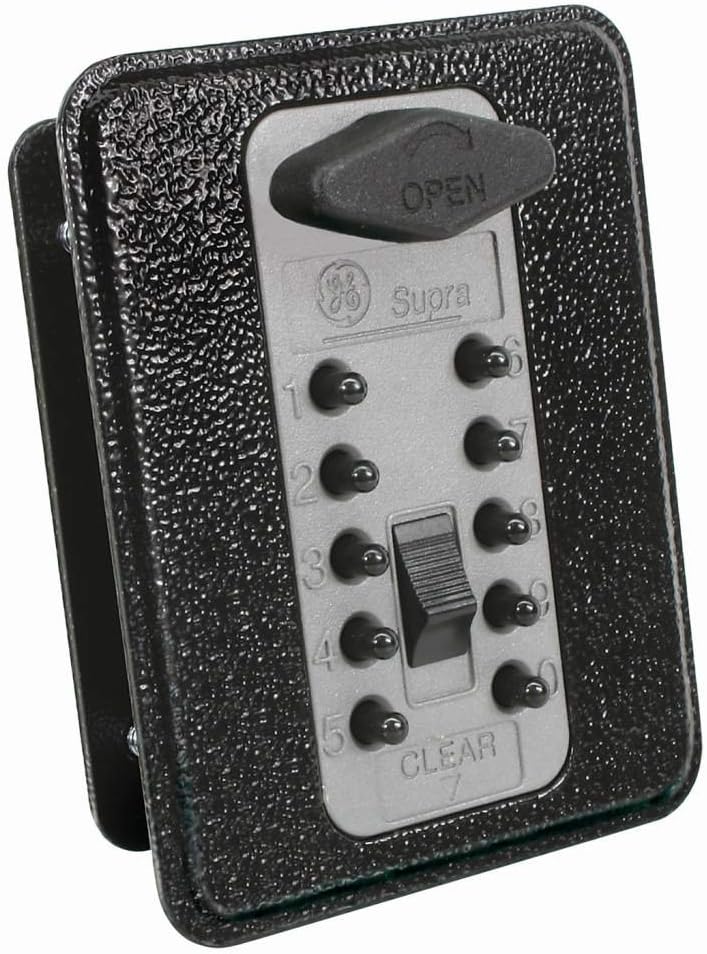
Abbildung 1: Kidde AccessPoint 001827 Supra TouchPoint Lock. This image displays the lock's front view, featuring a titanium gray faceplate with a black textured body. The keypad has ten numbered buttons (0-9) and a 'CLEAR' button. An 'OPEN' lever is visible at the top, indicating the mechanism to unlock the device. The lock is designed for flush mounting and includes a faceplate.
Setup und Installation
The TouchPoint lock is designed for easy replacement of standard cam locks in wood storage cabinets or enclosures with 5/16 inch square-hole cams. It can be flush-mounted or surface-mounted.
Installationsschritte:
- Bereiten Sie die Eröffnung vor: Ensure the cabinet or enclosure has a 5/16 inch square-hole cam opening. If replacing an existing lock, remove the old hardware.
- Positionieren Sie das Schloss: Insert the lock body into the prepared opening. The faceplate should sit flush against the surface of the door or cabinet.
- Sicherung mit Hardware: Use the provided bracket and stop cams to secure the lock from the inside of the door. Ensure the lock is firmly in place and does not wobble. The lock fits 1.5" Double D openings.
- Testbetrieb: Before setting a new combination, test the mechanical action of the lock by pressing the 'OPEN' lever. Ensure the cam rotates freely.
Setting/Changing the Combination:
The lock features a user-changeable 10-digit combination. Refer to the specific instructions included in the product packaging for detailed steps on how to set or change your personal combination. This process typically involves a reset mechanism on the back of the lock or a specific sequence of button presses.
Bedienungsanleitung
So entsperren Sie:
- Kombination eingeben: Press the buttons corresponding to your set combination in the correct sequence.
- Activate Open Lever: Once the correct combination is entered, push the 'OPEN' lever (visible at the top of the lock) to disengage the locking mechanism.
- Open Door/Drawer: The door or drawer can now be opened.
Abschließen:
- Close Door/Drawer: Ensure the door or drawer is fully closed.
- Scramble-Kombination: After closing, press the 'CLEAR' button or any random buttons on the keypad to scramble the entered combination. This ensures the lock is secured and the combination is not visible.
Wichtig: Always scramble the combination after locking to prevent unauthorized access. Remember your combination as there is no master key for this type of lock.
Wartung
The Kidde AccessPoint 001827 Supra TouchPoint Lock is designed for durability and requires minimal maintenance.
- Reinigung: Wischen Sie die Außenseite des Schlosses mit einem weichen, fusselfreien Tuch ab.amp cloth. Avoid using abrasive cleaners, solvents, or harsh chemicals, as these can damage the finish or internal mechanisms.
- Inspektion: Periodically check the lock for any signs of wear, damage, or loose components. Ensure the 'OPEN' lever and keypad buttons operate smoothly.
- Schmierung: Do not lubricate the internal mechanism unless specifically instructed by Kidde support. This lock is designed to operate without internal lubrication.
Fehlerbehebung
| Problem | Mögliche Ursache | Lösung |
|---|---|---|
| Lock does not open after entering combination. | Incorrect combination entered, or combination not fully cleared from previous attempt. | Press the 'CLEAR' button, then re-enter the combination carefully. Ensure all digits are pressed firmly. |
| 'OPEN' lever feels stiff or does not move. | Mechanism obstructed or lock misaligned. | Ensure the door/drawer is not binding against the lock. Check for any foreign objects. Re-check installation alignment if necessary. |
| Combination buttons are sticky or unresponsive. | Dirt or debris accumulated around buttons. | Gently clean around the buttons with a soft, dry brush or cloth. Avoid liquids. |
| Cannot change the combination. | Incorrect procedure followed for combination change. | Refer to the specific combination change instructions provided with your product. Ensure the lock is in the correct state (e.g., unlocked) before attempting to change. |
Technische Daten
| Marke | Kidde |
| Modellname | TouchPoint |
| Teilenummer | 001827 |
| Sperrtyp | Kombinationsschloss |
| Material | Metall |
| Farbe | Titangrau |
| Stil | With Faceplate |
| Kontrollmethode | Berührung (Druckknopf) |
| Artikelgewicht | 1.38 Pfund |
| Verpackungsabmessungen | 6.97 x 3.23 x 2.76 Zoll |
| UPC | 090928018270 |
| Hersteller | GE Sicherheit |
| Datum der ersten Verfügbarkeit | 10. November 2010 |
Garantie und Support
Garantieinformationen:
This Kidde AccessPoint 001827 Supra TouchPoint Lock comes with a 1 Jahre Teilegarantie Diese Garantie gilt ab Kaufdatum und deckt Material- und Verarbeitungsfehler bei normalem Gebrauch ab. Sie deckt keine Schäden ab, die durch Missbrauch, unsachgemäße Verwendung, unbefugte Änderungen oder fehlerhafte Installation entstehen.
Kundendienst:
For technical assistance, troubleshooting, or warranty claims, please contact Kidde customer support. You can find contact information on the official Kidde website or through the retailer where you purchased the product. Please have your model number (001827) and proof of purchase ready when contacting support.
Visit the official Kidde webWebsite für weitere Informationen: Www.kidde.com
Ask a question about this manual
Ask about setup, troubleshooting, compatibility, parts, safety, or missing instructions. Manuals+ will review the question and use this page’s manual context to help answer it.