
Einführung
Thank you for choosing the Casio G-Shock GW-M5600A-7ER. This watch combines robust G-Shock durability with advanced radio-controlled timekeeping and solar power technology. This manual provides essential information for proper setup, operation, and maintenance of your watch. Please read it carefully to ensure optimal performance and longevity.
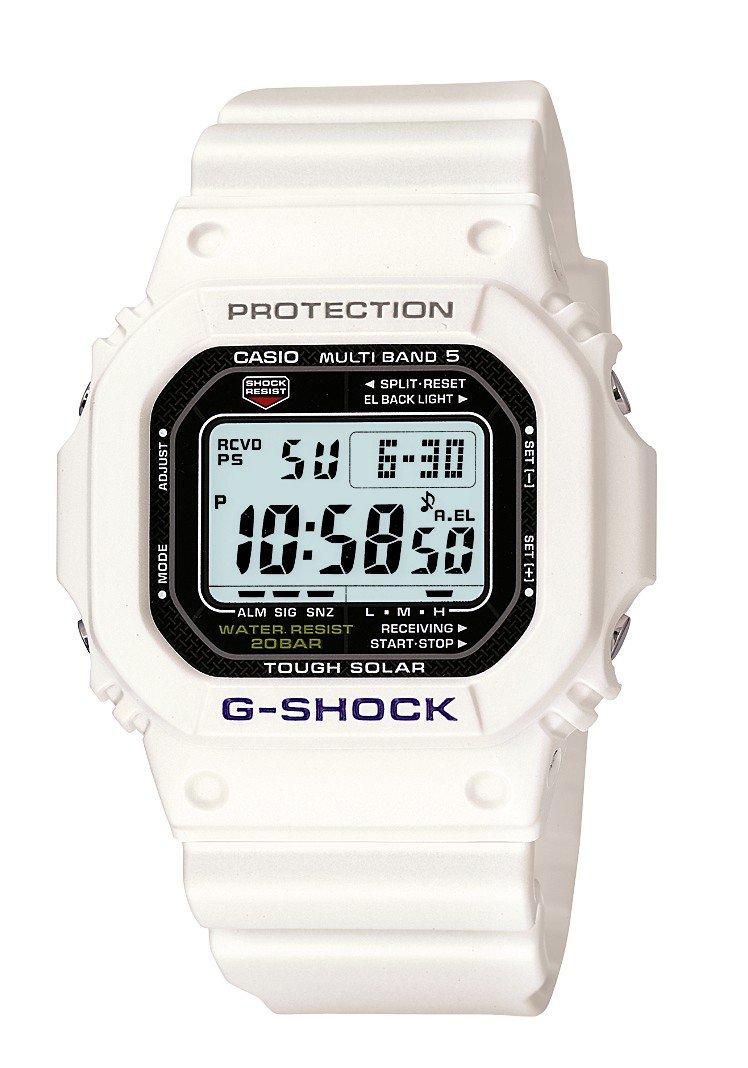
Bild: Vorderseite view of the Casio G-Shock GW-M5600A-7ER watch, showcasing its digital display and resin strap.
Hauptmerkmale
- Radio-Controlled Timekeeping: Automatically receives time calibration signals for accurate timekeeping.
- Solarbetrieben: Equipped with a solar panel that converts light into electrical power, eliminating the need for battery replacement.
- Wasserdicht bis 200 Meter: Suitable for swimming, snorkeling, and diving (excluding saturation diving).
- Stoßfestigkeit: Entwickelt, um Stößen und Vibrationen standzuhalten.
- Digitaler Bildschirm: Clear and easy-to-read digital time and function display.
- Stoppuhr-Funktion: Misst die verstrichene Zeit, die Zwischenzeit und die Zeiten für den 1. und 2. Platz.
- Alarmfunktion: Multiple daily alarms and an hourly-Zeitsignal.
- Weltzeit: Zeigt die aktuelle Uhrzeit in wichtigen Städten und bestimmten Regionen der Welt an.
- Mineralglas: Protective, scratch-resistant hard mineral lens.
- Langlebige Harzkonstruktion: High-performance and durable resin case and strap.
Aufstellen
1. Erstes Aufladen
Your watch is powered by a solar cell. Before initial use, expose the watch face to bright light for several hours to ensure it is sufficiently charged. The watch may arrive with a low charge, indicated by a flashing 'CHG' or 'LOW' indicator on the display. Avoid prolonged storage in dark places.
2. Festlegen Ihrer Heimatstadt
The Home City setting is crucial for correct time calibration and World Time functionality. Refer to the detailed instructions in the full manual for specific button operations to set your Home City. This setting determines which time calibration signal the watch attempts to receive.
3. Time Calibration Signal Reception
The watch automatically attempts to receive a time calibration signal up to six times a day (or five times a day for the Chinese calibration signal). For optimal reception, place the watch near a window at night, away from metal objects and electronic devices. Manual reception can also be initiated:
- In Timekeeping Mode, hold down the 'A' button (top left) for several seconds until the current time calibration status appears.
- Press the 'D' button (bottom right) to initiate manual reception.
- The watch will display 'RCVD' upon successful reception.
Bedienungsanleitung
Modusnavigation
Press the 'C' button (bottom left) to cycle through the different modes:
- Zeitnehmungsmodus: Zeigt die aktuelle Uhrzeit und das aktuelle Datum an.
- Weltzeitmodus: Displays current time in various time zones.
- Alarmmodus: Tägliche Alarme einstellen und aktivieren.
- Stoppuhr-Modus: Verstrichene Zeit messen.
- Countdown-Timer-Modus: Stelle einen Countdown ab einem festgelegten Zeitpunkt ein.
Stoppuhr benutzen
- Navigate to Stopwatch Mode using the 'C' button.
- Press the 'D' button (bottom right) to start/stop the stopwatch.
- Press the 'B' button (top right) to record split times or reset the stopwatch when stopped.
Einstellen von Alarmen
- Navigate to Alarm Mode using the 'C' button.
- Hold down the 'A' button (top left) until the alarm time starts flashing.
- Use the 'B' and 'D' buttons to adjust the hour and minute settings.
- Press 'A' to confirm and exit the setting screen.
- Press 'D' to toggle the alarm ON/OFF.
Beleuchtung
Press the 'B' button (top right) to illuminate the display for easy viewing in low light conditions. The duration of illumination can be adjusted in the watch settings.
Wartung
Aufladen der Uhr
To maintain optimal performance, ensure your watch is regularly exposed to light. The power indicator on the display shows the current charge level. If the charge level is low, expose the watch to direct sunlight or strong artificial light. Avoid covering the watch face when charging.
Reinigung
Wischen Sie die Uhr mit einem weichen, trockenen Tuch ab, um Schmutz und Feuchtigkeit zu entfernen. Bei hartnäckigem Schmutz verwenden Sie ein weiches Tuch.ampMit Wasser und einem milden, neutralen Reinigungsmittel abspülen und anschließend trocken wischen. Vermeiden Sie die Verwendung flüchtiger Substanzen wie Verdünner oder Benzin, da diese die Harzkomponenten beschädigen können.
Vorsichtsmaßnahmen hinsichtlich der Wasserbeständigkeit
While your watch is water-resistant to 200 meters, it is important to observe the following:
- Die Knöpfe dürfen nicht betätigt werden, solange die Uhr nass oder unter Wasser ist.
- Avoid exposing the watch to hot water or steam (e.g., in showers, saunas) as this can compromise seals.
- After exposure to saltwater, rinse the watch thoroughly with fresh water and wipe dry.
Fehlerbehebung
Time Not Syncing
- Heimatstadteinstellungen prüfen: Ensure your Home City is correctly set to a region that receives time calibration signals.
- Reception Environment: Move the watch to a location with better signal reception, ideally near a window, away from electronic interference.
- Manueller Empfang: Attempt a manual time calibration signal reception (refer to Setup section).
- Ladezustand: Ensure the watch has sufficient charge. Low power can affect signal reception.
Bildschirm ist leer oder dunkel
- Ladezustand: The watch may be in power-saving mode or have a very low charge. Expose it to bright light for an extended period.
- Energiesparen: The watch enters power-saving mode when left in the dark for a certain period. Press any button or expose it to light to reactivate the display.
Tasten reagieren nicht
- Zurücksetzen: In rare cases, a full reset might be necessary. Consult the full Casio manual for your specific module number (usually found on the watch's case back) for detailed reset procedures.
- Wasser: Ensure the watch is completely dry if it has been exposed to water.
Technische Daten
| Modellnummer | GW-M5600A-7ER |
| Hersteller | G-SHOCK |
| Anzeigetyp | Digitales |
| Bewegung | Quarz |
| Stromquelle | Solarbetrieben |
| Wasserbeständigkeitstiefe | 200 Meter |
| Gehäusematerialart | Harz |
| Armbandmaterialtyp | Harz |
| Materialtyp des Zifferblattfensters | Mineral |
| Gehäusedurchmesser | 49 mm |
| Gehäusedicke | 17 mm |
| Bandbreite | 25 mm |
| Verschlussart | Dornschließe |
| Gegenstandsform | Quadrat |
| Armbandfarbe | Weiß |
| Zifferblattfarbe | Grau |
Garantie und Support
Your Casio G-Shock GW-M5600A-7ER watch comes with a 2 Jahr HerstellergarantieDiese Garantie deckt Material- und Verarbeitungsfehler bei normalem Gebrauch ab. Bitte bewahren Sie Ihren Kaufbeleg für Garantieansprüche auf.
For detailed warranty terms, service, or technical support, please refer to the official Casio website or contact your local authorized Casio service center. Contact information can typically be found in the full product manual or on the manufacturer's webWebsite.