
Einführung
This manual provides essential information for the safe operation, assembly, maintenance, and troubleshooting of your WEN 4210 10-Inch Drill Press with Laser. Please read and understand all instructions before operating the tool to ensure personal safety and proper function.
The WEN 4210 drill press is designed for precision drilling in various materials. It features a 10-inch swing, a powerful 3.2-amp motor, five adjustable speeds, and a Class II 1mW laser for accurate hole placement.
Sicherheitshinweise
WARNUNG: Beachten Sie stets die grundlegenden Sicherheitsvorkehrungen, um das Risiko von Bränden, Stromschlägen und schweren Verletzungen zu verringern.
- Augenschutz: Always wear ANSI-approved safety goggles or safety glasses with side shields when operating this drill press.
- Arbeitsbereich: Keep the work area clean and well-lit. Do not operate power tools in the presence of flammable liquids or gases.
- Werkstück sichern: Immer clamp or secure the workpiece to the drill press table. Never hold the workpiece by hand.
- Angemessene Kleidung: Tragen Sie keine weite Kleidung, Handschuhe, Krawatten oder Schmuck, der sich in beweglichen Teilen verfangen kann. Binden Sie lange Haare zusammen.
- Stromversorgung trennen: Always disconnect the drill press from the power source before making adjustments, changing accessories, or performing maintenance.
- Lasersicherheit: This product uses a Class II 1mW laser. Avoid direct eye exposure to the laser beam. Do not stare into the beam.
- Belüftung: Ensure adequate ventilation when drilling, especially with materials that produce dust or fumes.
Packungsinhalt
Prüfen Sie beim Auspacken, ob alle Artikel vorhanden sind:
- WEN 4210 Drill Press
- Class II 1mW Laser
- 1/2-inch Keyed Chuck & Key
- Werkzeuge für die Montage
Einrichtung und Montage
Follow these general steps for assembly. Refer to the detailed diagrams in your printed manual for specific component identification.
- Sockel- und Säulenmontage: Securely attach the column to the base using the provided hardware.
- Kopfmontage: Carefully mount the head assembly onto the top of the column.
- Worktable Installation: Install the worktable and its support bracket onto the column. Ensure the rack and pinion mechanism operates smoothly for height adjustment.
- Montage des Spannfutters: Insert the chuck onto the spindle. Apply firm, even pressure and tap the chuck with a rubber mallet a few times to ensure a secure, compression fit.
- Laserinstallation: Install the laser centering device according to the instructions.
- Bench Mounting: For stability and safety, it is highly recommended to mount the drill press to a sturdy workbench using the pre-drilled holes in the base.
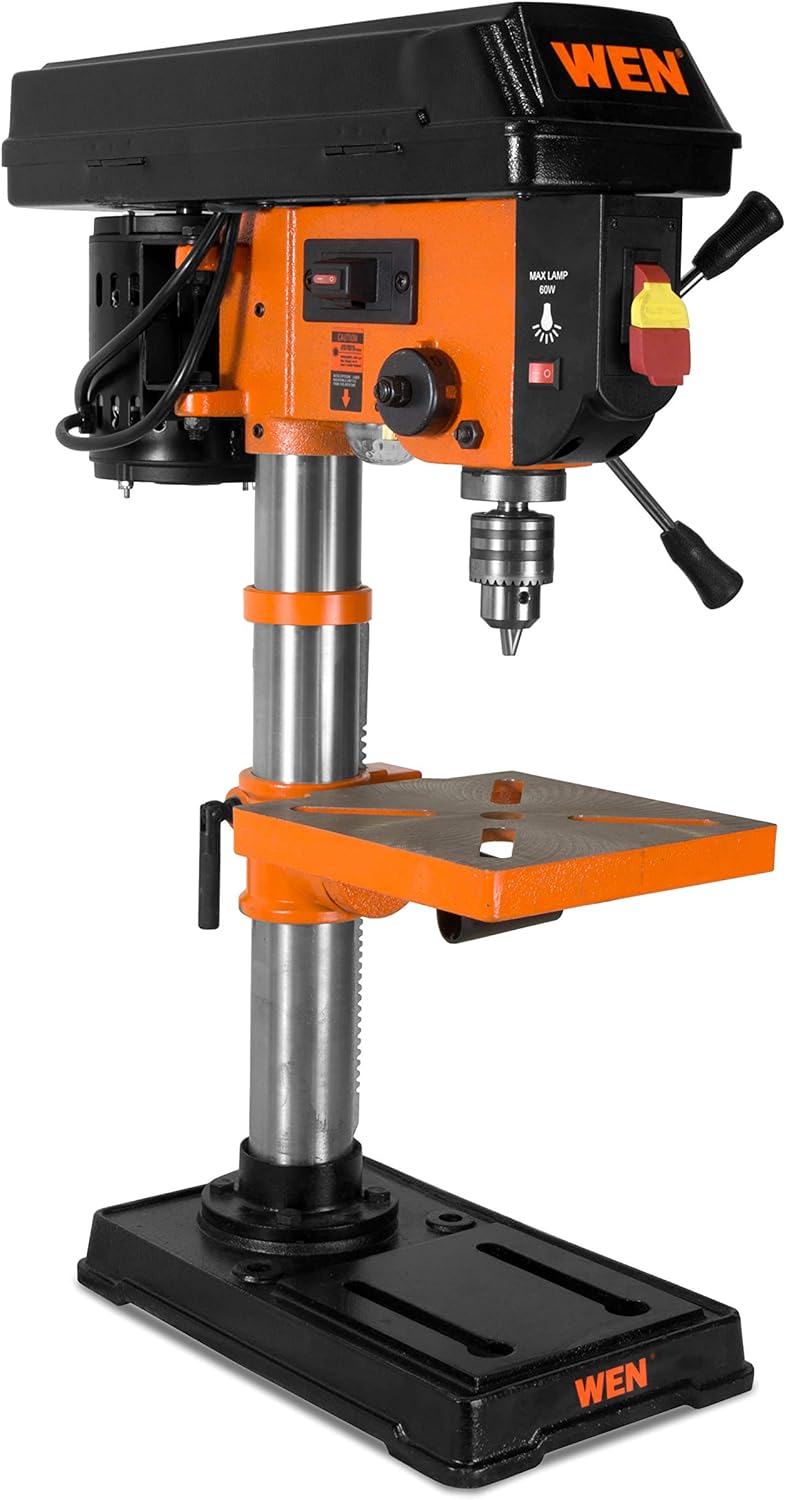
Figure 1: Fully assembled WEN 4210 Drill Press.
Bedienungsanleitung
1. Ein-/Ausschalten
The drill press is equipped with a clearly marked ON/OFF switch. Press the green button to turn the unit ON and the red button to turn it OFF.
2. Geschwindigkeitsanpassung
The WEN 4210 offers five speed settings: 600, 1100, 1700, 2400, and 3100 RPM. To change speeds:
- Trennen Sie die Bohrmaschine von der Stromquelle.
- Open the pulley cover located on top of the head assembly.
- Adjust the drive belt position on the motor and spindle pulleys to achieve the desired speed, as indicated on the speed chart inside the cover.
- Close the pulley cover securely before reconnecting power.

Figure 2: Control panel and pulley cover for speed adjustment.
3. Laser Centering Device
The integrated Class II 1mW laser projects an X-pattern onto your workpiece, indicating the exact drilling point. Activate the laser using its dedicated switch. This feature aids in precise hole placement, reducing guesswork.

Figure 3: Laser centering device projecting an X-pattern on the worktable.
4. Depth Stop
The drill press features a locking linear depth stop with 2-1/2 inches of spindle travel. To set the drilling depth:
- Lower the chuck until the drill bit touches the workpiece at the desired depth.
- Adjust the depth stop collar to the desired position.
- Lock the depth stop to ensure repeatable drilling to the set depth.
5. Arbeitstischverstellung
The 7-5/8 x 7-5/8 inch cast iron worktable can be adjusted for height and angle:
- Höhenverstellung: Use the rack and pinion crank to raise or lower the table to the desired working height. Lock it in place with the table locking handle.
- Neigungseinstellung: The worktable can bevel up to 45 degrees left and right for angled drilling. Loosen the table tilt bolt, adjust to the desired angle using the scale, and then re-tighten the bolt.

Figure 4: Worktable showing the bevel adjustment scale.
Wartung
Regelmäßige Wartung gewährleistet die Langlebigkeit und optimale Leistung Ihrer Bohrmaschine.
- Reinigung: After each use, clean the drill press to remove dust, chips, and debris. Use a brush or vacuum. Do not use solvents that may damage plastic parts.
- Schmierung: Um Rost vorzubeugen und einen reibungslosen Betrieb zu gewährleisten, sollte die Säule und andere bewegliche Teile regelmäßig mit einer dünnen Schicht Maschinenöl eingerieben werden.
- Riemeninspektion: Überprüfen Sie den Antriebsriemen regelmäßig auf Verschleiß, Risse oder Spannung. Ersetzen Sie ihn gegebenenfalls.
- Überprüfung der Befestigungselemente: Periodically inspect all nuts, bolts, and screws to ensure they are tight. Tighten any loose fasteners.
Fehlerbehebung
| Problem | Mögliche Ursache | Lösung |
|---|---|---|
| Bohrmaschine startet nicht | Kein Strom, defekter Schalter, Motorproblem | Check power connection, circuit breaker. Contact customer support if issue persists. |
| Übermäßige Vibration oder Wackeln | Loose components, bent spindle, unbalanced chuck/bit | Ensure all fasteners are tight. Check chuck and drill bit for proper installation and balance. If spindle wobble is suspected, contact customer support. |
| Laser funktioniert nicht | Laser switch off, battery depleted (if applicable), faulty laser module | Ensure laser switch is ON. Check for battery replacement if your model uses one. Contact customer support if the laser remains inoperable. |
| Difficulty changing speeds | Belt tension, pulley obstruction | Ensure the belt is not overly tight. Check for any obstructions in the pulley system. |
Technische Daten
| Besonderheit | Spezifikation |
|---|---|
| Marke | WEN |
| Modellnummer | 4210 |
| Stromquelle | Kabelgebundene Elektrik |
| Bandtage | 220 Volt (Wechselstrom) |
| AmpAlter | 3.2 Amps |
| Maximale Leistung | 384 Watt |
| Anzahl der Geschwindigkeiten | 5 |
| Geschwindigkeitsbereich | 600, 1100, 1700, 2400, 3100 U/min |
| Maximale Drehzahl | 3100 U/min |
| Maximale Futtergröße | 13 Millimeter (1/2 Zoll) |
| Spindelweg | 2.5 Zoll |
| Worktable Size | 7-5/8 x 7-5/8 Zoll |
| Worktable Bevel | 0-45 degrees Left & Right |
| Lasertyp | Class II 1mW |
| Bohrleistung (Holz/Metall) | 2.5 Zoll |
| Artikelgewicht | 51 Pfund |
| Materialtyp | Metall |
Garantie und Support
The WEN 4210 Drill Press is covered by a 2 Jahr eingeschränkte Garantie für Wohnzwecke und ein 90 Tage Garantie for commercial use. This warranty covers defects in material and workmanship under normal use.
For technical assistance, warranty claims, or to purchase replacement parts, please contact WEN Customer Support. You can find contact information and additional resources on the official WEN webWebsite oder durch Besuch der WEN Store auf Amazon.