
Einführung
This manual provides essential information for the proper setup, operation, and maintenance of your Samson Auro D208 8-Inch Active Loudspeaker. Please read these instructions thoroughly before using the product to ensure optimal performance and safety.
Sicherheitshinweise
Always follow basic safety precautions when using this product to reduce the risk of fire, electric shock, or injury. Keep the loudspeaker away from water and moisture. Do not block ventilation openings. Refer all servicing to qualified personnel.
Packungsinhalt
Überprüfen Sie, ob Ihr Paket die folgenden Artikel enthält:
- Samson Auro D208 8-Inch Active Loudspeaker
- Stromkabel
- Bedienungsanleitung
Aufstellen
Platzierung
The Auro D208 is designed for versatile placement. It can be used as a main PA speaker, a floor monitor, or mounted on a standard 1 3/8-inch (35mm) pole. Ensure the speaker is placed on a stable, level surface or securely mounted to prevent tipping.
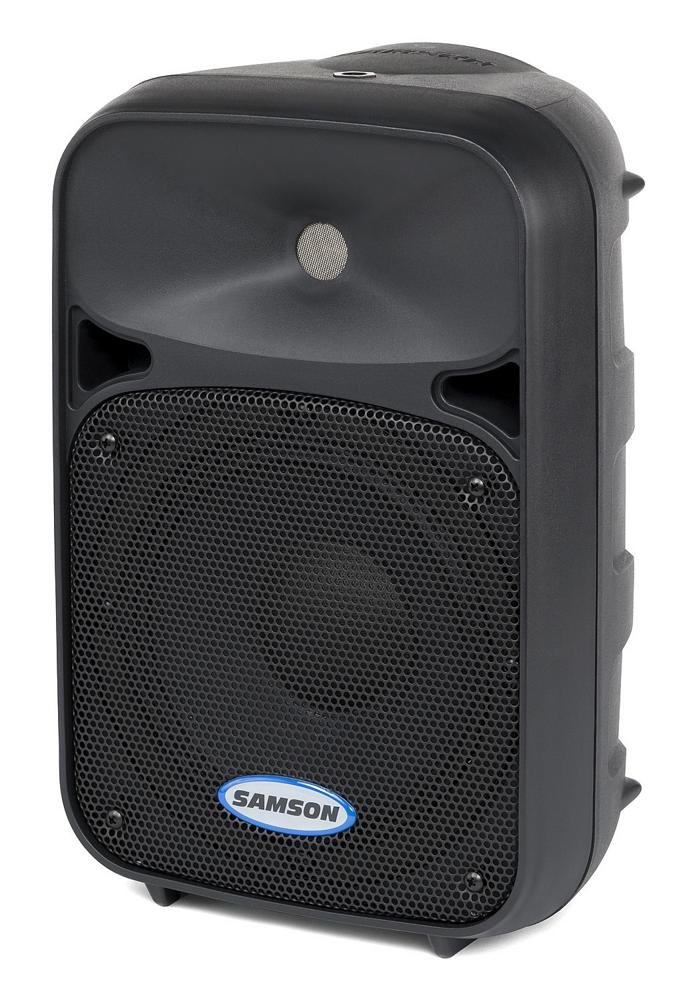
Front view of the Samson Auro D208 Active Loudspeaker, showcasing durch sein kompaktes Design und das Schutzgitter.
Anschlüsse
The Auro D208 features a Mic/Line input and an additional Line output for linking multiple speakers.
- Stromanschluss: Connect the supplied power cable to the AC inlet on the rear panel and then to a suitable power outlet.
- Eingangsanschluss: Use an XLR or 1/4-inch cable to connect your microphone or line-level audio source (e.g., mixer, instrument) to the Mic/Line input.
- Linking Speakers: To connect additional Auro D208 speakers, use an XLR cable from the Line output of the first speaker to the input of the next speaker.

Rear panel of the Samson Auro D208, illustrating the Mic/Line input, Line output, volume control, and Clip LED.
Bedienungsanleitung
Ein-/Ausschalten
After all connections are made, turn on the power switch located on the rear panel. It is recommended to turn on the Auro D208 last in your audio chain and turn it off first.
Lautstärkeregelung
Adjust the main Volume control knob on the rear panel to set the overall output level of the loudspeaker. Start with the volume at its minimum setting and gradually increase it to the desired level.
LED-Anzeige für Clips
The Clip LED illuminates when the input signal is too strong, indicating potential distortion. If the Clip LED lights up frequently, reduce the input level from your source or the volume on the Auro D208 to prevent signal clipping.
Wartung
Reinigung
Clean the exterior of the loudspeaker with a soft, dry cloth. Do not use abrasive cleaners, solvents, or waxes. Ensure the speaker is unplugged before cleaning.
Lagerung
When not in use, store the loudspeaker in a dry, cool environment, away from direct sunlight and extreme temperatures. If storing for extended periods, consider covering it to protect against dust.
Fehlerbehebung
| Problem | Mögliche Ursache | Lösung |
|---|---|---|
| Kein Ton | No power; input cable disconnected; volume too low. | Check power connection and switch; ensure input cables are secure; increase volume. |
| Verzerrter Klang | Input signal too high (clipping); faulty cable. | Reduce input level from source or speaker volume; replace cable. |
| Brummen oder Summen | Erdschleife; fehlerhaftes Kabel; Störungen. | Ensure all equipment is on the same electrical circuit; try different cables; move away from power sources. |
Technische Daten
| Besonderheit | Detail |
|---|---|
| Marke | SAMSON |
| Modellname | Auro D208 |
| Modellnummer | SAROD208A |
| Lautsprechertyp | 2-Way Active Loudspeaker |
| Lautsprechergröße | 8 Zoll |
| Woofer-Durchmesser | 8 Zoll |
| Hochtönerdurchmesser | 1 Zoll |
| Maximale Ausgangsleistung | 200 Watt |
| Konnektivitätstechnologie | USB (for control, not audio streaming) |
| Audioausgabemodus | Stereo |
| Montagetyp | Clip On, Floor Mount, 1 3/8-inch (35mm) Pole Mount Receptacle |
| Zusätzliche Merkmale | Mic/Line input with Volume control and Clip LED, Additional Line output for linking multiple speakers |
| Artikelabmessungen (T x B x H) | 17"T x 12.25"B x 10.25"H |
| Artikelgewicht | 7.75 Gramm |
| Stromquelle | Kabelgebundene Elektrik |
Garantie und Support
Garantieinformationen
This product is covered by a 1-year parts and labor limited warranty. Please retain your proof of purchase for warranty claims.
Kundenservice
For technical assistance, service, or warranty inquiries, please visit the official Samson webSie können die Website besuchen oder sich an den Kundendienst wenden. Die Kontaktdaten finden Sie in der Regel auf der Website des Herstellers. webWebsite oder in der Produktverpackung.