
Einführung
This manual provides essential instructions for the setup, operation, maintenance, and troubleshooting of your Insignia 6.1-Channel 600W Digital Home Theater Receiver, model IS-HC040917. Please read this manual thoroughly before using the receiver to ensure proper and safe operation.
Wichtige Sicherheitshinweise
- Die Lüftungsöffnungen dürfen nicht blockiert werden. Die Installation muss gemäß den Anweisungen des Herstellers erfolgen.
- Installieren Sie das Gerät nicht in der Nähe von Wärmequellen wie Heizkörpern, Heizregistern, Öfen oder anderen Geräten (einschließlich ampKonverter (Lüfter), die Wärme erzeugen.
- Schützen Sie das Netzkabel vor Beschädigungen oder Beschädigungen durch Fußgänger, insbesondere an den Steckern, Steckdosen und an der Stelle, an der es aus dem Gerät austritt.
- Verwenden Sie nur vom Hersteller angegebene Zusatzgeräte/Zubehör.
- Trennen Sie das Gerät bei Gewitter oder längerer Nichtbenutzung vom Stromnetz.
- Überlassen Sie alle Wartungsarbeiten qualifiziertem Servicepersonal. Eine Wartung ist erforderlich, wenn das Gerät in irgendeiner Weise beschädigt wurde.
Installationshandbuch
1. Auspacken
Carefully remove the receiver and all accessories from the packaging. Ensure all components are present:
- Insignia IS-HC040917 Receiver
- Fernbedienung
- AM-Rahmenantenne
- FM-Drahtantenne
- Benutzerhandbuch (dieses Dokument)
2. Lautsprecher anschließen
The IS-HC040917 receiver supports a 6.1-channel speaker configuration. Connect your speakers to the corresponding terminals on the rear panel. Ensure correct polarity (+ to + and - to -) for each speaker.
- Vorne links/rechts: For main stereo sound.
- Center: For dialogue.
- Surround Left/Right: For ambient sound effects.
- Surround-Back: For additional rear channel effects in 6.1 setups.
- Subwoofer (Pre-out): Connect to a powered subwoofer's LFE input.
Note: The receiver is designed for speakers with an impedance of 8 ohms.
3. Anschließen von Audio-/Videoquellen
Connect your external devices (e.g., DVD player, Blu-ray player, game console, cable box) to the appropriate input jacks on the receiver.
- HDMI: Use HDMI cables for high-definition audio and video signals. The receiver has 3 HDMI input ports.
- Digitaler Audioausgang (optisch/koaxial): For digital audio from devices like CD players or set-top boxes.
- Analoges Audio (RCA): For standard stereo audio connections from devices like VCRs or older CD players.
- S-Video: For video signals from compatible devices.
4. Antennenanschluss
Connect the supplied AM loop antenna and FM wire antenna to their respective terminals on the rear panel for radio reception.
5. Stromanschluss
Once all audio/video and speaker connections are made, plug the receiver's power cord into a standard AC wall outlet.
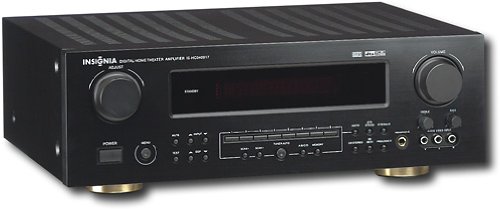
Bild: Rear panel of the Insignia IS-HC040917 receiver, showing various input and output connections for speakers, audio/video sources (HDMI, RCA, S-Video, Digital), and antenna terminals. This diagram is crucial for correctly wiring the home theater system.
Bedienungsanleitung
1. Ein-/Ausschalten
Drücken Sie die LEISTUNG Zum Ein- und Ausschalten des Receivers dient eine Taste an der Vorderseite oder auf der Fernbedienung.
2. Eingabeauswahl
Verwenden Sie die EINGANGSWAHLSCHALTER knob/buttons on the front panel or the remote control to choose the desired audio/video source (e.g., HDMI 1, DVD, CD, Tuner).
3. Lautstärkeregelung
Stellen Sie die Gesamtlautstärke mit dem großen Regler ein. VOLUMEN Drehknopf an der Vorderseite oder BAND +/- Tasten auf der Fernbedienung.
4. Audiomodi
The receiver supports various audio modes, including 6.1-channel surround sound. Use the MODUS or DSP buttons on the remote to cycle through available sound modes (e.g., Stereo, Dolby Digital, DTS, Pro Logic).
5. Tuner Operation (AM/FM Radio)
Select the "Tuner" input. Use the BAND button to switch between AM and FM. Use the TUNE +/- buttons to manually tune to stations or VOREINSTELLUNG +/- to select stored stations. Refer to the remote control for specific tuner functions.
Wartung
1. Reinigung
Wipe the exterior of the receiver with a soft, dry cloth. Do not use liquid cleaners or aerosol sprays, as they may damage the finish or internal components. Ensure the unit is unplugged before cleaning.
2. Belüftung
Ensure that the ventilation openings on the top and sides of the receiver are not blocked. Proper airflow is essential to prevent overheating and ensure long-term performance.
3. Kabelmanagement
Periodically check all cable connections to ensure they are secure. Loose connections can lead to poor audio or video quality.
Fehlerbehebung
| Problem | Mögliche Ursache | Lösung |
|---|---|---|
| Kein Strom | Netzkabel nicht angeschlossen; Steckdose nicht aktiv. | Überprüfen Sie den Netzanschluss; versuchen Sie es mit einer anderen Steckdose. |
| Kein Ton | Falscher Eingang ausgewählt; Lautsprecherkabel lose; Lautstärke zu niedrig; Stummschaltung aktiviert. | Wählen Sie den richtigen Eingang; prüfen Sie die Lautsprecheranschlüsse; erhöhen Sie die Lautstärke; deaktivieren Sie die Stummschaltung. |
| Kein Video | Incorrect input selected; video cables loose or incorrect. | Select correct input; check video cable connections (HDMI, S-Video, RCA). |
| Fernbedienung funktioniert nicht | Batterien leer; Blockade zwischen Fernbedienung und Empfänger; falscher Fernbedienungsmodus. | Replace batteries; remove obstructions; ensure remote is in the correct operating mode. |
Technische Daten
- Modell: IS-HC040917
- Marke: INSIGNIEN
- Ausgangsleistung: 600 Watt
- Anzahl der Kanäle: 6.1 Kanal
- Audioausgabemodus: Umgeben
- HDMI-Anschlüsse insgesamt: 3
- Steckertypen: 3.5mm Jack, HDMI, RCA, USB
- Kompatible Geräte: Lautsprecher
- Kontrollmethode: Fernbedienung
- Farbe: Schwarz
- UPC: 799530659962
- ASIN: B0075C3DN2
Garantie und Support
For warranty information and customer support, please refer to the warranty card included with your product or visit the official Insignia webWebsite. Bewahren Sie Ihren Kaufbeleg für Garantieansprüche auf.
For further assistance, you may contact Insignia customer service. Contact details are typically available on the manufacturer's webWebsite oder in der Produktverpackung.