
1. Einleitung
This manual provides essential information for the safe and efficient operation of your Alto Professional TMX160 DFX 16-Channel Powered Mixer. The TMX160 DFX is a versatile audio mixing console featuring 16 input channels, a built-in Alesis digital effects processor, and an integrated power amplifier capable of delivering 750W stereo output at 4Ω or 1500W mono output at 8Ω. It includes 12 XLR microphone inputs with phantom power, 16 line inputs, and stereo RCA inputs, along with a 3-band equalizer on each mono and stereo channel.
Please read this manual thoroughly before using the product to ensure proper setup and operation. Keep this manual for future reference.
2. Sicherheitshinweise
Beachten Sie bei der Verwendung dieses Produkts stets die grundlegenden Sicherheitsvorkehrungen, um das Risiko von Bränden, Stromschlägen und Verletzungen zu verringern.
- Energiequelle: Schließen Sie das Gerät nur an eine Wechselstromsteckdose mit der angegebenen Spannung an.tage.
- Erdung: Ensure the unit is properly grounded. Do not defeat the safety purpose of the polarized or grounding-type plug.
- Wasser und Feuchtigkeit: Do not expose this equipment to rain or moisture. Do not use near water.
- Belüftung: Sorgen Sie für ausreichende Belüftung. Blockieren Sie keine Belüftungsöffnungen.
- Hitze: Installieren Sie das Gerät nicht in der Nähe von Wärmequellen wie Heizkörpern, Heizregistern, Öfen oder anderen Geräten (einschließlich ampKonverter (Lüfter), die Wärme erzeugen.
- Kabel: Schützen Sie Netzkabel vor dem Betreten oder Einklemmen.
- Wartung: Überlassen Sie alle Wartungsarbeiten qualifiziertem Servicepersonal. Versuchen Sie nicht, dieses Produkt selbst zu reparieren.
3. Einrichtung
3.1 Auspacken und Prüfen
Carefully unpack the TMX160 DFX mixer and inspect it for any signs of damage that may have occurred during transit. If any damage is found, contact your dealer immediately.
3.2 Stromversorgung anschließen
Connect the supplied AC power cord to the mixer's power input and then to a suitable grounded AC power outlet. Ensure the mixer's power switch is in the OFF position before connecting to power.
3.3 Anschließen der Eingänge
The TMX160 DFX offers a variety of input options:
- Microphone Inputs (MIC 1-12): Use XLR cables to connect microphones to the 12 XLR inputs. Phantom power (+48V) can be activated for condenser microphones.
- Line-Eingänge (Kanäle 1-16): Use 1/4-inch TRS or TS cables for line-level instruments or devices. Channels 13/14 and 15/16 are stereo line inputs, also accepting RCA for 2-Track In.
- 2-Track In: Schließen Sie externe Audioquellen wie CD-Player oder Mediaplayer über RCA-Kabel an.
3.4 Ausgänge anschließen
Connect your speakers or monitoring system to the appropriate outputs:
- Lautsprecherausgänge: Schließen Sie passive Lautsprecher an die Stromversorgung an. amplifier outputs. Ensure the impedance of your speakers matches the mixer's output capabilities (e.g., 4Ω for 750W stereo, 8Ω for 1500W mono).
- Monitor/Aux Outputs: Use these outputs to send signals to stage Monitore oder externe Effektprozessoren.
- Stereo Out/Mono Out: These outputs provide the main mix signal for recording or connecting to additional sound systems.
3.5 Erstes Einschalten
After all connections are made, ensure all channel faders and the main mix fader are at their lowest settings. Turn on any connected devices (e.g., microphones, instruments) first, then power on the TMX160 DFX mixer. Finally, turn on your power ampVerstärker oder Aktivlautsprecher.
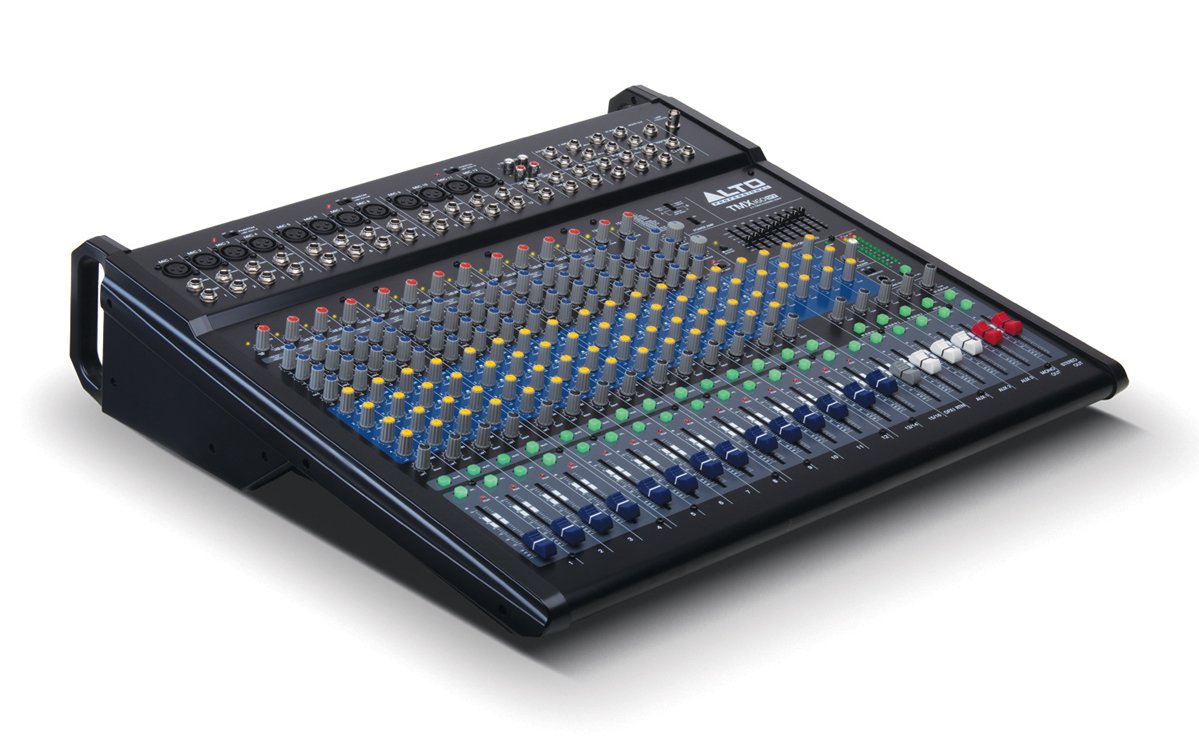
Abbildung 1: Frontplatte darüberview of the Alto Professional TMX160 DFX mixer. This image shows the comprehensive layout including microphone and line inputs at the top, channel controls in the middle, and faders at the bottom.
4. Bedienung
4.1 Kanalsteuerung
Each input channel (1-16) features a set of controls to shape its sound:
- DAZUGEWINNEN: Adjusts the input sensitivity for the connected microphone or line-level device. Set this to achieve a strong signal without clipping (distortion).
- EQ (Hoch, Mittel, Niedrig): A 3-band equalizer allows you to boost or cut frequencies (treble, midrange, bass) for each channel.
- AUX-Sends: Controls the amount of signal sent from the channel to the auxiliary outputs (e.g., for monitors or external effects).
- SCHWENKEN: Positioniert das Kanalsignal innerhalb des Stereofelds (von links nach rechts).
- LEVEL-Fader: Regelt die Gesamtlautstärke des Kanals im Hauptmix.
4.2 Hauptteil
The master section controls the overall output of the mixer:
- Hauptmix-Fader: Control the overall volume of the stereo output.
- DFX (Digital Effects) Controls: Select and adjust parameters for the built-in Alesis digital effects.
- Stereo Graphic EQ: A 7-band graphic equalizer allows for fine-tuning the overall frequency response of the main mix.
- Leistung Amp Steuerung: Adjust the output level and mode (Stereo/Mono) for the integrated power ampschwerer.
4.3 Built-in Alesis Digital Effects
The TMX160 DFX features a high-quality Alesis digital effects processor. Use the DFX controls in the master section to browse and select from various effects such as reverb, delay, chorus, and more. Adjust the effect send levels on individual channels and the overall effect return level in the master section to blend the effects into your mix.
Abbildung 2: Ausführlich view of the input channels, showing individual GAIN, EQ, AUX, PAN, and LEVEL controls for precise audio shaping.
5. Wartung
Proper maintenance ensures the longevity and optimal performance of your TMX160 DFX mixer.
- Reinigung: Reinigen Sie die Außenseite des Mixers mit einem weichen, trockenen Tuch. Vermeiden Sie die Verwendung von Scheuermitteln, Lösungsmitteln oder Wachsen.
- Staub: Regularly remove dust from the ventilation openings to prevent overheating.
- Lagerung: Bei längerer Nichtbenutzung sollte der Mixer an einem kühlen, trockenen Ort, fern von direkter Sonneneinstrahlung und extremen Temperaturen aufbewahrt werden.
- Fader und Knöpfe: Avoid applying excessive force to faders and knobs. Keep them free from dust and debris.
6. Fehlerbehebung
If you encounter issues with your TMX160 DFX, refer to the following common problems and solutions:
- Kein Strom:
- Check if the power cord is securely connected to both the mixer and the AC outlet.
- Prüfen Sie, ob die Steckdose funktioniert.
- Ensure the power switch on the mixer is in the ON position.
- Keine Tonausgabe:
- Überprüfen Sie alle Eingangs- und Ausgangskabelverbindungen.
- Ensure channel GAIN and LEVEL faders are appropriately set.
- Verify the Main Mix faders are raised.
- Check if connected speakers or power amplifiers are turned on and functioning.
- Stellen Sie die Stromversorgung sicher Amp controls are set correctly for your speaker configuration.
- Verzerrter Klang:
- Reduce the GAIN setting for the input channel.
- Lower the channel LEVEL fader or Main Mix faders.
- Prüfen Sie, ob die Kabel beschädigt sind.
- Effects Not Heard:
- Ensure the DFX send controls on the channels are turned up.
- Verify the DFX return level in the master section is raised.
- Check the selected effect program.
If the problem persists after trying these steps, contact Alto Professional customer support.
7. Spezifikationen
| Besonderheit | Spezifikation |
|---|---|
| Marke | Alt-Profi |
| Modell | TMX160 DFX |
| Anzahl der Kanäle | 16 |
| Artikelgewicht | 12.5 Kilogramm |
| Konnektivitätstechnologie | Hilfs |
| Audioeingang | XLR, RCA, Line, AUX, 2-Track |
| Hersteller | inMusik |
| ASIN | B007T1VZ52 |
| Power Output (Stereo) | 750 W @ 4 |
| Power Output (Mono) | 1500 W @ 8 |
| Equalizer | 3-band EQ per channel, Stereo Graphic EQ |
| Auswirkungen | Built-in Alesis Digital Effector (24-bit A/D and D/A converters) |
| Abmessungen (B x T x H) | Ca. 21.9 x 22.2 x 5.7 mm (555 x 565 x 145 Zoll) |
8. Garantie und Support
For warranty information and technical support, please refer to the documentation included with your product or visit the official Alto Professional webBewahren Sie Ihren Kaufbeleg als Kaufnachweis für Garantieansprüche auf.
For further assistance, you may contact Alto Professional customer service directly.