
Braeburn 5310
Benutzerhandbuch für das BRAEBURN 5310 Thermostat
Model: 5310 | Brand: Braeburn
Einführung
This manual provides comprehensive instructions for the installation, operation, and maintenance of your Braeburn 5310 Touchscreen Hybrid Thermostat. The Braeburn 5310 is a versatile thermostat designed for universal auto changeover, compatible with low voltage Single stage gas, oil, or electric heating/cooling systems, and single stage heat pump systems. It also supports 250Mv – 750Mv millivolt heating-only systems.
Key features include a bright blue backlight display, a responsive touchscreen with a Speedbar for quick adjustments, and a separate sub-base for easy installation. The thermostat offers multi-level keypad lockout for security and retains all user, installer, and program settings even during power failures due to its permanent non-volatile memory.
Produkt-Highlights:
- Large 6.5 sq. in. easy-read touchscreen display.
- Flexible programming: 7-day, 5-2 day, or non-programmable options.
- Automatic or manual changeover between heating and cooling.
- Speedbar multi-function button for intuitive control.
- Adjustable temperature limits for energy management.
- Indoor or outdoor remote sensing capability.
- Speed Set programming mode for quick setup.
- Meets Energy Aware guidelines.
- Separate user and installer reset buttons.
- Power options: Hardwire (24V AC) or battery (2 AA alkaline batteries).
- Multi-level keypad lockout for enhanced security.
- Circulating Fan mode and programmable Fan mode.
- Suitable for residential or commercial applications.

Abbildung 1: Vorderseite view of the Braeburn 5310 Thermostat, showcasing its touchscreen and control interface.
Setup und Installation
Proper installation is crucial for the optimal performance of your Braeburn 5310 thermostat. It is recommended that installation be performed by a qualified technician. Ensure all power to the HVAC system is turned off at the circuit breaker before beginning installation.
Strombedarf:
- The thermostat can be powered by 24 Volt AC (common wire required) or by two "AA" alkaline batteries (3.0 Volt DC).
- For continuous backlight and optimal performance, 24V AC power is recommended.
Montage und Verdrahtung:
- Strom ausschalten: Before any wiring, ensure the power to your heating and cooling system is completely off at the main circuit breaker.
- Alten Thermostat entfernen: Carefully remove your old thermostat from the wall. Note the wiring connections. It is advisable to take a picture of the existing wiring for reference.
- Install Sub-Base: The Braeburn 5310 features a separate sub-base. Mount this sub-base securely to the wall using the provided screws. Ensure it is level for aesthetic purposes.
- Drahtverbindungen: Connect the wires from your HVAC system to the corresponding terminals on the sub-base. Refer to the wiring diagram provided with your thermostat for specific connections. For systems requiring a common wire (C-wire), ensure it is connected for 24V AC power. If using battery power only, the C-wire may not be necessary, but connecting it is recommended for enhanced functionality.
- Thermostat anschließen: Once wiring is complete and secure, carefully snap the main thermostat unit onto the sub-base.
- Batterien einlegen: If using battery power, insert two fresh "AA" alkaline batteries into the battery compartment.
- Strom wiederherstellen: Schalten Sie den Strom am Leistungsschalter wieder ein.

Abbildung 2: Rückseite view of the Braeburn 5310 Thermostat, illustrating the wiring terminal block and sub-base design.
Anfangskonfiguration:
After installation, the thermostat will guide you through initial setup. It features separate installer and user setup modes. To access installer options, you may need to press specific buttons simultaneously (e.g., "System" and "Config" as mentioned in user reviews) and then release. This allows configuration of system type, programming mode (7-day, 5-2 day), temperature differential, and other advanced settings.
A front reset button is available to return user settings to default values if needed.
Bedienung Ihres Thermostats
The Braeburn 5310 thermostat is designed for user-friendly operation with its intuitive touchscreen and Speedbar.
Grundlegende Bedienung:
- Temperatureinstellung: Touch the desired temperature on the screen or use the up/down arrows (if present) to adjust the setpoint. The temperature control range is between 45°F and 90°F (7°C and 32°C), with an accuracy of +/- 1°F (+/- 0.5°C).
- Systemmodus: Select your desired system mode (Heat, Cool, Auto, Off) using the touchscreen options. "Auto" mode allows the thermostat to automatically switch between heating and cooling as needed.
- Gebläsemodus: Choose between Fan ON (continuous operation), Fan AUTO (fan runs only when heating or cooling is active), or Circulating Fan mode (fan cycles on and off periodically to keep air moving).
- Hintergrundbeleuchtung: The bright blue backlight display illuminates when the screen is touched and turns off shortly after to conserve energy.
Programmiermodi:
The Braeburn 5310 offers flexible programming options to suit your lifestyle:
- 7-Tage-Programm: Allows for different temperature settings for each day of the week.
- 5-2-Tage-Programm: Provides one set of programs for weekdays (Monday-Friday) and another for weekends (Saturday-Sunday).
- Nicht programmierbar: Operates as a manual thermostat, maintaining a constant temperature until adjusted.
Refer to the detailed programming instructions in the full manual for setting up your desired schedule using the Speed Set programming mode.
Erweiterte Funktionen:
- Adaptive Recovery Mode (ARM): This feature learns how long it takes your system to reach programmed temperatures, activating heating or cooling early to ensure comfort at the scheduled time.
- Hold-Funktion: Temporarily overrides the programmed schedule to maintain a specific temperature. The duration of the "Hold" can often be adjusted.
- Tastensperre: Prevents unauthorized changes to settings. Multiple levels of lockout are available.
- Residual Cooling Fan Delay: Allows the fan to continue running for a short period after the cooling cycle ends to maximize efficiency.
Wartung
Regular maintenance ensures the longevity and accurate operation of your Braeburn 5310 thermostat.
Batteriewechsel:
If your thermostat is battery-powered or uses batteries as a backup, replace the two "AA" alkaline batteries annually or when the low battery indicator appears on the display. To replace, gently pull the thermostat off its sub-base, remove the old batteries, insert new ones, and reattach the thermostat to the sub-base.
Reinigung:
Reinigen Sie den Touchscreen des Thermostats und casing periodically with a soft, damp Mit einem Tuch abwischen. Vermeiden Sie die Verwendung von Scheuermitteln oder Lösungsmitteln, da diese das Display oder die Oberfläche beschädigen können.
Filter, UV, and Humidifier Pad Check Monitor:
The thermostat includes a monitor for air filter, UV lamp, and humidifier pad checks. The display will indicate when it's time to inspect or replace these components based on programmed intervals. Follow your HVAC system's recommendations for these maintenance tasks.
Fehlerbehebung
If you encounter issues with your Braeburn 5310 thermostat, try the following troubleshooting steps:
| Problem | Mögliche Ursache | Lösung |
|---|---|---|
| Das Display des Thermostats ist leer oder schwach. | No power (24V AC) or dead batteries. | Check circuit breaker for HVAC system. Replace "AA" batteries with fresh ones. Ensure C-wire is properly connected if using 24V AC. |
| Das System (Heizung/Kühlung) reagiert nicht. | Incorrect system mode selected, wiring issue, or system lockout. | Verify the thermostat is set to the correct mode (Heat, Cool, Auto). Check wiring connections at the sub-base and HVAC unit. Ensure keypad lockout is not active. If the thermostat calls for heat/cool but no signal is sent to the equipment, consult a qualified technician. |
| Die Temperaturanzeigen scheinen ungenau zu sein. | Thermostat location, sensor obstruction, or calibration needed. | Ensure the thermostat is not exposed to direct sunlight, drafts, or heat sources. Clean any dust from the thermostat vents. If issues persist, a professional may need to check calibration. |
| Der Bildschirm ist schwer zu lesen. | Lighting conditions, display settings. | The blue backlight activates upon touch. Ensure adequate ambient lighting in the area where the thermostat is mounted. |
| Thermostat not holding program. | "Hold" function active, or programming error. | Deactivate the "Hold" function. Re-enter your program schedule carefully, ensuring all steps are followed. |
If these steps do not resolve the issue, please contact a qualified HVAC technician or Braeburn customer support for further assistance.
Technische Daten
| Besonderheit | Detail |
|---|---|
| Modellnummer | 5310 |
| Abmessungen (H x B x T) | 3.94" x 5.56" x 1.19" (ca. 10 cm x 14.1 cm x 3 cm) |
| Gewicht | 14.4 Unzen (ca. 408 Gramm) |
| Stromquelle | 24 Volt AC or 2 "AA" Alkaline Batteries (3.0 Volt DC) |
| Temperaturregelbereich | 45 °C bis 90 °C (7 °F bis 32 °F) |
| Temperaturgenauigkeit | +/- 1 °F (+/- 0.5 °C) |
| Luftfeuchtigkeitsbereich im Betrieb | 5 % bis 95 % relative Luftfeuchtigkeit (nicht kondensierend) |
| Kompatibilität | Geringe Lautstärketage Single stage gas, oil, or electric heating/cooling systems; single stage heat pump systems; 250Mv – 750Mv millivolt heating-only systems. |
| Anzeigetyp | Touchscreen with bright blue backlight |
| Besondere Merkmale | Permanent non-volatile memory, filter/UV/humidifier pad check monitor, Adaptive Recovery Mode (ARM), programmable independent Fan control, residual cooling Fan delay, indoor/outdoor remote sensor capability, multi-level keypad lockout. |
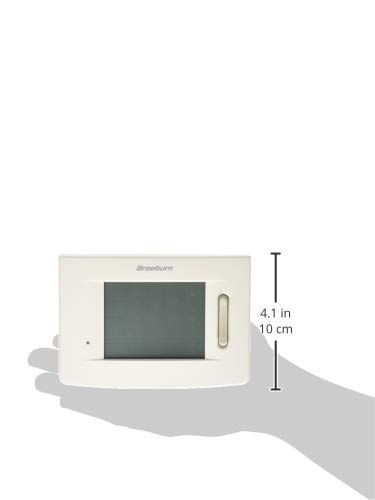
Figure 3: Size reference of the Braeburn 5310 Thermostat.
Garantie und Support
For specific warranty information regarding your Braeburn 5310 Thermostat, please refer to the warranty card included with your product packaging or visit the official Braeburn webDie Garantiebedingungen decken in der Regel Material- und Verarbeitungsfehler für einen bestimmten Zeitraum ab Kaufdatum ab.
For technical support, troubleshooting assistance beyond this manual, or to inquire about replacement parts, please contact Braeburn customer service. Contact details can usually be found on the manufacturer's website or on the product packaging. Braeburn also provides English/Spanish packaging and instruction cards.
Zugehörige Dokumente - 5310
 |
Braeburn Thermostats: Programmable, Non-Programmable & Touchscreen Models Explore the full range of Braeburn thermostats, including Builder, Economy, Premier, and Deluxe series. Find features, specifications, and contractor solutions for optimal home comfort and energy efficiency. |
 |
Braeburn-Thermostate: Die bessere Wahl für Komfort im Innenbereich Entdecken Sie die Thermostate von Braeburn, darunter die Serien Builder, Economy, Premier, Deluxe und Smart Wi-Fi. Entdecken Sie Funktionen wie große Displays, einfache Programmierung und erweiterte Bedienelemente für private und gewerbliche Anwendungen. Erfahren Sie mehr über die Markenpräsenz und Zubehöroptionen. |
 |
Braeburn-Thermostate: Die bessere Wahl für Komfort im Innenbereich Explore the range of Braeburn thermostats, including Builder, Economy, Premier, and Deluxe series. Discover features like large displays, easy-to-use programming, and energy-saving capabilities. Braeburn offers solutions for residential and commercial applications, focusing on reliability and innovative design. |
 |
Braeburn 6425 Programmable Touchscreen Thermostat User Manual User manual for the Braeburn 6425 Programmable Touchscreen Thermostat, detailing its features, programming options, operational modes, and maintenance procedures for optimal home comfort control. |
 |
Braeburn 5100 Premier Series Digital Thermostat User Manual User manual for the Braeburn 5100 Premier Series Universal 7 Day or 5-2 Day Programmable 2-Heat/2-Cool Digital Thermostat. Includes installation, programming, and troubleshooting instructions. |
 |
Braeburn Model 5200 Premier Series Programmable/Non-Programmable Thermostat Technical Specifications Detailed specifications, features, and compatibility information for the Braeburn Model 5200 Premier Series Universal Manual Changeover thermostat, designed for multi-stage conventional or heat pump systems. |
Ask a question about this manual
Ask about setup, troubleshooting, compatibility, parts, safety, or missing instructions. Manuals+ will review the question and use this page’s manual context to help answer it.