
beyerdynamic 721360
Beyerdynamic Stegos TB Wireless Boundary Microphone User Manual
Modell: 721360
Einführung
This manual provides comprehensive instructions for the setup, operation, and maintenance of your Beyerdynamic Stegos TB Wireless Boundary Microphone. Please read this manual thoroughly before using the device to ensure optimal performance and longevity.
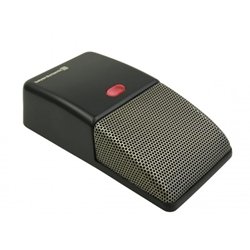
Image: Beyerdynamic Stegos TB Wireless Boundary Microphone. This image displays the compact, black wireless boundary microphone, designed for discreet placement on surfaces like conference tables.
Wichtige Sicherheitshinweise
- Setzen Sie das Gerät nicht Wasser oder übermäßiger Feuchtigkeit aus.
- Vermeiden Sie extreme Temperaturen.
- Versuchen Sie nicht, das Gerät zu öffnen oder zu verändern. Überlassen Sie alle Wartungsarbeiten qualifiziertem Fachpersonal.
- Verwenden Sie ausschließlich die angegebenen Stromquellen und Zubehörteile.
- Außerhalb der Reichweite von Kindern aufbewahren.
Packungsinhalt
Überprüfen Sie, ob alle Artikel im Paket vorhanden sind:
- Beyerdynamic Stegos TB Wireless Boundary Microphone
- USB-Ladekabel (Micro-USB)
- Benutzerhandbuch (dieses Dokument)
Aufstellen
1. Aufladen des Mikrofons
- Verbinden Sie das Micro-USB-Ende des Ladekabels mit dem Ladeanschluss des Mikrofons.
- Connect the standard USB end of the cable to a powered USB port (e.g., computer, USB wall adapter).
- The LED indicator on the microphone will show charging status.
- Sobald das Gerät vollständig aufgeladen ist, trennen Sie das Ladekabel.
2. Mit einem Gerät verbinden
The Stegos TB microphone connects wirelessly to compatible devices, typically personal computers, for video conferencing applications.
- Ensure the microphone is charged and powered on.
- Activate Bluetooth on your personal computer or compatible device.
- Put the microphone into pairing mode (refer to the device's specific button combination, usually holding a power/pairing button). The LED indicator will typically flash to indicate pairing mode.
- On your computer, search for available Bluetooth devices. Select "Beyerdynamic Stegos TB" from the list.
- Once paired, the LED indicator on the microphone will show a solid light, indicating a successful connection.
- In your computer's sound settings or video conferencing software, select the "Beyerdynamic Stegos TB" as the input audio device.
Bedienungsanleitung
Ein-/Ausschalten
- To power on: Press and hold the power button for approximately 3 seconds. The LED indicator will illuminate.
- To power off: Press and hold the power button for approximately 3 seconds. The LED indicator will turn off.
Stummschaltung
The microphone features a mute function for privacy during calls.
- To mute: Press the mute button once. The LED indicator may change color or flash to indicate mute status.
- To unmute: Press the mute button again. The LED indicator will return to its normal operating state.
Placement for Optimal Performance
For best audio pickup, place the Stegos TB microphone on a flat surface in the center of the participants. Its omnidirectional polar pattern ensures 360-degree sound capture.
Wartung
Reinigung
- Wipe the microphone's exterior with a soft, dry, or slightly damp Tuch.
- Verwenden Sie keine scharfen Chemikalien, Lösungsmittel oder Scheuermittel.
- Ensure no liquid enters the microphone grille or ports.
Lagerung
When not in use for extended periods, store the microphone in a cool, dry place, away from direct sunlight and extreme temperatures. It is recommended to fully charge the battery before long-term storage and recharge it every few months to maintain battery health.
Fehlerbehebung
| Problem | Mögliche Ursache | Lösung |
|---|---|---|
| Das Mikrofon lässt sich nicht einschalten. | Niedriger oder leerer Akku. | Charge the microphone using the provided USB cable. |
| Drahtlose Verbindung nicht möglich. | Bluetooth is off on the device; microphone not in pairing mode; out of range. | Ensure Bluetooth is enabled. Put microphone into pairing mode. Move microphone closer to the device. |
| No audio input from microphone. | Microphone is muted; incorrect audio input selected on computer/software. | Unmute the microphone. Select "Beyerdynamic Stegos TB" as the input device in your system settings or application. |
| Schlechte Audioqualität. | Microphone too far from speaker; environmental noise; interference. | Place microphone closer to speakers. Reduce background noise. Ensure no obstructions between microphone and receiving device. |
Technische Daten
- Marke: Beyerdynamic
- Modell: Stegos TB (721360)
- Konnektivitätstechnologie: Wireless (USB for charging)
- Steckertyp: Micro-USB (zum Aufladen)
- Besonderheit: Kabellos
- Kompatible Geräte: Personalcomputer
- Farbe: Schwarz
- Richtcharakteristik: Omnidirektional
- Energiequelle: Batteriebetrieben
- Empfohlene Verwendung: Videokonferenz
Garantieinformationen
Beyerdynamic products are covered by a limited warranty. For specific warranty terms and conditions, please refer to the warranty card included with your product or visit the official Beyerdynamic webBewahren Sie Ihren Kaufbeleg für Garantieansprüche auf.
Note: Warranty details are subject to change and may vary by region.
Support und Kontakt
For further assistance, technical support, or service inquiries, please contact Beyerdynamic customer support through their official webWebsite oder die Kontaktinformationen, die auf Ihrer Produktverpackung angegeben sind.
Offiziell WebWebsite: www.beyerdynamic.com
Bitte halten Sie Ihre Modellnummer (721360) und Seriennummer bereit, wenn Sie sich an den Support wenden.
Ask a question about this manual
Ask about setup, troubleshooting, compatibility, parts, safety, or missing instructions. Manuals+ will review the question and use this page’s manual context to help answer it.