
1. Einleitung
This manual provides detailed instructions for the proper use, setup, operation, and maintenance of your Telex RE-92TX Cardioid Lavalier Condenser Microphone. The RE-92TX is a premium lapel microphone designed for professional audio applications, featuring a cardioid polar pattern and a TA4F connector for compatibility with various wireless systems, including Telex R100, RE-2, and RE-1.
Please read this manual thoroughly before using the microphone to ensure optimal performance and longevity of the product.
2. Produktüberschreitungview
The Telex RE-92TX is a compact and discreet lavalier microphone engineered for clear and articulate speech reproduction. Its cardioid pickup pattern helps to reduce background noise, focusing on the sound source directly in front of the microphone.
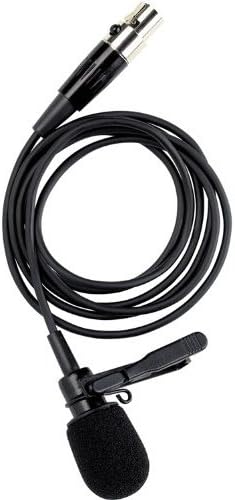
Figure 2.1: The Telex RE-92TX Cardioid Lavalier Condenser Microphone, showing the microphone capsule, cable, and attached lapel clip.
2.1 Komponenten
- RE-92TX Lavalier Microphone with integrated cable
- Lapel Clip (pre-attached or included)
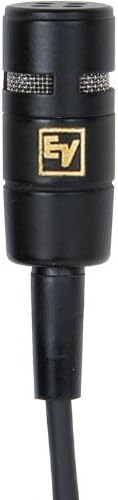
Abbildung 2.2: Nahaufnahme view of the RE-92TX microphone capsule, highlighting the grille and compact design.
2.2 Hauptmerkmale
- Nieren-Polarmuster: Provides excellent off-axis rejection, minimizing pickup of sounds from the sides and rear, which helps to reduce feedback and ambient noise.
- Kondensatorelement: Offers a wide frequency response and high sensitivity for clear, detailed audio capture.
- TA4F Connector: Ensures compatibility with a wide range of Telex and Electro-Voice wireless bodypack transmitters.
- Kompaktes und diskretes Design: Easily concealed for on-camera or stage verwenden.
3. Einrichtung
Proper setup is crucial for optimal performance of your RE-92TX microphone.
3.1 Anschließen des Mikrofons
- Ensure your wireless bodypack transmitter (e.g., Telex R100, RE-2, RE-1) is turned off.
- Align the TA4F connector of the RE-92TX microphone with the input jack on your bodypack transmitter.
- Push the connector firmly into the jack until it clicks into place, indicating a secure connection.
- To disconnect, gently pull back on the release collar of the TA4F connector and then pull the connector out of the jack. Do not pull directly on the cable.
3.2 Mikrofonplatzierung
The placement of the lavalier microphone significantly impacts sound quality.
- Optimale Position: For most applications, clip the microphone to clothing approximately 6-8 inches (15-20 cm) below the chin, centered on the chest. This position typically provides a balanced sound.
- Clothing Noise: Ensure the microphone is not rubbing against clothing, jewelry, or other objects, as this can cause unwanted noise. Use the included clip to secure the microphone firmly.
- Windgeräusche: If operating outdoors or in windy conditions, consider using an additional foam windscreen (not included) to minimize wind noise.
- Näherungseffekt: Be aware that placing the microphone too close to the mouth can result in an exaggerated bass response (proximity effect). Adjust placement to achieve desired tonal balance.
4. Betrieb
Once connected and placed, follow these guidelines for operating your RE-92TX microphone.
4.1 Verstärkungseinstellung
The input gain on your wireless bodypack transmitter should be set correctly to prevent distortion and ensure a strong signal.
- Testniveau: Speak into the microphone at your normal speaking volume.
- Verstärkung anpassen: Adjust the gain control on your transmitter until the audio level indicator (if present) shows a strong signal without consistently peaking or clipping.
- Clipping vermeiden: If the indicator frequently shows red or maximum levels, reduce the gain to prevent distortion.
4.2 Leistungstipps
- Sprechen Sie deutlich: Articulate your words clearly and maintain a consistent distance from the microphone for best results.
- Audio überwachen: If possible, monitor the audio output through headphones to catch any issues (e.g., clothing noise, low battery, interference) in real-time.
- Akkulaufzeit: Ensure your wireless transmitter has sufficient battery life for the duration of your use. Low battery can affect audio quality.
5. Wartung
Proper care and maintenance will extend the life of your RE-92TX microphone.
5.1 Reinigung
- Mikrofonkapsel: Gently wipe the microphone capsule and grille with a soft, dry, lint-free cloth. Do not use liquid cleaners directly on the capsule.
- Kabel: Wipe the cable with a damp cloth if necessary, then dry thoroughly. Avoid harsh chemicals.
- Windschutzscheibe: If a foam windscreen is used, it can typically be removed and gently hand-washed with mild soap and water, then air-dried completely before reattaching.
5.2 Lagerung und Handhabung
- Vermeiden Sie extreme Bedingungen: Setzen Sie das Mikrofon nicht über längere Zeit extremen Temperaturen, hoher Luftfeuchtigkeit oder direkter Sonneneinstrahlung aus.
- Vor Stößen schützen: Handle the microphone carefully. Avoid dropping it or subjecting it to strong impacts.
- Kabelpflege: Do not sharply bend or crimp the cable. Coil it loosely when storing to prevent damage.
- Lagerung: Store the microphone in a clean, dry place, preferably in its original packaging or a protective case.
6. Fehlerbehebung
If you encounter issues with your RE-92TX microphone, refer to the following common problems and solutions.
| Problem | Mögliche Ursache | Lösung |
|---|---|---|
| Keine Tonausgabe | Mikrofon nicht richtig angeschlossen Transmitter/receiver off Low/dead battery in transmitter Falsche Verstärkungseinstellung Faulty cable/microphone | Ensure TA4F connector is fully seated. Verify transmitter and receiver are powered on. Replace or recharge transmitter batteries. Increase gain on transmitter. Test with another microphone/cable if available. |
| Verzerrter Ton | Verstärkung zu hoch eingestellt Das Mikrofon ist zu nah an der Schallquelle. Beschädigtes Mikrofonelement | Reduce gain on transmitter. Adjust microphone placement further from mouth. Contact support if distortion persists after adjusting gain and placement. |
| Excessive background noise/feedback | Falsche Mikrofonplatzierung Raumakustik Gewinn zu hoch | Ensure microphone is positioned correctly and not rubbing against clothing. Adjust room acoustics if possible. Gewinn reduzieren. |
| Unterbrochener Ton | Wackelkontakt Interferenz Schwache Batterie | Überprüfen Sie alle Verbindungen. Ensure clear line of sight between transmitter and receiver; check for other wireless devices. Replace or recharge transmitter batteries. |
Sollte das Problem nach Anwendung dieser Lösungsansätze weiterhin bestehen, wenden Sie sich bitte an den Kundendienst.
7. Spezifikationen
The following are the technical specifications for the Telex RE-92TX Cardioid Lavalier Condenser Microphone:
| Besonderheit | Spezifikation |
|---|---|
| Marke | Elektro-Stimme |
| Hersteller | Telex |
| Modell | RE-92TX |
| Mikrofon-Formfaktor | Lavalier |
| Richtcharakteristik | Unidirektional (Niere) |
| Konnektivitätstechnologie | TA4F (compatible with XLR via adapter, not included) |
| Besonderheit | Wireless (requires compatible transmitter) |
| Im Lieferumfang enthaltene Komponenten | Mikrofon |
| Artikelgewicht | 2 Pfund (ungefähres Versandgewicht) |
| UPC | 800549416641 |
| Erstes verfügbares Datum | 16. Oktober 2012 |
8. Garantie und Support
For specific warranty information regarding your Telex RE-92TX microphone, please refer to the warranty card included with your product or visit the official Electro-Voice webDie Garantiebedingungen können je nach Region und Händler variieren.
8.1 Kundendienst
If you require technical assistance, have questions about your product, or need to arrange for service, please contact Electro-Voice customer support through their official website or the retailer from whom you purchased the product. When contacting support, please have your product model number (RE-92TX) and purchase information readily available.
You can visit the Electro-Voice Store for more information: Electro-Voice Store on Amazon