
1. Einleitung
Thank you for choosing the Tenergy TN190 Universal Smart Charger. This charger is designed to efficiently and safely charge various NiMH rechargeable batteries, including AA, AAA, C, D, and 9V sizes. Please read this manual thoroughly before use to ensure proper operation and to maximize the lifespan of your batteries and charger.
2. Sicherheitshinweise
- Use this charger only for NiMH rechargeable batteries. Attempting to charge other battery types (e.g., Alkaline, Lithium-ion, NiCd) may cause explosion, rupture, or leakage, leading to personal injury or property damage.
- Das Ladegerät darf nicht auseinandergenommen, verändert oder kurzgeschlossen werden.
- Das Ladegerät darf weder Regen, Feuchtigkeit noch extremen Temperaturen ausgesetzt werden.
- Halten Sie das Ladegerät von Kindern und Haustieren fern.
- Sorgen Sie während des Ladevorgangs für ausreichende Belüftung. Decken Sie das Ladegerät nicht ab.
- Ziehen Sie den Stecker des Ladegeräts aus der Steckdose, wenn Sie es nicht verwenden.
- If the charger or batteries become excessively hot during charging, discontinue use immediately and contact support.
3. Produktmerkmale und Komponenten
The Tenergy TN190 charger offers intelligent charging with individual channel monitoring and a clear LCD display. It also includes a discharge function and a USB output port.
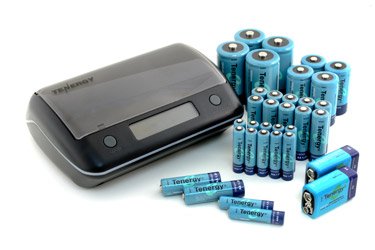
Bild 1: Überview of the Tenergy TN190 Universal Smart Charger. Key components include the LCD screen, Power Input, USB Outlet, Open Button, and Discharge Button.
- Universelle Kompatibilität: Charges AA, AAA, C, D, and 9V NiMH batteries.
- Einzelne Ladekanäle: Each battery slot is monitored independently.
- LCD Bildschirm: Displays charging status, battery capacity, and other indicators.
- Entladefunktion: Helps to recondition batteries and reduce memory effect.
- USB-Ausgang: Allows charging of external USB-powered devices.
- Sicherheitsmerkmale: Over-charge protection, short-circuit protection, and bad battery detection.
4. Einrichtung
- Auspacken: Nehmen Sie das Ladegerät und jegliches Zubehör vorsichtig aus der Verpackung.
- Stromanschluss: Connect the provided AC adapter to the charger's power input port (refer to Image 1). Plug the other end of the AC adapter into a standard wall outlet (100-240V AC, 50/60Hz).
- Erstprüfung: The LCD screen should illuminate briefly, indicating the charger is powered on and ready for use.
5. Bedienungsanleitung
5.1 Batterien einlegen
- Press the 'Open Button' (refer to Image 1) to open the charger lid.
- Insert NiMH rechargeable batteries into the appropriate slots, ensuring correct polarity (+ and -). The charger supports AA, AAA, C, D, and 9V batteries.
- Close the charger lid securely.
5.2 Ladevorgang
- Once batteries are inserted, the charger will automatically detect the battery type and begin charging.
- The LCD screen will display the charging status for each individual battery.
- Charging time varies depending on battery capacity and discharge level.
- When a battery is fully charged, the LCD indicator for that slot will show 'FULL'.
5.3 Entladefunktion
The discharge function can help to reduce the memory effect in NiMH batteries and optimize their performance. It is recommended to discharge batteries periodically before recharging.
- Insert the batteries you wish to discharge into the charger.
- Press the 'Discharge Button' (refer to Image 1). The LCD screen will indicate 'DISCHARGE'.
- Sobald der Entladezyklus abgeschlossen ist, schaltet das Ladegerät automatisch in den Lademodus.
5.4 USB-Ausgang
The charger features a USB outlet (refer to Image 1) that can provide power to external USB-powered devices (e.g., smartphones, MP3 players).
- Connect your USB device to the USB outlet on the side of the charger using a compatible USB cable.
- The USB function indicator on the LCD screen will illuminate.
- Note: The USB output may be affected if the charger is simultaneously charging multiple high-capacity batteries.
5.5 LCD Indicators Explained
The LCD screen provides real-time information about the charging process.
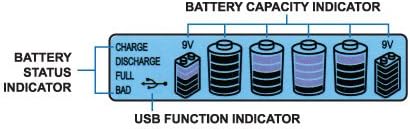
Bild 2: Detaillierte view of the LCD screen indicators, showing Battery Status and Battery Capacity.
- Aufladung: Zeigt an, dass der Akku gerade geladen wird.
- Entladung: Indicates that the battery is currently being discharged.
- Voll: Zeigt an, dass der Akku vollständig aufgeladen ist.
- Schlecht: Indicates a faulty or non-rechargeable battery. Remove immediately.
- Batteriekapazitätsanzeige: Bars on the screen show the approximate charge level of each battery.
- USB Function Indicator: Illuminates when the USB output is active.
6. Wartung
- Reinigung: Trennen Sie das Ladegerät vor der Reinigung vom Stromnetz. Wischen Sie die Außenseite mit einem weichen, trockenen Tuch ab. Verwenden Sie keine flüssigen Reiniger oder Lösungsmittel.
- Lagerung: Bewahren Sie das Ladegerät an einem kühlen, trockenen Ort ohne direkte Sonneneinstrahlung und extreme Temperaturen auf.
- Batteriepflege: For optimal battery life, avoid fully discharging NiMH batteries frequently unless using the discharge function for reconditioning.
7. Fehlerbehebung
- Ladegerät lässt sich nicht einschalten: Ensure the AC adapter is securely connected to both the charger and a working wall outlet.
- Battery not charging (LCD shows 'BAD'): The battery may be faulty, non-rechargeable, or inserted with incorrect polarity. Remove the battery and try a known good rechargeable battery.
- Akkus erhitzen sich beim Laden: Some warmth is normal, but excessive heat indicates a problem. Discontinue charging immediately. This could be due to faulty batteries or improper ventilation.
- USB-Ausgang funktioniert nicht: Ensure the charger is powered on. Try a different USB cable or device. The USB output may be temporarily disabled if the charger is under heavy load from battery charging.
8. Spezifikationen
| Marke | Tenergie |
| Modellnummer | 96018 (TN190) |
| Kompatible Batterietypen | NiMH (AA, AAA, C, D, 9V) |
| Eingangslautstärketage | Wechselstrom 100 – 240 V, 50/60 Hz |
| Ausgangsvolumentage (Aufladung) | Varies by battery type |
| USB-Ausgang | Gleichstrom 5 V |
| ASIN | B00BC4QHTQ |
| UPC | 844949013758 |
9. Garantieinformationen
Tenergy products are covered by a manufacturer's warranty against defects in materials and workmanship. Please refer to the warranty card included with your product or visit the official Tenergy webDie vollständigen Garantiebedingungen finden Sie auf der Website. Bewahren Sie Ihren Kaufbeleg als Kaufnachweis für Garantieansprüche auf.
10. Unterstützung
If you encounter any issues or have questions regarding your Tenergy TN190 Universal Smart Charger that are not addressed in this manual, please contact Tenergy customer support. You can typically find contact information on the official Tenergy webauf der Website oder auf der Produktverpackung.
Tenergy Official WebWebsite: Visit Tenergy Store on Amazon