
Einführung
This manual provides essential information for the safe and efficient operation of your Eaton 5PX 3000 2U Rack/Tower LCD Uninterruptible Power Supply (UPS). The Eaton 5PX 3000 is designed to provide reliable power protection for servers, storage, and network equipment. Please read this manual thoroughly before installation and operation.
Sicherheitshinweise
Beachten Sie die folgenden Sicherheitsvorkehrungen, um Verletzungen und Schäden an der USV oder angeschlossenen Geräten zu vermeiden:
- Elektrische Sicherheit: Dieses Gerät enthält gefährliche VoltagBitte öffnen Sie das USV-Gehäuse nicht. Wartungsarbeiten dürfen nur von qualifiziertem Fachpersonal durchgeführt werden.
- Batteriesicherheit: Batterien bergen die Gefahr eines Stromschlags und eines hohen Kurzschlussstroms. Legen Sie Uhren, Ringe oder andere Metallgegenstände ab, bevor Sie Batterien handhaben. Verwenden Sie Werkzeuge mit isolierten Griffen.
- Installationsumgebung: Install the UPS in a controlled environment, free from excessive dust, moisture, and extreme temperatures. Ensure adequate ventilation.
- Erdung: Schließen Sie die USV immer an eine geerdete Steckdose an.
- Gewicht: The UPS is heavy. Use proper lifting techniques or assistance during installation to avoid injury.
Packungsinhalt
Prüfen Sie, ob alle Artikel in der Verpackung vorhanden sind:
- Eaton 5PX 3000 2U Rack/Tower LCD UPS Unit
- Rack mounting kit (rails, screws)
- Tower stand kit
- USB-Kabel
- Serielles Kabel
- Netzkabel
- Ausgangsnetzkabel
- Kurzanleitung und Sicherheitshinweise
Aufstellen
1. Physische Installation
The Eaton 5PX 3000 can be installed in a standard 19-inch rack or as a tower unit.
Rack-Installation:
- Attach the rack mounting rails to the rack using the provided hardware.
- Carefully slide the UPS unit onto the installed rails until it is fully seated.
- Secure the front of the UPS to the rack using the provided screws.
Turminstallation:
- Attach the tower stands to the bottom of the UPS unit.
- Place the UPS on a stable, level surface, ensuring adequate clearance for ventilation.
2. Stromversorgung anschließen
Connect the UPS to a dedicated, grounded electrical outlet using the supplied input power cord. Ensure the outlet matches the UPS voltage Anforderungen (120V).
3. Geräte anschließen
Connect your critical equipment (servers, network devices) to the output receptacles on the rear of the UPS. The UPS features 7 outlets with various connector types (L5-30P, 5-20R, L5-30R). Distribute the load evenly across the outlets if possible.
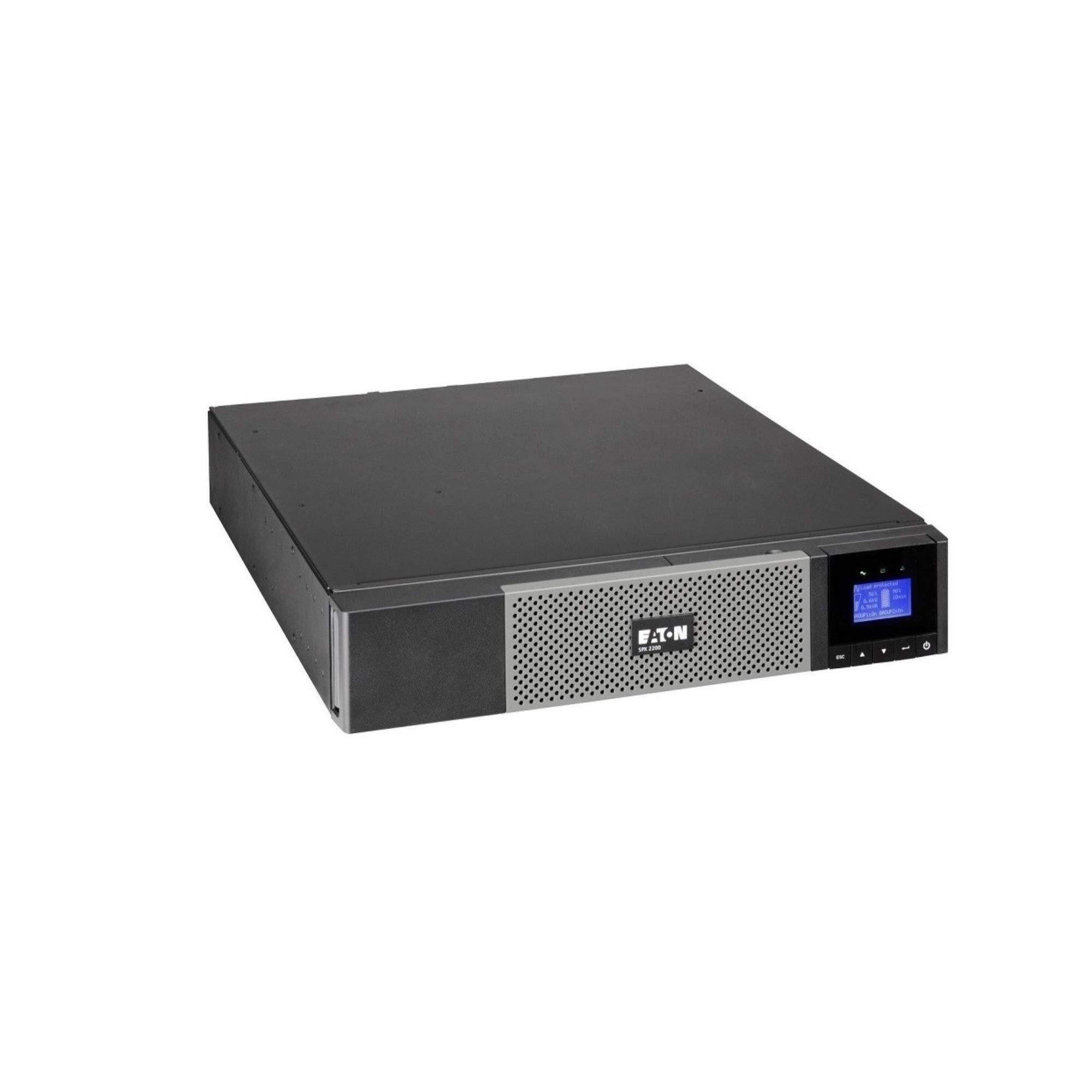
Bild: Vorderseite view of the Eaton 5PX 3000 2U Rack/Tower LCD UPS, showing the LCD display and front panel controls.
4. Erstes Einschalten
- After connecting all equipment and the input power, press and hold the power button on the front panel for a few seconds until the LCD display illuminates.
- The UPS will perform a self-test and then display its operational status.
- Allow the UPS batteries to charge for at least 24 hours before relying on them for extended backup power.
Betrieb
LCD-Anzeige vorbeiview
The front panel LCD provides real-time information about the UPS status, battery charge, load level, and various settings. Use the navigation buttons to scroll through menus and adjust parameters.
Grundfunktionen
- Ein-/Ausschalten: Press and hold the power button to turn the UPS on or off.
- Alarm stumm schalten: Briefly press any button to silence an active alarm.
- Selbsttest: Initiate a battery self-test through the LCD menu to check battery health.
Batteriemanagement
The UPS automatically manages battery charging and discharge. For optimal battery life, avoid frequent deep discharges. The LCD will indicate battery charge level and estimated runtime.
Software-Integration
The Eaton 5PX 3000 supports communication with computers and network management systems via USB or serial ports. Install Eaton's power management software (available from the Eaton website) for advanced monitoring, graceful shutdown of connected devices, and remote management capabilities.
Wartung
Batteriewechsel
The batteries in your UPS are user-replaceable. The typical lifespan of UPS batteries is 3-5 years, depending on usage and environmental conditions. The UPS LCD or management software will indicate when battery replacement is recommended. Always use genuine Eaton replacement battery modules to ensure compatibility and performance. Refer to the detailed battery replacement instructions in the full product manual or on the Eaton support webWebsite.
Reinigung
Periodically clean the exterior of the UPS with a soft, dry cloth. Ensure ventilation openings are free from dust and obstructions to maintain proper airflow and cooling.
Firmware-Aktualisierungen
Eaton may release firmware updates to improve performance or add features. Check the Eaton support website periodically for available updates and follow the provided instructions for installation.
Fehlerbehebung
This section addresses common issues you might encounter with your Eaton 5PX 3000 UPS.
| Problem | Mögliche Ursache | Lösung |
|---|---|---|
| Die USV schaltet sich nicht ein. | No input power; Battery not connected or discharged | Check power cord connection and wall outlet. Ensure internal battery connectors are secure. Allow batteries to charge. |
| Die USV piept ununterbrochen. | On battery power; Overload; Battery fault | Check input power. Reduce connected load. Perform a battery self-test or consider battery replacement. |
| Short runtime on battery | Overload; Old batteries; Batteries not fully charged | Reduce connected load. Replace batteries if they are old. Allow batteries to charge for 24 hours. |
| LCD shows an error code | Internal fault; Specific issue | Refer to the full user manual for a list of error codes and their corresponding solutions. Contact technical support if the issue persists. |
Technische Daten
Key technical specifications for the Eaton 5PX 3000 2U Rack/Tower LCD UPS (Model: 5PX3000RT2U):
- Marke: Eaton
- Modellnummer: 5PX3000RT2U
- Formfaktor: Rack/Tower (2 HE)
- Wastage: 3000 Watt
- Maximale Leistung: 2700 Watt
- Ausgang Wattage: 2430 Watt
- Bandtage: 120 Volt
- Eingangslautstärketage: 120 Volt (Wechselstrom)
- Ausgangsvolumentage: 120 Volt (Wechselstrom)
- Ausgangsstrom: 20.25 Amps
- Frequenzbereich: 47-53 Hz and 56.5-63.5 Hz
- Anzahl der Verkaufsstellen: 7
- Steckertyp: L5-30P, 5-20R, L5-30R
- Netzsteckertyp: Typ B – 3-polig (Nordamerika)
- Zusammensetzung der Batteriezellen: Bleisäure
- Runtime (typical): 20 minutes (at half load)
- Gehäusematerial: Legierter Stahl
- Farbe: Schwarz
- Artikelgewicht: 0.01 Pounds (Note: This weight is likely incorrect in the source data and should be verified with actual product specifications)
Garantie und Support
Garantieinformationen
Eaton provides a standard warranty for the 5PX 3000 UPS. The specific terms and duration of the warranty may vary by region and purchase date. Please refer to the warranty card included with your product or visit the official Eaton webAuf dieser Website finden Sie detaillierte Garantieinformationen und können sich registrieren.
Technische Unterstützung
For technical assistance, troubleshooting beyond this manual, or to inquire about replacement parts, please contact Eaton customer support. Support contact information can be found on the official Eaton webauf der Website oder in der mit Ihrem USV-Gerät gelieferten Dokumentation.