
Einführung
This manual provides essential instructions for setting up, operating, maintaining, and troubleshooting your Sony KDL-32W655A 32-inch Full HD Smart TV. Please read this manual thoroughly before using your television to ensure proper and safe operation. Keep this manual for future reference.

Figure 1: Sony KDL-32W655A Smart TV (Front View)
Sicherheitshinweise
Beachten Sie beim Benutzen Ihres Fernsehers stets die folgenden Sicherheitsvorkehrungen:
- Blockieren Sie keine Lüftungsöffnungen. Sorgen Sie für ausreichend Platz um den Fernseher herum, um eine gute Luftzirkulation zu gewährleisten.
- Stellen Sie den Fernseher nicht auf einen instabilen Wagen, Ständer, ein Stativ, eine Halterung oder einen Tisch.
- Schützen Sie das Netzkabel vor Beschädigungen durch Treten oder Einklemmen.
- Ziehen Sie bei Gewittern oder längerer Nichtbenutzung den Netzstecker des Fernsehers.
- Überlassen Sie sämtliche Wartungsarbeiten qualifiziertem Servicepersonal.
Aufstellen
1. Auspacken
Carefully remove the TV and all accessories from the packaging. Retain the packaging materials for potential future transport or service.
2. Standaufbau
Attach the desktop stand to the television. Ensure all screws are securely fastened. Refer to the diagram below for proper assembly.

Figure 2: TV with Desktop Stand Attached
Alternatively, the TV can be wall-mounted using a compatible VESA wall mount (sold separately). Consult a professional for wall-mounting installation.
3. Peripheriegeräte anschließen
Connect your external devices to the TV's ports. Ensure the TV is unplugged before making any connections.
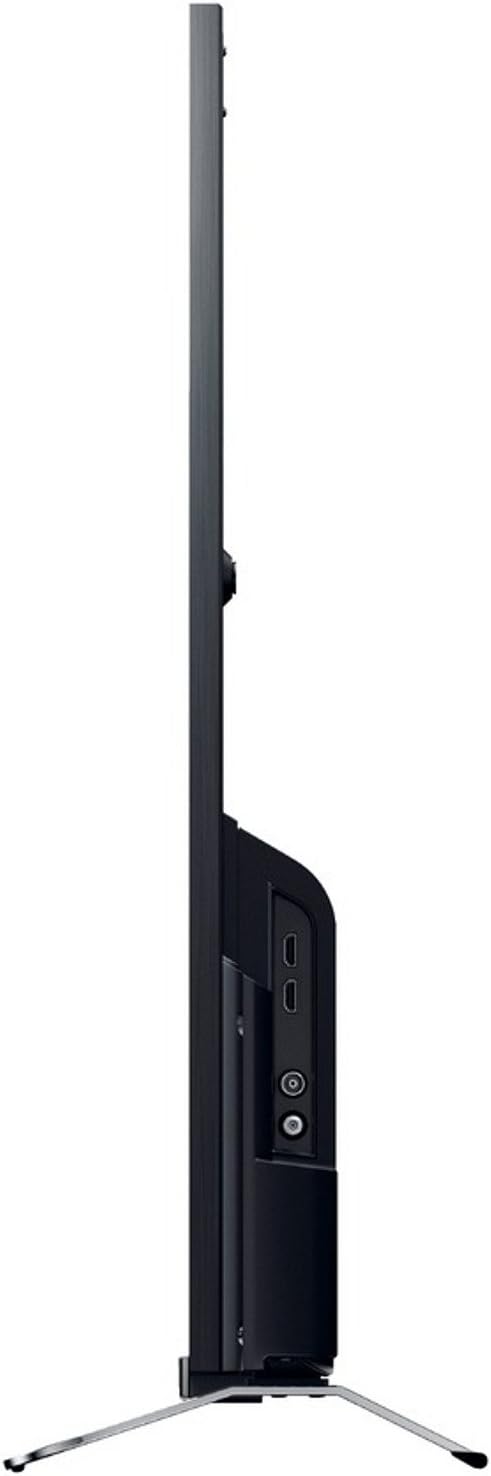
Abbildung 3: Seite View mit Anschlussporten
- Leistung: Connect the power cord to the AC inlet on the TV and then to a wall outlet.
- HDMI: Use an HDMI cable to connect devices like Blu-ray players, game consoles, or set-top boxes to the HDMI 1 or HDMI 2 Häfen.
- USB: Connect USB storage devices for media playback or DVR functionality to the USB 2.0 Hafen.
- Ethernet (LAN): Für eine kabelgebundene Internetverbindung schließen Sie ein Ethernet-Kabel an den/die/das an. LAN Hafen.
- Antenne/Kabel: Connect your antenna or cable TV feed to the RF Eingang.
- Component Video (YPbPr/YCbCr): Connect older video devices using component cables to the dedicated input.
- Zusammengesetztes Video: Connect legacy video devices using a composite video cable to the dedicated input.
- Digitaler Audioausgang (optisch): Zum Anschluss an eine Soundbar oder ein Heimkinosystem mit optischem Eingang.
- Kopfhörer: Schließen Sie Kopfhörer für privates Hören an.
4. Ersteinrichtungsassistent
After connecting all cables, plug in the TV and press the power button on the remote control. The initial setup wizard will guide you through:
- Sprachauswahl.
- Auswahl der Region/des Landes.
- Channel scanning (for DVB-C, DVB-S, DVB-T).
- Network setup (Wi-Fi or wired Ethernet).
- Uhrzeit- und Datumseinstellungen.
Bedienungsanleitung
1. Fernbedienungsfunktionen
Mit der mitgelieferten Fernbedienung können Sie alle TV-Funktionen steuern. Legen Sie die mitgelieferten Batterien unter Beachtung der Polarität in die Fernbedienung ein.
- Netzschalter: Schaltet den Fernseher ein oder aus.
- Kanal hoch/runter: Wechselt die Fernsehkanäle.
- Lautstärke erhöhen/verringern: Passt die Lautstärke an.
- Eingabequelle: Wählt die Eingangsquelle aus (HDMI, USB usw.).
- Home/Smart TV: Greift auf die Smart-TV-Oberfläche zu.
- Navigation Buttons (Arrows, Enter): Navigiert durch Menüs und bestätigt Auswahlen.
- Zurück/Rückkehr: Kehrt zum vorherigen Bildschirm oder Menü zurück.
- Optionen: Zeigt kontextbezogene Optionen an.
2. Smart-TV-Funktionen
Your Sony KDL-32W655A is equipped with Smart TV capabilities, allowing access to internet content and applications.
- Internetverbindung: Connect to your home network via Wi-Fi or Ethernet. Navigate to the Network Settings menu to configure.
- Internet-TV: Access various online streaming services and content directly from your TV.
- Anwendungen: The TV supports lifestyle applications such as Skype. An Opera browser is also available for web Surfen.
- DLNA Certified: Streamen Sie Medien von kompatiblen Geräten in Ihrem Heimnetzwerk.
3. Medienwiedergabe und -aufzeichnung
- USB-Medienwiedergabe: Insert a USB storage device into the USB port. The TV will detect the device, allowing you to browse and play supported media files (JPG, MPO for images; 3GP, AVCHD, AVI, M-JPEG, MKV, MOV, MP4, MPEG1, MPEG2, TS, XVID for video).
- Digitaler Videorekorder (DVR): Record digital TV broadcasts to a connected USB hard drive. Consult the on-screen menu for DVR setup and scheduling.
4. Bild- und Toneinstellungen
Passen Sie Ihre viewing and listening experience through the TV's settings menus.
- Bildmodi: Select from predefined picture modes such as Kino, Spiel, Foto, Sport, Und Lebendig to optimize display settings for different content types.
- Motionflow 200 Hz: This technology enhances motion clarity for fast-moving scenes.
- Toneinstellungen: Adjust bass, treble, and other audio parameters using the 6-band equalizer. The TV features 2 built-in speakers with a total RMS power of 10W.
- Bildschirmformat: Adjust the aspect ratio (16:9, 14:9, Auto, Zoom) to fit your content.
5. Zusätzliche Funktionen
- Elektronischer Programmführer (EPG): View upcoming TV programs and schedule recordings.
- Bild-in-Bild (PiP): Display two different sources simultaneously.
- Sleep Timer/On/Off Timer: Set the TV to automatically turn off or on at specified times.
Wartung
1. Reinigung des Fernsehers
- Bildschirm: Wischen Sie den Bildschirm vorsichtig mit einem weichen, fusselfreien Tuch ab. Bei hartnäckigen Flecken leicht andrücken.ampBefeuchten Sie das Tuch mit Wasser oder einem speziellen Bildschirmreiniger. Sprühen Sie keine Flüssigkeit direkt auf den Bildschirm.
- Kabinett: Wischen Sie den Fernsehschrank mit einem weichen, trockenen Tuch ab. Vermeiden Sie die Verwendung von Scheuermitteln oder Lösungsmitteln.
- Belüftung: Ensure the ventilation openings on the back of the TV remain clear of dust and obstructions.
2. Software-Updates
Periodically check for software updates to ensure your TV has the latest features and performance improvements. Updates can usually be performed via the network connection in the TV's settings menu.
Fehlerbehebung
Bevor Sie sich an den Kundendienst wenden, versuchen Sie bitte die folgenden Lösungsansätze für häufig auftretende Probleme:
| Problem | Mögliche Ursache/Lösung |
|---|---|
| Kein Strom |
|
| Kein Bild / Schwarzer Bildschirm |
|
| Kein Ton |
|
| Verbindung zum WLAN nicht möglich |
|
| Fernbedienung funktioniert nicht |
|
If the problem persists after trying these steps, please contact Sony customer support.
Technische Daten
| Besonderheit | Detail |
|---|---|
| Modell | KDL-32W655A |
| Bildschirmgröße | 32 Zoll (81.3 cm) |
| Display-Technologie | LED |
| Auflösung | Full HD (1920 x 1080 Pixel) |
| Bewegungsverbesserung | Motionflow 200 Hz |
| Seitenverhältnis | 16:9 |
| Smart TV-Funktionen | Yes (Internet TV, Skype, Opera Browser, DLNA) |
| W-lan | Ja |
| Ethernet (LAN) | 1-Anschluss |
| HDMI-Anschlüsse | 2 |
| USB 2.0-Anschlüsse | 1 |
| SCART Ports | 1 |
| Komponenten-Videoeingang | 1 |
| Composite-Video-Eingang | 1 |
| HF-Eingang | 1 |
| Digitaler Audioausgang (optisch) | 1 |
| Kopfhörerausgang | 1 |
| Tunertyp | Analog & Digital (DVB-C, DVB-S, DVB-S2, DVB-T) |
| Lautsprecher | 2 (eingebaut) |
| RMS-Nennleistung | 10 Watt |
| Stromverbrauch (im Betrieb) | 41 Watt |
| Stromverbrauch (Standby) | 0.45 Watt |
| Jährlicher Energieverbrauch | 57 kWh |
| Energieeffizienzklasse | A |
| Abmessungen (B x H x T) ohne Standfuß | 725 mm x 438 mm x 69 mm |
| Gewicht ohne Ständer | 6.8 kg |
| Gewicht mit Ständer | 7.8 kg |
| Farbe | Schwarz |
Hinweis: Technische Daten können ohne vorherige Ankündigung geändert werden.
Garantie und Support
Your Sony KDL-32W655A television comes with a limited warranty. Please refer to the warranty card included in your product packaging for detailed terms and conditions, including the warranty period and coverage.
For technical assistance, product registration, or to find authorized service centers, please visit the official Sony support webBesuchen Sie die Website oder kontaktieren Sie den Sony-Kundendienst in Ihrer Region. Halten Sie Ihren Kaufbeleg und die Seriennummer Ihres Produkts bereit, wenn Sie den Support kontaktieren.
Online-Hilfe: https://www.sony.com/electronics/support