
1. Einleitung
This manual provides detailed instructions for the assembly, operation, and maintenance of your Sky-Watcher Virtuoso S11750 Maksutov-Cassegrain telescope. Please read this manual thoroughly before using your telescope to ensure proper function and longevity.
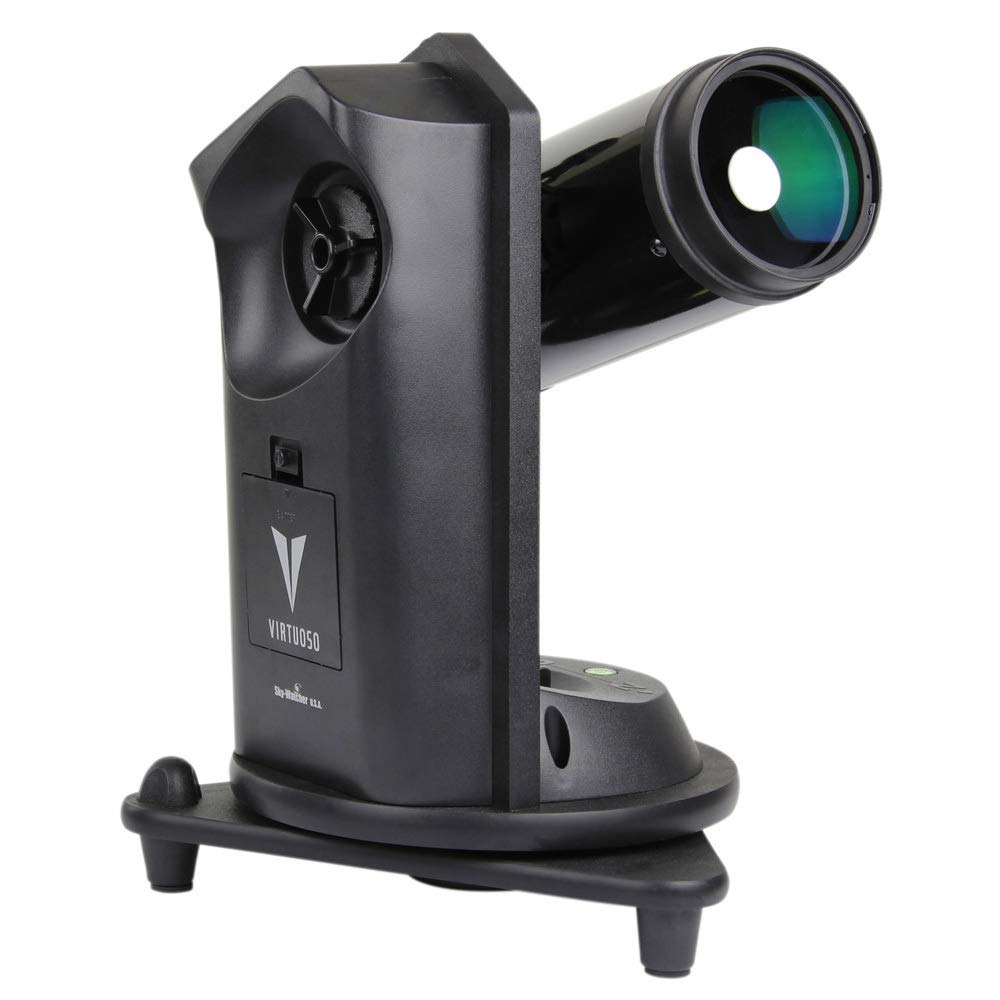
The Sky-Watcher Virtuoso S11750 features a 90 mm Maksutov-Cassegrain optical tube, a multi-function motorized alt-azimuth mount, and includes accessories for both astronomical and terrestrial viewing.
2. Lieferumfang
Packen Sie alle Artikel sorgfältig aus und überprüfen Sie, ob alle Komponenten vorhanden sind:
- Optical tube (90mm Maksutov-Cassegrain)
- Multi-function motorized alt-azimuth mount
- 5x24 finder scope
- Mounting bracket for finder scope
- Solarfilter
- Solar finder
- 10 mm 1.25" eyepiece
- 20 mm 1.25" eyepiece
- 1.25" Sterndiagonale
- Bracket for DSLR, camcorder or cell phone
- Remote shutter release cable (for Canon Rebel EOS DSLR cameras)

3. Montage und Ersteinrichtung
3.1. Auspacken und Inspektion
Remove all components from the packaging. Inspect each part for any signs of damage. Retain the packaging for future transport or storage.
3.2. Attaching the Optical Tube to the Mount
Place the motorized alt-azimuth mount on a stable, level surface. Secure the 90mm Maksutov-Cassegrain optical tube to the mount using the provided dovetail clamp. Ensure it is firmly attached to prevent accidental dislodgement.
3.3. Installing the Finder Scope
Attach the 5x24 finder scope to its mounting bracket. Slide the bracket into the receptacle on the optical tube and tighten the retaining screw. The finder scope aids in locating objects before viewing them through the main telescope eyepiece.
3.4. Inserting the Star Diagonal and Eyepiece
Insert the 1.25" Star Diagonal into the focuser of the optical tube. Secure it with the thumbscrew. Then, insert either the 10 mm or 20 mm eyepiece into the star diagonal and tighten its thumbscrew. The 20 mm eyepiece provides a wider field of view, suitable for initial object location, while the 10 mm eyepiece offers higher magnification for detailed observation.
3.5. Stromversorgung der Halterung
The motorized mount requires 8 AA batteries (not included). Open the battery compartment on the mount and insert the batteries, observing correct polarity. Alternatively, an external 12V DC power supply (not included) can be used.

4. Bedienung
4.1. Grundlegende Bedienung
Turn on the mount using the power switch. Use the directional buttons on the control panel to move the telescope in altitude (up/down) and azimuth (left/right). The mount features dual axis encoders, allowing manual movement of the telescope without losing its alignment or tracking capabilities.
4.2. Ausrichten des Suchers
Before observing, align the finder scope with the main telescope. Point the main telescope at a distant, stationary object (e.g., a distant tree or street light) during daylight hours. Center the object in the main telescope's eyepiece. Then, adjust the screws on the finder scope bracket until the same object is centered in the finder scope's crosshairs.
4.3. Astronomical Observation
Für astronomische viewing, point the telescope towards your desired celestial object. Use the 20 mm eyepiece for a wide field of view to locate the object, then switch to the 10 mm eyepiece for higher magnification. Adjust the focus knob until the image is sharp.
4.4. Solar Observation (WARNING: Use Extreme Caution)
NEVER look directly at the Sun without a certified solar filter. Permanent eye damage or blindness will result.
To safely observe the Sun, attach the provided solar filter securely to the front of the optical tube. Use the solar finder to safely aim the telescope at the Sun. The solar finder projects a small image of the Sun onto a screen, allowing you to center it without looking directly at the Sun. Once centered, you can view the Sun through the main telescope with the solar filter in place.
4.5. Terrestrial Observation
The Virtuoso S11750 can also be used for terrestrial viewing. The alt-azimuth mount allows for easy panning across landscapes. The included star diagonal provides a comfortable viewing angle, though it will present an image that is correctly oriented vertically but reversed horizontally.
4.6. Photography with the Virtuoso Mount
The mount includes a bracket for attaching a DSLR, camcorder, or cell phone. A remote shutter release cable is provided for Canon Rebel EOS DSLR cameras, enabling automatic shutter release functionality. This allows for stable imaging without touching the camera.
5. Wartung
5.1. Reinigung der Optik
Dust on the optical surfaces should be removed with a soft brush or compressed air. For smudges or fingerprints, use a specialized optical cleaning solution and a microfiber cloth. Apply the solution to the cloth, not directly to the lens, and wipe gently in a circular motion from the center outwards. Avoid touching optical surfaces with bare hands.
5.2. Cleaning the Mount
Wischen Sie die Halterung mit einem weichen, fusselfreien Tuch ab.amp cloth. Do not use abrasive cleaners or solvents. Keep the mount free from dust and moisture.
5.3. Speicherung
When not in use, store the telescope in a dry, dust-free environment. It is recommended to keep the original packaging for safe storage and transport. Replace all lens caps and covers.
6. Fehlerbehebung
| Problem | Mögliche Ursache | Lösung |
|---|---|---|
| No power to mount | Batteries are dead or incorrectly inserted; power cable disconnected. | Replace batteries, ensuring correct polarity. Check power cable connection if using external power supply. |
| Bild ist verschwommen | Out of focus; atmospheric conditions; dirty optics. | Adjust the focus knob. Wait for better seeing conditions. Clean optics as described in Maintenance section. |
| Cannot find objects with main telescope | Finder scope is not aligned. | Align the finder scope with the main telescope as described in Section 4.2. |
| Motorized tracking is inaccurate or not working | Mount not properly aligned; low batteries; mechanical issue. | Ensure the mount is level and properly aligned. Replace batteries. If issues persist, contact customer support. |
| Sucherbereich view is poor or difficult to use | Low quality finder scope; uncomfortable viewing-Winkel. | Consider upgrading to a red dot finder or a right-angle correct-image finder for improved usability. |
7. Spezifikationen
| Besonderheit | Detail |
|---|---|
| Optisches Design | Maksutov-Cassegrain |
| Öffnung | 90 mm |
| Montagetyp | Multi-function Motorized Alt-Azimuth |
| Finder-Bereich | 5 x 24 |
| Okulare enthalten | 10 mm (1.25"), 20 mm (1.25") |
| Sterndiagonale | 1.25 Zoll |
| Strombedarf | 8 AA-Batterien (nicht im Lieferumfang enthalten) |
| Technische Daten | 14 x 14 x 19 Zoll |
| Artikelgewicht | 17 Pfund |
| Modellnummer | Staffel 11750 |
8. Garantie und Kundendienst
For warranty information and technical assistance, please refer to the official Sky-Watcher webBesuchen Sie die Website oder kontaktieren Sie direkt den Kundendienst. Bewahren Sie Ihren Kaufbeleg als Kaufnachweis auf.
Manufacturer: Sky-Watcher