
1. Einleitung
The Mastech MS8232B is a compact, auto-ranging digital multimeter designed for measuring AC/DC voltage, AC/DC current, resistance, frequency, capacitance, and duty cycle. It features a 3 3/4 digit LCD display with 3999 counts, overload protection, a flashlight function, low voltage display, and automatic power-off for energy conservation. This manual provides essential information for safe and effective operation of the device.
2. Sicherheitshinweise
To ensure safe operation and avoid damage to the meter, observe the following safety precautions:
- Vor jeder Messung ist sicherzustellen, dass die Messleitungen in gutem Zustand und ordnungsgemäß angeschlossen sind.
- Nicht anwenden voltage oder Stromstärke, die die für jeden Bereich festgelegten maximalen Grenzwerte überschreitet.
- Seien Sie äußerst vorsichtig, wenn Sie mit vol arbeitentagEs darf nicht über 60 V DC oder 30 V AC RMS betrieben werden, da hiervon Stromschlaggefahr ausgeht.
- Trennen Sie vor dem Ändern von Funktionen die Messleitungen vom zu testenden Stromkreis.
- Das Messgerät darf nicht in Betrieb genommen werden, wenn es beschädigt erscheint oder das Gehäuse geöffnet ist.
- Tauschen Sie die Batterie sofort aus, sobald die Anzeige für niedrigen Batteriestand erscheint, um genaue Messwerte zu gewährleisten.
- Halten Sie sich an lokale und nationale Sicherheitsvorschriften.
3. Produktüberschreitungview
The Mastech MS8232B is a compact and versatile digital multimeter. Key features include a 4000-count display, non-contact voltage detection, and an integrated flashlight.

Figure 3.1: Mastech MS8232B Mini Digital Multimeter with test leads.
3.1 Komponenten
- LCD Anzeige: Zeigt Messwerte, Einheiten und Funktionsindikatoren an.
- Drehschalter: Dient zur Auswahl der gewünschten Messfunktion.
- FUNC-Taste: Toggles between different measurement modes within a single rotary switch position (e.g., AC/DC, Resistance/Continuity/Diode).
- Taschenlampentaste: Aktiviert die eingebaute Taschenlampe.
- Hz%-Taste: Schaltet zwischen Frequenz- und Tastverhältnismessungen um.
- Eingangsbuchsen: Zum Anschließen von Messleitungen.
- Kontaktloses Volumentage (NCV) Sensor: Erkennt AC-Voltage ohne direkten Kontakt.

Figure 3.2: Close-up of the rotary switch and function buttons, including FUNC, Flashlight, and Hz%.

Figure 3.3: The multimeter's LCD display showing a measurement.
4. Einrichtung
4.1 Einlegen der Batterie
The MS8232B is powered by batteries. To install or replace batteries:
- Stellen Sie sicher, dass das Multimeter ausgeschaltet ist.
- Suchen Sie die Abdeckung des Batteriefachs auf der Rückseite des Geräts.
- Verwenden Sie einen Schraubendreher, um die Schraube(n) zu entfernen, mit der/denen die Abdeckung befestigt ist/sind.
- Carefully remove the old batteries (if any) and insert new ones, observing the correct polarity (+ and -).
- Bringen Sie die Abdeckung des Batteriefachs wieder an und befestigen Sie sie mit der/den Schraube(n).
4.2 Anschließen der Testleitungen
Connect the red test lead to the 'VΩHz%CAP' input jack and the black test lead to the 'COM' input jack for most voltage, resistance, frequency, and capacitance measurements. For current measurements, refer to the specific current measurement section.
5. Bedienungsanleitung
Always ensure the correct function is selected and test leads are properly connected before making any measurement.
5.1 DC-Voltage (DCV) Messung
- Set the rotary switch to the 'VΩHz%' position.
- Press the 'FUNC' button until 'DC' is indicated on the display.
- Schließen Sie die rote Messleitung an den Pluspol des Stromkreises und die schwarze Messleitung an den Minuspol an.
- Lesen Sie den Bandtage-Wert auf dem LCD-Display.
5.2 AC-Voltage (ACV) Messung
- Set the rotary switch to the 'VΩHz%' position.
- Press the 'FUNC' button until 'AC' is indicated on the display.
- Schließen Sie die Messleitungen an die Wechselstromspannung an.tagDie Quelle.
- Lesen Sie den Bandtage-Wert auf dem LCD-Display.
5.3 DC Current (DCA) Measurement
- Set the rotary switch to the 'μA' or 'mA' position, depending on the expected current range.
- Press the 'FUNC' button until 'DC' is indicated on the display.
- Disconnect power to the circuit. Break the circuit and connect the multimeter in series. The red lead connects to the higher potential side, and the black lead to the lower potential side.
- Schalten Sie die Stromversorgung ein und lesen Sie den Stromwert ab.
5.4 Wechselstrommessung (ACA)
- Set the rotary switch to the 'μA' or 'mA' position, depending on the expected current range.
- Press the 'FUNC' button until 'AC' is indicated on the display.
- Disconnect power to the circuit. Break the circuit and connect the multimeter in series.
- Schalten Sie die Stromversorgung ein und lesen Sie den Stromwert ab.
5.5 Widerstandsmessung
- Den Drehschalter auf die Position 'Ω' stellen.
- Stellen Sie sicher, dass der zu prüfende Stromkreis spannungsfrei ist.
- Schließen Sie die Messleitungen an das Bauteil an, um dessen Widerstand zu messen.
- Lesen Sie den Widerstandswert auf dem LCD-Display ab.
5.6 Messung von Frequenz (Hz) und Tastverhältnis (%)
- Set the rotary switch to the 'VΩHz%' position.
- Press the 'Hz%' button to cycle between Frequency and Duty Cycle modes.
- Schließen Sie die Messleitungen an die Signalquelle an.
- Lesen Sie den Frequenz- oder Tastverhältniswert auf dem LCD-Display ab.
5.7 Kapazitätsmessung
- Set the rotary switch to the 'CAP' position.
- Stellen Sie sicher, dass der Kondensator vollständig entladen ist, bevor Sie die Messleitungen anschließen.
- Schließen Sie die Messleitungen an die Kondensatoranschlüsse an.
- Lesen Sie den Kapazitätswert auf dem LCD-Display ab.
5.8 Taschenlampenfunktion
The multimeter includes a built-in flashlight for illuminating dark work areas.
- Press the flashlight button (labeled with a light bulb icon) to turn the flashlight ON.
- Press the button again to turn the flashlight OFF.

Figure 5.1: The integrated flashlight on the Mastech MS8232B.
5.9 Berührungslose Voltage (NCV) Erkennung
Die NCV-Funktion ermöglicht die Erkennung von Wechselstromspannungen.tage ohne direkten Kontakt mit Leitern.
- Set the rotary switch to the 'NCV' position (often integrated with other functions or a dedicated position).
- Bring the top front part of the multimeter (where the NCV sensor is located) close to the conductor.
- Das Messgerät zeigt das Vorhandensein von Wechselspannung an.tage durch einen hörbaren Piepton und/oder eine visuelle Anzeige.
5.10 Automatische Abschaltung
The multimeter features an automatic power-off function to conserve battery life. If no operation is performed for approximately 15 minutes, the meter will automatically shut down. To reactivate, turn the rotary switch to OFF and then back to the desired function, or press any button.
6. Wartung
6.1 Reinigung
Löschen Sie den Fall mit Anzeigeamp Mit einem Tuch und mildem Reinigungsmittel reinigen. Keine Scheuermittel oder Lösungsmittel verwenden. Die Eingangsanschlüsse sauber und trocken halten.
6.2 Batteriewechsel
Refer to Section 4.1 for battery replacement instructions. Always use the specified battery type.
6.3 Speicherung
If the meter is not to be used for an extended period, remove the batteries to prevent leakage and damage to the unit. Store the meter in a cool, dry place away from direct sunlight.
7. Fehlerbehebung
| Problem | Mögliche Ursache | Lösung |
|---|---|---|
| Das Messgerät schaltet sich nicht ein | Leere oder falsch eingelegte Batterien | Überprüfen Sie die Batteriepolarität oder ersetzen Sie die Batterien. |
| "OL" (Überlastung) angezeigt | Der Eingangswert überschreitet den gewählten Bereich oder die maximale Kapazität des Messgeräts. | Select a higher range (if available) or ensure the input is within the meter's specifications. |
| Ungenaue Messwerte | Low battery, incorrect function selected, or poor test lead connection | Replace batteries, verify function selection, ensure leads are securely connected. |
| Keine NCV-Erkennung | Kein AC-Voltage present, or sensor not close enough to source | Überprüfen Sie die AC-Lautstärketage presence with direct contact method if safe, move sensor closer. |
8. Spezifikationen
The Mastech MS8232B offers the following technical specifications:
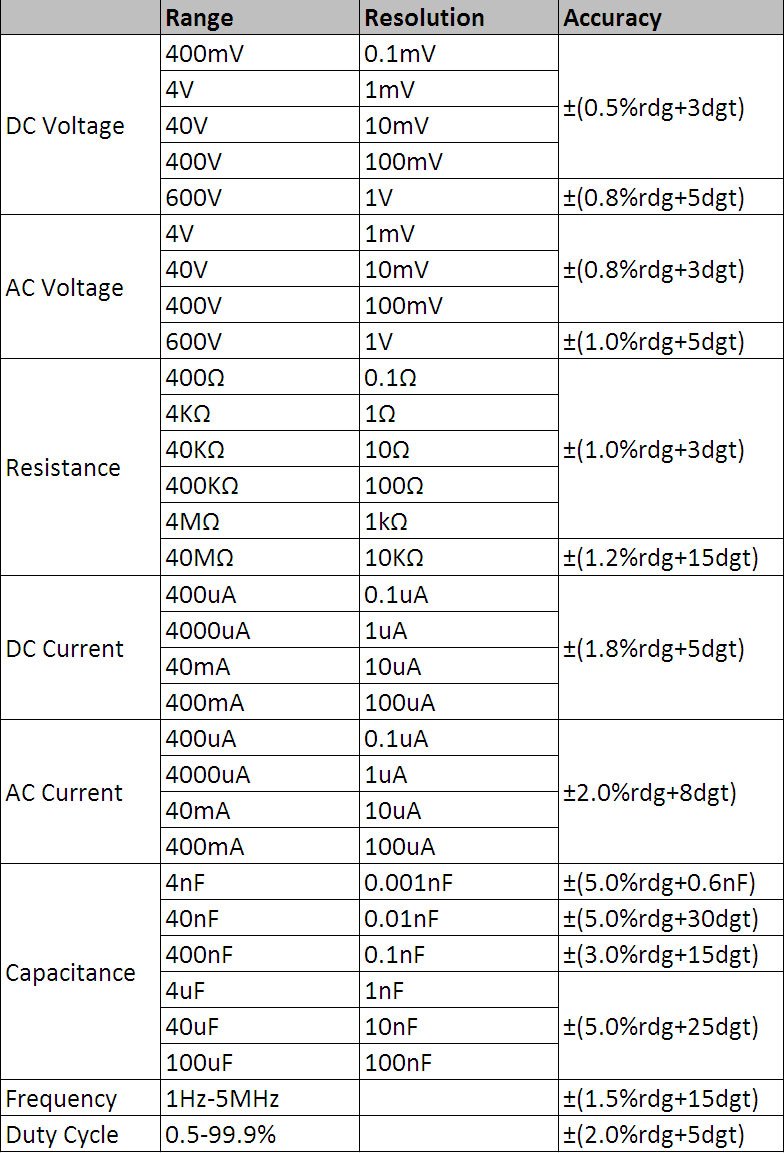
Abbildung 8.1: Tabelle mit detaillierten technischen Spezifikationen.
Allgemeine Spezifikationen:
- Anzeige: 3 3/4 digits LCD, 3999 Counts
- Überlastschutz: Rundumschutz
- Niedrige Lautstärketage Anzeige: Ja
- Automatisches Ausschalten: Ja
- Taschenlampenfunktion: Ja
- Energiequelle: Batteriebetrieben
- Sicherheitsstandards: UL 61010-1, IEC 61010-1
Messbereiche und Genauigkeit:
- DC-Voltage (DCV): 400mV / 4V / 40V / 400V / 600V (±0.5% + 3 digits)
- AC-Lautstärketage (ACV): 4V / 40V / 400V / 600V (±0.8% + 3 digits)
- Gleichstrom (DCA): 400μA / 4000μA / 40mA / 400mA (±1.8% + 5 digits)
- Wechselstrom (ACA): 400μA / 4000μA / 40mA / 400mA (±2.0% + 8 digits)
- Widerstand: 400Ω / 4KΩ / 40KΩ / 400KΩ / 4MΩ / 40MΩ (±1.0% + 3 digits)
- Frequenz: 1Hz - 5MHz (±1.5% + 15 digits)
- Kapazität: 4nF / 40nF / 400nF / 4μF / 40μF / 100μF (±5.0% + 6 digits)
- Arbeitszyklus: 0.5% - 99.9% (±2.0% + 5 digits)
9. Garantie und Support
Specific warranty information for the Mastech MS8232B Mini Digital Multimeter is not provided in the product data. For warranty claims or technical support, please contact your retailer or the manufacturer directly. Retain your proof of purchase for any warranty-related inquiries.