
Eurotime 23708-00
Eurotime LCD Digital Alarm Clock Model 23708-00 User Manual
Modell: 23708-00
Einführung
This manual provides instructions for the setup, operation, and maintenance of your Eurotime LCD Digital Alarm Clock, Model 23708-00. Please read this manual thoroughly before using the product to ensure proper function and longevity.
The Eurotime LCD Digital Alarm Clock features an LCD display, 7-color changing LED lighting, multiple natural alarm tones, and displays time, date, day of the week, and indoor temperature. It also includes a snooze function and a countdown feature.
Sicherheitshinweise
- Halten Sie das Gerät von Wasser und hoher Luftfeuchtigkeit fern.
- Setzen Sie das Gerät nicht direkter Sonneneinstrahlung oder extremen Temperaturen aus.
- Use only the specified battery type (3 x 1.5V AAA batteries).
- Mischen Sie keine alten und neuen Batterien oder verschiedene Batterietypen.
- Entsorgen Sie gebrauchte Batterien verantwortungsvoll gemäß den örtlichen Vorschriften.
- Versuchen Sie nicht, das Gerät selbst zu zerlegen oder zu reparieren. Wenden Sie sich zur Reparatur an qualifiziertes Fachpersonal.
Packungsinhalt
- Eurotime LCD Digital Alarm Clock (Model 23708-00)
- 3 x 1.5 V AAA-Batterien
- Benutzerhandbuch (dieses Dokument)
Produkt überview
Machen Sie sich mit den Komponenten und Bedienelementen Ihres Weckers vertraut.
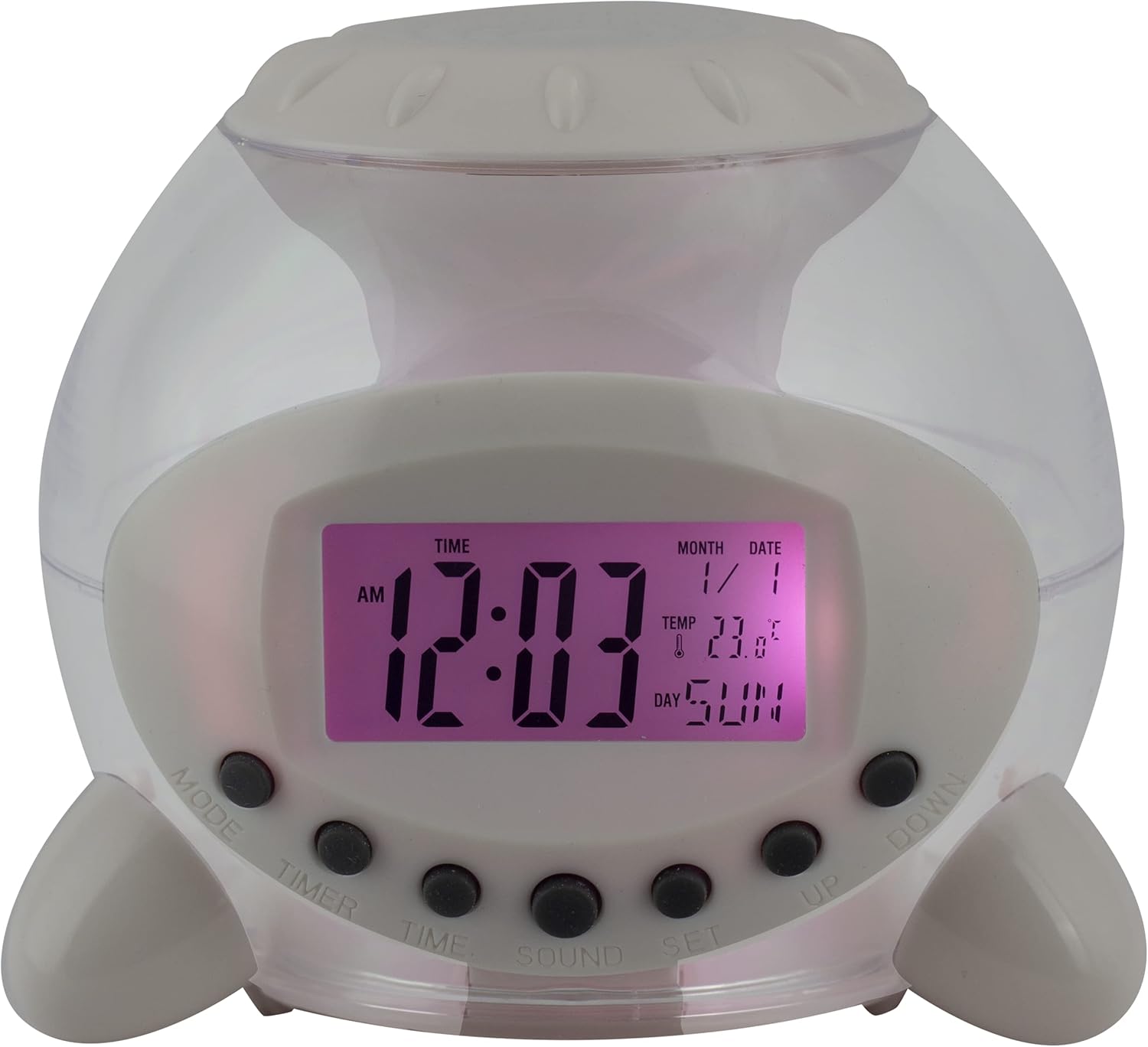
Abbildung 1: Vorderseite View of the Alarm Clock. This image displays the front of the Eurotime LCD Digital Alarm Clock, highlighting its transparent plastic housing and the central LCD screen. The screen shows the time (12:03 AM), month (1), date (1), temperature (23.8°C), and day (SUN). Below the screen are control buttons labeled MODE, TIMER, TIME, SOUND, and SET, along with UP and DOWN buttons.

Abbildung 2: Seite View mit Bedienknöpfen. This image shows a side perspective of the alarm clock, emphasizing the array of control buttons located on the front-bottom edge. The transparent housing allows a glimpse of the internal structure and the LED lighting effect. The buttons are clearly visible for user interaction.

Abbildung 3: Seite View with Internal Lighting. This image provides another side view, illustrating the transparent housing and the internal LED lighting. The light emanates from the base, creating a soft glow within the clock's structure, demonstrating its color-changing feature.
Bedientasten:
- MODUS: Switches between time display, alarm setting, and countdown timer.
- TIMER: Activates and sets the countdown timer.
- ZEIT: Dient zum Einstellen der aktuellen Uhrzeit und des Datums.
- KLANG: Selects alarm tones or natural sounds.
- EINSTELLEN: Confirms settings or enters setting mode.
- OBEN UNTEN: Adjusts values during setting modes.
Aufstellen
1. Einlegen der Batterie
- Suchen Sie das Batteriefach an der Unterseite des Weckers.
- Öffnen Sie die Abdeckung des Batteriefachs.
- Legen Sie drei (3) 1.5V AAA-Batterien ein und achten Sie dabei auf die richtige Polarität (+/-).
- Schließen Sie den Batteriefachdeckel fest.
Notiz: The clock will automatically power on after battery installation. The display may flash, indicating it's ready for time setting.
Bedienungsanleitung
1. Uhrzeit und Datum einstellen
- Drücken Sie im normalen Zeitanzeigemodus die Taste ZEIT Drücken Sie die Taste einmal. Die Stundenanzeige blinkt.
- Verwenden Sie die UP or RUNTER Tasten zum Einstellen der Stunde.
- Drücken ZEIT Um erneut auf die Minuteneinstellung zu wechseln. Einstellen mit UP or RUNTER.
- Drücken Sie weiter ZEIT um die Einstellungen für Jahr, Monat und Datum durchzugehen und jede einzelne anzupassen mit UP or RUNTER.
- Nach der Datumseinstellung drücken Sie ZEIT one last time or wait a few seconds for the settings to be saved and return to normal display.
2. Einstellen des Alarms
- Drücken Sie die MODUS button until "ALARM" appears on the display (or an alarm icon).
- Drücken Sie die SATZ Drücken Sie den Knopf. Die Ziffern der Weckzeit blinken.
- Verwenden Sie die UP or RUNTER Tasten, um die Weckstunde einzustellen.
- Drücken SATZ Um erneut auf die Minuteneinstellung zu wechseln. Einstellen mit UP or RUNTER.
- Drücken SATZ one last time to confirm the alarm time.
- Zum Aktivieren/Deaktivieren des Alarms drücken Sie die Taste UP button in alarm display mode. An alarm icon will appear/disappear.
3. Schlummerfunktion
When the alarm sounds, press any button (except SATZ or MODUS) to activate the snooze function. The alarm will pause and sound again after a few minutes (duration is adjustable, refer to advanced settings if available).
Um den Alarm vollständig auszuschalten, drücken Sie die Taste SATZ button when it is sounding.
4. Color Changing LED Lighting
The alarm clock features a 7-color changing LED light. This function typically activates automatically when the alarm sounds or can be manually toggled. Refer to the MODUS or SATZ button for specific controls related to the lighting, if available.
5. Natural Alarm Tones
To select an alarm tone:
- In alarm setting mode (after pressing MODUS to display alarm time), press the KLANG Taste.
- Verwenden Sie die UP or RUNTER buttons to cycle through the available natural alarm tones.
- Drücken SATZ , um Ihre Auswahl zu bestätigen.
6. Countdown Feature
So verwenden Sie den Countdown-Timer:
- Drücken Sie die MODUS button until "TIMER" appears on the display.
- Drücken Sie die TIMER Taste. Die Stundenziffern blinken.
- Verwenden UP or RUNTER die gewünschte Countdown-Stunde einstellen.
- Drücken TIMER again to set minutes, then seconds.
- Drücken SATZ um den Countdown zu starten.
- To pause or resume, press SATZZum Zurücksetzen drücken Sie MODUS.
Wartung
Reinigung
- Wischen Sie die Uhr mit einem weichen, trockenen Tuch ab.
- Do not use abrasive cleaners or solvents, as they may damage the plastic housing or display.
Batteriewechsel
When the display dims or functions become erratic, it is time to replace the batteries. Follow the "Battery Installation" steps in the Setup section.
Fehlerbehebung
| Problem | Mögliche Ursache | Lösung |
|---|---|---|
| Das Display ist leer oder dunkel. | Niedrige oder leere Batteriekapazität. Falscher Batterieeinbau. | Ersetzen Sie die Batterien durch neue 1.5-V-AAA-Batterien. Achten Sie auf die richtige Polarität. |
| Der Alarm ertönt nicht. | Der Alarm ist nicht aktiviert. Die Alarmlautstärke ist zu niedrig (sofern einstellbar). | Ensure the alarm icon is displayed. Check alarm settings. |
| Datum/Uhrzeit sind falsch. | Not set correctly after battery installation or power interruption. | Follow "Setting Time and Date" instructions to reset. |
| Color changing light not working. | Feature not activated or malfunction. | Check operating instructions for light activation. If problem persists, contact support. |
Technische Daten
- Marke: Eurotime
- Modellnummer: 23708-00
- Produktabmessungen: 8.99 x 8.99 x 8 cm
- Gewicht: 120 g
- Material: Plastik
- Anzeigetyp: Digital LCD
- Besondere Merkmale: Calendar display, Snooze, Alarm, 7-Color Changing LED, Natural Alarm Tones, Countdown Feature, Indoor Temperature Display
- Energiequelle: 3 x 1.5V AAA-Batterien (im Lieferumfang enthalten)
Garantie und Support
For warranty information or technical support, please refer to the retailer where the product was purchased or visit the official Eurotime webBewahren Sie Ihren Kaufbeleg als Kaufnachweis auf.
Ask a question about this manual
Ask about setup, troubleshooting, compatibility, parts, safety, or missing instructions. Manuals+ will review the question and use this page’s manual context to help answer it.