
Einführung
This manual provides essential information for the proper use and care of your Beats Studio Wireless Over-Ear Headphones. Please read these instructions carefully before using your headphones to ensure optimal performance and longevity. The Beats Studio Wireless headphones offer a premium audio experience with wireless connectivity and Adaptive Noise Canceling technology.
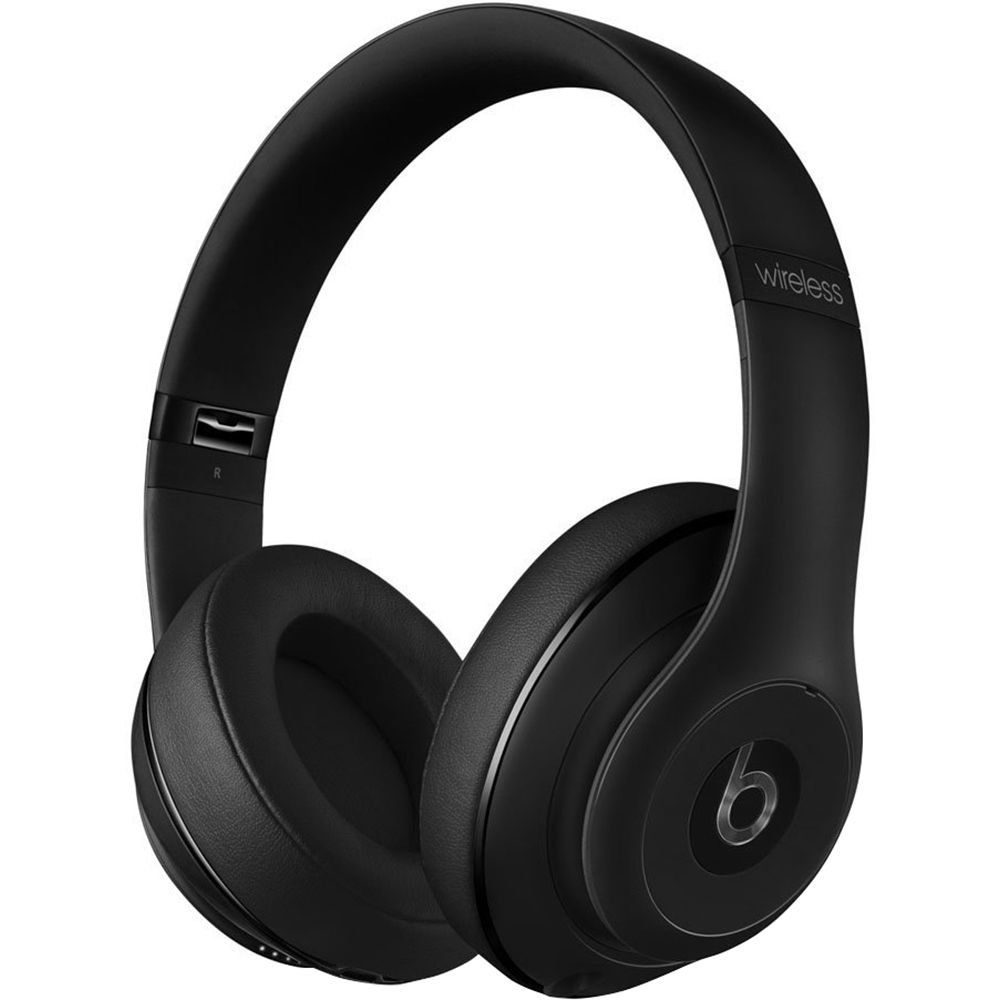
Image: Beats Studio Wireless Over-Ear Headphones in Matte Black, showcasing das elegante Design.
Lieferumfang
Überprüfen Sie, ob alle Artikel in Ihrem Paket vorhanden sind:
- Beats Studio Wireless over-ear headphones
- 3.5mm audio cable with RemoteTalk (for wired connection and controls)
- Standard 3.5 mm audio cable (for wired connection without RemoteTalk features)
- USB 2.0 cable (USB-A to USB Micro-B) for charging
- Hard-shell carrying case with carabiner clip

Image: The Beats Studio Wireless headphones, hard-shell carrying case, and various cables laid out from the packaging.
Aufstellen
1. Aufladen der Kopfhörer
Before first use, fully charge your Beats Studio Wireless headphones. A full charge provides approximately 12 hours of wireless playback or 20 hours of wired playback with Adaptive Noise Canceling enabled.
- Connect the small end of the USB 2.0 cable (USB-A to USB Micro-B) to the Micro-USB port on the right earcup of the headphones.
- Connect the larger end of the USB cable to a USB power adapter (not included) or a powered USB port on a computer.
- The Fuel Gauge LEDs on the right earcup will indicate charging status. When all five LEDs are solid white, the headphones are fully charged.
Notiz: The headphones cannot be used while charging.
2. Bluetooth-Kopplung
Koppeln Sie Ihre Kopfhörer mit Ihrem Bluetooth-fähigen Gerät für kabelloses Audiovergnügen.
- Stellen Sie sicher, dass Ihre Kopfhörer geladen und ausgeschaltet sind.
- Press and hold the power button on the right earcup for 3-5 seconds until the Fuel Gauge LEDs begin to pulse. This indicates pairing mode.
- Gehen Sie auf Ihrem Gerät zu den Bluetooth-Einstellungen und aktivieren Sie Bluetooth.
- Select "Beats Studio Wireless" from the list of available devices.
- Once paired, the Fuel Gauge LEDs will turn solid white.
The headphones have a Bluetooth range of up to 30 feet (9 meters).
3. Kabelgebundene Verbindung
For a wired connection, use the provided 3.5mm audio cables.
- Plug one end of the 3.5mm audio cable into the audio input port on the left earcup.
- Stecken Sie das andere Ende in die 3.5-mm-Audioausgangsbuchse Ihres Geräts.
The RemoteTalk cable allows for inline control of music and calls when connected to compatible devices.
Bedienungsanleitung
1. Ein-/Ausschalten
- So schalten Sie das Gerät ein: Press and hold the power button on the right earcup until the Fuel Gauge LEDs illuminate.
- So schalten Sie das Gerät aus: Press and hold the power button until the Fuel Gauge LEDs turn off.
2. Controls (Wireless Mode)
The "b" button on the left earcup and the volume buttons control playback and calls.
- Abspielen/Pause: Press the "b" button once.
- Nächster Titel: Press the "b" button twice quickly.
- Vorheriges Lied: Press the "b" button three times quickly.
- Lautstärke erhöhen: Press the top volume button.
- Lautstärke runter: Press the bottom volume button.
- Anruf annehmen/beenden: Press the "b" button once during an incoming call or active call.
- Anruf ablehnen: Press and hold the "b" button for 2 seconds during an incoming call.
- Sprachassistenten aktivieren: Press and hold the "b" button for 2 seconds (functionality depends on device).
3. Adaptive Noise Canceling (ANC)
The Beats Studio Wireless headphones feature Dual-Mode Adaptive Noise Canceling. ANC is automatically active when the headphones are powered on. There are two modes:
- Full ANC: Engaged when listening to music or media, providing maximum noise reduction.
- ANC Only: When the audio cable is unplugged and the headphones are powered on, ANC will automatically switch to a more aggressive mode to reduce external noise without playing audio.
Wartung
1. Reinigung
To maintain the appearance and performance of your headphones:
- Wischen Sie die Ohrmuscheln und den Kopfbügel mit einem weichen, trockenen, fusselfreien Tuch ab.
- Verwenden Sie keine Scheuermittel, Alkohol oder chemische Lösungsmittel.
- Vermeiden Sie, dass Feuchtigkeit in die Öffnungen eindringt.
2. Speicherung
When not in use, store your headphones in the provided hard-shell carrying case to protect them from damage.
- Fold the headphones carefully to fit into the case.
- Keep headphones away from extreme temperatures and humidity.
3. Batteriepflege
So verlängern Sie die Akkulaufzeit:
- Vermeiden Sie häufiges vollständiges Entladen des Akkus.
- Laden Sie die Kopfhörer regelmäßig auf, auch wenn Sie sie längere Zeit nicht benutzen.
- Kühl und trocken aufbewahren.
Fehlerbehebung
If you encounter issues with your Beats Studio Wireless headphones, try the following solutions:
Kein Strom / Schaltet sich nicht ein
- Stellen Sie sicher, dass die Kopfhörer vollständig aufgeladen sind. Verbinden Sie sie mit dem USB-Kabel mit einer Stromquelle.
- Überprüfen Sie das USB-Kabel und den Ladeanschluss auf Beschädigungen.
No Sound / Intermittent Audio
- Kabellos:
- Stellen Sie sicher, dass die Kopfhörer mit Ihrem Gerät gekoppelt und verbunden sind.
- Überprüfen Sie die Lautstärke sowohl an den Kopfhörern als auch an Ihrem Gerät.
- Move closer to your device to avoid interference or exceeding Bluetooth range.
- Versuchen Sie, die Kopfhörer von Ihrem Gerät zu entkoppeln und anschließend erneut zu koppeln.
- Verdrahtet:
- Ensure the 3.5mm audio cable is securely plugged into both the headphones and your audio source.
- Try a different 3.5mm audio cable if available.
Koppelungsprobleme
- Ensure the headphones are in pairing mode (pulsing Fuel Gauge LEDs).
- Schalten Sie Bluetooth an Ihrem Gerät aus und anschließend wieder ein.
- Forget "Beats Studio Wireless" from your device's Bluetooth list and attempt to pair again.
- Stellen Sie sicher, dass keine anderen Bluetooth-Geräte den Kopplungsvorgang stören.
Adaptive Noise Canceling (ANC) Not Working
- Ensure the headphones are powered on. ANC requires power.
- Check for any obstructions around the external microphones on the earcups.
Technische Daten
Key technical specifications for the Beats Studio Wireless Over-Ear Headphones:
- Modellname: Studio
- Konnektivitätstechnologie: Bluetooth (kabellos), 3.5-mm-Klinkenanschluss (kabelgebunden)
- Drahtlose Kommunikationstechnologie: Bluetooth
- Bluetooth-Reichweite: Bis zu 30 Fuß (9 Meter)
- Geräuschpegelkontrolle: Active Noise Cancellation (Dual-Mode Adaptive Noise Canceling)
- Akkulaufzeit: Approximately 12 hours (wireless), 20 hours (wired with ANC)
- Akku-Typ: 1 Lithium-Ionen-Akku (wiederaufladbar)
- Steuerungstyp: Media Control (on-earcup "b" button, volume buttons)
- Mikrofon: Eingebaut für Freisprechanrufe
- Formfaktor: Über dem Ohr
- Ohrplatzierung: Über dem Ohr
- Material: Plastik
- Artikelgewicht: Ungefähr 9.2 Unzen (0.26 Kilogramm)
- Produktabmessungen: 9.6 x 7.3 x 4.5 Zoll
- Hersteller: Beats Electronics, LLC
- Datum der Erstveröffentlichung: 1. Dezember 2013

Bild: Eine Nahaufnahme view of the headphone's inner band, displaying the model number B0501.
Garantie und Support
For warranty information and customer support, please refer to the official Beats webBesuchen Sie die Website oder kontaktieren Sie direkt den Kundenservice. Bewahren Sie Ihren Kaufbeleg für Garantieansprüche auf.
Notiz: This product is an older model. Specific warranty terms may vary based on purchase date and region. Please consult the manufacturer's official resources for the most accurate and up-to-date information.
Weitere Hilfe erhalten Sie unter: Beats-Support