
SureFlap 5060180390389
SureFlap DualScan Microchip Cat Door User Manual
Model: 5060180390389 | Brand: SureFlap
1. Produktüberschreitungview
The SureFlap DualScan Microchip Cat Door is designed to provide secure and controlled access for your cats while preventing entry by unwanted animals. It operates by reading your cat's existing microchip, allowing individual programming for entry and exit permissions for up to 32 cats. This dual-sided scanning capability ensures only authorized pets can use the door in either direction.
Hauptmerkmale:
- Compatible with all common microchips, utilizing your cat's existing microchip for identification.
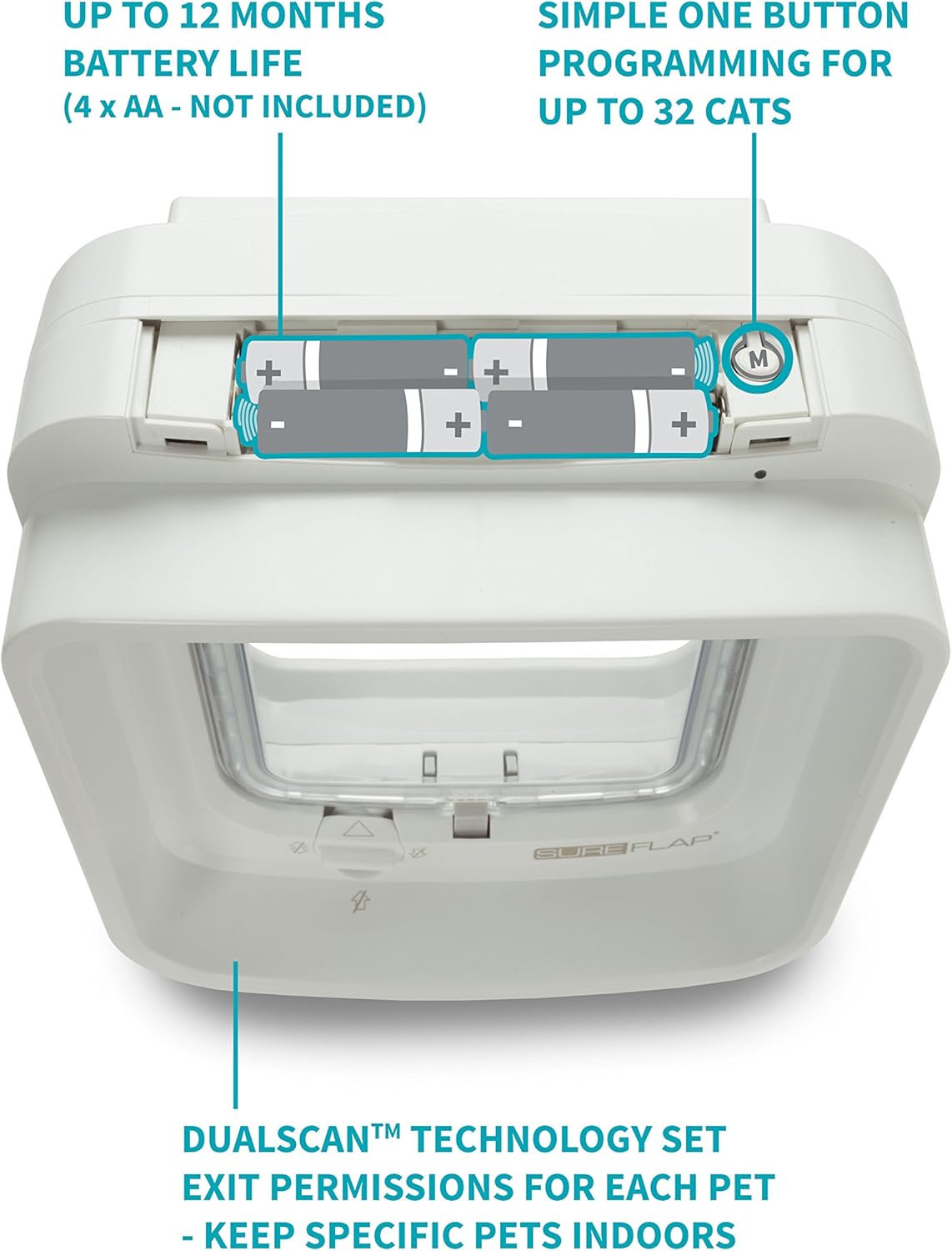
- DualScan technology allows setting individual exit permissions for each pet, keeping specific pets indoors.
- Capable of storing up to 32 unique pet microchip IDs.
- Versatile installation options: can be installed in doors, windows, or walls (accessories available separately for specific installations like glass doors or thick walls).
- Door opening dimensions: 4 3/4 inches (H) x 5 5/8 inches (W).
- Requires 4 AA batteries (not included), providing up to a year of normal use.
- Features a transparent flap and low noise level operation.
- Includes a display for low battery power indication.

2. Einrichtung und Installation
2.1 Auspacken und Komponenten
Vor der Installation sicherstellen, dass alle Komponenten vorhanden sind:
- 1 x SureFlap DualScan Microchip Cat Flap unit
- 1 x Benutzerhandbuch (dieses Dokument)
- 3 x Sets of screws of varying lengths
2.2 Einlegen der Batterie
The SureFlap DualScan requires 4 AA (mignon) batteries. These are not included. To install:
- Locate the battery compartment on the top of the unit.
- Öffnen Sie die Batterieabdeckung.
- Legen Sie 4 AA-Batterien ein und achten Sie dabei auf die richtige Polarität (+/-).
- Schließen Sie die Batterieabdeckung fest.
2.3 Programming Microchips
The cat door can store up to 32 unique microchip IDs. To program your cat's microchip:
- Press the 'M' (Memory) button located near the battery compartment. The indicator light will flash.
- Encourage your cat to pass through the cat door. As the cat's microchip is read, the door will register it.
- The indicator light will change to confirm successful registration.
- Wiederholen Sie den Vorgang für alle Katzen, denen Sie Zugang gewähren möchten.
2.4 Überlegungen zur Installation
The SureFlap DualScan Microchip Cat Door is designed for installation in various materials. The total measurements are 21 x 21 cm, with a cut-out size of 16.6 x 17.2 cm. The installation depth ranges from 3-60 mm.
- Türen: Suitable for most standard doors. Use the provided screws of appropriate length.
- Wände: For thicker walls, tunnel elements (available separately) can be used to extend the depth.
- Glass Doors/Windows: An extra mounting adapter (available separately) is required for installation in glass.


3. Bedienungsanleitung
3.1 Microchip Identification
The SureFlap DualScan Microchip Cat Door uses your cat's unique implanted microchip to control access. When an authorized cat approaches the door, the scanner reads their microchip, and if recognized, the locking mechanism disengages, allowing the cat to pass through. This prevents stray animals or wildlife from entering your home.
3.2 DualScan Technology and Exit Permissions
The DualScan feature allows you to set individual permissions for each cat, controlling both entry and exit. This is particularly useful if you need to keep certain cats indoors while allowing others to go outside. The two-sided scanner ensures precise control over which cats can exit and which must remain inside.
3.3 Manual Locking Options
The cat door features a manual 4-way lock, allowing you to control access regardless of microchip settings:
- Nur in: Allows cats to enter but not exit.
- Nur im Handel erhältlich: Allows cats to exit but not enter.
- Gesperrt: Prevents both entry and exit.
- Freigeschaltet: Allows free movement in both directions (subject to microchip permissions).

4. Wartung
4.1 Batteriewechsel
The cat door is designed for long battery life, typically up to one year with normal use. A low battery power display will illuminate when the batteries need replacing. Replace all 4 AA batteries simultaneously to ensure optimal performance.
4.2 Reinigung
Regular cleaning of the cat door, especially the transparent flap and the microchip reading area, will ensure smooth operation and longevity. Use a soft, damp Mit einem Tuch und mildem Reinigungsmittel reinigen. Scheuermittel und Lösungsmittel vermeiden.
5. Fehlerbehebung
- Cat not using the door: Some cats may require training to get accustomed to using the microchip cat door. Start by propping the flap open and enticing your cat with treats. Gradually lower the flap as they become more comfortable. The slight clicking sound when the microchip is read can also be a training aid.
- Unwanted animals entering: Ensure the microchip programming is correct and the door is not set to "Unlocked" or "In Only" if you wish to restrict access. Verify that the door is installed correctly and securely, especially if using tunnel extenders, to prevent gaps. While designed to deter, highly persistent or intelligent wildlife (like raccoons) may attempt to manipulate the flap.
- Door not recognizing microchip: Check battery levels. Ensure the cat is passing close enough to the scanner. In some rare cases, environmental interference might occur; try repositioning the door if possible, or contact support for advanced troubleshooting.
- Drafts or poor seal: Ensure the installation is flush and sealed properly. While the door provides a good seal, extreme weather conditions or improper installation can lead to minor drafts. Consider additional weather stripping if necessary.
6. Spezifikationen
| Attribut | Wert |
|---|---|
| Markenname | SureFlap |
| Modellnummer | 5060180390389 |
| ASIN | B00GAZZIMY |
| Artikelgewicht | 2.2 Pfund (1 Kilogramm) |
| Produktabmessungen (L x B x H) | 8.27 x 8.27 x 5.83 Zoll |
| Abmessungen der Artikelverpackung (L x B x H) | 10 x 9.16 x 7.17 Zoll |
| Door Opening Size (HxW) | 4 3/4" H x 5 5/8" W (14.2 x 12.0 cm flap size) |
| Größe ausschneiden | 16.6 x 17.2 cm |
| Gesamtmessungen | 21 x 21 cm |
| Einbautiefe | 3-60 mm |
| Batterien erforderlich | 4 x AA (nicht im Lieferumfang enthalten) |
| Max. Programmed Cats | 32 |
| Farbe | Weiß |
| Hersteller | Sure petcare |
| Ursprungsland | China |
7. Garantie und Support
7.1 Garantieinformationen
The SureFlap DualScan Microchip Cat Door comes with a 3-year guarantee from the date of purchase. This warranty covers defects in materials and workmanship under normal use. Please retain your proof of purchase for warranty claims.
7.2 Kundendienst
For further assistance, technical support, or warranty claims, please contact SureFlap customer service. Refer to the SureFlap website or the packaging for the most up-to-date contact information.
Ask a question about this manual
Ask about setup, troubleshooting, compatibility, parts, safety, or missing instructions. Manuals+ will review the question and use this page’s manual context to help answer it.