
1. Produktüberschreitungview
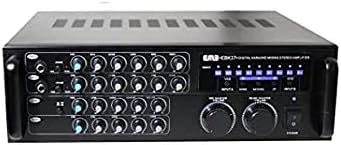
The EMB Pro EBK37BT is a 700-watt digital rack mountable karaoke mixer stereo amplifier designed for versatile audio mixing and amplification. It features USB, Echo, and Bluetooth streaming capabilities, making it suitable for various audio setups. The intuitive control panel allows for precise adjustment of sound parameters, ensuring stable audio levels and high-quality performance.

This image shows the front panel of the EMB Pro EBK37BT karaoke mixer amplifier, highlighting its various controls and inputs.
2. Hauptmerkmale
- 700 Watt Spitzenleistung: Delivers robust audio output for various applications.
- Zwei Mikrofoneingänge: Allows for simultaneous use of two microphones with individual controls.
- Bass Functions: Dedicated bass controls for enhanced low-frequency sound.
- Echo Selector: Adjustable echo effects for vocal enhancement.
- Remote & Volume Control: Includes a remote control for convenient operation and master volume control.
- USB & Bluetooth Streaming: Integrated USB port and Bluetooth connectivity for versatile audio playback.
- Rack Mountable Design: Standard size for easy integration into professional audio racks.
3. Packungsinhalt
- EMB Pro EBK37BT Karaoke Mixer Stereo Ampschwerer
- Fernbedienung
- Stromkabel
- Bedienungsanleitung
4. Sicherheitshinweise
Please read all instructions carefully before operating this device. Keep this manual for future reference.
- Energiequelle: Connect the unit to a power supply of the type indicated on the rear panel.
- Belüftung: Sorgen Sie für ausreichende Belüftung. Blockieren Sie keine Belüftungsöffnungen.
- Wasser und Feuchtigkeit: Setzen Sie das Gerät weder Regen noch Feuchtigkeit aus. Stellen Sie keine mit Flüssigkeiten gefüllten Gegenstände auf das Gerät.
- Hitze: Stellen Sie das Gerät nicht in der Nähe von Wärmequellen wie Heizkörpern, Heizlüftern, Öfen oder anderen Geräten auf, die Wärme erzeugen.
- Wartung: Do not attempt to service the unit beyond what is described in this manual. Refer all servicing to qualified service personnel.
- Erdung: This unit uses a 3-prong power cable. Ensure proper grounding to prevent electrical shock.
5. Einrichtung
5.1 Rackmontage (optional)
The EBK37BT is designed to be rack mountable. If you intend to install it in an audio rack, ensure sufficient space for ventilation. The unit includes side wings for secure rack installation.
5.2 Lautsprecheranschluss
Connect your passive speakers to the "SPEAKER" binding post terminals on the rear panel. Ensure correct polarity (red to red, black to black) for optimal sound quality. The binding posts allow for bare wire connections or banana plugs.
This image displays the rear panel of the amplifier, showing the speaker terminals and various input/output options.
5.3 Stromanschluss
Connect the provided power cable to the AC input on the rear panel and then to a suitable wall outlet. Ensure the voltage selector (115V/230V) is set correctly for your region before powering on the unit.
5.4 Bluetooth-Antenne
Extend the Bluetooth antenna on the rear panel for optimal wireless signal reception. While it often works fine in a lowered position, extending it can improve range and stability.
6. Bedienungsanleitung
6.1 Ein-/Ausschalten
Drücken Sie den „POWER“-Schalter auf der Vorderseite, um das Gerät einzuschalten. ampVerstärker ein- oder ausgeschaltet. Die Betriebsanzeige leuchtet, wenn das Gerät eingeschaltet ist.
6.2 Initial Volume Settings
Before playing any audio, ensure all individual volume knobs (MIC1, MIC2, ECHO, MUSIC) are set to their minimum position. Gradually raise the "MIC MASTER VOLUME" and "MUSIC MASTER VOLUME" knobs to a comfortable listening level.

Dieses Bild liefert eine detaillierte Ansicht. view of the front panel, showing all individual channel controls and master volume knobs.
6.3 Eingangsauswahl
Use the "INPUT" selector button on the front panel to cycle through available audio sources: USB, Bluetooth, VCD, and DVD. The selected input will be indicated on the display.
6.4 Mikrofonnutzung
Plug your microphones into the "MIC1" or "MIC2" 1/4-inch inputs on the front panel. Adjust the individual "VOL", "BAL", "ECHO", "LOW", "MID", and "HIGH" knobs for each microphone channel to achieve desired sound. A -10dB gain control is available for each mic input.
6.5 Musikwiedergabe
Connect your music source (USB drive, Bluetooth device, VCD/DVD player) and select the corresponding input. Adjust the "MUSIC" volume, balance, and tone controls (LOW, MID, HIGH) to blend with the microphone audio.
7. Detailed Connections
7.1 Anschlüsse an der Vorderseite
- MIC1/MIC2 Eingänge: 1/4-inch jacks for dynamic microphones.
- USB-Anschluss: Zum Abspielen von Audio files von einem USB-Laufwerk.
7.2 Anschlüsse auf der Rückseite
- Lautsprecherausgänge: Binding post terminals for connecting passive speakers.
- AC-Lautstärketage Selektor: Umschalten zwischen 115-V- und 230-V-Stromversorgung.
- Fuse Tray: Contains the replaceable fuse for power protection.
- Bluetooth-Antenne: Extend for optimal Bluetooth reception.
- MIC Insert: 1/4-inch inputs for microphones, identical to front panel.
- Input Video Out: Analog video outputs (VCD, DVD).
- Audio Outputs (MIC, REC, LINE): RCA outputs for microphone-only, recording, and variable line-level audio.
- Audio Inputs (VCD, DVD): RCA-Eingänge für externe Audioquellen.
- Effects Loop (IN/OUT): RCA connections for external effects processors or EQs. Ensure jumpers are in place if not using external effects.
- Schlüsselcontroller: Input for an external key controller.
- Volume Reset (ON/OFF): Switch to enable/disable automatic volume reset upon power cycle.
8. Bedienelemente
8.1 Microphone Controls (MIC1, MIC2)
- LAUTSTÄRKE: Adjusts the volume level of the individual microphone.
- BAL: Adjusts the stereo balance (left/right) for the microphone.
- ECHO: Controls the amount of echo effect applied to the microphone.
- NIEDRIG/MITTEL/HOCH: 3-band equalizer for adjusting the tone of the microphone.
- -10dB-Dämpfung: Reduces the input gain by 10dB for loud microphones.
8.2 Echo Controls
- LAUTSTÄRKE: Master volume for the echo effect.
- NIEDRIG/HOCH: 2-band equalizer for the echo effect.
- WIEDERHOLEN: Adjusts the number of echo repetitions.
- VERZÖGERUNG: Adjusts the time between echo repetitions.
- STEREO/MONO: Selects stereo or mono output for the echo.
8.3 Musiksteuerung
- LAUTSTÄRKE: Adjusts the volume level of the music source.
- BAL: Adjusts the stereo balance (left/right) for the music.
- NIEDRIG/MITTEL/HOCH: 3-band equalizer for adjusting the tone of the music.
8.4 Hauptsteuerung
- MIC MASTER VOLUME: Overall volume control for all microphone inputs.
- MUSIC MASTER VOLUME: Overall volume control for all music inputs.
- EINGANG: Selects the active audio input source.
- PITCH Control: Adjusts the pitch of the music playback.
9. Wartung
- Reinigung: Reinigen Sie das Gerät mit einem weichen, trockenen Tuch. Verwenden Sie keine Scheuermittel oder Lösungsmittel.
- Sicherungswechsel: If the unit does not power on, check the fuse in the rear panel tray. Replace with a fuse of the same type and rating (e.g., 230V/1.6A or 115V/4A).
- Belüftung: Halten Sie die Lüftungsöffnungen frei, um eine Überhitzung zu vermeiden.
10. Fehlerbehebung
- Kein Strom: Check the power cable connection, the power switch, and the fuse. Ensure the voltagDer e-Selektor ist korrekt eingestellt.
- Kein Ton: Verify all input and output connections. Check volume levels (individual, master, and source device). Ensure correct input source is selected. If using external effects, check effects loop jumpers.
- Verzerrter Klang: Reduce volume levels. Check for proper impedance matching with speakers. Ensure cables are securely connected.
- Crackling/Popping Noise: Check all cable connections for looseness or damage. Ensure proper grounding of all connected audio equipment to avoid ground loops.
- Probleme mit der Bluetooth-Verbindung: Ensure the Bluetooth antenna is extended. Check that the amplifier is in Bluetooth input mode. Forget the device on your phone/tablet and try pairing again.
11. Spezifikationen
| Artikelgewicht | 16 Pfund |
| Technische Daten | 18.5 x 7.5 x 15.5 Zoll |
| Artikelmodellnummer | EBK37BT |
| Stromquelle | Kabelgebundene Elektrik |
| Leistungsabgabe | 700 Watt (Spitzenleistung) |
12. Garantie und Support
This product comes with a standard manufacturer's warranty. For specific warranty details, please refer to the warranty card included in your package or contact EMB customer support.
For technical support or service inquiries, please visit the official EMB webBesuchen Sie die Website oder kontaktieren Sie den Kundendienst. Bewahren Sie Ihren Kaufbeleg als Kaufnachweis für Garantieansprüche auf.