
Engineer SKZ-14
Engineer SKZ-14 Soldering Iron Tip
Bedienungsanleitung
1. Produktüberschreitungview
The Engineer SKZ-14 is a high-quality BC-type soldering iron tip designed for use with the Engineer SKZ series soldering irons, specifically compatible with the SKZ-10 model. This tip is engineered for efficient heat transfer and durability, making it suitable for a wide range of soldering applications.
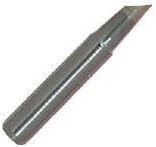
Figure 1: Engineer SKZ-14 BC-type soldering iron tip. This image displays the metallic, tapered design of the tip, indicating its form factor for soldering applications.
2. Einrichtung
Before using the SKZ-14 soldering iron tip, ensure your soldering iron is unplugged and cool. This tip is designed for the Engineer SKZ-10 soldering iron.
- Vorbereitung: Ensure the soldering iron is turned off and completely cooled down.
- Alte Spitze entfernen (falls zutreffend): Carefully unscrew or pull out the existing soldering tip from the iron's heating element. Use heat-resistant gloves if the iron was recently used.
- Neuen Tipp einfügen: Gently insert the SKZ-14 tip into the heating element opening. Ensure it is fully seated to allow for proper heat transfer.
- Sicherheitstipp: If your soldering iron has a retaining screw or mechanism, tighten it to secure the tip in place. Do not overtighten.
- Erstverzinnung: Before first use, or after prolonged storage, it is recommended to tin the tip. Heat the iron to its operating temperature and apply a small amount of solder to the tip's working surface until it is fully coated. This protects the tip and improves heat transfer.
3. Betriebsrichtlinien
Proper operation of the soldering iron tip ensures optimal performance and longevity.
- Temperaturkontrolle: Use the lowest effective temperature for your soldering task. Excessive heat can shorten tip life and damage components.
- Reinigung der Spitzen: Regularly clean the tip during use. Wipe it on a damp Mit einem Schwamm oder Messingwolle reinigen, um altes Lötzinn und Oxidation zu entfernen.
- Apply Solder to Workpiece: Always apply solder to the joint, not directly to the tip. The tip should heat the components, allowing the solder to flow onto the heated surfaces.
- Tinning After Use: After each soldering session, apply a fresh coat of solder to the tip before turning off the iron. This 'tins' the tip, protecting it from oxidation during storage.
4. Wartung
Regular maintenance is crucial for extending the life of your soldering iron tip.
- Tägliche Reinigung: Anzeige verwendenamp cellulose sponge or brass wire cleaner to wipe the tip frequently during soldering to remove flux residue and oxidized solder.
- Re-tinning: If the tip becomes discolored or solder does not adhere well, re-tin it by applying fresh solder. If severe oxidation occurs, a tip tinner compound can be used.
- Vermeiden Sie Scheuermittel: Never use abrasive materials like sandpaper or files to clean the tip, as this will damage the protective plating.
- Lagerung: Store the tip in a dry environment. If storing for an extended period, ensure it is properly tinned.
5. Fehlerbehebung
Häufige Probleme und ihre Lösungen:
| Problem | Mögliche Ursache | Lösung |
|---|---|---|
| Spitze erwärmt sich nicht | Poor contact with heating element; faulty soldering iron. | Ensure tip is fully inserted. Check soldering iron's power and heating element. |
| Solder does not stick to tip | Tip is oxidized; insufficient tinning. | Clean and re-tin the tip. Use a tip tinner if oxidation is severe. |
| Poor solder joints | Incorrect temperature; dirty tip; improper soldering technique. | Adjust temperature. Clean and tin tip. Review soldering technique. |
6. Spezifikationen
- Modell: SKZ-14
- Tipptyp: BC Type
- Gewicht: 6.3 Gramm
- Compatible Soldering Iron: Engineer SKZ-10
- ASIN: B00HCEG87Q
- Frühestmöglicher Termin: 23. Juni 2014
7. Garantie und Support
Specific warranty information for the Engineer SKZ-14 soldering iron tip is not provided in this manual. For details regarding warranty coverage, technical support, or service, please refer to the official Engineer product webBesuchen Sie die Website oder kontaktieren Sie direkt den Kundenservice. Bewahren Sie Ihren Kaufbeleg als Kaufnachweis auf.
Weitere Hilfe finden Sie unter Engineer official webWebsite.
Ask a question about this manual
Ask about setup, troubleshooting, compatibility, parts, safety, or missing instructions. Manuals+ will review the question and use this page’s manual context to help answer it.