
1. Einleitung
This manual provides essential information for the safe and efficient operation of your InFocus IN2126a WXGA Network Projector. Please read this manual thoroughly before using the projector and retain it for future reference. The InFocus IN2126a is designed for versatile use in various environments, offering high brightness and network capabilities.
2. Sicherheitshinweise
Beachten Sie die folgenden Sicherheitsvorkehrungen, um Schäden am Projektor zu vermeiden und die Sicherheit des Benutzers zu gewährleisten:
- Blockieren Sie nicht die Lüftungsöffnungen. Sorgen Sie für ausreichende Luftzirkulation um den Projektor herum.
- Schauen Sie nicht direkt in die Projektorlinse, wenn der lamp ist eingeschaltet. Das helle Licht kann Augenschäden verursachen.
- Vermeiden Sie es, den Projektor direkter Sonneneinstrahlung, der Nähe von Wärmequellen oder Umgebungen mit hoher Luftfeuchtigkeit oder übermäßigem Staub auszusetzen.
- Verwenden Sie ausschließlich das mit dem Projektor gelieferte Netzkabel.
- Überlassen Sie alle Wartungsarbeiten qualifiziertem Fachpersonal. Versuchen Sie nicht, den Projektor selbst zu öffnen oder zu reparieren.
3. Produktüberschreitungview
Familiarize yourself with the components and features of your InFocus IN2126a projector.
3.1 Projektorkomponenten
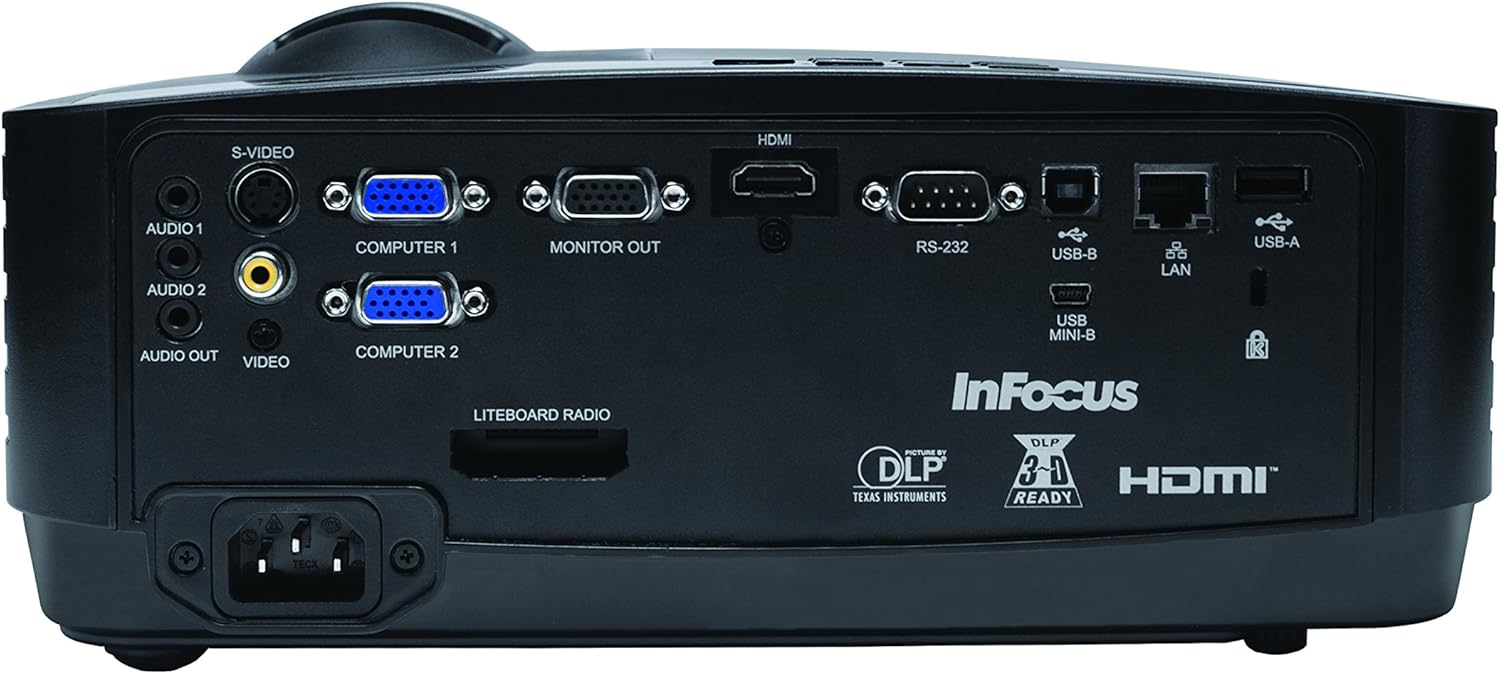
Abbildung 1: Vorderseite view of the InFocus IN2126a projector, showing the lens and ventilation.

Abbildung 2: Seite view of the InFocus IN2126a projector, highlighting the ventilation grilles.
3.2 Anschlüsse auf der Rückseite
The rear panel provides various input and output ports for connecting external devices.
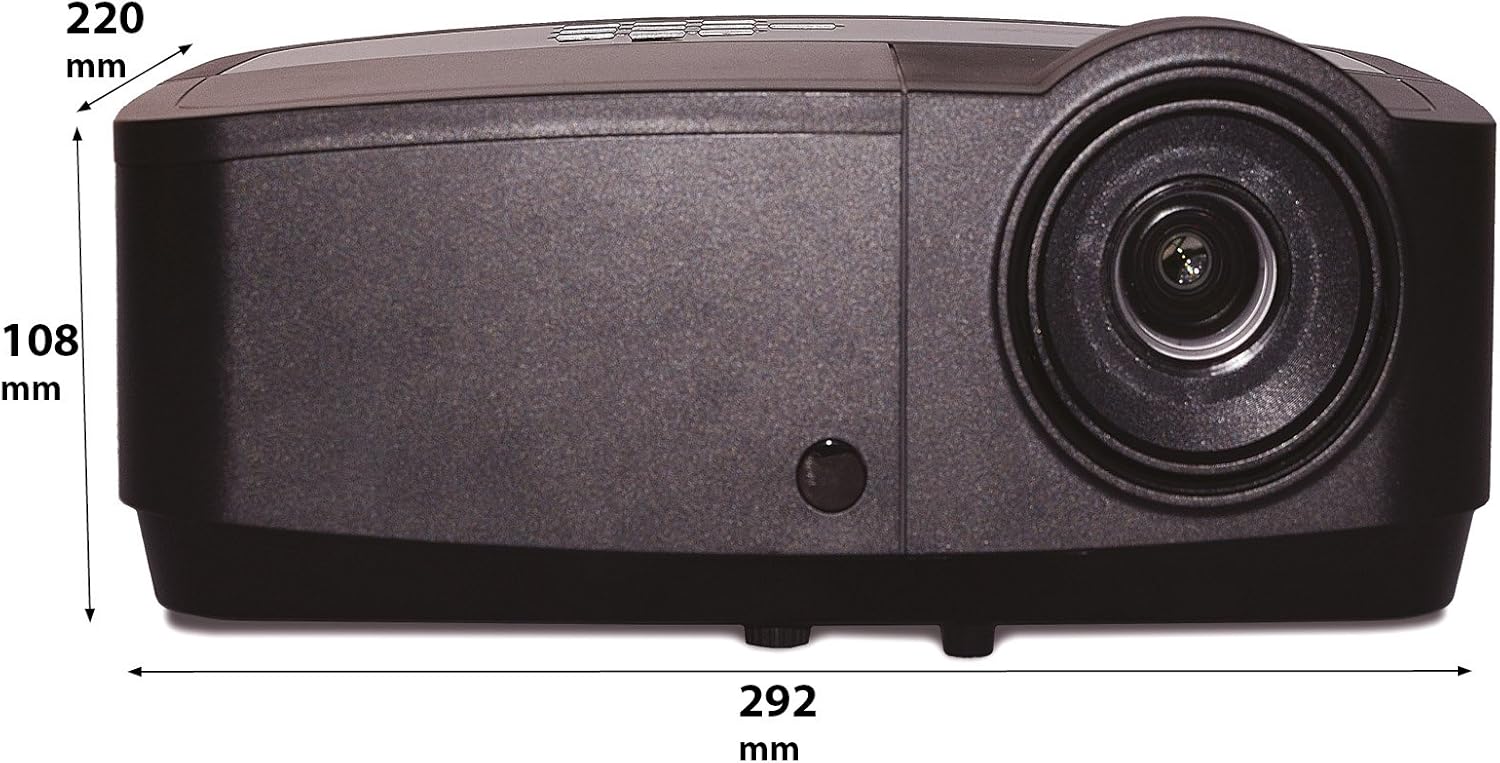
Figure 3: Rear panel of the InFocus IN2126a projector, displaying various connectivity ports including HDMI, VGA, USB, and LAN.
- HDMI: Für digitale Video- und Audioeingänge.
- COMPUTER 1 / COMPUTER 2 (VGA): Für analoge Videoeingänge von Computern.
- MONITOR OUT (VGA): Zum Anschluss eines externen Monitors.
- USB-B / USB Mini-B: For service or specific USB functions.
- USB-A: For connecting USB devices, such as a wireless adapter.
- LAN (RJ45): Für die Netzwerkkonnektivität.
- RS-232: Für serielle Steuerung.
- AUDIO 1 / AUDIO 2 (RCA): Für Audioeingang.
- AUDIO AUSGANG: Zum Anschluss externer Audiosysteme.
- VIDEO (RCA): Für Composite-Videoeingang.
- S-VIDEO: For S-Video input.
- Stromeingang: Zum Anschließen des Netzkabels.
3.3 Bedienelemente auf der Oberseite
The top panel features controls for basic projector functions and image adjustments.

Figure 4: Top panel of the InFocus IN2126a projector, showing the control buttons and focus/zoom rings.
- Netzschalter: Schaltet den Projektor ein oder aus.
- Menu/Exit Button: Accesses or exits the on-screen display (OSD) menu.
- Navigationsschaltflächen (Hoch, Runter, Links, Rechts): Navigiert durch die Menüoptionen.
- Eingabetaste: Bestätigt die Menüauswahl.
- Quellentaste: Wählt Eingangsquellen aus.
- Blank Button: Temporarily blanks the screen.
- Auto-Taste: Passt die Bildeinstellungen automatisch an.
- Fokusring: Passt die Bildschärfe an.
- Zoomring: Passt die Bildgröße an.
3.4 Abmessungen
Understanding the physical dimensions is important for installation and placement.

Figure 5: Diagram illustrating the dimensions of the InFocus IN2126a projector (292mm length, 220mm width, 108mm height).
4. Einrichtung
4.1 Aufstellung des Projektors
Place the projector on a stable, flat surface or mount it securely. Ensure the projector is positioned at an appropriate distance from the screen to achieve the desired image size. Maintain sufficient space around the projector for proper ventilation.
4.2 Geräte anschließen
- Stromanschluss: Schließen Sie das Netzkabel an den Stromeingang des Projektors und anschließend an eine geerdete Steckdose an.
- Videoquelle:
- For digital sources (e.g., Blu-ray player, laptop), use an HDMI cable to connect to the HDMI port.
- For analog computer sources, use a VGA cable to connect to the COMPUTER 1 or COMPUTER 2 port.
- For other video sources, use the appropriate S-VIDEO or VIDEO (RCA) connections.
- Audioquelle: If your video source does not transmit audio via HDMI, connect audio cables to the AUDIO 1 or AUDIO 2 ports.
- Netzwerkverbindung: Für einen kabelgebundenen Netzwerkzugang verbinden Sie ein Ethernet-Kabel mit dem LAN-Anschluss.
- Kabellose Verbindung: If using a compatible wireless adapter (sold separately), insert it into the USB-A port.
4.3 Ein-/Ausschalten
- So schalten Sie das Gerät ein: Press the Power button on the projector's top panel or the remote control. The power indicator light will illuminate.
- So schalten Sie das Gerät aus: Press the Power button again. The projector will enter a cooling cycle before shutting down completely. Do not unplug the projector during the cooling cycle.
5. Bedienung des Projektors
5.1 Quellenauswahl
After powering on, the projector may automatically detect an active input source. If not, or to switch sources:
- Drücken Sie die Quelle Taste am Projektor oder auf der Fernbedienung.
- Use the navigation buttons to highlight the desired input source (e.g., HDMI, Computer 1, Video).
- Drücken Eingeben um die Quelle auszuwählen.
5.2 Bildanpassung
- Fokus: Drehen Sie den Fokus ring on the projector lens until the image appears sharp and clear.
- Zoom: Drehen Sie den Zoom ring on the projector lens to adjust the image size to fit your screen.
- Trapezkorrektur: If the image appears trapezoidal, use the keystone correction feature in the OSD menu to square the image.
5.3 Bildschirmmenü (OSD)
The OSD menu allows you to configure various projector settings.
- Drücken Sie die Speisekarte Taste zum Öffnen des OSD-Menüs.
- Verwenden Sie die Hoch/Runter navigation buttons to select a menu category.
- Verwenden Sie die Links rechts navigation buttons to adjust settings or enter sub-menus.
- Drücken Eingeben , um die Änderungen zu bestätigen.
- Drücken Ausfahrt to close the OSD menu.
5.4 Drahtlose Konnektivität
The IN2126a is wireless-ready. To enable wireless display, a compatible InFocus wireless adapter (sold separately) must be connected to the USB-A port. Refer to the wireless adapter's specific instructions for setup and connection procedures.
5.5 3D-Funktionalität
Der Projektor unterstützt 3D-Inhalte. view 3D content, you will need a compatible 3D source, 3D glasses, and appropriate 3D content. Refer to the projector's OSD menu for 3D settings and ensure your source device is configured for 3D output.
6. Wartung
Regelmäßige Wartung gewährleistet optimale Leistung und verlängert die Lebensdauer Ihres Projektors.
6.1 Literamp Ersatz
Der Projektor lamp has a limited lifespan (approximately 4000 hours). When the lamp indicator illuminates or the image brightness significantly decreases, the lamp needs replacement. Always use an authorized InFocus replacement lampDetaillierte Informationen finden Sie im vollständigen Servicehandbuch.amp replacement instructions or contact customer support.
6.2 Filterreinigung
Dust accumulation on the air filter can impede airflow and cause overheating. Regularly clean the air filter to maintain proper ventilation. Turn off and unplug the projector before cleaning. Use a soft brush or vacuum cleaner to remove dust from the filter cover.
6.3 Allgemeine Reinigung
- Projektor Casing: Verwenden Sie ein weiches, fusselfreies Tuch dampened with a mild, non-abrasive cleaner. Do not use harsh chemicals.
- Linse: Use a lens cleaning cloth and specialized lens cleaning solution. Avoid touching the lens surface with your fingers.
7. Fehlerbehebung
Sollten Sie Probleme mit Ihrem Projektor haben, beachten Sie bitte die folgenden häufig auftretenden Probleme und Lösungen:
| Problem | Mögliche Ursache | Lösung |
|---|---|---|
| Kein Bild auf dem Bildschirm | Falsche Eingangsquelle ausgewählt; Kabelverbindung locker; Projektor im Standby-Modus. | Verify input source; Check all cable connections; Press power button to wake from standby. |
| Bild ist verschwommen | Fokus nicht eingestellt; Projektor zu nah/zu weit von der Leinwand entfernt. | Adjust the focus ring; Reposition the projector and adjust zoom. |
| Das Bild ist trapezförmig | Projektor nicht senkrecht zur Leinwand. | Verwenden Sie die Trapezkorrektur im OSD-Menü. |
| Kein Ton | Audio cables not connected; Volume too low; Muted. | Check audio cable connections; Adjust volume; Unmute projector. |
| Der Projektor überhitzt und schaltet sich ab. | Verstopfte Belüftung; verschmutzter Luftfilter. | Ensure clear airflow around projector; Clean the air filter. |
For more detailed troubleshooting, consult the complete user manual or contact InFocus customer support.
8. Spezifikationen
Key technical specifications for the InFocus IN2126a WXGA Network Projector:
- Modellname: IN2126a
- Anzeigetyp: DLP
- Native Auflösung: 1280 x 800 (WXGA)
- Helligkeit: 3500 Lumen
- Kontrastverhältnis: 15000:1
- Farbwiedergabe: 1.07 Milliarden Farben (30-Bit)
- Lebensdauer der Lichtquelle: 4000 Stunden
- Konnektivitätstechnologie: Wireless-ready, HDMI 1.4, VGA (x2), USB (Type-A, Mini-B, Type-B), LAN (RJ45), RS-232, Audio In (x2), Audio Out, Video (RCA), S-Video
- Besondere Merkmale: 3D-Ready, Network Projector
- Formfaktor: Tragbar
- Montageart: Tischhalterung
- Artikelgewicht: 7.1 Pfund
9. Garantie und Support
For information regarding your product's warranty, please refer to the warranty card included with your purchase or visit the official InFocus website. For technical support, service, or to purchase accessories, please contact InFocus customer service through their official channels.