
1. Einleitung
This manual provides essential information for the safe and effective operation of your Electro-Voice ETX-12P 12-inch 2000W 2-Way Full Range Powered Loudspeaker. Please read this manual thoroughly before setup and use to ensure proper functionality and to prevent damage to the unit or injury to personnel. The ETX-12P is a high-performance, portable powered loudspeaker designed for a variety of sound reinforcement applications, offering robust power and advanced digital signal processing.
2. Sicherheitshinweise
Adherence to the following safety guidelines is crucial for preventing electrical shock, fire, or damage to the loudspeaker.
- Stromversorgung: Connect the loudspeaker only to a power source that matches the voltage and frequency specified on the unit. Ensure the power cord is undamaged and properly grounded.
- Belüftung: Blockieren Sie nicht die Lüftungsöffnungen. Sorgen Sie für ausreichende Luftzirkulation um das Gerät herum, um eine Überhitzung zu vermeiden.
- Feuchtigkeit: Do not expose the loudspeaker to rain or moisture. Avoid placing liquids on or near the unit.
- Platzierung: Position the loudspeaker on a stable, level surface or use appropriate mounting hardware. If pole-mounting, ensure the pole and stand are rated for the loudspeaker's weight.
- Wartung: Führen Sie keine Reparaturen am Gerät selbst durch. Überlassen Sie alle Wartungsarbeiten qualifiziertem Fachpersonal.
- Gehörschutz: Längere Einwirkung hoher Schalldruckpegel kann zu dauerhaften Gehörschäden führen. Tragen Sie beim Betrieb des Lautsprechers mit hoher Lautstärke einen geeigneten Gehörschutz.
3. Produktüberschreitungview
The Electro-Voice ETX-12P is a versatile 12-inch, 2000W powered loudspeaker featuring a 2-way design for full-range audio reproduction. It incorporates advanced technologies for optimal sound quality and user control.
Hauptmerkmale:
- Hohe Ausgangsleistung: Up to 2000 watts of peak power for robust sound.
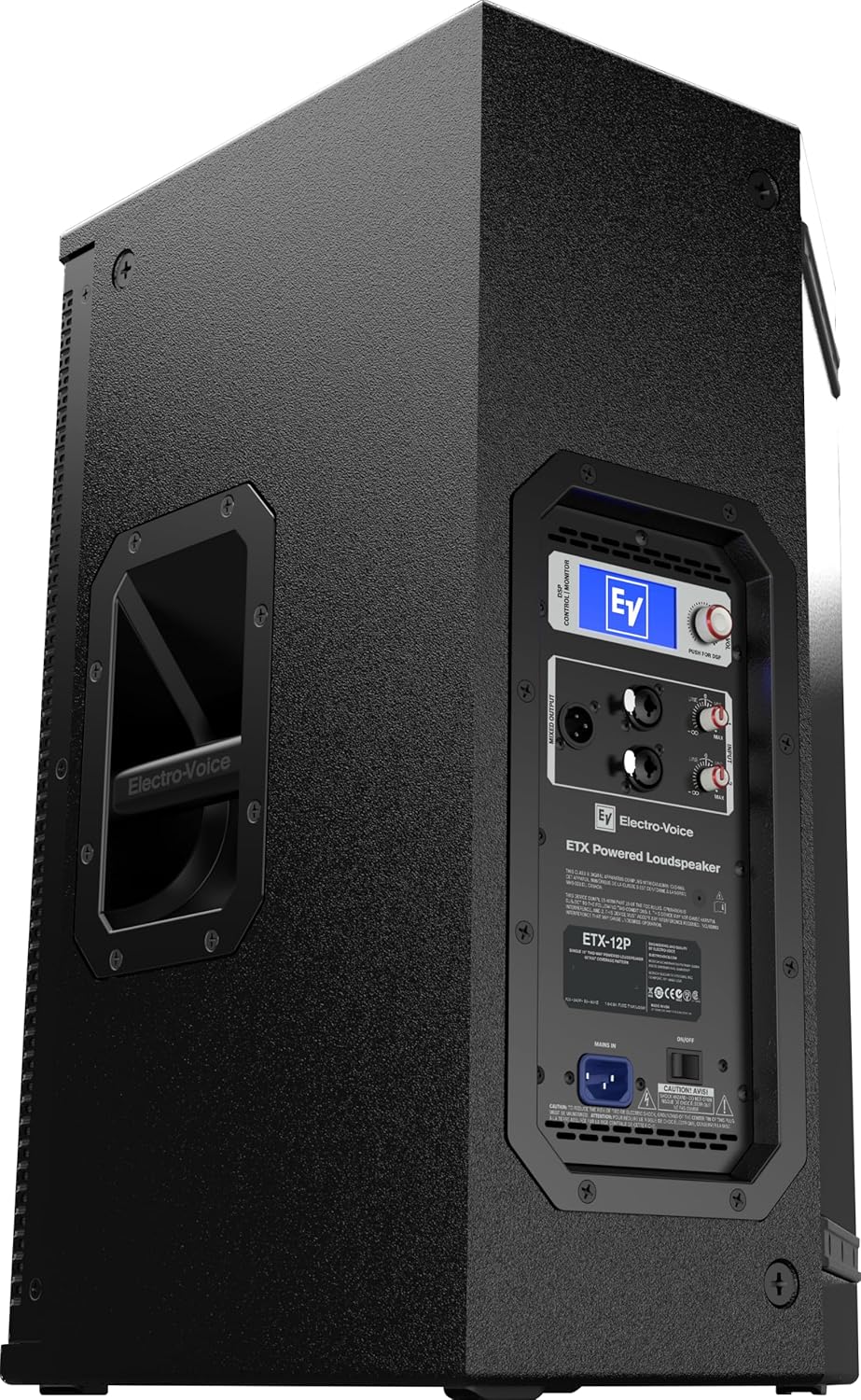
- Integrierter DSP: Digital Signal Processing with a single-knob interface and LCD for precise control over EQ, boundary compensation, limiting, and delay.
- SST Waveguide: Signal Synchronized Transducers waveguide design ensures uniform coverage and directivity, optimizing time-alignment between high and low-frequency drivers.
- SMX Woofer Technology: Utilizes composite cone materials, flux stabilizing rings, and thermal management for lower distortion and smooth response.
- DH3-B Compression Driver: High-efficiency driver with a convex diaphragm for extended frequency response up to 20 kHz.
- Vielseitige Montage: Suitable for floor monitor use, tripod mounting, or suspension.
Komponenten:


4. Einrichtung
Proper setup ensures optimal performance and safety. Follow these steps for initial installation.
4.1 Auspacken
- Carefully remove the loudspeaker from its packaging.
- Inspect the unit for any signs of damage during transit. Contact your dealer immediately if damage is found.
- Bewahren Sie die Originalverpackung für späteren Transport oder Lagerung auf.
4.2 Aufstellung und Montage
The ETX-12P offers flexible placement options:
- Bodenmontage: Place the loudspeaker directly on a stable floor surface. The cabinet design allows for use as a floor monitor.
- Stativhalterung: Utilize the integrated pole cup on the bottom of the unit for mounting on a standard speaker tripod stand. Ensure the stand is rated for the loudspeaker's weight (approximately 60 lbs).

Abbildung 4.1: Unten View with Pole Mount. This image shows the underside of the ETX-12P, clearly displaying the receptacle for pole mounting on a tripod stand. This feature allows for elevated sound projection. - Suspension: The loudspeaker can be suspended using appropriate rigging hardware. Consult a qualified professional for suspended installations to ensure safety and compliance with local regulations.
4.3 Anschlüsse
- Audioeingang: Connect your audio source (mixer, instrument, etc.) to the XLR input connectors on the rear panel. The ETX-12P supports balanced XLR connections.
- Audioausgang: Use the XLR output connector to link multiple ETX series loudspeakers or send the signal to another audio device.
- Leistung: Connect the supplied power cord to the AC inlet on the rear panel, then plug it into a suitable grounded electrical outlet. Ensure the power switch is in the OFF position before connecting to power.
5. Bedienungsanleitung
The ETX-12P features an intuitive DSP interface for precise sound control.
5.1 Ein-/Ausschalten
- To power on, ensure all audio connections are made and input levels are at minimum. Flip the power switch on the rear panel to the ON position.
- To power off, reduce input levels, then flip the power switch to the OFF position.
5.2 DSP-Steuerung
The integrated DSP is controlled via the single-knob interface and LCD screen on the rear panel. Rotate the knob to navigate menus and press to select options.
- Modusauswahl: Choose from various presets optimized for different applications (e.g., Music, Speech, Live).
- Standorteinstellungen: Adjust for placement (e.g., Pole, Monitor, Suspend) to optimize frequency response.
- Subwoofer-Integration: Select appropriate crossover settings when used with an ETX series subwoofer.
- EQ: Fine-tune the frequency response to suit your environment or preference.
- Verzögerung: Apply delay for proper time alignment in multi-speaker setups.
- Begrenzung: The DSP includes an intelligent limiting function to protect the drivers from excessive signal levels.
5.3 Eingangspegelanpassung
Adjust the input level knob on the rear panel to achieve the desired volume without clipping. Monitor the signal indicator lights on the LCD to avoid distortion.
6. Wartung
Regular maintenance helps prolong the life and performance of your ETX-12P loudspeaker.
- Reinigung: Use a soft, dry cloth to clean the exterior of the loudspeaker. Do not use abrasive cleaners, solvents, or waxes.
- Gitter: Periodically check the front grille for dust or debris accumulation. A soft brush or vacuum cleaner can be used to gently remove particles.
- Verbindungen: Stellen Sie sicher, dass alle Kabel fest angeschlossen und unbeschädigt sind.
- Lagerung: When not in use for extended periods, store the loudspeaker in a dry, temperature-controlled environment, ideally in its original packaging or a protective cover.
7. Fehlerbehebung
If you encounter issues with your ETX-12P, refer to the following common troubleshooting steps.
| Problem | Mögliche Ursache | Lösung |
|---|---|---|
| Keine Tonausgabe | No power; Input level too low; Faulty cable; Muted source. | Check power connection and switch; Increase input level; Test cables; Verify audio source is active. |
| Verzerrter Ton | Input signal too high (clipping); DSP settings incorrect; Damaged driver. | Reduce input level from source or on loudspeaker; Check DSP EQ/mode settings; Contact service if driver damage is suspected. |
| Loudspeaker not powering on | No power to outlet; Faulty power cord; Internal fuse blown. | Check power outlet with another device; Inspect power cord for damage; Contact service for fuse replacement. |
| Unexpected noise/hum | Ground loop; Unshielded cables; Interference. | Ensure all equipment is on the same electrical circuit; Use balanced, shielded cables; Isolate from other electronic devices. |
If the problem persists after attempting these solutions, please contact Electro-Voice customer support or a qualified service technician.
8. Spezifikationen
Detailed technical specifications for the Electro-Voice ETX-12P powered loudspeaker.
| Besonderheit | Spezifikation |
|---|---|
| Modellname | ETX-12P |
| Lautsprechertyp | Portable, 2-Way Full Range Powered Loudspeaker |
| Woofer-Durchmesser | 12 Zoll |
| Hochtönerdurchmesser | 1.25 Zoll |
| Maximale Lautsprecherausgangsleistung | 2000 Watt |
| Frequenzgang | Bis zu 20 KHz |
| Konnektivitätstechnologie | XLR |
| Audioausgabemodus | Mono |
| Montagetyp | Floor Mount, Tripod Mount, Freestanding |
| Produktabmessungen (T x B x H) | 15" x 16" x 24" |
| Artikelgewicht | 60 Pfund |
| Stromquelle | Kabelgebundene Elektrik |
| Im Lieferumfang enthaltene Komponenten | Lautsprecher |
| UPC | 800549769303, 800549738897 |

9. Garantie und Support
The Electro-Voice ETX-12P loudspeaker comes with a limited warranty. Please refer to the warranty card included with your product or visit the official Electro-Voice webDetaillierte Geschäftsbedingungen finden Sie auf der Website.
For technical support, service inquiries, or further assistance, please contact Electro-Voice customer service through their official website or the contact information provided in your product documentation. When contacting support, please have your product model number (ETX-12P) and serial number available.