
1. Einleitung
This manual provides instructions for the safe and effective operation of the Mastech MS2108A Auto Range DC AC Current Digital Clamp Meter Multimeter. This instrument is designed for measuring AC/DC voltage and current, resistance, capacitance, frequency, duty cycle, diode, and continuity. It features an auto-ranging function, LCD backlight, clamp lighting, and data hold capabilities, making it suitable for various electrical testing applications.
2. Sicherheitshinweise
Warnung: To avoid electrical shock or personal injury, read all safety information before using this product. Use the product only as specified in this manual, or the protection provided by the product may be impaired.
- Vor jeder Messung sollte sichergestellt sein, dass sich das Messgerät im richtigen Funktionsmodus und Messbereich befindet.
- Nicht mehr als die angegebene Menge auftragen.tage) wie auf dem Messgerät markiert, zwischen den Klemmen oder zwischen einer beliebigen Klemme und der Erdung.
- Seien Sie vorsichtig beim Arbeiten mit VolumentagEs liegt über 30 V AC RMS, 42 V Spitze oder 60 V DC. Diese SpannungentagEs besteht die Gefahr eines Stromschlags.
- Before measuring current, ensure the circuit is de-energized and the clamp jaws are properly closed around the conductor.
- Do not operate the meter with the battery cover open.
- Tauschen Sie die Batterie sofort aus, wenn die Anzeige für niedrigen Batteriestand erscheint.
- Vor Funktionsänderungen müssen die Messleitungen immer vom Stromkreis getrennt werden.
- Alle lokalen und nationalen Sicherheitsvorschriften sind einzuhalten.
3. Produktüberschreitungview und Funktionen
Der Mastech MS2108A ist ein vielseitiger digitaler Lautsprecher.amp meter designed for electrical professionals and enthusiasts. Its key features include:
- AC/DC-VoltagE- und Strommessung
- Resistance, capacitance, frequency, and duty cycle measurement
- Diode and continuity test functions
- Clamp for non-contact AC/DC current measurement
- LCD with backlight and bar graph display
- Integrierte Klamp lighting bulb
- Relativwertmessung
- Auto-ranging function
- Data hold, maximum (MAX), and minimum (MIN) value measuring
- Automatic power off and low battery indication
- Full overload protection and dual insulation
- Durable over-molding rubber case for shake-proof and skid-proof handling
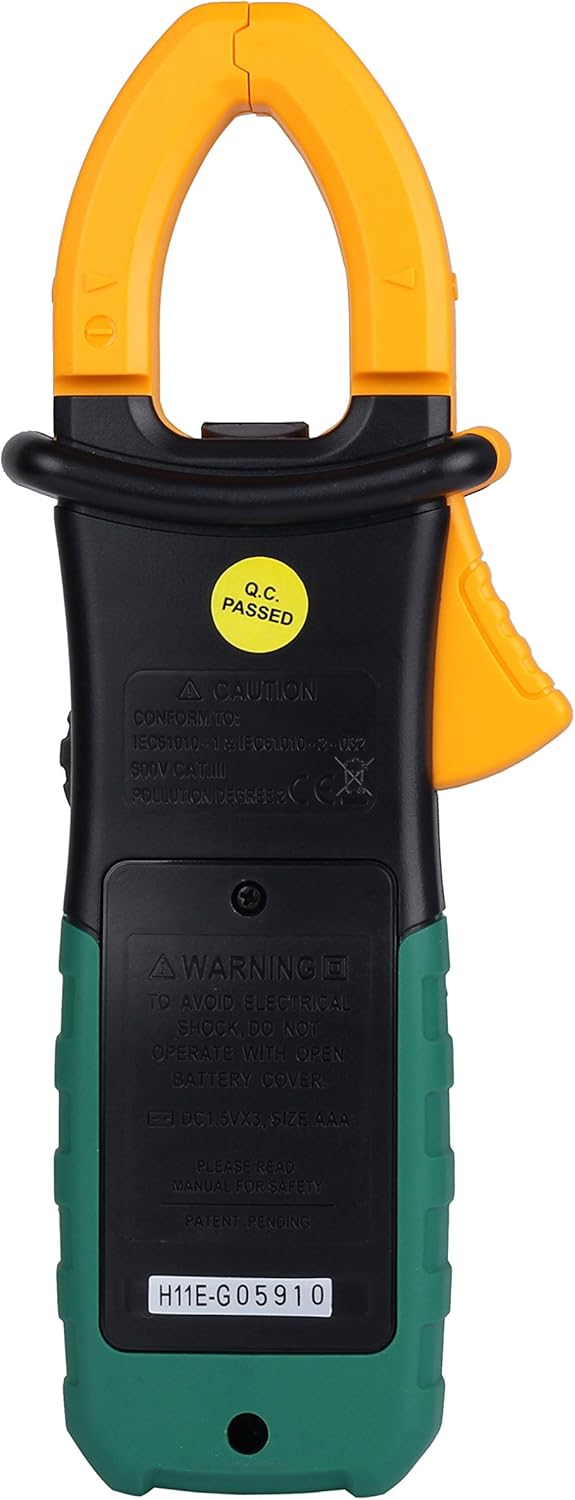
Abbildung 3.1: Vorderseite view des Mastech MS2108A Digital Clamp Meter, showing the display, function dial, and clamp Kiefer.
4. Packungsinhalt
Prüfen Sie beim Öffnen der Verpackung, ob alle Artikel vorhanden und in einwandfreiem Zustand sind:
- Mastech MS2108A Digital Clamp Meter
- Messleitungen (eine rote, eine schwarze)
- Tragetasche
- Benutzerhandbuch (dieses Dokument)

Figure 4.1: The Mastech MS2108A Clamp Meter, test leads, and carrying case.
5. Einrichtung
5.1 Einlegen der Batterie
- Stellen Sie sicher, dass der Zähler ausgeschaltet ist.
- Suchen Sie den Batteriefachdeckel auf der Rückseite des Messgeräts.
- Verwenden Sie einen Schraubendreher, um die Schraube(n) zu lösen, mit der/denen die Batterieabdeckung befestigt ist/sind.
- Entfernen Sie die Batterieabdeckung.
- Insert three AAA 1.5V batteries, observing the correct polarity (+ and -).
- Bringen Sie die Batterieabdeckung wieder an und ziehen Sie die Schraube(n) fest.
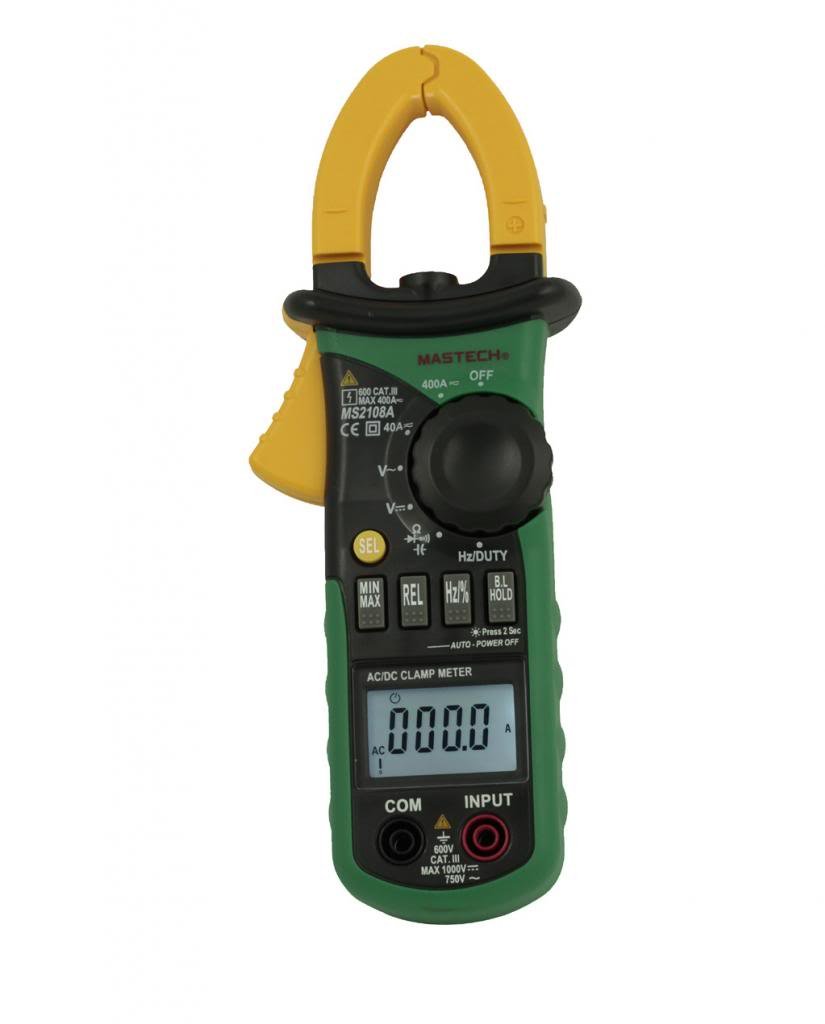
Abbildung 5.1: Rückseite view der clamp meter, indicating the battery compartment location.
5.2 Anschließen der Testleitungen
Für voltage, resistance, capacitance, frequency, duty cycle, diode, and continuity measurements:
- Stecken Sie die rote Messleitung in den Anschluss „INPUT“.
- Insert the black test lead into the "COM" (common) terminal.
6. Bedienungsanleitung
6.1 Ein-/Ausschalten
Rotate the function dial from the "OFF" position to any desired measurement function to turn the meter ON. To turn OFF, rotate the dial back to the "OFF" position.
6.2 Funktionsauswahl
The large rotary dial allows selection of various measurement functions. Some positions on the dial may have multiple functions (e.g., AC voltage und DC voltage). Drücken Sie die "SEL" button to cycle through these functions.

Abbildung 6.1: Seite view der clamp meter, highlighting the function dial and control buttons.
6.3 Wechsel-/Gleichstrommessung (Clamp)
- Drehen Sie den Funktionswähler auf die entsprechende Position. "A~" (Wechselstrom) oder "A=" (Gleichstrom) Position.
- Drücken Sie die Tasteamp Auslöser zum Öffnen des Mauls.
- Schließen Sie einen einzelnen Leiter (kein Netzkabel mit mehreren Drähten) in den Klemmen ein.amp Kiefer. Stellen Sie sicher, dass die Kiefer vollständig geschlossen sind.
- Lesen Sie den aktuellen Wert auf dem LCD ab.
- For DC current, observe the polarity indicated on the display.

Abbildung 6.2: Die clamp jaws of the meter, showing the integrated work light for illuminating the measurement area.
6.4 AC/DC-Voltage Messung
- Connect the red test lead to the "INPUT" terminal and the black test lead to the "COM" terminal.
- Drehen Sie den Funktionswähler auf die entsprechende Position. "V~" (AC Voltage) oder "V=" (DC-Voltage) Position. Verwenden Sie die "SEL" Taste, falls erforderlich.
- Schließen Sie die Messleitungen parallel an den zu prüfenden Stromkreis oder das zu prüfende Bauteil an.
- Lesen Sie den Bandtage-Wert auf dem LCD.
6.5 Resistance, Capacitance, Frequency, Duty Cycle, Diode, and Continuity
For these measurements, connect the test leads as described in Section 5.2. Rotate the function dial to the appropriate position and use the "SEL" button to select the specific function if multiple are available on one dial position.
- Widerstand (Ω): Vor der Widerstandsmessung muss sichergestellt werden, dass der Stromkreis spannungsfrei ist.
- Kapazität (F): Discharge capacitors before measurement.
- Frequenz (Hz) / Duty Cycle (%): Connect across the signal source.
- Diodentest (→|): Connect the red lead to the anode and black lead to the cathode.
- Durchgangsprüfung ()))): A built-in buzzer will sound if the resistance is below approximately 50Ω.
6.6 Sonderfunktionen
- "HALTEN" Button: Press to freeze the current reading on the display. Press again to release.
- "MAX/MIN" Button: Press to enter MAX/MIN recording mode. The meter will display the maximum or minimum value measured since entering the mode. Press again to cycle between MAX, MIN, and current reading. Hold to exit.
- "REL" (Relative) Button: Press to store the current reading as a reference value. Subsequent measurements will be displayed as the difference from this reference. Press again to exit.
- Backlight/Clamp Licht: The backlight and clamp light can be activated for improved visibility in low-light conditions. Refer to the specific button on the meter (often combined with another function or a dedicated light button).
7. Wartung
7.1 Reinigung
Löschen Sie den Fall mit Anzeigeamp Mit einem Tuch und mildem Reinigungsmittel reinigen. Keine Scheuermittel oder Lösungsmittel verwenden. Die Anschlüsse sauber und trocken halten.
7.2 Batteriewechsel
When the low battery indicator appears on the display, replace the batteries as described in Section 5.1. Always use three new AAA 1.5V batteries.
7.3 Speicherung
If the meter is not used for an extended period, remove the batteries to prevent leakage and damage. Store the meter in its carrying case in a cool, dry place.
8. Fehlerbehebung
| Problem | Mögliche Ursache | Lösung |
|---|---|---|
| Das Messgerät lässt sich nicht einschalten. | Defekte oder falsch eingesetzte Batterien. | Batteriepolarität prüfen; Batterien austauschen. |
| „OL“ (Überlastung) wird angezeigt. | Input exceeds selected range or meter's maximum capacity. | Select a higher range (if manual ranging) or ensure input is within meter's specifications. |
| Ungenaue Messwerte. | Poor test lead connection, incorrect function selected, or external interference. | Ensure leads are firmly connected; verify function selection; move away from strong electromagnetic fields. |
| Kein Durchgangssignal. | Der Widerstand im Stromkreis ist zu hoch. | Prüfen Sie den Stromkreis auf Unterbrechungen oder Stellen mit hohem Widerstand. |
9. Spezifikationen
The following are general specifications for the Mastech MS2108A. Detailed ranges and accuracies can be found in the full technical datasheet.
- Marke: Mastech
- Modellnummer: MS2108A
- Messart: Multimeter, Klamp Meter
- Energiequelle: Batteriebetrieben (3 x AAA 1.5 V)
- Enthaltene Komponenten: Case, Test Leads
- Sicherheitsbewertung: IEC 61010-1, CAT III 600V
- Anzeige: LCD with Backlight and Bar Graph
- Automatisches Ausschalten: Ja
- Datenaufnahme: Ja
- MAX/MIN-Messung: Ja
- Relative Messung: Ja
10. Garantie und Support
Mastech products are manufactured to high quality standards. For warranty information and technical support, please refer to the warranty card included with your purchase or contact your local Mastech distributor. Keep your purchase receipt as proof of purchase.