
1. Einleitung
The Cellet Portable Bluetooth Wireless Keyboard BKP200 offers a convenient and functional solution for typing on the go. Its foldable design and QWERTY layout with low-profile keys provide an efficient typing experience. The built-in rechargeable lithium battery ensures extended use, making it ideal for smartphones, tablets, laptops, and other Bluetooth-enabled devices.
Lieferumfang
- Wireless foldable keyboard
- Keyboard case (doubles as a phone holder stand)
- Micro-USB-Ladekabel
- Benutzerhandbuch

Image: The Cellet Portable Bluetooth Wireless Keyboard, shown unfolded, alongside its protective case which functions as a phone/tablet stand, and a micro USB charging cable.
2. Wichtige Sicherheitshinweise
Before using this product, please read all instructions carefully and retain them for future reference. Adherence to these guidelines ensures safe operation and prevents damage.
- This product may be used by children and individuals with physical, sensory, or mental disabilities, or those lacking experience and knowledge, provided they receive proper supervision or instruction regarding safe use and understanding of associated hazards.
- Reinigung und Wartung dürfen nicht von Kindern ohne Aufsicht durchgeführt werden.
- Kinder sollten beaufsichtigt werden, um sicherzustellen, dass sie nicht mit dem Gerät spielen.
- Verwenden Sie das Produkt nur bestimmungsgemäß.
- For indoor use only. Do not expose the product to water, excessive moisture, or snow.
- Do not place the product in or near flammable, explosive, or hazardous objects.
- Betreiben Sie das Produkt nicht mit einem beschädigten Kabel oder Stecker.
- Verwenden Sie das Produkt nicht, wenn es in irgendeiner Weise beschädigt wurde.
- Zerlegen Sie das Produkt nicht. Die Demontage kann zu Sicherheitsrisiken führen.
- Avoid throwing or shaking the product.
3. Einrichtung
Erstladung
Before first use, fully charge the keyboard for approximately 1.5 to 2 hours using the provided Micro USB charging cable. The charging indicator light will glow red during charging and turn off once fully charged. If the battery is low, the Bluetooth status light will flash.
Schritte zum Bluetooth-Pairing
- Schritt 1: Unfold the keyboard. The Bluetooth status indicator light will illuminate for 3 seconds and then turn off.
- Schritt 2: Drücken Sie die Fn+C buttons simultaneously. The Bluetooth indicator light will begin blinking, indicating it is in pairing mode.
- Schritt 3: On your device (smartphone, tablet, etc.), activate Bluetooth and search for available devices. Select "Cellet BKP200 Keyboard" from the list to connect.
- Schritt 4: Once successfully connected, the Bluetooth indicator light on the keyboard will turn off.

Image: The Cellet foldable keyboard displayed with a tablet and smartphone, illustrating its universal compatibility.
4. Bedienungsanleitung
Auswahl des Betriebssystems
To optimize keyboard functionality for your device, select the correct operating system:
- For Android devices: Press and hold Fn + Q.
- Für Windows-Geräte: Drücken und halten Fn + W.
- Für iOS-Geräte: Gedrückt halten Fn + E.
Tastenkombinationen
To use the shortcut keys, press and hold the Fn key while simultaneously pressing the desired shortcut key.
| Funktion | Tastenkombination | Hinweise |
|---|---|---|
| Vorheriger Titel | Fn + 1 | |
| Lautstärke verringern | Fn + 2 | |
| Lautstärke erhöhen | Fn + 3 | |
| Abspielen/Pause | Fn + 4 | |
| Sprache wechseln | Fn + 5 | |
| Suche | Fn + 6 | |
| Kopie | Fn + 7 | |
| Schneiden | Fn + 8 | |
| Alles auswählen | Fn + 9 |
System-Specific Functions:
| Android-Systeme | Funktion |
|---|---|
| Bild auf | Letzte Seite |
| Bild ab | Nächste Seite |
| iOS Systems | Funktion |
|---|---|
| Heim | Heim |
| Bild auf | Cursor to the top |
| Bild ab | Cursor to the bottom |
| Windows-Systeme | Funktion |
|---|---|
| Web Browser | Offen web Browser |
| ESC | Flucht |
| Bild auf | Letzte Seite |
| Bild ab | Nächste Seite |

Image: The keyboard case is shown transforming into a stand, holding both a smartphone and a tablet in landscape orientation for convenient viewing während des Tippens.
5. Wartung
Proper care and maintenance will extend the life of your Cellet keyboard.
- Reinigen Sie die Tastatur mit einem weichen Tuch dampmit Wasser oder Alkohol beendet.
- Halten Sie die Tastatur von scharfen Gegenständen fern.
- Legen Sie keine schweren Gegenstände auf die Tastatur.
- Do not microwave the keyboard.
- Wenden Sie keine Gewalt an und verformen Sie die Tastatur nicht.
- Keep away from any oil, chemicals, or other organic liquids.
6. Fehlerbehebung
If you encounter issues with your keyboard, consider the following:
- Tastatur kann nicht gekoppelt werden: Ensure the keyboard is fully charged and in pairing mode (Bluetooth indicator blinking). Check your device's Bluetooth settings to ensure it's discoverable and try re-scanning for devices.
- Tasten reagieren nicht: Verify the keyboard is connected to your device. If connected, try restarting both the keyboard and your device. Ensure no debris is lodged under the keys.
- Unterbrechungsverbindung: Ensure the keyboard is within the 10-meter operating range of your device and there are no significant obstructions. Other wireless devices might cause interference.
- Falsche Zeichen eingegeben: Confirm that you have selected the correct operating system for your device (Fn + Q for Android, Fn + W for Windows, Fn + E for iOS).
- Akku wird nicht aufgeladen: Check the Micro USB cable and charging port for damage. Try using a different charging cable or power source.
If problems persist, refer to the Cellet support webBesuchen Sie unsere Website oder kontaktieren Sie unseren Kundenservice für weitere Unterstützung.
7. Spezifikationen
Detailed technical specifications for the Cellet BKP200 Portable Bluetooth Wireless Keyboard:
| Besonderheit | Spezifikation |
|---|---|
| Bluetooth-Version | 5.1 |
| Schnittstelle | USB-C (zum Laden) |
| Reichweite | Bis zu 10 Meter |
| Modulationssystem | GFSK |
| Betriebslautstärketage | 3.0 bis 4.2 V |
| Betriebsstrom | <3.0 mA |
| Ruhestrom | <0.3 mA |
| Schlafstrom | <0.1 mA |
| Ladestrom | <200 mA |
| Standby-Zeit | Etwa 100 Tage |
| Ladezeit | <2 Stunden |
| Lithiumbatteriekapazität | 110 mAh |
| Ununterbrochene Arbeitszeit | >40 Stunden |
| Lebensdauer der Lithiumbatterie | 3 Jahre |
| Lithium Battery Dimensions | 30 x 15 x 23 mm |
| Schlüsselkraft | 50-80 g |
| Schlüssellebensdauer | 3 Million Anschläge |
| Arbeitstemperatur | -10 bis +55 ℃ |
| Artikelgewicht | 7.5 Unzen |
| Produktabmessungen (gefaltet) | 5.75 x 3.5 x 0.75 Zoll |
| Produktabmessungen (aufgeklappt) | 11.5 x 3.3 x 0.27 inches (approximate, derived from image) |
| Farbe | Schwarz |
| Kompatible Betriebssysteme | Android, iOS, Windows |
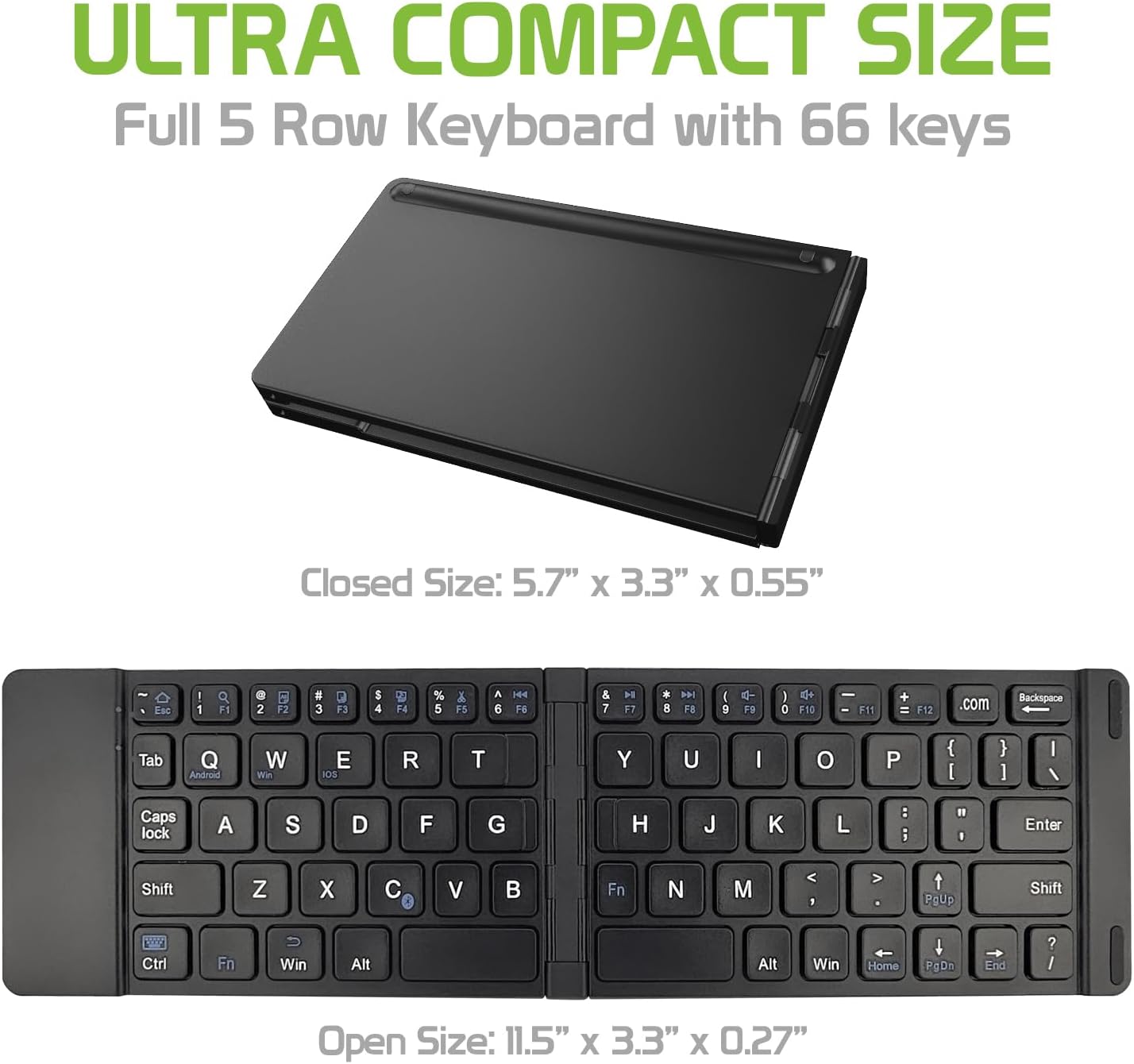
Image: The Cellet keyboard in both its closed, compact state and its unfolded, full-size state, with dimensions indicating its portability and functional size.
8. Garantie und Support
For warranty information or technical support, please visit the official Cellet webBesuchen Sie die Website oder kontaktieren Sie den Kundendienst. Bewahren Sie Ihren Kaufbeleg für Garantieansprüche auf.
Umweltfreundliche Entsorgung
To dispose of the product responsibly, follow these guidelines:
- Carefully pry up the plastic top to remove it completely. This action will likely render the keyboard unusable.
- Turn the top over and remove any tape securing the battery.
- Separate the battery from the circuit board.
- Dispose of the battery according to local regulations and laws. Recycle remaining keyboard parts where possible.