
Einführung
The TC Electronic T2 Reverb effects pedal provides a diverse range of reverb effects for guitar and other instruments. This manual details the pedal's features, setup procedures, operational guidelines, maintenance tips, troubleshooting steps, and technical specifications to ensure optimal performance.
Produkt überview
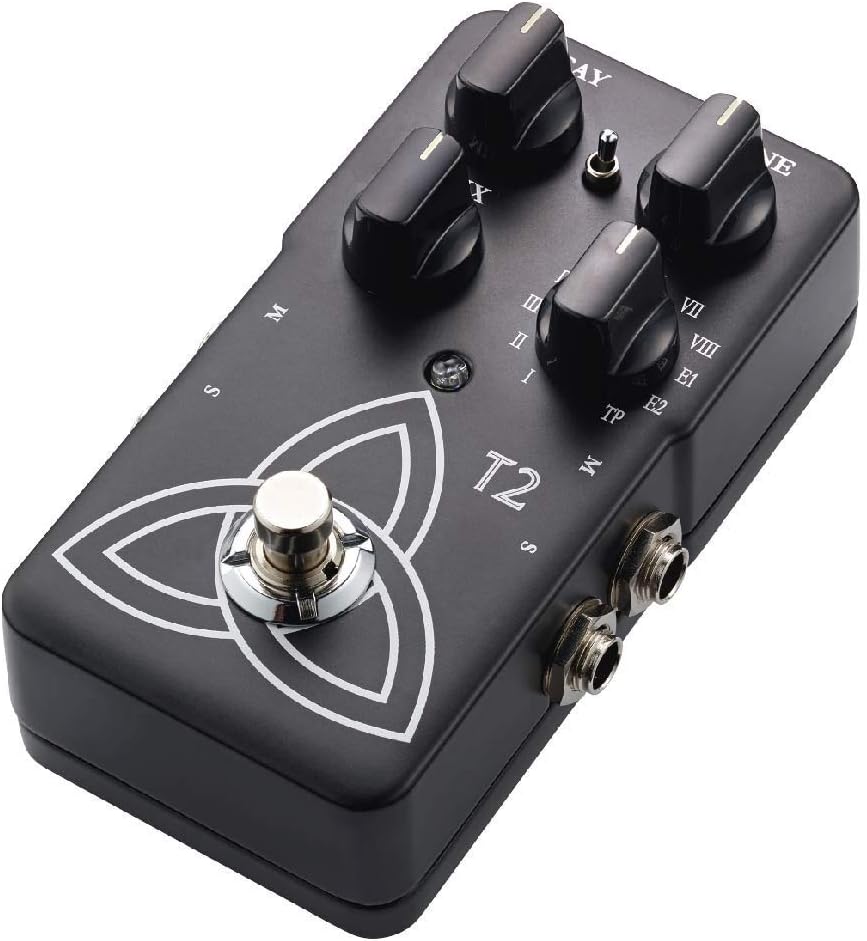
The T2 Reverb pedal features intuitive controls for shaping your sound and a robust design for reliable use. Familiarize yourself with the pedal's components:
- DECAY-Knopf: Controls the length of the reverb tail.
- TONE-Regler: Adjusts the brightness or darkness of the reverb.
- MIX-Knopf: Balances the ratio between the dry (unaffected) signal and the wet (effected) signal.
- Reverb Type Selector: A rotary switch to select from various reverb algorithms (I-VIII, E1, E2, TP).
- Fußschalter: Aktiviert oder umgeht den Effekt.
- Eingangs-/Ausgangsbuchsen: For connecting your instrument and ampschwerer.
- Leistungsaufnahme: Zum Anschluss eines 9V-Gleichstromnetzteils.

Aufstellen
- Stromanschluss: Connect a 9V DC power adapter (center negative, not included) to the power input jack. Alternatively, the pedal can be powered by a 9V battery (not included) by opening the battery compartment.
- Geräteanschluss: Verbinden Sie Ihr Instrument (z. B. eine Gitarre) mit der Eingangsbuchse auf der rechten Seite des Pedals mithilfe eines handelsüblichen 6,35-mm-Instrumentenkabels (1/4 Zoll).
- Amplifier-Verbindung: Verbinden Sie die Ausgangsbuchse auf der linken Seite des Pedals mit Ihrem ampDer Verstärkereingang wird über ein Standard-Instrumentenkabel mit 6,35 mm (1/4 Zoll) angeschlossen.
- Stereo Operation (Optional): For stereo output, connect the second output jack to a second ampVerstärker oder Stereo-Eingabegerät.
Stellen Sie sicher, dass alle Verbindungen sicher sind, bevor Sie Ihr amplifier and pedal.
Bedienungsanleitung
Grundlegende Bedienung
- Einschalten: Once connected, press the footswitch to engage the effect. The LED indicator will illuminate. Press again to bypass the effect.
- Auswahl des Halltyps: Rotate the Reverb Type Selector knob to choose from the available reverb algorithms (I through VIII, E1, E2). Each setting offers a distinct reverb character.
- Adjusting Reverb Parameters:
- Verwenden Sie die VERFALL knob to control the duration of the reverb.
- Verwenden Sie die TON knob to adjust the frequency content of the reverb, making it brighter or darker.
- Verwenden Sie die MISCHEN knob to blend the dry signal with the reverb effect. A higher setting increases the effect's prominence.
TonePrint Feature
The "TP" setting on the Reverb Type Selector activates the TonePrint feature. TonePrint allows you to upload custom-tuned reverb sounds created by artists or design your own using the TC Electronic TonePrint app. Connect your pedal to a computer via USB (cable not included) or beam TonePrints wirelessly from your smartphone to the pedal's pickup.
Wartung
- Reinigung: Reinigen Sie die Außenseite des Pedals mit einem weichen, trockenen Tuch. Vermeiden Sie scheuernde Reiniger oder Lösungsmittel.
- Batteriewechsel: If using battery power, replace the 9V battery when the LED indicator dims or the effect performance degrades. To replace, open the battery compartment on the underside of the pedal.
- Lagerung: Store the pedal in a dry environment, away from extreme temperatures and direct sunlight, when not in use. Disconnect power and remove the battery if storing for extended periods.
Fehlerbehebung
| Problem | Mögliche Ursache | Lösung |
|---|---|---|
| Kein Ton oder schwaches Signal | Incorrect cable connections, dead battery, faulty power supply, volume knobs on instrument/amp abgelehnt. | Check all cable connections. Replace battery or verify power supply. Ensure instrument and amplifier volumes are set appropriately. |
| Unerwünschtes Rauschen oder Brummen | Ground loop, faulty cables, interference from other electronics, improper power supply. | Use shielded cables. Try a different power outlet or isolated power supply. Move pedal away from other electronic devices. |
| Effect not engaging (LED off) | Kein Strom, Fußschalter defekt. | Verify power connection and battery status. If problem persists, contact support. |
| TonePrint not loading | Incorrect app usage, connection issues. | Ensure the TonePrint app is updated and the pedal is correctly connected (USB or beaming). Refer to the TonePrint app's instructions for detailed guidance. |
Technische Daten
- Modell: T2
- Artikelgewicht: 1 pound (approximately 454 grams)
- Produktabmessungen: 4.61 x 2.48 x 2.91 Zoll (11.7 x 6.3 x 7.4 cm)
- Energiequelle: 9-V-Gleichstrom-Netzteil (Mittelkontakt negativ) oder 9-V-Batterie
- Bandtage: 9 Volt
- Signalformat: Analog
- Hardware-Schnittstelle: HP-HSC
Garantie und Support
TC Electronic products are covered by a limited warranty. For detailed warranty information, product support, or service inquiries, please visit the official TC Electronic webBesuchen Sie die Website oder kontaktieren Sie direkt den Kundendienst. Bewahren Sie Ihren Kaufbeleg für Garantieansprüche auf.
Offiziell WebWebsite: www.tcelectronic.com