
1. Einleitung
The JJC Off-Camera TTL Flash Cord FC-N3A is designed to extend the distance between your Nikon camera and an external flash unit while maintaining full TTL (Through-The-Lens) functionality. This cord allows for flexible flash positioning, enabling creative lighting setups and reducing harsh shadows often associated with direct on-camera flash. It serves as a reliable replacement for the Nikon SC-28 cord.
2. Einrichtungsanweisungen
Follow these steps to properly connect and set up your JJC Off-Camera TTL Flash Cord:
- Attach the Sync Cord to Your Camera: Locate the hot shoe on your Nikon camera. Slide the camera-end of the flash sync cord onto the hot shoe. Secure it firmly using the locking knob or lever on the cord's base.
- Attach the Flash Unit: Take your external Nikon-compatible flash unit and slide its hot shoe foot into the flash-end of the off-camera flash sync cord. Ensure it clicks into place or is secured by its locking mechanism.
- Mount the Off-Camera Hot Shoe (Optional): The flash-end of the cord features a shoe mount with a 1/4"-20 threaded stud. This allows you to mount the flash onto a flash bracket, light stand, or tripod for versatile positioning.

Image: Step-by-step guide for connecting the JJC Off-Camera TTL Flash Cord to a camera and flash, and mounting it to a stand.
3. Bedienungsanleitung
Once the JJC Off-Camera TTL Flash Cord is connected, it maintains all automatic functions of your Nikon flash, including TTL metering. This allows you to control the flash output and other settings directly from your camera, just as if the flash were mounted on the camera's hot shoe.
- Off-Camera Positioning: The 1.3m (4.2 ft) coiled cord provides ample length to position your flash away from the camera. This enables you to direct light from various angles, creating more dynamic and professional-looking photographs.
- TTL-Funktionalität: The cord transmits all necessary data between the camera and flash, ensuring accurate exposure control through Nikon's TTL system.
- Manuelle Kontrolle: If your flash supports manual power settings, you can still adjust these directly on the flash unit or via your camera's menu, depending on your camera and flash model.

Bild: Ein Example of a camera and an external flash connected by the coiled cord, allowing for flexible flash positioning.
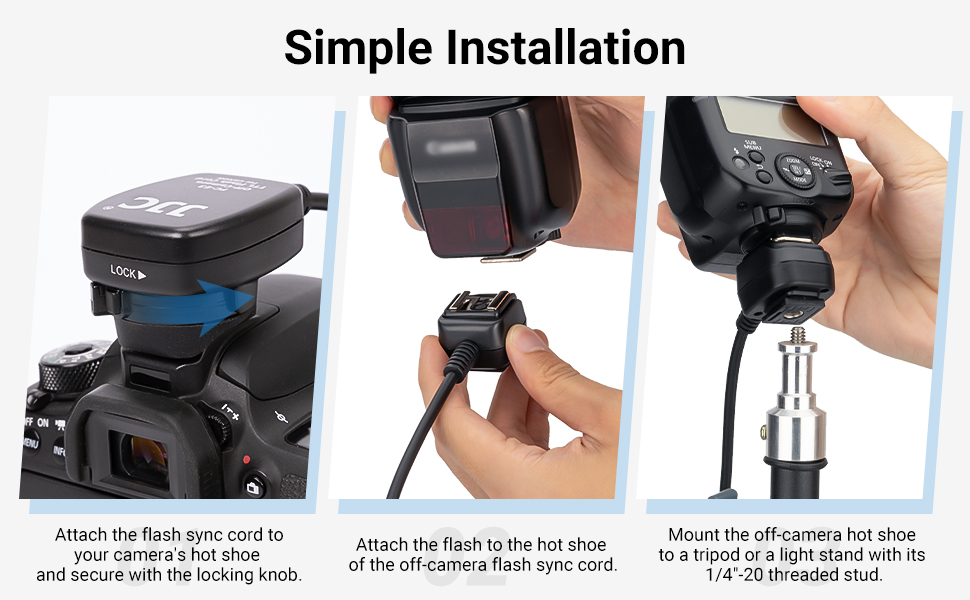
Image: Demonstrations of creative lighting techniques using the off-camera flash cord.
4. Wartung
Proper maintenance ensures the longevity and reliable performance of your flash cord.
- Trocken halten: Avoid exposing the cord to moisture or extreme humidity. If it gets wet, disconnect it immediately and allow it to dry completely before reuse.
- Saubere Anschlüsse: Periodically inspect the hot shoe contacts on both ends of the cord. Use a clean, dry cloth to gently wipe away any dust or debris. Avoid touching the contacts with your fingers to prevent oil transfer.
- Richtig lagern: When not in use, coil the cord loosely and store it in a protective bag or case to prevent kinks, twists, or damage to the wiring.
- Vorsichtig handhaben: Avoid pulling the cord forcefully from the camera or flash. Always grasp the connector ends when attaching or detaching.
5. Fehlerbehebung
If you encounter issues with your JJC Off-Camera TTL Flash Cord, consider the following:
- Blitz zündet nicht:
- Ensure both ends of the cord are securely attached to the camera and flash.
- Check that the flash unit is powered on and has sufficient battery life.
- Verify that the flash and camera settings are appropriate for external flash use.
- Test the flash directly on the camera's hot shoe to rule out a flash unit issue.
- Inconsistent Exposure (TTL Mode):
- Confirm that the cord's contacts are clean and free from obstruction.
- Ensure the flash is set to TTL mode and the camera is in a compatible exposure mode (e.g., P, A, S, M).
- Environmental factors like reflective surfaces or very dark subjects can sometimes affect TTL accuracy; adjust flash compensation if needed.
- Lose Verbindungen: If the flash or cord feels loose, ensure the locking mechanisms are fully engaged. Avoid excessive force when tightening.
6. Spezifikationen
| Modellnummer | FC-N3A |
| Kabellänge | 1.3 meters (4.2 feet) coiled |
| Technische Daten | 1.57 x 1.14 x 0.98 inches (approximate connector size) |
| Artikelgewicht | 3.2 Unzen |
| Kompatibilität | Replaces Nikon SC-28 cord. Compatible with Nikon Z5, Z6, Z6 II, Z7, Z7 II, D7500, D7200, D5600, D5500, D5300, D5000, D3500, D3400, D3300, D3200, D850, D810, D780, D750, D700, D500, D5, D6 DSLR cameras. Works with Nikon SB-5000, SB-800, SB-910, SB-900, SB-800, SB-700, SB-600, SB-400, SB-80DX, SB-28DX, SB-28, SB-27, SB-26, SB-25, SB-24, SB-22 and other brands of flashes that support Nikon TTL. |

Image: Visual representation of compatible Nikon camera models and flash units.
7. Garantieinformationen
JJC products typically come with a limited manufacturer's warranty. For specific details regarding the warranty period and terms for your FC-N3A Off-Camera TTL Flash Cord, please refer to the packaging or visit the official JJC webBewahren Sie Ihren Kaufbeleg als Kaufnachweis für eventuelle Garantieansprüche auf.
8. Unterstützung
For further assistance, technical support, or inquiries about your JJC Off-Camera TTL Flash Cord, please contact JJC customer service or visit their official webWebsite:
- JJC Official WebWebsite: www.jjc.cc (Bitte beachten Sie: Dies ist ein allgemeiner Platzhalter.) URL, refer to product packaging for exact support contact information.)
- Kundendienst: Refer to the contact information provided on the product packaging or the official JJC website for regional support options.