
Einführung
This manual provides instructions for the Goldmaster RCU 881 Universal Remote Control. This device is designed to control various television sets using infrared technology, offering a convenient replacement or alternative to multiple original remote controls.
Sicherheitshinweise
- Bewahren Sie Batterien außerhalb der Reichweite von Kindern auf.
- Mischen Sie keine alten und neuen Batterien oder verschiedene Batterietypen.
- Do not expose the remote control to extreme temperatures, direct sunlight, or moisture.
- Entsorgen Sie verbrauchte Batterien entsprechend den örtlichen Umweltvorschriften.
- Avoid disassembling the remote control; this may void any warranty.
Packungsinhalt
- 1 x Goldmaster RCU 881 Universal Remote Control
- Note: Batteries are not included and must be purchased separately (2x AAA batteries required).
Produkt überview
The Goldmaster RCU 881 is a universal infrared remote control featuring a sleek silver design and a comprehensive button layout for intuitive control of compatible devices, primarily televisions.
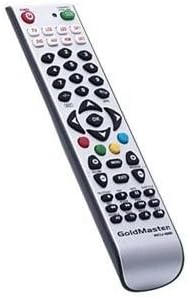
Bild: Vorderseite view of the Goldmaster RCU 881 Universal Remote Control, showing its silver finish and button layout.

Image: The official Goldmaster brand logo.
Aufstellen
1. Einlegen der Batterie
- Suchen Sie die Batteriefachabdeckung auf der Rückseite der Fernbedienung.
- Slide the cover off in the direction indicated by an arrow (if present).
- Insert two AAA batteries, ensuring correct polarity (+ and - symbols match the markings inside the compartment).
- Bringen Sie die Abdeckung des Batteriefachs wieder an, bis sie sicher einrastet.
2. Programmieren der Fernbedienung
The Goldmaster RCU 881 is a universal remote. Programming typically involves entering a code specific to your TV brand or using an automatic search function. Refer to the included code list (if available with your purchase) or follow these general steps:
- Schalten Sie das Gerät ein, das Sie steuern möchten (z. B. Ihren Fernseher).
- Halten Sie die SATZ button (or a similar button, if present) on the remote until the indicator light turns on and remains lit.
- Enter the 3 or 4-digit code for your TV brand using the number buttons. If the indicator light turns off, the code has been accepted.
- Testen Sie die Fernbedienung, indem Sie die Taste drücken. LEISTUNG button or other function buttons. If the device responds, the programming is successful.
- If the code does not work, or if the indicator light flashes and turns off without controlling the device, repeat steps 2-4, trying other codes listed for your brand.
- If no code works, or if a code list is not provided, use the automatic search function:
- Halten Sie die SATZ Taste, bis die Kontrollleuchte aufleuchtet.
- Drücken Sie die LEISTUNG button once. The indicator light will begin to flash slowly.
- Richten Sie die Fernbedienung auf Ihren Fernseher und drücken Sie wiederholt die Taste LEISTUNG Taste (oder CH+ button) slowly, allowing a few seconds between presses, until the TV turns off.
- Sobald sich der Fernseher ausschaltet, drücken Sie sofort die Taste SATZ Drücken Sie diese Taste, um den Code zu speichern. Die Kontrollleuchte erlischt.
- Test the remote. If it controls your TV, programming is complete. If not, repeat the automatic search process.
Note: Specific programming steps and available codes may vary. Consult the original packaging or manufacturer's website for a comprehensive code list or detailed instructions for your specific device model.
Bedienungsanleitung
Once programmed, the Goldmaster RCU 881 functions like your original remote control for the assigned device. Below are common button functions:
- Netzschalter: Schaltet das Gerät ein oder aus.
- Channel Buttons (CH+/CH-): Schaltet die Kanäle nach oben oder unten.
- Volume Buttons (VOL+/VOL-): Passt die Lautstärke an.
- Stummschaltfläche: Schaltet den Ton stumm oder hebt die Stummschaltung auf.
- Zifferntasten (0-9): Wird für direkte Kanaleingabe verwendet.
- Menu/Settings Buttons: Accesses device menus and settings.
- Navigationstasten (Hoch/Runter/Links/Rechts/OK): Navigiert durch Menüs und bestätigt Auswahlen.
- Eingabe-/Quellenschaltfläche: Changes the input source (e.g., HDMI 1, AV, Component).
Button layout and specific functionality may vary based on the programmed device and the universal code used.
Wartung
- Clean the remote control with a soft, dry cloth. Do not use liquid cleaners, abrasive materials, or chemical solvents.
- Wenn die Fernbedienung über einen längeren Zeitraum (z. B. einen Monat oder länger) nicht benutzt wird, sollten die Batterien entfernt werden, um ein mögliches Auslaufen und eine Beschädigung zu vermeiden.
- Avoid dropping the remote control or exposing it to strong impacts, which can damage internal components.
- Bewahren Sie die Fernbedienung an einem kühlen, trockenen Ort ohne direkte Sonneneinstrahlung auf.
Fehlerbehebung
Fernbedienung funktioniert nach der Programmierung nicht:
- Ensure batteries are inserted correctly with the correct polarity and are not depleted. Replace if necessary.
- Re-attempt the programming process, trying different codes for your device brand.
- Stellen Sie sicher, dass sich keine Hindernisse zwischen der Fernbedienung und dem Infrarotempfänger des Geräts befinden.
- The remote control may not be compatible with all functions of your specific device model.
Einige Tasten funktionieren nicht:
- This can occur if the programmed code does not fully support all functions of your device. Try a different code.
- Ensure the buttons are clean and free from debris.
Kontrollleuchte schaltet sich nicht ein:
- Check battery installation and ensure batteries have sufficient charge. Replace batteries if needed.
Technische Daten
| Besonderheit | Detail |
|---|---|
| Marke | GoldMaster |
| Modell | RCU-881 |
| Konnektivitätstechnologie | Infrarot |
| Kompatible Geräte | Fernsehen |
| Farbe | Silber |
| Eingabemethode | Taste |
| Batterien im Lieferumfang enthalten | NEIN |
| Modelljahr | 2014 |
| ASIN | B00PUIXRRA |
Garantie und Support
Specific warranty information for the Goldmaster RCU 881 Universal Remote Control is not provided in the product details. For warranty claims, technical support, or further assistance, please contact GoldMaster customer service directly or refer to the documentation included with your original purchase.
You can often find up-to-date support information and contact details on the official GoldMaster webWebsite.