
Einführung
The HIFIMAN RE400i V2 is an in-ear earphone specifically designed for use with iOS devices, featuring an integrated in-line control for convenient audio management and communication. This earphone incorporates an 8.5mm coated Titanium driver, engineered by HIFIMAN, to deliver detailed sound and an extended frequency response. The design prioritizes a superb fit and comfort, making it suitable for prolonged listening sessions.
Key features include Oxygen-Free Copper cabling for optimal signal transmission, an improved in-line control for enhanced reliability and durability, and advanced ergonomics for comfortable and extended listening. Its lightweight and stylish design complement its acoustic performance, providing a balanced sound profile.
Packungsinhalt
- HIFIMAN RE400i V2 Earphones
- Multiple sizes of silicone ear tips (various pairs)
- Kabelmanagement-Clip
Aufstellen
1. Choosing and Fitting Ear Tips
Selecting the correct ear tip size is crucial for optimal sound quality and comfort. Experiment with the included silicone ear tips to find the pair that creates a secure seal in your ear canal. A proper seal enhances bass response and passive noise isolation.
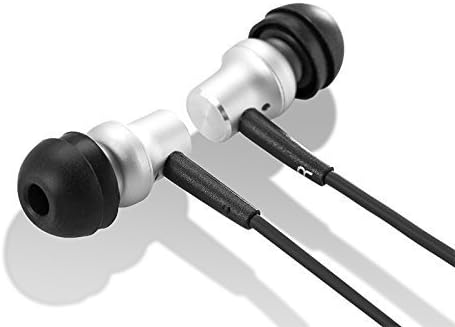
Bild: Nahaufnahme view of the HIFIMAN RE400i V2 earphone earpieces, showing the silver housing and black silicone ear tips.
2. Verbindung mit Ihrem Gerät herstellen
Insert the 3.5mm audio jack of the RE400i V2 earphones firmly into the headphone port of your compatible iOS device. Ensure the connection is secure to prevent audio interruptions.
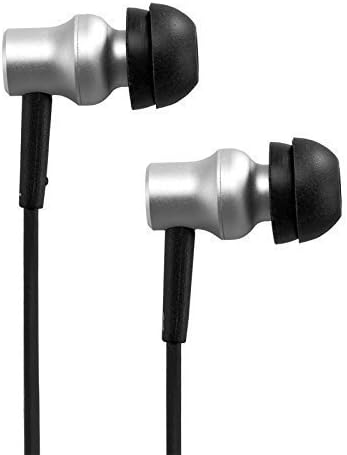
Abbildung: Seite view of the HIFIMAN RE400i V2 earphones, highlighting their compact and ergonomic design.
Bedienungsanleitung
Using the In-Line Control
The HIFIMAN RE400i V2 features an in-line control unit designed for seamless interaction with your iOS device. This unit allows you to manage audio playback and phone calls without needing to access your device directly.

Image: The HIFIMAN RE400i V2 earphones, showing the full cable length with the in-line control unit.
- Lautstärketaste (+): Drücken Sie diese Taste, um die Lautstärke zu erhöhen.
- Leiser-Taste (-): Drücken Sie diese Taste, um die Lautstärke zu verringern.
- Center Button (Multi-function):
- Einzelpresse: Audio abspielen/pausieren, Anruf annehmen/beenden.
- Doppeltes Drücken: Zum nächsten Titel springen.
- Dreifaches Drücken: Gehen Sie zurück zum vorherigen Titel.
- Drücken und halten: Activate Siri or other voice assistant (if configured on your iOS device).

Image: Detailed close-up of the in-line control unit on the HIFIMAN RE400i V2, showing the buttons.
Mikrofonfunktion
The in-line control unit also houses a microphone, enabling hands-free communication during phone calls. Position the microphone close to your mouth for clear voice transmission.
Wartung
Reinigung Ihrer Kopfhörer
- Nehmen Sie die Silikon-Ohrstöpsel regelmäßig heraus und reinigen Sie sie mit einem weichen Tuch.amp Stoff. Lassen Sie sie vollständig trocknen, bevor Sie sie wieder anbringen.
- Gently wipe the earphone housings and cable with a dry, soft cloth to remove dust and debris.
- Avoid using harsh chemicals or abrasive materials, as these can damage the earphones.
Kabelpflege
While the RE400i V2 features Oxygen-Free Copper cabling, proper care is essential for longevity. Avoid sharp bends, excessive pulling, or tangling of the cable. When storing, coil the cable loosely to prevent damage.
Fehlerbehebung
- Kein Ton oder nur zeitweise Audioaussetzer:
- Stellen Sie sicher, dass der 3.5-mm-Klinkenstecker vollständig in Ihr Gerät eingesteckt ist.
- Überprüfen Sie die Lautstärke sowohl an Ihrem Gerät als auch über die Bedienelemente am Kabel.
- Test the earphones with another audio source to rule out device issues.
- Poor Sound Quality (e.g., lack of bass, tinny sound):
- Verify that the ear tips are correctly sized and creating a proper seal in your ear canal.
- Check for any debris or earwax buildup in the earphone nozzles and clean if necessary.
- In-Line Control Not Responding:
- Ensure the earphones are fully connected to your iOS device.
- Starten Sie Ihr iOS-Gerät neu.
- Confirm that your device's software is up to date.
- Mikrofon funktioniert nicht:
- Stellen Sie sicher, dass die Kopfhörer vollständig angeschlossen sind.
- Check your device's privacy settings to ensure microphone access is granted to relevant applications.
Technische Daten
| Besonderheit | Spezifikation |
|---|---|
| Marke | HIFIMAN |
| Modellnummer | RE400I |
| Formfaktor | Im Ohr |
| Impedanz | 32 Ohm |
| Kopfhöreranschluss | 3.5 mm Klinke |
| Steuerungstyp | Lautstärkeregelung |
| Konnektivitätstechnologie | Verdrahtet |
| Artikelgewicht | 13.61 g |
| Gehäusematerial | Kupfer |
| Zusätzliche Merkmale | Designed for iPhone/ iPad/ iPod, Perfect sound same as RE400 |
Garantie und Support
For detailed warranty information, technical support, and service inquiries regarding your HIFIMAN RE400i V2 earphones, please refer to the official HIFIMAN website or contact your authorized retailer. It is recommended to retain your proof of purchase for any warranty claims.