
Einführung
This manual provides detailed instructions for the EMOS E0042 Wireless Digital Thermometer. This device is designed to accurately measure and display both indoor and outdoor temperatures using a main unit and a remote wireless sensor. Please read this manual thoroughly before use to ensure proper operation and longevity of your device.

Image showing the EMOS E0042 Wireless Digital Thermometer in its retail packaging.
Packungsinhalt
The EMOS E0042 package includes the following components:
- 1x EMOS E0042 Main Display Unit
- 1x EMOS Wireless Outdoor Sensor

Image showing the EMOS E0042 main display unit and the wireless outdoor sensor.
Produkteigenschaften
The EMOS E0042 Wireless Digital Thermometer offers a range of features for convenient temperature monitoring:
- Clear and easy-to-read LCD display with large digits.
- Simultaneous display of indoor and outdoor temperatures.
- Wireless outdoor sensor with a transmission range of up to 100 meters (open area).
- Temperature measurement range: Indoor 0 °C to 60 °C, Outdoor -40 °C to +60 °C.
- Temperature resolution: 0.1 °C.
- Main unit suitable for tabletop placement or wall mounting.
- Sensor designed for outdoor use.
- Powered by AAA batteries (not included).
Icon indicating indoor and outdoor temperature measurement capabilities.
Aufstellen
1. Einlegen der Batterie
The main unit and the wireless sensor each require 2x AAA 1.5V batteries (not included).
Hauptanzeigeeinheit:
- Suchen Sie das Batteriefach auf der Rückseite der Hauptanzeigeeinheit.
- Öffnen Sie die Abdeckung des Batteriefachs.
- Legen Sie 2 AAA-Batterien ein und achten Sie dabei auf die richtige Polarität (+/-).
- Schließen Sie den Batteriefachdeckel fest.
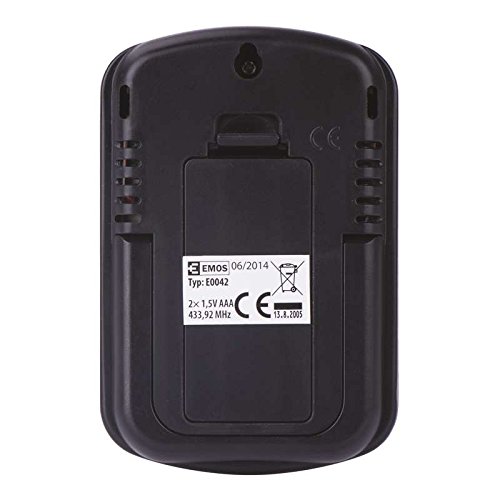
Hinteren view of the EMOS E0042 main display unit, showing the battery compartment and wall-mount hole.
Drahtloser Außensensor:
- Suchen Sie das Batteriefach auf der Rückseite des drahtlosen Außensensors.
- Öffnen Sie die Abdeckung des Batteriefachs.
- Legen Sie 2 AAA-Batterien ein und achten Sie dabei auf die richtige Polarität (+/-).
- Schließen Sie den Batteriefachdeckel fest.
- The sensor will automatically begin transmitting data.
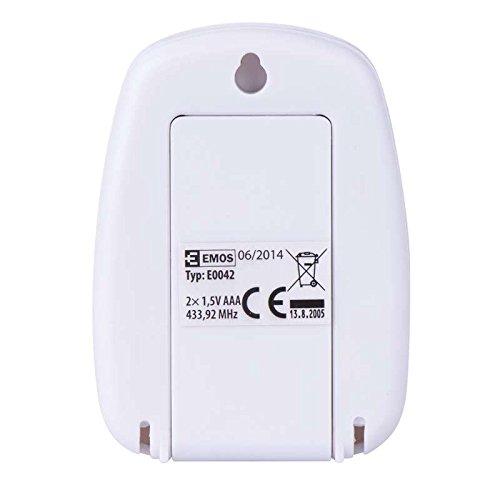
Hinteren view of the EMOS wireless outdoor sensor, showing the battery compartment.
2. Sensorkopplung
The main unit and sensor should automatically pair once batteries are installed. If the outdoor temperature is not displayed, ensure both units are within range and try re-inserting the batteries in both units.
3. Platzierung
Hauptanzeigeeinheit:
Place the main unit indoors on a flat surface using its integrated stand, or mount it on a wall using the hanging hole on the back. Ensure it is in a location where the display is easily visible and not exposed to direct sunlight or extreme temperature fluctuations.
Seite view of the EMOS E0042 main display unit, showing its integrated stand for tabletop placement.
Drahtloser Außensensor:
Position the wireless sensor outdoors in a shaded area, protected from direct rain and sunlight, to ensure accurate temperature readings. The maximum effective range between the sensor and the main unit is 100 meters in an open area. Walls, obstacles, and electronic interference can reduce this range.
Bedienungsanleitung
Reading Temperatures
Once powered on and paired, the main display unit will show two temperature readings:
- AUS: This indicates the outdoor temperature measured by the wireless sensor.
- IN: This indicates the indoor temperature measured by the main display unit itself.
The temperature is displayed in degrees Celsius (°C).
Anzeige
The large LCD screen provides clear, simultaneous readings of both indoor and outdoor temperatures.
Wartung
Reinigung
Wischen Sie das Gerät zum Reinigen mit einem weichen,amp Verwenden Sie kein scheuerndes Reinigungs- oder Lösungsmittel, da diese das Display oder die Elektronik beschädigen können.asing.
Batteriewechsel
When the display becomes dim or readings are inconsistent, it is time to replace the batteries in both the main unit and the wireless sensor. Follow the battery installation steps outlined in the "Setup" section.
Fehlerbehebung
| Problem | Mögliche Ursache | Lösung |
|---|---|---|
| Kein Display am Hauptgerät. | Die Batterien sind leer oder falsch eingelegt. | Prüfen Sie die Batteriepolarität und ersetzen Sie die Batterien durch neue AAA-Batterien. |
| Outdoor temperature not displayed or shows "--". | Sensor out of range, batteries dead, or interference. | Move sensor closer to the main unit. Replace sensor batteries. Ensure no strong electronic interference sources are nearby. Re-pair by removing and re-inserting batteries in both units. |
| Ungenaue Temperaturmessungen. | Sensor, der direkter Sonneneinstrahlung, Regen oder Wärmequellen ausgesetzt ist. | Relocate the sensor to a shaded, protected area. Ensure proper ventilation around both units. |
Technische Daten
| Besonderheit | Detail |
|---|---|
| Modellnummer | E0042 |
| Marke | EMOS |
| Innentemperaturbereich | 0 °C bis 60 °C |
| Außentemperaturbereich | -40 °C bis +60 °C |
| Temperaturauflösung | 0.1 °C |
| Drahtlose Reichweite | Bis zu 100 Meter (freier Bereich) |
| Frequenz | 433 MHz |
| Netzteil der Haupteinheit | 2x AAA 1.5V Batterien (nicht im Lieferumfang enthalten) |
| Sensorstromversorgung | 2x AAA 1.5V Batterien (nicht im Lieferumfang enthalten) |
| Abmessungen der Haupteinheit (L x B x H) | 8.5 x 5.6 x 1.8 cm |
| Sensorabmessungen (L x B x H) | 6.8 x 4.9 x 2.0 cm |
| Anzeigetyp | Digital LCD |
| Konnektivitätstechnologie | RF (Radiofrequenz) |
| Material | Plastik |
| Zertifizierungen | CE |
Sicherheitshinweise
For detailed safety guidelines and important warnings, please refer to the official Safety Information PDF document provided by the manufacturer. Sicherheitsinformationen herunterladen (PDF)
Garantie und Support
EMOS products are manufactured to high-quality standards. For warranty information or technical support, please contact your retailer or the official EMOS customer service. Keep your purchase receipt as proof of purchase.