
1. Einleitung
The G-FORCE Multi Warming System G0148 is designed to optimize the performance of small electric RC car tires by maintaining them at an ideal operating temperature. Proper tire temperature management is crucial for achieving consistent lap times and improved grip. This system features individual warming cups with built-in temperature sensors, ensuring precise control for each tire.
2. Sicherheitshinweise
Please read and understand all safety instructions before operating the G-FORCE Multi Warming System G0148. Failure to follow these instructions may result in injury or damage to the product.
- Always use the specified power input (DC 11-18V).
- Setzen Sie das Gerät weder Wasser noch Feuchtigkeit aus.
- Außerhalb der Reichweite von Kindern aufbewahren.
- Versuchen Sie nicht, das Gerät zu zerlegen oder zu modifizieren.
- Sorgen Sie während des Gebrauchs für eine ausreichende Belüftung, um eine Überhitzung zu vermeiden.
- Trennen Sie das Gerät von der Stromversorgung, wenn es nicht benutzt wird oder bevor Sie es reinigen.
- Avoid touching the warming cups directly when hot.
3. Packungsinhalt
Bitte überprüfen Sie, ob alle unten aufgeführten Artikel in Ihrem Paket enthalten sind:
- G-FORCE Multi Warming System Main Unit
- 4x Warming Cups with integrated temperature sensors
- 4x Cup Spacers (for smaller tire diameters)
- DC Power Input Cable
- Bedienungsanleitung (dieses Dokument)
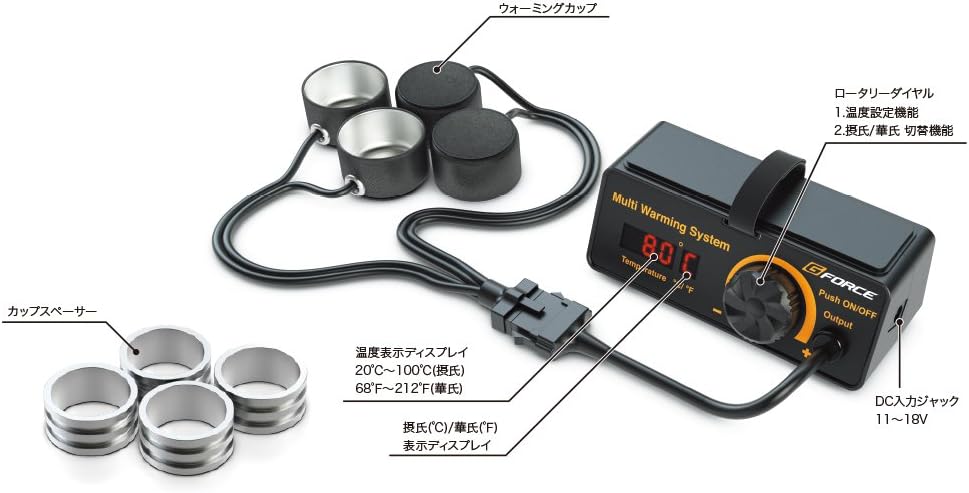
Abbildung 3.1: Überview of the G-FORCE Multi Warming System components. This image displays the main control unit, four black warming cups connected by wires, and four silver cup spacers, along with a power cable.
4. Einrichtung
- Connect Warming Cups: Plug the connector from the warming cups assembly into the "Output" port on the main unit. Ensure the connection is secure.
- Strom anschließen: Connect the DC power input cable to the "DC INPUT: 11-18V" port on the main unit. Then, connect the other end of the power cable to a compatible DC power source (not included).
- Platzierung: Place the main unit on a stable, flat surface. Arrange the warming cups as needed for your RC car.
- Using Cup Spacers: If your RC car tires are smaller than the standard warming cup diameter, insert the provided cup spacers into the warming cups to ensure a snug fit and efficient heat transfer.

Abbildung 4.1: The main unit of the G-FORCE Multi Warming System. This image highlights the digital display showing "80 C", the rotary dial for settings, and the DC input and output ports.
5. Bedienung
- Einschalten: Press and hold the "Push ON/OFF" button (integrated into the rotary dial) for a few seconds to power on the unit. The digital display will illuminate.
- Temperatur einstellen: Rotate the dial to adjust the target temperature. The display will show the set temperature. The temperature range is typically 20°C to 100°C (68°F to 212°F).
- Temperatureinheiten wechseln: Briefly press the "Push ON/OFF" button to toggle between Celsius (°C) and Fahrenheit (°F) display modes.
- Place Tires: Carefully place your RC car tires into the warming cups. Ensure the tires are fully seated for optimal heat transfer.
- Erwärmungsprozess: The system will automatically begin heating the cups to the set temperature. The display will show the current temperature of the cups.
- Ausschalten: After use, remove the tires and press and hold the "Push ON/OFF" button until the unit powers off.

Abbildung 5.1: The G-FORCE Multi Warming System actively warming RC car tires. The main unit displays "45.0 C", indicating the current temperature, with an RC car chassis resting on top and its tires in the warming cups.
6. Wartung
- Reinigung: Disconnect the power before cleaning. Use a soft, dry cloth to wipe the main unit and warming cups. Do not use abrasive cleaners or solvents.
- Lagerung: Store the system in a cool, dry place away from direct sunlight and extreme temperatures. Keep all components organized to prevent damage.
- Inspektion: Periodically inspect cables and connectors for any signs of wear or damage. If any damage is found, discontinue use and contact support.
7. Fehlerbehebung
| Problem | Mögliche Ursache | Lösung |
|---|---|---|
| Gerät lässt sich nicht einschalten. | Keine Stromversorgung oder falsche Lautstärketage. | Ensure the DC power cable is securely connected and the power source provides 11-18V. |
| Warming cups are not heating. | Warming cups not connected or faulty. | Check the connection of the warming cups to the "Output" port. Ensure a temperature is set. |
| Ungenaue Temperaturanzeige. | Sensor issue or improper tire placement. | Ensure tires are fully seated in the cups. If the issue persists, contact support. |
8. Spezifikationen
- Modell: G0148
- Hersteller: G Force
- Ursprungsland: China
- Materialien: Metal, resin, cloth
- Body Dimensions (Main Unit): 4.4 x 1.9 x 1.8 Zoll (112 x 47 x 45 mm)
- Warming Cup Inner Diameter: 1.3 Zoll (32.0 mm)
- Cup Spacer Inner Diameter: 1.0 Zoll (26.4 mm)
- Weight (Set): 9.8 g
- Weight (Main Unit Only): 6.1 g
- Item Weight (Overall): 10.2 Unzen
- Paketabmessungen: 6.65 x 4.8 x 2.2 Zoll
- DC-Eingangsvoltage: 11 bis 18 V
- Temperaturbereich: 20 °C - 100 °C (68 °F - 212 °F)
9. Garantie und Support
The G-FORCE Multi Warming System G0148 comes with a standard manufacturer's warranty. For specific warranty details, please refer to the warranty card included with your purchase or contact your retailer. For technical support, troubleshooting assistance, or replacement parts, please contact G-FORCE customer service through their official webWebsite oder die mit Ihrem Produkt gelieferten Kontaktinformationen.