
Einführung
This manual provides instructions for the setup, operation, and maintenance of your Youshiko Large LCD Radio Controlled Wall and Desk Clock, Model YC8055. This clock is designed to provide accurate time, date, indoor temperature, and humidity readings. It automatically synchronizes with the MSF radio time signal from the UK, ensuring precise timekeeping and automatic adjustments for Daylight Saving Time.
Sicherheitshinweise
- Use only the specified battery type (2 x AA Mignon LR06).
- Mischen Sie keine alten und neuen Batterien oder verschiedene Batterietypen.
- Achten Sie darauf, dass die Batterien mit der richtigen Polarität (+/-) eingelegt werden.
- Entfernen Sie leere Batterien umgehend, um ein Auslaufen zu verhindern.
- Setzen Sie die Uhr keinen extremen Temperaturen, direkter Sonneneinstrahlung oder hoher Luftfeuchtigkeit aus.
- Halten Sie die Uhr von starken Magnetfeldern fern.
- Clean the clock with a soft, dry cloth. Do not use abrasive cleaners or liquids.
Packungsinhalt
- Youshiko Large LCD Radio Controlled Wall and Desk Clock (Model YC8055)
- Integrated stand for desk placement
- Löcher für die Wandmontage
Note: 2 x AA batteries are not included and must be purchased separately.
Produkt überview
Layout anzeigen
The large LCD screen provides clear visibility of time, date, temperature, and humidity. The display is designed for easy readability in various indoor environments.

Bild: Front view of the Youshiko YC8055 clock display, showing the time, date, day, temperature, humidity, and radio signal indicator. Dimensions are overlaid, indicating a height of 279mm and width of 246mm for the main unit, with display sections measuring 63mm and 25mm in height respectively.
Tasten und Bedienelemente
The control buttons are located on the back of the unit for setting and adjusting various functions.

Bild: Hinteren view of the Youshiko YC8055 clock, highlighting the control buttons: SET, ALARM, UP (▲), DOWN (▼), WAVE, and SNOOZE. The battery compartment is also visible at the bottom center.
Stand and Mounting Options
The clock can be placed on a desk using its integrated stand or mounted on a wall using the provided hanging holes.
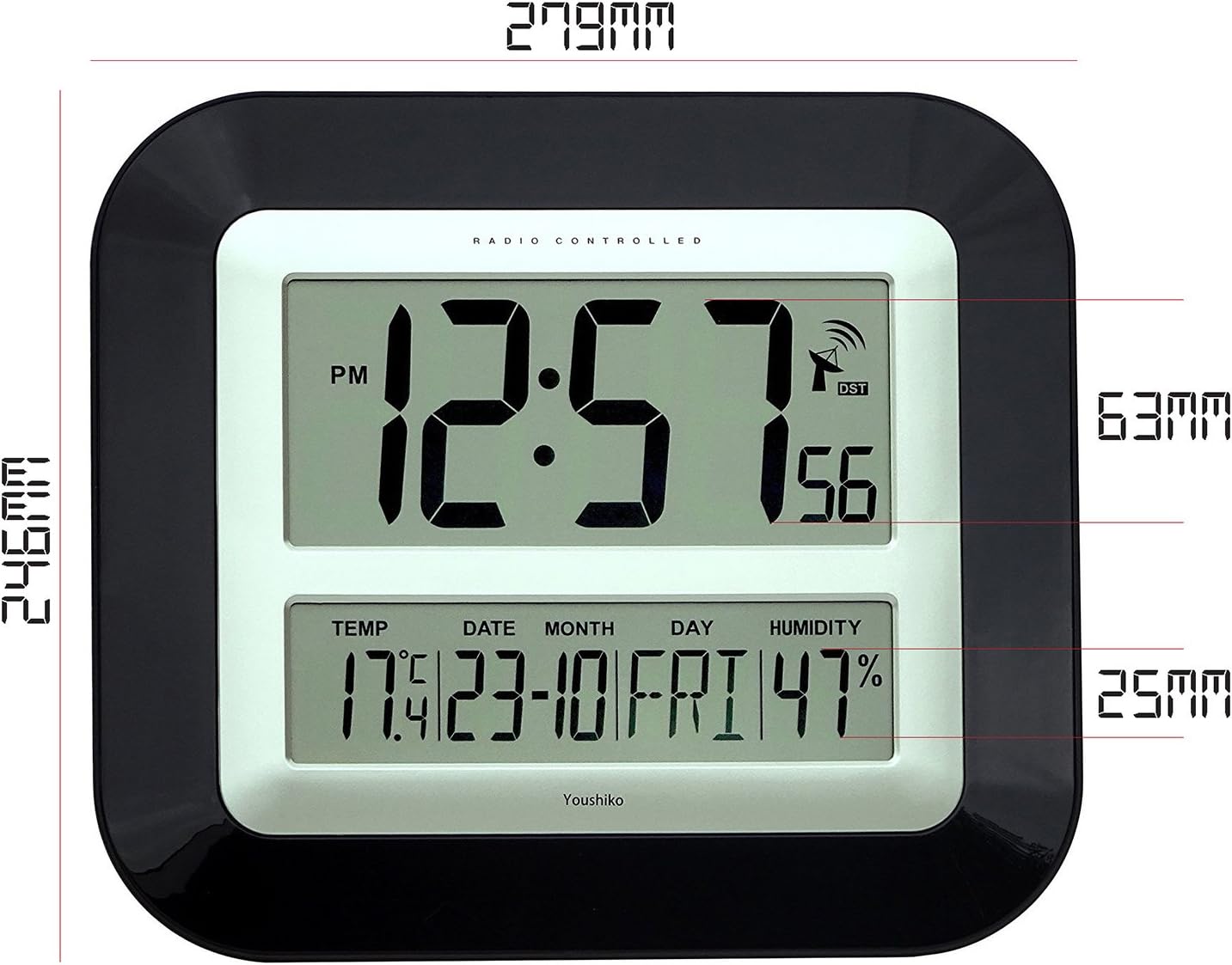
Bild: Seite view of the Youshiko YC8055 clock, illustrating the extended integrated stand for stable desk placement.
Aufstellen
1. Einlegen der Batterie
- Öffnen Sie die Batteriefachabdeckung auf der Rückseite der Uhr.
- Insert 2 x AA (LR6) batteries, ensuring correct polarity (+ and -).
- Schließen Sie den Batteriefachdeckel fest.
2. Erster Funksignalempfang
Upon battery insertion, the clock will automatically attempt to receive the MSF radio time signal. This process may take a few minutes (typically less than 3 minutes). During this time, an antenna symbol will usually appear on the display, indicating it is searching for the signal. Once the signal is received, the clock will automatically set the correct time, date, and adjust for Daylight Saving Time (DST) if applicable.
If the clock does not set itself within a few minutes, try placing it near a window for better signal reception. Radio-controlled clocks can sometimes struggle to pick up signals in certain rooms or locations due to interference or building materials.
3. Radio Control Systems
This clock is designed for the UK and Ireland market, utilizing the MSF signal. For other regions, different radio control systems may be in use.

Bild: Diagram illustrating the two main radio control systems in Europe: MSF for the UK and Ireland (transmitters in Cumbria, UK) and DCF-77 for the rest of Europe (transmitters in Mainflingen, Germany). It advises choosing the correct system for your location.
4. Manual Time/Date Adjustment (if needed)
In rare cases where the radio signal cannot be received, or if you wish to manually adjust certain settings, follow these steps:
- To change 12h/24h display format: Halten Sie die [Einstellen] button until the display shows either '12h' or '24h'. Use the [▲] (Nach oben) oder [▼] (Down) buttons to toggle to your desired setting. Press [Einstellen] again to confirm. Continue pressing [Einstellen] a few more times until the clock returns to displaying the time.
- Other manual settings (e.g., time zone, specific time/date) may be available by repeatedly pressing the [Einstellen] Klicken Sie auf die Schaltfläche [▲] Und [▼] Schaltflächen zum Anpassen von Werten.
Betrieb
Zeitanzeige
The clock displays hours, minutes, and seconds. It can be set to either a 12-hour format (with AM/PM indicator) or a 24-hour format.
Datums- und Wochentagsanzeige
The lower section of the display shows the current date (day and month) and the day of the week.
Temperatur- und Feuchtigkeitsanzeige
The clock continuously monitors and displays the indoor temperature (in Celsius or Fahrenheit) and relative humidity. While providing a general indication, these readings are not intended for scientific accuracy.
Alarmfunktion
The clock includes an alarm with a snooze function.
- Einstellen des Alarms: Drücken Sie die [ALARM] Taste zum Aufrufen des Alarmeinstellungsmodus. Verwenden Sie die [▲] Und [▼] Tasten zum Einstellen der gewünschten Alarmzeit. Drücken [ALARM] zur Bestätigung erneut.
- Alarm aktivieren/deaktivieren: Drücken Sie die [ALARM] button briefly outside of setting mode to toggle the alarm on or off. An alarm icon will appear on the display when activated.
- Schlummerfunktion: Wenn der Alarm ertönt, drücken Sie die [SCHLUCKEN] button to temporarily silence the alarm. The alarm will sound again after a short interval.
Wartung
Reinigung
Wipe the clock with a soft, dry cloth. Do not use liquid cleaners, sprays, or abrasive materials, as these can damage the display or casing.
Batteriewechsel
When the display dims or the clock stops functioning, replace the batteries. Follow the battery installation steps in the Setup section. It is recommended to replace both batteries simultaneously.
Fehlerbehebung
| Problem | Mögliche Ursache | Lösung |
|---|---|---|
| Clock does not display time or is incorrect. | Batteries are low or incorrectly inserted. No radio signal received. | Check battery polarity and replace if necessary. Move the clock to a location near a window and allow it to search for the signal. Manually set the time if signal reception remains an issue. |
| Antenna symbol is flashing or not displayed. | Clock is searching for or has lost the radio signal. | Ensure the clock is placed in an optimal location for signal reception (e.g., near a window, away from electronic interference). Allow several minutes for synchronization. |
| Die Messwerte für Temperatur und Luftfeuchtigkeit scheinen ungenau zu sein. | Environmental factors or general indication. | The temperature and humidity displays provide general indications and are not calibrated for scientific precision. Ensure the clock is not in direct sunlight or near heat/cold sources. |
| Der Alarm ertönt nicht. | Der Alarm ist nicht aktiviert oder die Lautstärke ist zu niedrig (sofern einstellbar). | Ensure the alarm function is turned on (check for alarm icon on display). This model has a fixed alarm volume. |
Technische Daten
| Besonderheit | Detail |
|---|---|
| Marke | Youshiko |
| Modellnummer | YC8055 |
| Anzeigetyp | Digital LCD |
| Zeitformat | 12-Stunden-/24-Stunden-Anzeige wählbar |
| Fernsteuerung | MSF (UK & Ireland) 60 kHz |
| Funktionen | Time, Date, Day of Week, Indoor Temperature, Indoor Humidity, Alarm with Snooze |
| Temperatureinheit | Celsius / Fahrenheit selectable |
| Stromquelle | 2 x AA (LR6) Batterien (nicht im Lieferumfang enthalten) |
| Montageoptionen | Wall mount or Desk stand |
| Abmessungen (H x B x T) | 27.9 cm x 24.6 cm x 3.0 cm (ca. 11 x 9.7 x 1.2 Zoll) |
| Material | Plastic with clear glass lens |
| Farbe | Schwarz |
| Innen-/Außenbereich | Innenbereich |
| UPC / GTIN | 635346122354 |
Garantie und Support
For warranty information and customer support, please refer to the documentation provided with your purchase or contact Youshiko customer service directly. Keep your proof of purchase for any warranty claims.